
1. הקדמה
תודה על הרכישהasing the Philco Portable CD Player Boombox. This versatile audio system combines modern and classic audio playback options, including CD, cassette, FM radio, and Bluetooth connectivity. This manual provides essential information for safe and efficient use of your device.
2. הוראות בטיחות חשובות
- קרא את כל ההוראות לפני הפעלת המכשיר.
- שמור מדריך זה לעיון עתידי.
- אין לחשוף את המכשיר לגשם או לחות כדי למנוע שריפה או התחשמלות.
- יש לוודא אוורור נאות; אין לחסום פתחי אוורור.
- השתמש רק בתוספות/אביזרים שצוינו על ידי היצרן.
- נתק את היחידה מהחשמל במהלך סופות ברקים או כאשר אינו בשימוש לתקופות ארוכות.
- הפנה כל טיפול לצוות שירות מוסמך.
- אל תפתח את ה-casinז; אין בפנים חלקים הניתנים לתחזוקה על ידי המשתמש.
- הימנעו מהצבת היחידה בקרבת מקורות חום כגון רדיאטורים, אוגרי חום, תנורים או מכשירים אחרים (כולל ampמחצבים) המייצרים חום.
3. רכיבי מוצר ובקרות
Familiarize yourself with the various parts and controls of your Philco Portable CD Player Boombox.
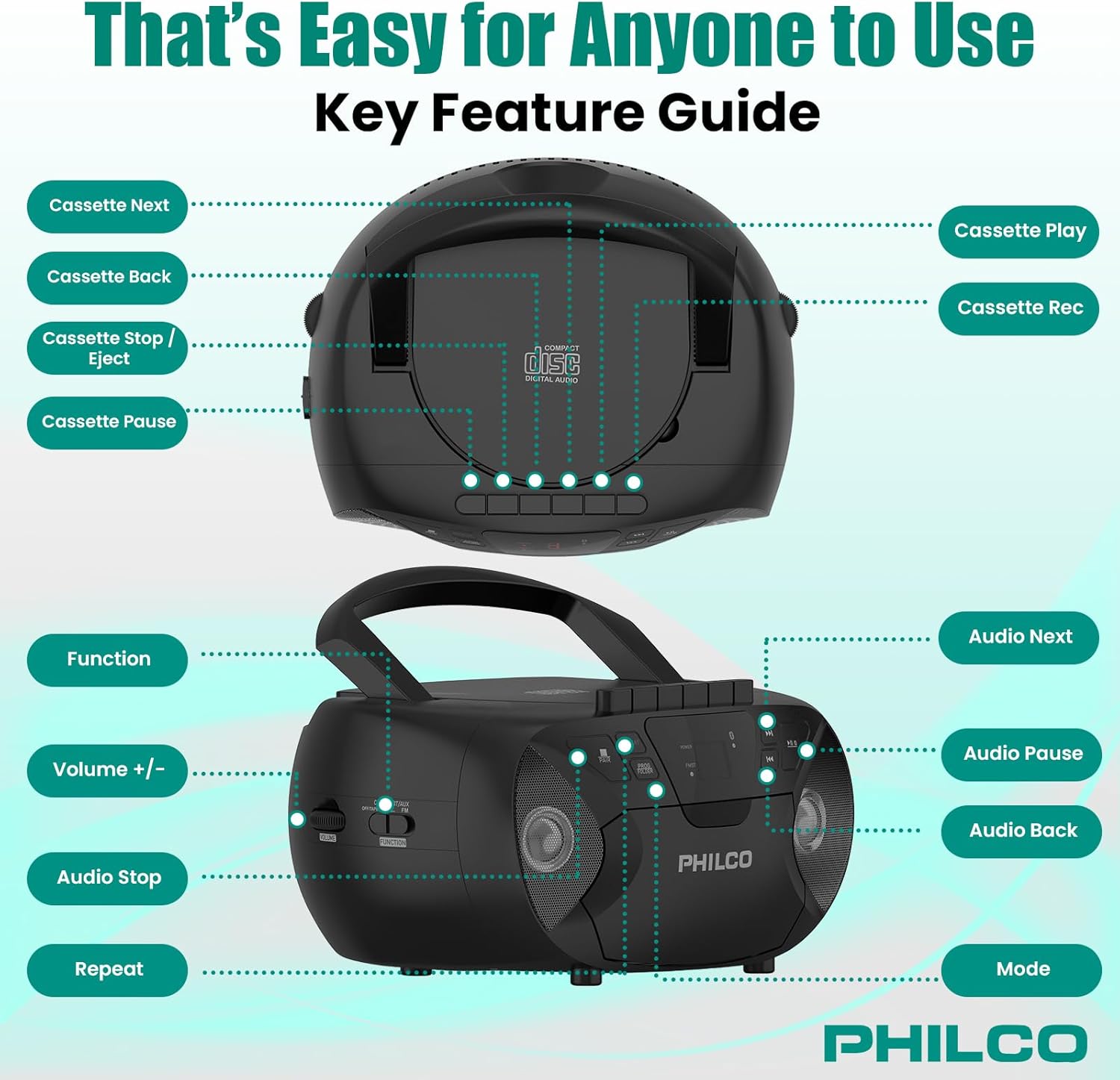
תמונה 3.1: למעלה ולצד view of the Philco Boombox with key controls labeled. This image shows the layout of buttons for cassette functions (Next, Back, Stop/Eject, Pause, Play, Record) and audio controls (Next, Pause, Back, Mode, Volume, Function, Stop, Repeat).
פקדי לוח קדמי:
- כפתור הפעלה: מפעיל או מכבה את היחידה.
- לחצן MODE: Switches between CD, Cassette, FM Radio, Bluetooth, and AUX modes.
- PLAY/PAUSE Button (CD/Bluetooth): מתחיל או מושהה את ההפעלה.
- STOP Button (CD/Bluetooth): מפסיק את ההשמעה.
- כפתורי דילוג/חיפוש (<< / >>): דילוג על רצועות או הרצה קדימה/אחורה.
- בקרת עוצמת קול: מכוונן את רמת פלט השמע.
- FM TUNER Dial: Selects FM radio stations.
בקרות קלטת:
- כפתור הפעלה: מתחיל ניגון קסטה.
- לחצן הקלט: Initiates cassette recording (from CD, FM, or AUX).
- REWIND/FAST FORWARD Buttons: Rewinds or fast forwards the tape.
- כפתור עצירה/הוצאה: Stops tape playback/recording and opens the cassette door.
- לחצן הפסקה: Temporarily pauses cassette playback/recording.
Rear/Side Panel Connections:
- כניסת מתח AC: מחבר את כבל החשמל AC.
- תא סוללות: Holds 6 x 'C' size batteries (not included) for portable use.
- שקע AUX IN (3.5 מ"מ): מחבר התקני שמע חיצוניים.
- HEADPHONE Jack (3.5mm): להאזנה פרטית עם אוזניות.
- אנטנת FM: אנטנה נפתחת לשיפור קליטת FM.
4. התקנה
4.1 הפעלת היחידה
Your Philco Boombox can be powered by either AC power or batteries.

תמונה 4.1: Illustration of AC power connection and battery installation for the Philco Boombox.
מתח AC:
- ודא שהיחידה כבויה.
- Connect the supplied AC power cord to the AC power input jack on the back of the unit.
- חבר את הקצה השני של כבל החשמל לשקע חשמל סטנדרטי (AC 120V ~ 60Hz).
כוח סוללה:
- ודא שהיחידה כבויה ומנותקת ממתח AC.
- פתחו את מכסה תא הסוללות הממוקם בתחתית או בחלק האחורי של היחידה.
- Insert 6 x 'C' size batteries (not included), observing the correct polarity (+/-) as indicated inside the compartment.
- סגור היטב את מכסה תא הסוללות.
פֶּתֶק: When using AC power, batteries are automatically disconnected. Remove batteries if the unit will not be used for an extended period to prevent leakage.
4.2 הפעלה ראשונית
הקש על כּוֹחַ button to turn on the unit. The unit will typically default to the last used mode or CD mode.
5. תפעול
5.1 הפעלת נגן התקליטורים
תמונה 5.1: Demonstrating the top-loading CD compartment for disc insertion.
- הקש על MODE עד לבחירת מצב "CD".
- פתחו את דלת תא התקליטורים על ידי הרמה עדינה שלה.
- Place a CD (CD-R, CD-RW, MP3, WMA compatible) onto the spindle with the label side facing up.
- Close the CD compartment door securely.
- הקש על PLAY/PAUSE כפתור להפעלת השמעה.
- השתמש ב- דילוג / חיפוש buttons (<< / >>) to navigate between tracks.
- הקש על לְהַפְסִיק כפתור כדי לסיים את ההפעלה.
- הקש על לַחֲזוֹר עַל לחזרה על הרצועה הנוכחית או על כל הרצועות.
5.2 הפעלת נגן/מקליט קלטות

תמונה 5.2: View of the cassette deck with a tape loaded, ready for playback or recording.
ניגון קסטה:
- הקש על MODE button until "TAPE" or "CASSETTE" mode is selected.
- הקש על עצור/הוצאה לחצן לפתיחת דלת הקסטה.
- הכניסו קלטת כאשר הקצה הפתוח פונה כלפי מעלה והצד המיועד להשמעה פונה אליכם.
- סגור את דלת הקסטה.
- הקש על לְשַׂחֵק כפתור להפעלת השמעה.
- לְהִשְׁתַמֵשׁ REWIND/FAST FORWARD כפתורים לניווט בקלטת.
- הקש על עצור/הוצאה כפתור כדי לעצור את ההפעלה ולהוציא את הקלטת.
הקלטה לקלטת:
- הכנס קלטת ריקה לדיסק הקלטת.
- Select the desired source (CD, FM Radio, or AUX) using the MODE לַחְצָן.
- Start playback on the source (e.g., play a CD track, tune to an FM station).
- הקש על רְשׁוּמָה כפתור בדיסק הקלטת. ה- לְשַׂחֵק הכפתור גם הוא ייכנס לפעולה.
- כדי להשהות את ההקלטה, לחץ על הַפסָקָה לחצן. לחץ עליו שוב כדי לחדש את ההפעלה.
- להפסקת ההקלטה, לחץ על עצור/הוצאה לַחְצָן.
פעולת רדיו FM 5.3
- הקש על MODE עד לבחירת מצב "FM".
- Extend the FM telescopic antenna for optimal reception.
- סובב את ה FM TUNER לחייג כדי לבחור את תחנת הרדיו הרצויה.
- התאם את כֶּרֶך control to your preferred listening level.
5.4 הזרמת שמע באמצעות בלוטות'

תמונה 5.3: The Philco Boombox wirelessly connected to a smartphone via Bluetooth for audio streaming.
- הקש על MODE button until "BT" or "BLUETOOTH" mode is selected. The unit will enter pairing mode, indicated by a flashing Bluetooth indicator.
- במכשיר התומך ב-Bluetooth שלך (למשל, סמארטפון, טאבלט), הפעל את Bluetooth וחפש מכשירים זמינים.
- Select "PHILCO BOOMBOX" (or similar name) from the list of devices to pair.
- לאחר הצימוד, נורית הבלוטות' תפסיק להבהב ותמשיך לפעול באופן קבוע.
- Start playing audio on your connected device. The sound will be streamed to the boombox.
- כוונן את עוצמת הקול הן ברמקול והן במכשיר המחובר שלך.
הערה חשובה: This boombox is designed to לְקַבֵּל audio via Bluetooth from other devices. It cannot לְהַעֲבִיר audio to Bluetooth headphones, earbuds, or speakers.
5.5 פעולת כניסת AUX

תמונה 5.4: The AUX input jack on the Philco Boombox, used for connecting external audio sources.
- חבר קצה אחד של כבל שמע 3.5 מ"מ (לא כלול) לשקע AUX IN שברמקול.
- Connect the other end of the audio cable to the headphone jack or audio output of your external device (e.g., MP3 player, smartphone).
- הקש על MODE עד לבחירת מצב "AUX".
- התחל להשמיע אודיו במכשיר החיצוני שלך.
- Adjust the volume on both the boombox and your external device.
5.6 שימוש באוזניות
For private listening, plug any standard 3.5mm headphones into the אֹזְנִית jack. The internal speakers will automatically mute.
6. תחזוקה
6.1 ניקוי היחידה
- נגב את החלק החיצוני של היחידה בעזרת חומר רך, דamp בַּד. אין להשתמש בחומרי ניקוי שוחקים או ממסים.
- For the CD lens, use a specialized CD lens cleaning kit.
- עבור קלטת הקלטת, יש לנקות מעת לעת את ראשי הקלטת ואת גלילי הלחיצה בעזרת מקלון צמר גפן קלות.ampהסתיים עם איזופרופיל אלכוהול.
6.2 טיפול בסוללה
- Remove batteries if the unit will not be used for an extended period to prevent battery leakage and corrosion.
- אין לערבב סוללות ישנות וחדשות, או סוגים שונים של סוללות.
- השלך סוללות משומשות בצורה אחראית בהתאם לתקנות המקומיות.
7. פתרון תקלות
| בְּעָיָה | סיבה אפשרית | פִּתָרוֹן |
|---|---|---|
| אין כוח | כבל החשמל אינו מחובר; הסוללות התרוקנו או הוכנסו בצורה שגויה. | בדוק את חיבור כבל החשמל; החלף סוללות או ודא שהקוטביות נכונה. |
| No sound from CD/Cassette/Radio/Bluetooth/AUX | Volume too low; Incorrect mode selected; Headphones connected; CD/Cassette inserted incorrectly or damaged; Bluetooth not paired. | Increase volume; Select correct mode; Disconnect headphones; Check/replace media; Re-pair Bluetooth device. |
| CD skips | CD dirty or scratched; Unit on an unstable surface. | Clean or replace CD; Place unit on a stable, flat surface. |
| קליטת FM גרועה | אנטנה לא מורחבת; אות חלש. | Fully extend and adjust the FM antenna; Try moving the unit to a different location. |
| מכשיר בלוטות' לא מתחבר | בום בוקס לא במצב צימוד; המכשיר רחוק מדי; בלוטות' כבר מחובר למכשיר אחר. | Ensure boombox is in BT pairing mode; Move device closer; Disconnect from other devices and try again. |
| Cassette tape not playing/recording correctly | Tape damaged; Tape heads dirty; Buttons stuck (as per review). | Try a different tape; Clean tape heads; If buttons are stuck, gently try to free them or contact support if persistent. |
8. מפרטים
- מותג: פילקו
- דֶגֶם: B0DHYKCWYN
- טכנולוגיית קישוריות: בלוטות'
- צֶבַע: שָׁחוֹר
- סוג רמקול: סטריאו
- מידות פריט (L x W x H): 10.08 x 5.71 x 10.75 אינץ'
- מקור כוח: AC 120V ~ 60Hz or 6 x 'C' Batteries (not included)
- מכשירים תואמים: MP3 Player (via AUX)
- פורמטי שמע נתמכים: CD, CD-R, CD-RW, MP3, WMA (from CD)
- מספר רמקולים: 2
- מצב פלט אודיו: סטריאו
- תמיכת Bluetooth: Yes (receive only)
- מדיה מובנית: CD, Cassette, FM Radio
9. אחריות ותמיכה
9.1 מידע אחריות
For specific warranty details, please refer to the warranty card included with your product or visit the official Philco webאתר. תנאי האחריות עשויים להשתנות בהתאם לאזור ולקמעונאי.
9.2 תמיכת לקוחות
If you encounter any issues or have questions not covered in this manual, please visit the official Philco website for support resources, FAQs, and contact information. You can typically find support links on the product page where you purchased the item or by searching for "Philco customer support" online.