1. הקדמה
The ALONEFIRE SV77 is a portable and rechargeable UV flashlight designed for various detection and curing applications. It utilizes a high-quality 395nm UV LED, providing a luminous power of up to 2400mW. Constructed from durable aluminum alloy, this flashlight offers reliable performance and includes essential accessories for safe and convenient use.
2. מידע בטיחות
אַזהָרָה: Ultraviolet (UV) light can be harmful to eyes and skin. Direct exposure to UV light should be avoided.
- Do not look directly into the UV light source when the flashlight is active.
- Always wear the provided UV protective glasses when operating the flashlight, especially during prolonged use. These glasses feature darker lenses for enhanced UV protection.
- הרחק את המכשיר מהישג ידם של ילדים.
- אל תנסה לפרק או לשנות את הפנס.
- This device is not water resistant. Avoid exposure to water or high humidity.

Image: The flashlight head showing the UV LED and a caution label regarding direct eye exposure.
3. תכולת החבילה
ודא שכל הפריטים נמצאים בחבילה:
- ALONEFIRE SV77 395nm UV Flashlight (with built-in rechargeable battery)
- כבל טעינה USB-C
- משקפי מגן UV
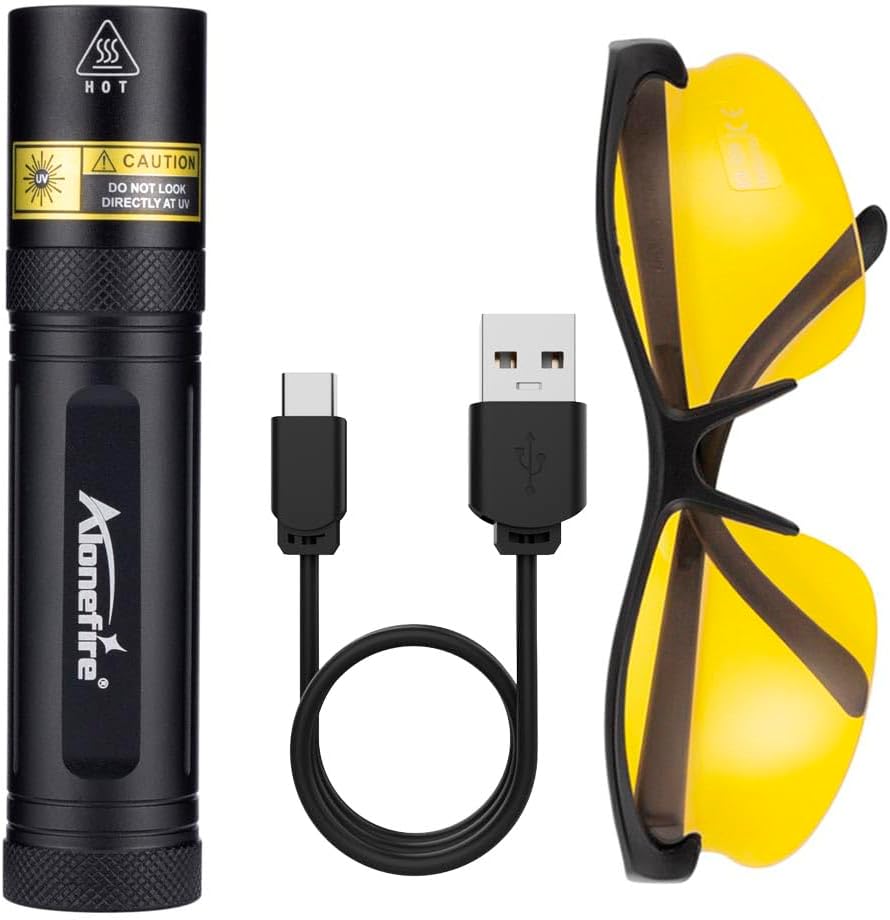
Image: The ALONEFIRE SV77 UV flashlight, USB-C charging cable, and UV protective glasses.
4. התקנה ושימוש ראשון
4.1. טעינת ההתקן
Before initial use, fully charge the ALONEFIRE SV77 UV Flashlight.
- Locate the USB-C charging port on the flashlight. This port is designed for easy insertion without specific orientation.
- חבר את כבל הטעינה USB-C המצורף לשקע של הפנס.
- Connect the other end of the USB-C cable to a compatible USB power source (e.g., computer USB port, wall adapter, power bank).
- Observe the charging indicator light:
- אור אדום: מציין שהפנס נטען כעת.
- אור כחול: Indicates the flashlight is fully charged.
- לאחר טעינה מלאה, נתק את כבל הטעינה.
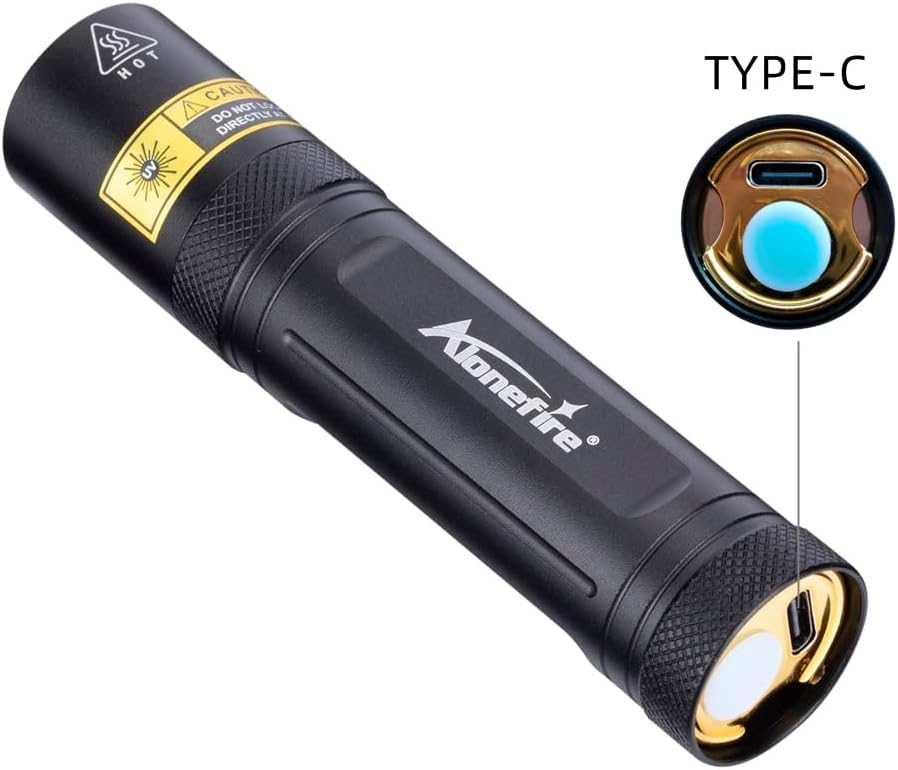
Image: Detail of the USB-C charging port on the flashlight.

Image: The flashlight charging via USB-C, illustrating the charging indicator colors.
5. הוראות הפעלה
To operate the ALONEFIRE SV77 UV Flashlight:
- Ensure the flashlight is charged.
- Put on the provided UV protective glasses.
- Press the power button located at the rear of the flashlight to turn it on.
- Direct the UV light towards the area you wish to inspect or illuminate.
- Press the power button again to turn the flashlight off.
6. יישומים
The ALONEFIRE SV77 UV Flashlight is suitable for detecting fluorescent substances not visible under normal light. Its applications include:
- Pet Urine and Stains: Identify dried pet urine, feces, and other organic stains on carpets, rugs, and upholstery.
- Pet Ringworm Detection: Assist in identifying fungal infections like ringworm on pets, which may fluoresce under UV light.
- Currency Authentication: Verify the authenticity of banknotes by revealing security features that glow under UV light.
- זיהוי עקרבים: Scorpions fluoresce brightly under UV light, making them easier to spot in dark environments.
- בדיקת מינרלים ואבני חן: Observe fluorescence in certain minerals and gemstones for identification or authentication.
- ריפוי שרף ודבק: להאיץ את תהליך הייבוש של שרפים ודבקים הרגישים לקרינת UV.
- איתור דליפות: Detect leaks in HVAC systems, automotive systems, and other machinery when used with UV-sensitive dyes.
- Hotel Room Inspection: Check for cleanliness and hidden stains in hotel rooms.

תמונה: דוגמהamples of pet urine and ringworm detection using the UV flashlight.

Image: Various applications including washroom inspection, mechanical inspection, tableware, and mineral/jewelry authentication.
7. תחזוקה
- ניקוי: Wipe the flashlight body with a soft, dry cloth. Do not use abrasive cleaners or solvents.
- אִחסוּן: Store the flashlight in a cool, dry place away from direct sunlight and extreme temperatures. If storing for extended periods, ensure the battery is partially charged (around 50%) to prolong its lifespan.
- טיפול בסוללה: Recharge the flashlight regularly, even if not in frequent use, to maintain battery health. Avoid fully discharging the battery for prolonged periods.
8. פתרון תקלות
| בְּעָיָה | סיבה אפשרית | פִּתָרוֹן |
|---|---|---|
| הפנס לא נדלק. | הסוללה התרוקנה. | טען את הפנס באמצעות כבל ה-USB-C המצורף. |
| הפנס לא נטען. | בעיה בכבל טעינה או במקור חשמל. | Ensure the USB-C cable is properly connected. Try a different USB power source or cable. |
| אור UV נראה עמום. | סוללה חלשה או עדשה מלוכלכת. | Recharge the flashlight. Clean the lens with a soft, dry cloth. |
9. מפרטים
| מספר דגם | SV77 395nm |
| מותג | ALONEFIRE |
| אורך גלי UV | 395 ננומטר |
| סוג מקור אור | LED |
| עוצמה זוהרת | עד 2400mW |
| מקור אור Wattage | 10 וואט |
| מקור כוח | מופעל על ידי סוללה (סוללת ליתיום-יון מובנית) |
| יציאת טעינה | USB-C |
| חוֹמֶר | אלומיניום אנודייז |
| משקל פריט | 0.12 קילוגרם (כ-4.2 אונקיות) |
| רמת עמידות במים | לא עמיד במים |
| תכונות מיוחדות | Portable, Rechargeable, Includes UV Protective Glasses |

Image: Dimensions of the ALONEFIRE SV77 UV Flashlight.
10. אחריות ותמיכה
The ALONEFIRE SV77 UV Flashlight comes with a limited warranty. For specific warranty terms and conditions, please refer to the product packaging or contact the manufacturer directly.
For technical support, troubleshooting assistance, or inquiries regarding your product, please contact ALONEFIRE customer service through their official channels or the retailer from whom the product was purchased.