
מָבוֹא
Thank you for choosing the KLIM K7 Cassette Tape Player and MP3 Converter. This device allows you to enjoy your classic cassette tapes and convert them into digital MP3 files for modern playback. It features a built-in microphone for recording, an integrated speaker, and a rechargeable battery for portability. This manual provides detailed instructions for setup, operation, and maintenance of your KLIM K7.
המוצר נגמרview
תכונות מפתח
- Cassette to MP3 Converter: Effortlessly convert cassette tapes to digital MP3 files directly onto an SD card.
- עיצוב נייד: Lightweight and compact for on-the-go listening.
- מיקרופון מובנה: Record audio directly to the SD card.
- רמקול מובנה: Share your audio without external devices.
- סוללה נטענת: Integrated 1000mAh battery provides extended playback.
- SD Card Player: נגן MP3 fileמאוחסן בכרטיס ה- SD.
- שקע אוזניות 3.5 מ"מ: For private listening with included earphones.
רכיבי מכשיר ובקרה
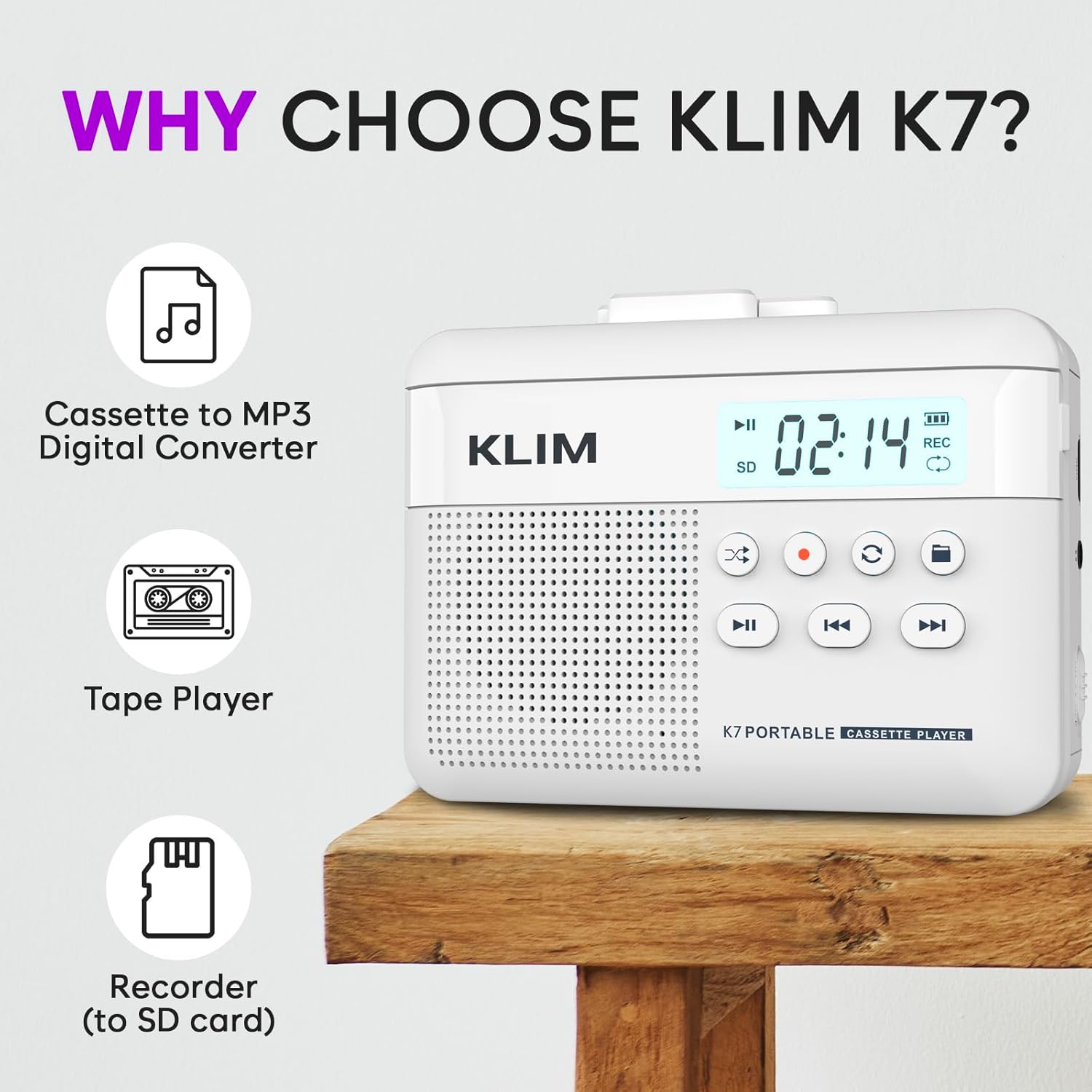
איור 1: חֲזִית view of the KLIM K7 Cassette Player, showing the speaker grille, LCD display, and control buttons (Play/Pause, Rewind, Fast Forward, Stop, Record, Mode, Folder, Loop).
- תצוגת LCD: Shows track number, recording status, and battery level.
- רַמקוֹל: רמקול משולב להשמעת אודיו.
- כפתור הפעלה/השהיה (►▮): מתחיל או מושהה את ההפעלה.
- Rewind Button (◀◀): Rewinds the cassette tape or navigates backward through MP3 tracks.
- Fast Forward Button (►►): Fast forwards the cassette tape or navigates forward through MP3 tracks.
- כפתור עצירה (■): מפסיק את ההשמעה או ההקלטה.
- Record Button (●): Initiates or stops recording.
- כפתור מצב (↻): Switches between cassette playback and SD card MP3 playback.
- Folder Button (🖿): Navigates through folders on the SD card.
- Loop Button (⟳): חוזר על הרצועה הנוכחית או על כל הרצועות.

איור 2: צַד view of the KLIM K7 Cassette Player, highlighting the SD card slot, 3.5mm headphone jack, and On/Off switch.
- חריץ לכרטיס SD: Insert your Micro SD card here for recording and MP3 playback.
- שקע אוזניות 3.5 מ"מ: Connect the included earphones or other standard headphones.
- מתג הפעלה/כיבוי: מדליק או מכבה את המכשיר.
- בקרת עוצמת הקול: מכוונן את רמת פלט השמע.

איור 3: רֹאשׁ view of the KLIM K7 Cassette Player with the cassette compartment open, showing the tape mechanism.
- תא קסטה: Insert your cassette tapes here.
- Cassette Door Release: Opens the cassette compartment.
הגדרה
1. טעינת הסוללה
Before first use, fully charge the KLIM K7. The device comes with a 1000mAh rechargeable battery.
- Locate the Type-C USB charging port on the side of the device.
- Connect the included Type-C USB cable to the charging port and the other end to a USB power adapter (not included) or a computer's USB port.
- The charging indicator on the LCD display will show charging status. A full charge typically takes approximately 2 hours.

איור 4: The KLIM K7 connected to a Type-C USB cable for charging.
2. הכנסת כרטיס SD
An SD card (16GB included) is required for converting tapes to MP3 and for recording with the built-in microphone.
- Locate the SD card slot on the side of the device (refer to Figure 2).
- הכנס בעדינות את כרטיס ה-Micro SD לחריץ כאשר המגעים הזהובים פונים כלפי מטה עד שיינעל במקומו בנקישה.
- To remove, push the SD card inward until it clicks, then release, and it will eject.

איור 5: Inserting the Micro SD card into the KLIM K7.
3. הכנסת קלטת
- Press the Cassette Door Release button to open the cassette compartment.
- Insert your cassette tape with the open side facing upwards and the tape reels aligned with the player's mechanism.
- סגור את דלת תא הקסטה בחוזקה עד שתישמע נקישה.
הוראות הפעלה
1. השמעת קלטות קלטות
- Ensure the device is powered on using the On/Off switch.
- Insert a cassette tape as described in the Setup section.
- הקש על Play/Pause (►▮) כפתור להפעלת השמעה.
- כוונן את עוצמת הקול באמצעות בקרת עוצמת הקול.
- השתמש ב- Rewind (◀◀) ו Fast Forward (►►) כפתורים לניווט בקלטת.
- הקש על עצור (■) כפתור כדי לסיים את ההפעלה.
2. Converting Cassette Tapes to MP3
The KLIM K7 allows direct conversion of cassette audio to MP3 files on the inserted SD card, without needing a computer or additional software.
- Ensure an SD card is inserted and the device is powered on.
- Insert the cassette tape you wish to convert.
- הקש על Play/Pause (►▮) כפתור כדי להתחיל להשמיע את הקלטת.
- לחיצה ארוכה את Record (●) button. The 'REC' indicator on the LCD display will illuminate, indicating that recording has started.
- להפסקת ההקלטה, לחץ על Record (●) button again. The 'REC' indicator will turn off. The recorded audio will be saved as an MP3 file בכרטיס ה-SD.
- You can then remove the SD card and use the included SD card reader to transfer the MP3 files to a computer or other device.

איור 6: Visual guide for converting cassette audio to MP3 files.
3. Using the Built-in Microphone for Recording
The KLIM K7 can also record audio directly from its built-in microphone to the SD card.
- Ensure an SD card is inserted and the device is powered on.
- הקש על Mode (↻) button until the device is in SD card mode (no cassette playing).
- לחיצה ארוכה את Record (●) button. The 'REC' indicator will light up, and the device will start recording audio from its microphone.
- להפסקת ההקלטה, לחץ על Record (●) button again. The 'REC' indicator will turn off, and the recording will be saved as an MP3 file.

איור 7: Using the KLIM K7's built-in microphone for recording.
4. Playing MP3 Files from SD Card
- Ensure an SD card with MP3 files is inserted and the device is powered on.
- הקש על Mode (↻) button to switch to SD card playback mode. The LCD display will show track information.
- הקש על Play/Pause (►▮) כפתור להפעלת השמעה.
- השתמש ב- Rewind (◀◀) ו Fast Forward (►►) לחצנים כדי לדלג על רצועות.
- ה Folder (🖿) button allows navigation through different folders on the SD card.
- ה Loop (⟳) ניתן להשתמש בלחצן כדי לחזור על הרצועה הנוכחית או על כל הרצועות.
- כוונן את עוצמת הקול באמצעות בקרת עוצמת הקול.
- הקש על עצור (■) כפתור כדי לסיים את ההפעלה.

איור 8: Enjoying audio with the KLIM K7 and included earphones.
תַחזוּקָה
Proper maintenance ensures the longevity and optimal performance of your KLIM K7.
- ניקוי: השתמשו במטלית רכה ויבשה לניקוי החלק החיצוני של המכשיר. אין להשתמש בחומרי ניקוי נוזליים או ממסים.
- תא קסטה: נקו מעת לעת את ראשי הסרט וגלילי הלחיצה בעזרת מקלון צמר גפן קלות.ampened with isopropyl alcohol to prevent audio quality degradation. Ensure the device is off and dry before use.
- אִחסוּן: יש לאחסן את המכשיר במקום קריר ויבש, הרחק מאור שמש ישיר וטמפרטורות קיצוניות.
- טיפול בסוללה: לאחסון לטווח ארוך, טען את הסוללה לכ-50% כל כמה חודשים כדי לשמור על תקינותה.
פתרון בעיות
If you encounter any issues with your KLIM K7, please refer to the following common solutions:
| בְּעָיָה | סיבה אפשרית | פִּתָרוֹן |
|---|---|---|
| המכשיר לא נדלק. | הסוללה התרוקנה. | Charge the device using the provided Type-C USB cable. |
| No sound during cassette playback. | עוצמת הקול נמוכה מדי או שהאוזניות אינן מחוברות כראוי. | Increase the volume. Ensure headphones are fully plugged into the 3.5mm jack. |
| Recording to MP3 fails or produces no file. | SD card is full, not inserted correctly, or corrupted. | Check SD card insertion. Ensure sufficient space on the SD card. Try reformatting the SD card (this will erase all data). |
| Poor audio quality from cassette. | Dirty tape heads or worn-out cassette tape. | Clean the tape heads and pinch rollers. Try a different cassette tape to determine if the issue is with the tape itself. |
| המכשיר קופא או מאבד את התגובות. | תקלת תוכנה זמנית. | Turn the device off and then on again. If the issue persists, allow the battery to fully discharge and then recharge. |
מפרטים
- מידות המוצר: 4.76 x 3.61 x 1.56 אינץ'
- משקל פריט: 9.9 אונקיות
- סוֹלְלָה: סוללת ליתיום-יון אחת (כלולה), 1000mAh
- זמן טעינה: בערך שעתיים
- אִחסוּן: Supports Micro SD card (16GB included)
- פלט שמע: Built-in speaker, 3.5mm headphone jack
- פורמט הקלטה: MP3

איור 9: Dimensions of the KLIM K7 Cassette Player.
אחריות ותמיכה
KLIM is committed to producing quality electronics. The KLIM K7 Cassette Tape Player comes with a אחריות ל-5 שנים. If you encounter any problems with your device, please contact KLIM customer support for assistance.
ייתכן שיהיה ניתן לרכוש תוכניות הגנה נוספות:
- תוכנית הגנה לשנתיים: $3.99 (one-time)
- תוכנית הגנה לשנתיים: $5.99 (one-time)
- NEW Complete Protect: $16.99 (monthly)
לתמיכה נוספת, בקרו באתר KLIM Store on Amazon.