
מָבוֹא
Thank you for choosing the GGSTOPWATER Open Ear Headphones, Model JM13. These headphones are designed to provide a comfortable listening experience while maintaining awareness of your surroundings. Featuring Bluetooth 5.4 connectivity and an IPX5 waterproof rating, they are suitable for various activities including sports, gaming, and driving.
Please read this manual carefully to ensure proper use and to maximize the performance and lifespan of your device.
תוכן החבילה
ודא שכל הפריטים נמצאים בחבילה שלך:
- True Wireless Bluetooth Headphones (2 units)
- Headset Charging Compartment (1 unit)
- כבל טעינה מסוג C (יחידה אחת)
- מדריך למשתמש (יחידה אחת)
- Silicone Lanyard (1 unit)

המוצר נגמרview
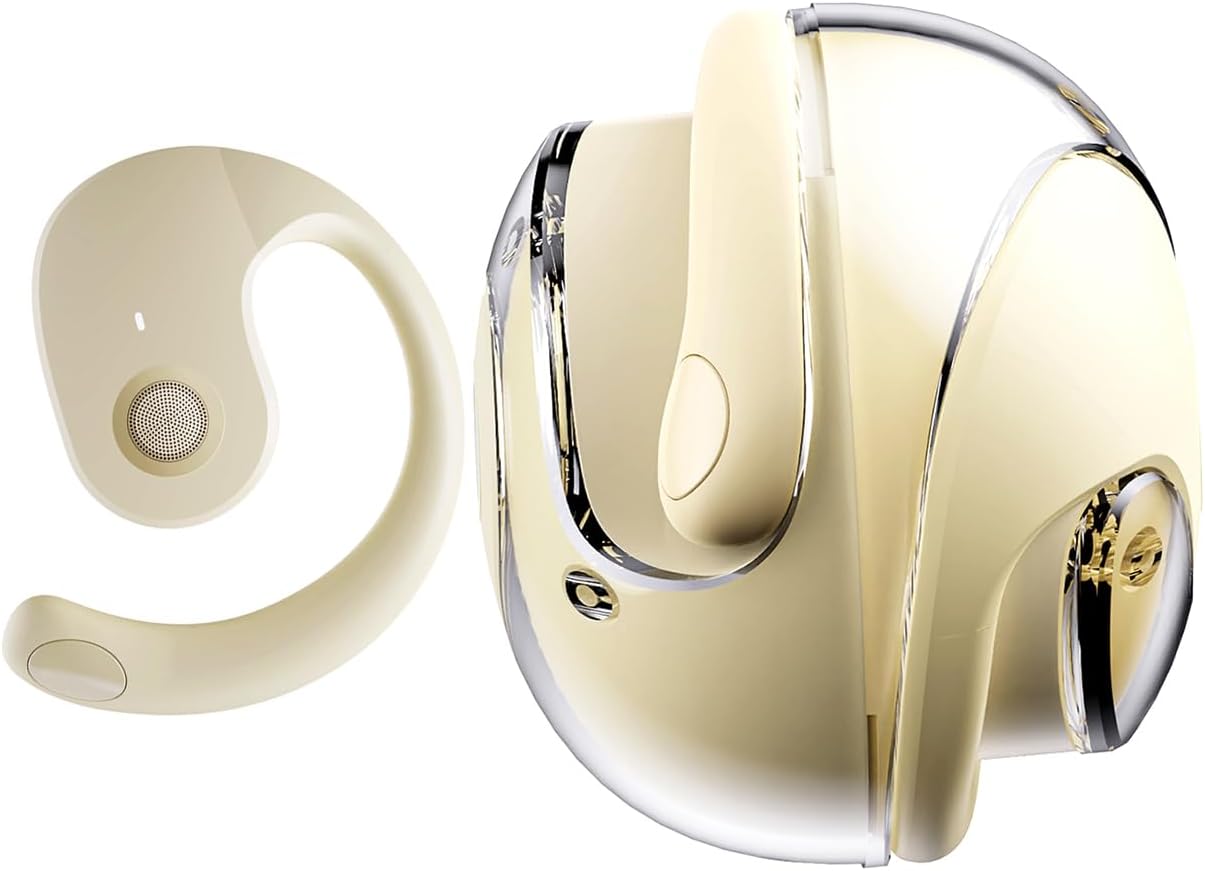
The GGSTOPWATER JM13 headphones feature an open-ear design with ear hooks for a secure and comfortable fit. The charging case is designed for portability and convenience.
הגדרה
1. טעינת האוזניות והמארז
Before first use, fully charge the headphones and the charging case. Place the headphones into the charging case. Connect the Type-C charging cable to the charging port on the case and plug the other end into a USB power source.
- זמן טעינה: כשעתיים לטעינה מלאה.
- Headset Usage Time: עד 4 שעות בטעינה בודדת.
- זמן המתנה: עד 120 שעות.


2. חבשת האוזניות
The open-ear design with ear hooks ensures a stable and comfortable fit without entering the ear canal.
- Pick up the headset from the charging case.
- Wear it along the back of your ear, positioning the speaker over your ear canal.
- Gently adjust the headphones to a comfortable and secure position.

3. זיווג Bluetooth
The headphones utilize Bluetooth 5.4 for a stable and fast connection. They support multi-device linking and are compatible with iOS, Android, and Windows systems.
- ודא שהאוזניות טעונות ומופעלות.
- פתח את הגדרות ה-Bluetooth במכשיר שלך (סמארטפון, טאבלט, מחשב נייד).
- חפש available devices and select "JM13" from the list.
- Once connected, you will hear a confirmation tone, and the device will show as 'Connected'.

הוראות הפעלה
מגע בפקדים
The headphones feature intuitive touch controls for managing calls and music playback.

| פְּעוּלָה | Function (Telephone Mode) | פונקציה (מצב מוזיקה) |
|---|---|---|
| לחיצה ארוכה על 2 שניות | דחה שיחה | לא |
| נְקִישָׁה | ענה לשיחה נכנסת | לא |
| לחץ שוב | ניתוק השיחה | לא |
| Double touch (L) | לא | השמע שיר קודם |
| Double touch (R) | לא | נגן את השיר הבא |
| מגע יחיד | לא | הפעל/השהה |
| לחיצה ארוכה על 3 שניות | הפעלה/כיבוי | הפעלה/כיבוי |
| Three touch (L) | לא | הורדת עוצמת הקול |
| Three touch (R) | לא | הגברת עוצמת הקול |
חיבור רב-נקודות
The headphones support connecting to multiple devices simultaneously. This allows you to seamlessly switch between, for example, your smartphone and laptop without needing to re-pair each time. Ensure both devices are paired with the headphones. The headphones will prioritize audio from the active device.
תַחזוּקָה
ניקוי
ניקוי קבוע מסייע לשמור על איכות צליל והיגיינה:
- Use a soft, dry, lint-free cloth to wipe the headphones and charging case.
- אין להשתמש בכימיקלים קשים, חומרי ניקוי או חומרי ניקוי חזקים.
- הימנעו מלחות להיכנס לפתחים כלשהם.
אִחסוּן
כאשר אינן בשימוש, יש לאחסן את האוזניות בנרתיק הטעינה שלהן כדי להגן עליהן מפני אבק ונזק. יש לאחסן במקום קריר ויבש הרחק מטמפרטורות קיצוניות.
עמידות במים (IPX5)
The headphones are rated IPX5 water-resistant, meaning they can withstand splashes of water and sweat. This makes them suitable for workouts and light rain exposure. However, they are not designed for submersion in water or for use during heavy rain or showering. Ensure the charging port is dry before charging.
פתרון בעיות
If you encounter issues with your GGSTOPWATER JM13 headphones, please refer to the following common solutions:
- אין כוח: ודא שהאוזניות ומארז הטעינה טעונים במלואם.
- לא ניתן לזווג:
- Ensure Bluetooth is enabled on your device and the headphones are within range.
- Turn off and then turn on the headphones.
- Delete "JM13" from your device's Bluetooth list and attempt to re-pair.
- If only one earbud connects, try placing both back in the case, closing it, and then reopening to reset.
- אין צליל או עוצמת קול נמוכה:
- Check the volume level on both your connected device and the headphones using the touch controls.
- Ensure the headphones are properly seated on your ears.
- Confirm that the headphones are connected to the correct audio output on your device.
- בקרות מגע לא מגיבות:
- ודא שהאצבעות שלך נקיות ויבשות בעת שימוש בפקדי מגע.
- Restart the headphones by placing them in the charging case and taking them out again.
- בעיות טעינה:
- ודא שכבל הטעינה מחובר היטב הן למארז והן למקור החשמל.
- נסה כבל Type-C ומתאם חשמל אחרים.
- ודאו שמגעי הטעינה באוזניות ובתוך המארז נקיים וללא לכלוך.
אם שלבים אלה אינם פותרים את הבעיה, אנא צור קשר עם תמיכת הלקוחות.
מפרטים
| תכונה | פְּרָט |
|---|---|
| שם הדגם | JM13 |
| מותג | GGSTOPWATER |
| טכנולוגיית קישוריות | אלחוטי (Bluetooth) |
| גרסת בלוטות' | 5.4 |
| מיקום אוזניים | אוזן פתוחה |
| צורת אפרכסת | וו אוזניים |
| רמת עמידות במים | IPX5 (Water Resistant, Sweatproof) |
| בקרת רעש | ביטול רעשים אקטיבי |
| סוג מנהל התקן שמע | דרייבר דינמי (16 מ"מ) |
| טווח תדרים | 20 הרץ - 20,000 הרץ |
| עַכָּבָּה | 32 אוהם |
| שיטת בקרה | Remote (Touch) |
| סוג סוללה | ליתיום פולימר |
| משקל פריט | 4.6 אונקיות |
| חוֹמֶר | סיליקון |
| מכשירים תואמים | Laptops, Tablets, Cellphones (iOS, Android, Windows) |
אחריות ותמיכה
GGSTOPWATER products are manufactured to high-quality standards. For information regarding warranty coverage, please refer to the warranty card included in your product packaging or contact your retailer. Keep your purchase receipt as proof of purchase.
תמיכת לקוחות
If you have any questions, concerns, or require technical assistance, please contact GGSTOPWATER customer support through the retailer's platform or the official GGSTOPWATER website. Please have your product model (JM13) and purchase details ready when contacting support.