
Gustard X30
מדריך למשתמש של ממיר DAC לסטרימינג רשת Gustard X30
Model: X30 | Brand: Gustard
1. הקדמה
This manual provides detailed instructions for the setup, operation, maintenance, and troubleshooting of your Gustard X30 Network Streaming DAC. Please read this manual thoroughly before using the device to ensure optimal performance and longevity.

איור 1: חזית view of the Gustard X30 Network Streaming DAC in silver finish.
2. תכונות עיקריות
The Gustard X30 is a high-performance balanced DAC and preamplifier designed for audiophiles, featuring advanced digital and analog technologies.
- Quad ES9039SPRO & ES9311Q Chipset: Utilizes four ES9039SPRO DAC chips and ES9311Q for a fully balanced architecture with independent power supply and grounding for each channel.
- תמיכה באודיו ברזולוציה גבוהה: Supports PCM up to 32bit 768kHz, native DSD512, and MQA 384K decoding via XMOS XU216 USB interface.
- Advanced DSP Digital Filter: Incorporates ADI SHARC DSP platform with newly developed high-performance digital filters, supporting 3 types of PCM and 4 types of DSD, including NOS mode.
- Passive Analog Preampחיים יותר: Features R2R relay volume adjustment for lossless signal control, allowing direct connection to active studio monitors or power ampבעלי חיים.
- Network Streaming Capabilities: Connects to networks and supports Roon, Airplay, DLNA, UPnP, and NAA protocols with configurable settings and online upgrade functions.
- High-End Components: Includes K2 synthesizer synchronous clock implantation technology, local OCXO clock, external 10M clock input, and discrete Class A analog LPF circuits for optimized performance.
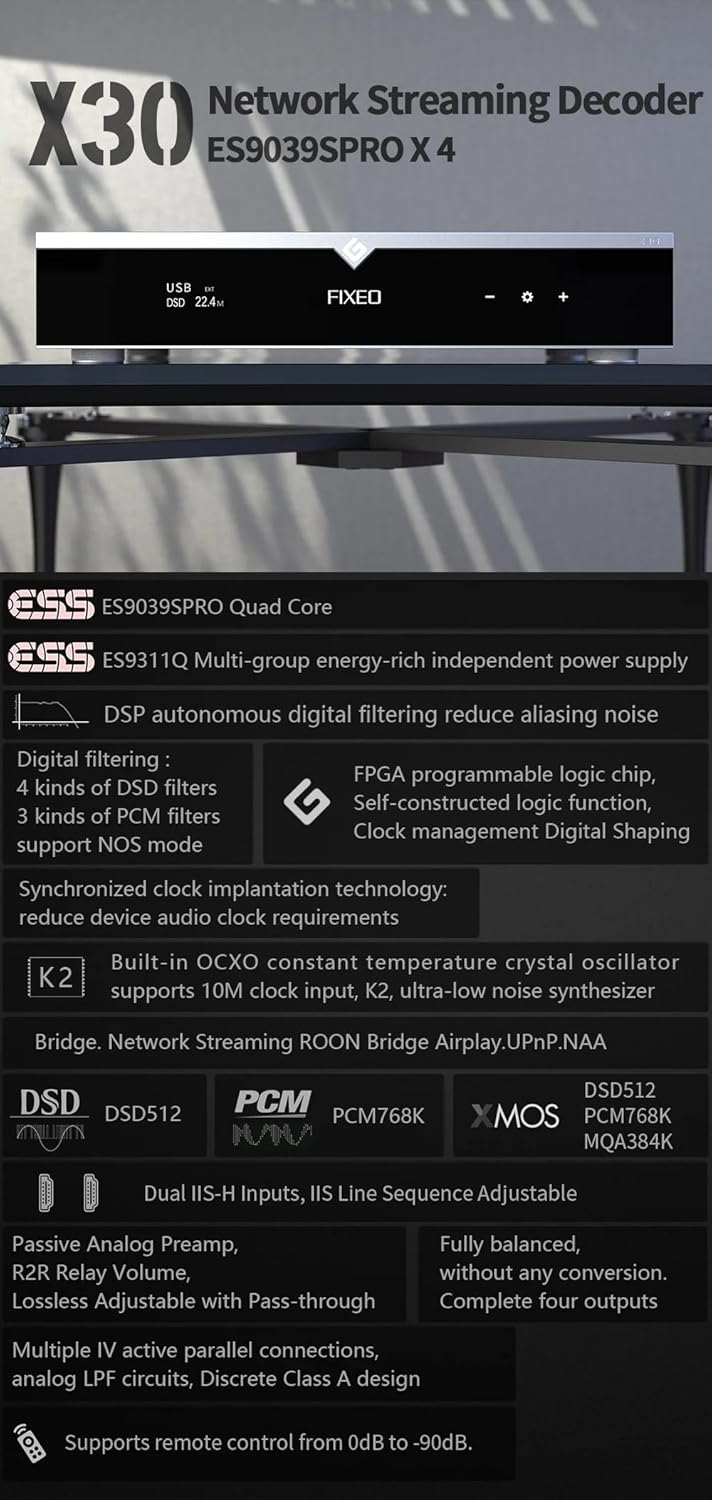
איור 2: מעלview of key features and supported audio formats, including ES9039SPRO Quad Core, DSP digital filtering, network streaming, and clock synchronization.
3. מדריך התקנה
3.1 פריקה ומיקום
Carefully remove the Gustard X30 from its packaging. Place the unit on a stable, level surface away from direct sunlight, heat sources, and excessive moisture. Ensure adequate ventilation around the unit.
3.2 חיבור חשמל
Connect the provided power cable to the AC input on the rear panel of the X30. Ensure the voltage switch (if present and accessible) is set to your local mains voltage (AC115V/230V). Plug the other end into a suitable wall outlet.
3.3 חיבורי כניסה ויציאה
The Gustard X30 offers a variety of digital inputs and analog outputs. Refer to the rear panel diagram for connection points.

Figure 3: Rear panel showing various input and output connections, including Clock, Coaxial, AES, USB, LAN, IIS, XLR, and RCA.
- כניסת USB: Connect your computer or digital audio source via a USB cable.
- Optical/Coaxial/AES Inputs: For connecting digital audio sources like CD players, media streamers, or TVs.
- קלט LAN: For network streaming capabilities. Connect an Ethernet cable to your router or network switch.
- IIS Inputs (x2): להעברת שמע דיגיטלית באיכות גבוהה ממקורות תואמים.
- קלט שעון: For connecting an external 10M clock for enhanced timing precision.
- XLR Outputs (Balanced): לחיבור לרשת מאוזנת ampמחזקות או רמקולים פעילים.
- RCA Outputs (Unbalanced): לחיבור לרשת לא מאוזנת ampמחזקות או רמקולים פעילים.
4. הוראות הפעלה
4.1 בקרות בלוח הקדמי
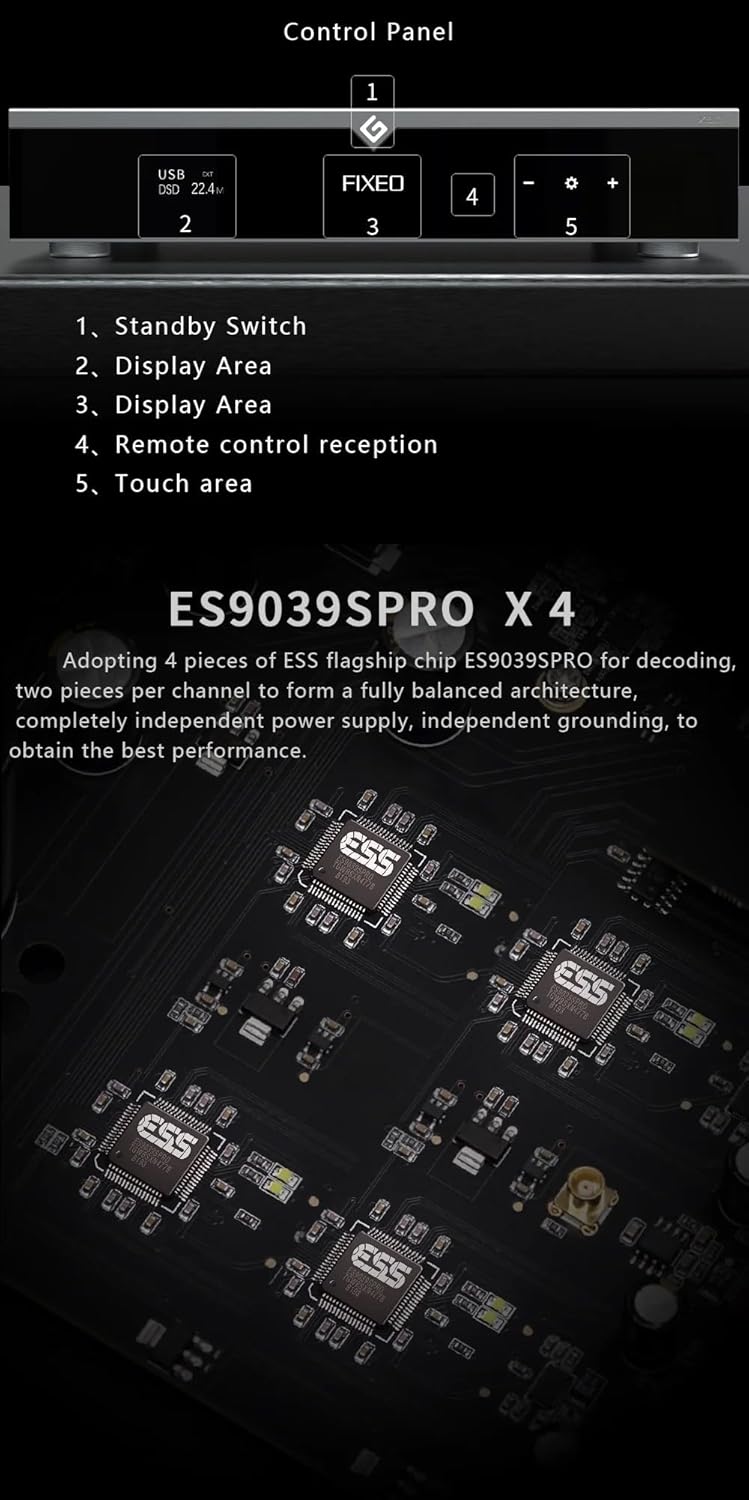
Figure 4: Front panel layout and control areas, indicating standby switch, display, remote reception, and touch area.
- מתג המתנה: Press to power on/off the unit or put it into standby mode.
- אזור תצוגה: מציג את הקלט הנוכחי, sampקצב ההורדה, ומידע תפעולי אחר.
- Remote Control Reception: מקלט אינפרא אדום לשלט.
- אזור מגע: Used for navigation and selection on the display.
- Volume/Menu Controls: כוונון עוצמת הקול או ניווט בין אפשרויות התפריט.
4.2 פעולה בסיסית
- הפעלה/כיבוי: Press the standby switch on the front panel or the power button on the remote control.
- בחירת קלט: Use the front panel controls or remote to cycle through available digital inputs (USB, Optical, Coaxial, AES, LAN, IIS, Clock).
- התאמת עוצמת הקול: Rotate the volume knob or use the +/- buttons on the remote. The X30 features a passive analog preamplifier with R2R relay volume adjustment for lossless control.
- תפריט ניווט: Access settings and advanced options via the front panel touch area or remote control.
4.3 סטרימינג ברשת
The Gustard X30 supports various network streaming protocols. For initial setup and configuration, access the device's web configuration page. The Linux kernel is optimized for I/O to reduce audio data forwarding delay and jitter.
- רון מוכן: Integrate the X30 into your Roon ecosystem for seamless music management and playback.
- שידור אוויר 2: הזרמת אודיו באופן אלחוטי ממכשירי אפל.
- DLNA/UPnP: Connect to compatible media servers and control points.
- NAA (Network Audio Adapter): For advanced network audio setups.
- עדכוני קושחה: The device supports online firmware upgrades via the network connection.

איור 5: דוגמהample of network streaming interface on a tablet and smartphone, demonstrating connectivity and music playback.
5. תחזוקה
- ניקוי: השתמשו במטלית רכה ויבשה לניקוי החלק החיצוני של היחידה. הימנעו משימוש בחומרי ניקוי שוחקים או ממסים.
- אוורור: ודא שפתחי האוורור אינם חסומים כדי למנוע התחממות יתר.
- עדכוני קושחה: Regularly check for and install firmware updates to ensure optimal performance and access to new features. Instructions for online updates are available via the device's web מִמְשָׁק.
6. פתרון תקלות
| בְּעָיָה | סיבה אפשרית | פִּתָרוֹן |
|---|---|---|
| אין כוח | Power cable not connected; Power outlet faulty; Unit in standby. | Check power cable connection; Try a different outlet; Press standby switch to power on. |
| אין פלט קול | Incorrect input selected; Volume too low; Cables not connected properly; Amplifier/speakers off or faulty. | Select correct input; Increase volume; Check all audio cable connections; Verify amplifier/speaker status. |
| Network streaming issues | Network cable disconnected; Router/network issue; Incorrect network settings. | Check LAN cable connection; Restart router; Verify network settings via web מִמְשָׁק. |
| שמע מעוות | איכות שמע מקור; שגיאותample rate setting; Faulty cables. | Ensure source audio is high quality; Check sample rate settings on source and DAC; Replace audio cables. |
אם הבעיה נמשכת לאחר ניסיון פתרונות אלה, אנא צור קשר עם תמיכת הלקוחות.
7. מפרט טכני

Figure 6: Detailed specifications table outlining supported PCM, MQA, and DSD formats for USB/IIS streamer and AES/Coaxial/Optical inputs.
קלט דיגיטלי
- LAN Support Protocols: Roon, Airplay, UPnP, NAA, Spotify (configurable via web page, online upgradeable)
- מהירות LAN: 100/1000Mbps
- 10M Clock (BNC): Input impedance 50 Ohm, 0dBm-20dBm, CMOS square wave 0.2V-3.3V, Sine wave 0.5V-3.3V
פלט אנלוגי
- תגובת תדירות: 20-20kHz / +-0.2dB
- טווח דינמי: >130dB
- יחס אות לרעש: >129dB
- הצלבות ערוץ: -139dB @ 10kHz
- THD+N: <=0.0001% @ 1kHz
- IMD: ~0.001% @ -1dbfs
- רמת פלט RCA: 2.5Vrms (נפח קבוע)
- RCA Output Impedance: 100Ω
- XLR Output Level: 5.1Vrms (נפח קבוע)
- עכבת יציאה XLR: 100Ω
- XLR Interface Definition: American standard (1 ground, 2 hot, 3 cold)
פרמטרים אחרים
- ספק כוח AC: AC115V/230V 50/60Hz
- צריכת חשמל: <30W
- גודל (W*D*H): 430mm * 300mm * 80mm (including feet 92mm)
- גודל החבילה (אורך*רוחב*גובה): 530 מ"מ * 400 מ"מ * 180 מ"מ
- Weight with Package: 10 ק"ג
8. אחריות ותמיכה
The Gustard X30 is covered by a manufacturer's warranty. Please refer to the warranty card included with your product for specific terms and conditions. For technical support, troubleshooting assistance beyond this manual, or warranty claims, please contact your retailer or the manufacturer, Gustard, directly. The seller, Auinshifiman, also provides 24-hour online service and a 1-year or more pledge from the date of purchase.
For further assistance, you may contact Auinshifiman through their Amazon seller page: Auinshifiman Seller Page.
Ask a question about this manual
Ask about setup, troubleshooting, compatibility, parts, safety, or missing instructions. Manuals+ will review the question and use this page’s manual context to help answer it.