
1. הקדמה
The Gustard H26 is a high-performance, fully balanced discrete Class A headphone amplifier designed to deliver exceptional audio fidelity. It incorporates advanced features and robust construction to provide a superior listening experience for audiophiles.
תכונות עיקריות:
- Fully balanced discrete Class A amplifier with 8 pairs of power tubes for powerful and controlled sound.
- Seamless switching of preamplifier output, allowing the device to function as a pure pre-stagפלט e.
- טרום-שtage utilizes two direct-insert LME49720 dual op-amps.
- Matrix relay volume control for consistent and unbiased 4-way volume accuracy.
- Equipped with two custom 50W audio-specific toroidal transformers, one for each channel, ensuring minimal interference.
- Fully balanced input stage, enhancing clarity and richness for both balanced and single-ended RCA inputs.
2. מידע בטיחות
Please read and follow these safety guidelines to ensure safe operation and to prevent damage to the device or injury to yourself.
- אין לחשוף את היחידה לגשם, לחות או טמפרטורות קיצוניות.
- ודא אוורור נאות סביב ampמגן למניעת התחממות יתר.
- אל תפתח את ה-casinז; הפנה את כל הטיפולים לצוות מוסמך.
- השתמש רק במתאם החשמל ובכבלים שצוינו.
- נתק את החשמל לפני ניקוי או הזזת היחידה.
3. תכולת החבילה
ודא שכל הפריטים נמצאים בחבילה:
- Gustard H26 Headphone Ampחיים יותר
- כבל חשמל
- שְׁלַט רָחוֹק
- מדריך למשתמש (מסמך זה)
4. המוצר נגמרview
4.1 לוח קדמי
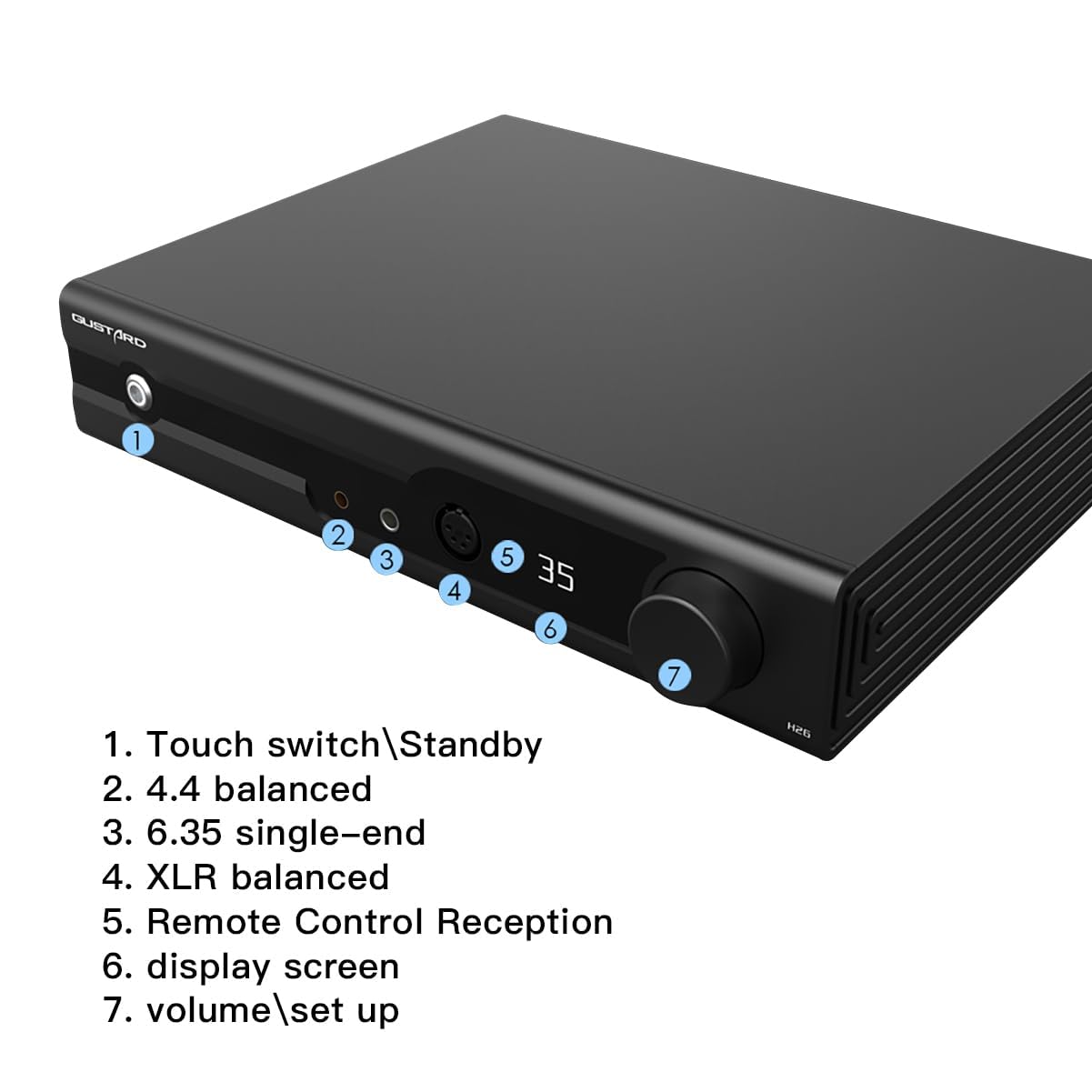
The front panel provides access to essential controls and headphone outputs.
- Touch Switch/Standby: Power on/off or place the unit in standby mode.
- 4.4 Balanced Output: Headphone output for 4.4mm balanced connectors.
- 6.35 Single-End Output: Headphone output for 6.35mm single-ended connectors.
- פלט מאוזן XLR: Headphone output for 4-Pin XLR balanced connectors.
- Remote Control Reception: מקלט אינפרא אדום לשלט.
- מסך תצוגה: Shows current settings such as volume, input, and gain.
- Volume/Setup Knob: Adjusts volume and navigates setup menus.
4.2 פאנל אחורי

The rear panel houses all input and output connections, along with power controls.
- Balanced Input XLR 1 & 2 (Left/Right): For balanced audio sources.
- Single Input RCA (Left/Right): For single-ended audio sources.
- מִרֹאשׁamp Output XLR (Left/Right): מאוזן לפניampתפוקת חיים יותר.
- מִרֹאשׁamp Output RCA (Left/Right): טרום חד-קצהampתפוקת חיים יותר.
- כרך ידtagהבחירה: Switch to select appropriate input voltagה (למשל, 115V/230V).
- כניסת מתח AC: Connect the power cord here.
- מתג הפעלה: מתג הפעלה ראשי של היחידה.
- נתיך: Replaceable fuse for electrical protection.
4.3 רכיבים פנימיים
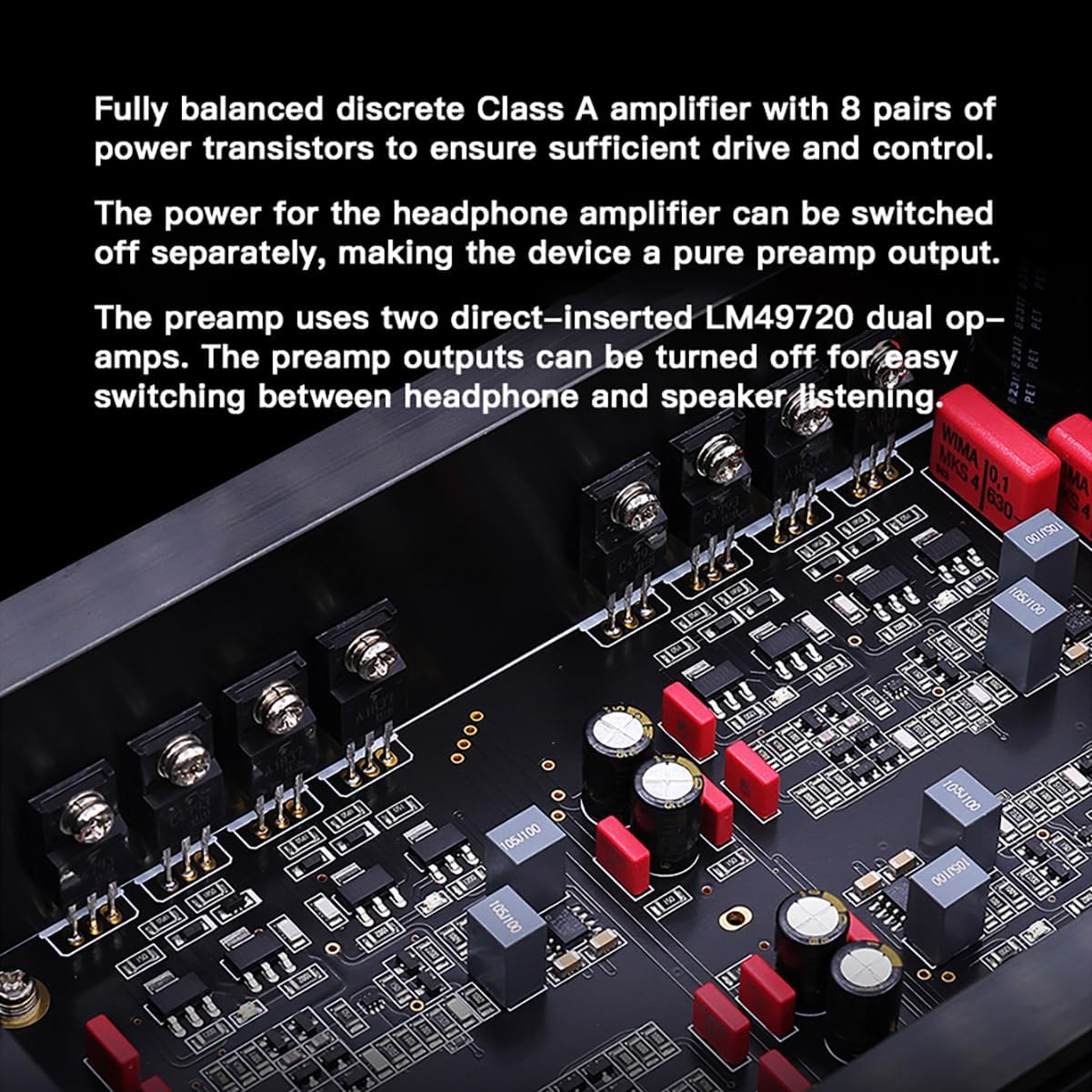
The Gustard H26 features a fully balanced discrete Class A amplifier design, utilizing 8 pairs of power transistors to ensure robust driving capability and precise control. The use of discrete components allows for fine-tuning of each stage, optimizing performance. The pre-stage incorporates two LME49720 dual op-amps.
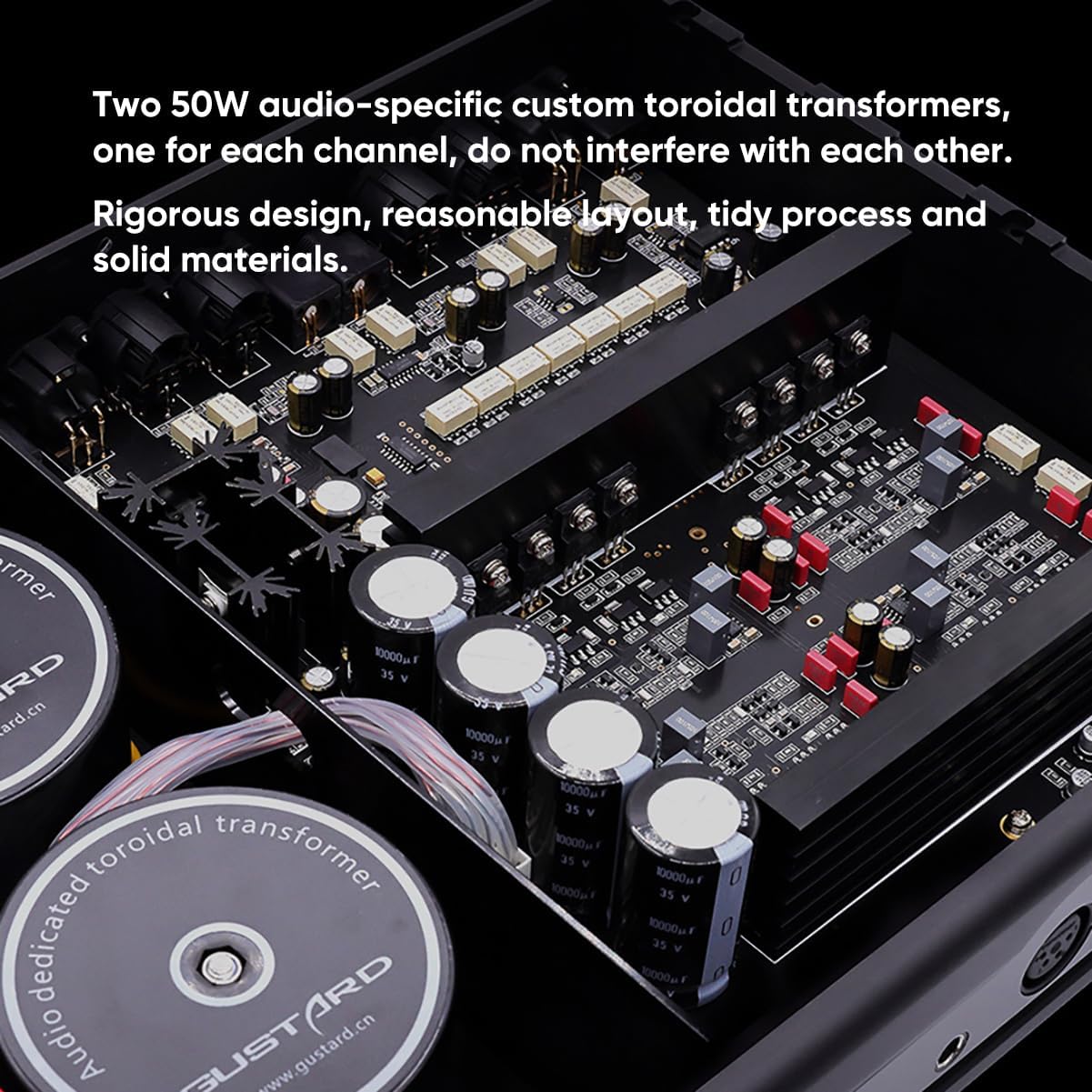
The power supply section is equipped with two custom 50W audio-specific toroidal transformers, one dedicated to each channel. This design minimizes cross-channel interference and ensures stable power delivery. Multiple low-noise regulators and Nichicon capacitors contribute to the unit's clean power and overall audio quality.
4.4 מידות
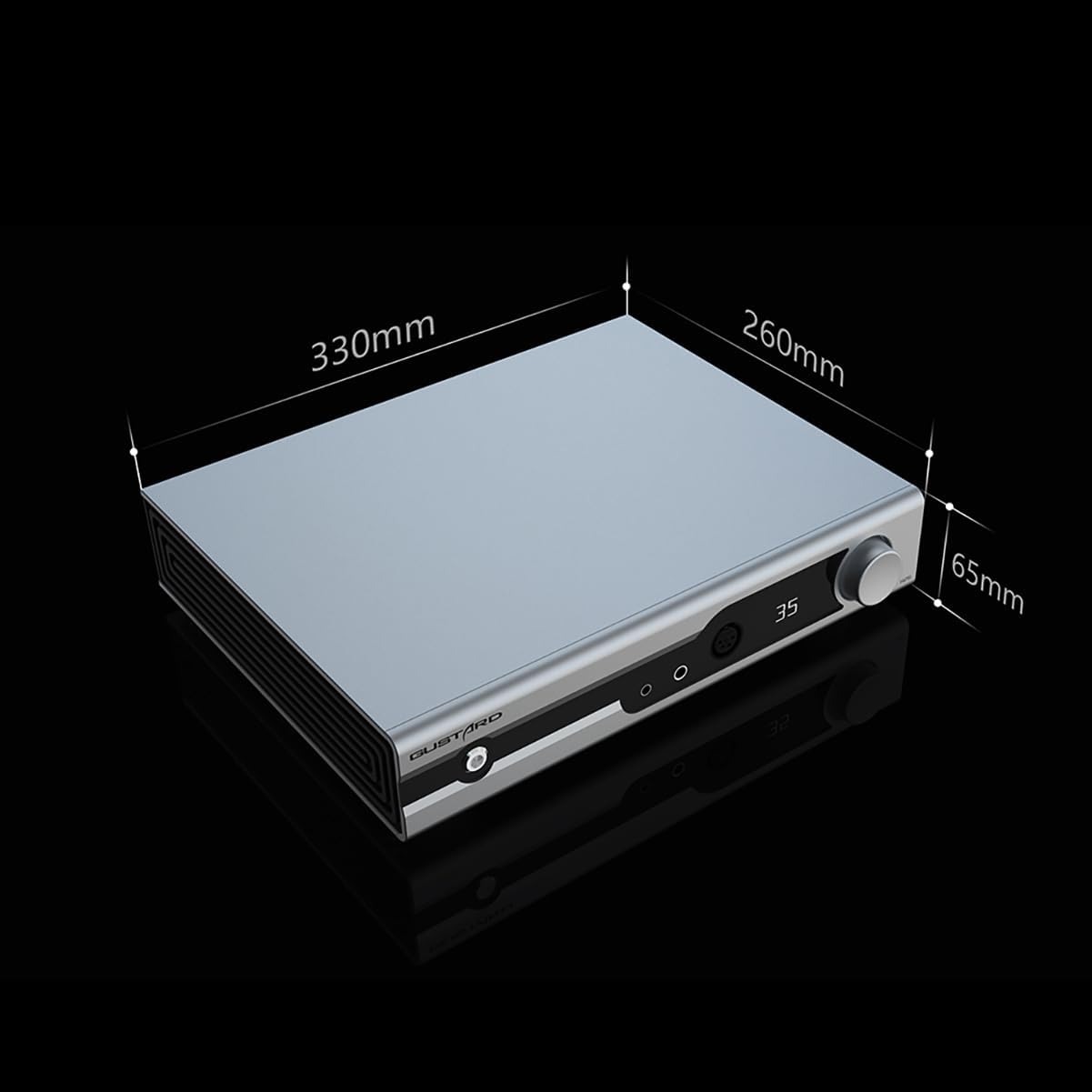
The physical dimensions of the Gustard H26 are approximately 330mm (width) x 260mm (depth) x 65mm (height).
5. התקנה
5.1 חיבור חשמל
- Ensure the main power switch on the rear panel is in the OFF position.
- ודא את הכרךtage selection switch on the rear panel matches your local power supply (e.g., 115V or 230V).
- Connect the provided power cord to the AC Power Input on the rear panel and then to a suitable wall outlet.
5.2 חיבור מקורות שמע
The H26 supports both balanced (XLR) and single-ended (RCA) audio inputs.
- For Balanced Sources: Connect your audio source's balanced outputs to the XLR 1 or XLR 2 inputs on the rear panel.
- For Single-Ended Sources: Connect your audio source's RCA outputs to the RCA inputs on the rear panel.
5.3 חיבור אוזניות
The H26 offers multiple headphone output options on the front panel.
- 4.4 מ"מ מאוזן: For headphones with a 4.4mm balanced connector.
- 6.35 מ"מ חד-קצה: For headphones with a standard 6.35mm (1/4 inch) single-ended connector.
- 4-Pin XLR Balanced: For headphones with a 4-pin XLR balanced connector.
5.4 טרוםampפלט חיים יותר
The H26 can also function as a preamplifier. Connect the XLR or RCA Preamp Outputs on the rear panel to your power amplifier or active speakers. The headphone amplifier section can be turned off separately when using the preampתפוקת חיים יותר.
6. תפעול
6.1 הפעלה/כיבוי
- Flip the main power switch on the rear panel to the ON position.
- Press the front panel Touch Switch (1) to power on the unit from standby, or to put it back into standby.
6.2 בקרת עוצמת הקול
Rotate the Volume/Setup Knob (7) on the front panel clockwise to increase volume and counter-clockwise to decrease volume. The matrix relay volume control ensures precise and balanced adjustments across all channels.
6.3 בחירת קלט
Single press the Volume/Setup Knob (7) to cycle through available input sources (XLR 1, XLR 2, RCA). The selected input will be shown on the Display Screen (6).
6.4 כוונון רמת ההגבר
Long press the Volume/Setup Knob (7) to switch between low and high gain levels. This allows for optimal matching with various headphones and In-Ear Monitors (IEMs).
6.5 Quiescent Current Adjustment
Double press the Volume/Setup Knob (7) to toggle between 50mA and 100mA quiescent current settings. This feature allows for fine-tuning the Class A operation.
6.6 שימוש בשלט רחוק

השלט הרחוק המצורף מספק גישה נוחה לכל הפונקציות העיקריות מרחוק.
6.7 סרטון הדגמה מבצעי
This video demonstrates the operational controls, including volume adjustment, input selection, gain level, and quiescent current settings. While the video features a similar product (Aune S17 Pro), the control principles and functions are analogous to the Gustard H26.
7. תחזוקה
7.1 ניקוי
To clean the unit, disconnect it from the power source. Use a soft, dry cloth to wipe the exterior surfaces. Avoid using abrasive cleaners, solvents, or chemical sprays, as these can damage the finish.
7.2 אחסון
כאשר אינו בשימוש למשך תקופות ממושכות, יש לאחסן את amplifier in a cool, dry place, away from direct sunlight and excessive dust. It is recommended to keep the original packaging for protection during storage or transport.
8. פתרון תקלות
If you encounter issues with your Gustard H26, refer to the following common problems and solutions:
- אין כוח: Ensure the power cord is securely connected to both the unit and the wall outlet. Check the rear panel power switch and the front panel touch switch. Verify the voltagמתג הבחירה e מוגדר כהלכה.
- אין צליל: Confirm that the correct input source is selected. Check all audio cable connections (source to ampמרים, amplifier to headphones/speakers). Ensure headphone cables are fully inserted. Adjust the volume level.
- סאונד מעוות: Check audio cable integrity. Ensure the input source is not overdriving the amplifier. Try adjusting the gain level to match your headphones.
- השלט הרחוק לא עובד: Check the batteries in the remote control. Ensure there are no obstructions between the remote and the unit's remote reception window.
אם הבעיה נמשכת לאחר ניסיון פתרונות אלה, אנא צור קשר עם תמיכת הלקוחות.
9. מפרטים
- מספר דגם:
- H26
- מותג:
- משמר
- סוג מחבר:
- RCA, XLR
- פלט וואטtage:
- 50 וואט
- מקור כוח:
- חשמלי עם כבלים
- צֶבַע:
- שָׁחוֹר
- Number of Bands:
- 4
10. אחריות ותמיכה
10.1 מידע אחריות
All Gustard products purchased from authorized retailers are covered by a warranty. The standard warranty period is 1 year or more from the date of purchase, depending on the specific product and regional regulations. Please retain your proof of purchase for warranty claims.
10.2 תמיכת לקוחות
For technical assistance, troubleshooting, or warranty inquiries, please contact your retailer or the manufacturer's customer service. Support is typically available online, and inquiries are addressed promptly.