
1. המוצר נגמרview
The GEYA GPS8-01-U-40A is an AC220V Din Rail mounted overvoltage ו-undervoltage protective device designed for household equipment. It provides essential protection against voltage fluctuations, ensuring the safety and longevity of connected appliances. This device features real-time voltage monitoring, self-reset capabilities after a fault, and clear LED indicators for fault status.

תמונה 1.1: חזית view of the GEYA GPS8-01 Overvoltage Undervoltage Protective Device.
2. מידע בטיחות
Please read this manual carefully before installation and operation. Incorrect installation or use may result in electric shock, fire, or damage to the device and connected equipment. Always adhere to local electrical codes and standards.
- ההתקנה צריכה להתבצע רק על ידי צוות מוסמך.
- Ensure the main power supply is disconnected before any wiring or maintenance.
- אין להפעיל את המכשיר אם הוא פגום או אינו תקין.
- Verify correct wiring connections to prevent short circuits or improper operation.
- Keep the device away from moisture, dust, and corrosive environments.
3. תכונות מוצר
- כרך ידtage (True RMS) monitoring and protection.
- נפח יתר מתכוונןtage ו-undervoltagערכי e.
- Double bus wiring design for enhanced capability.
- Automatic reset after fault conditions.
- תצוגה דיגיטלית עבור כרךtage values and LED indicators for fault status.
- Compact 1-MODULE design for DIN rail mounting.
4. התקנה והתקנה
4.1 תרשים חיווט
The GPS8-01 device supports both upper and down wiring configurations. Ensure the neutral (N) and incoming line (IN) connections are correctly made as per the diagram below.

Image 4.1: Comparison of upper and down wiring for GPS8-01 and GPS8-02 models. For GPS8-01, connect N to N and IN to 1 for upper incoming line, and N to N and IN to 1 for down incoming line.
4.2 שלבי התקנה
- Mount the device onto a standard DIN rail.
- Connect the incoming neutral (N) and live (IN) wires to the corresponding terminals on the device.
- Connect the load wires (neutral and live) from the device's output terminals to the equipment requiring protection.
- Ensure all connections are secure and tightened appropriately.
- לאחר השלמת החיווט, יש להחזיר את החשמל למעגל.
Video 4.2: Demonstration of connecting the GEYA protective device to a load and power supply. The video illustrates accessing the load, connecting to the power supply, and turning on electricity to show the device's operation.
5. הוראות הפעלה
5.1 Panel Diagram and Indicators
The device features a digital display and LED indicators to show operating status and fault conditions.
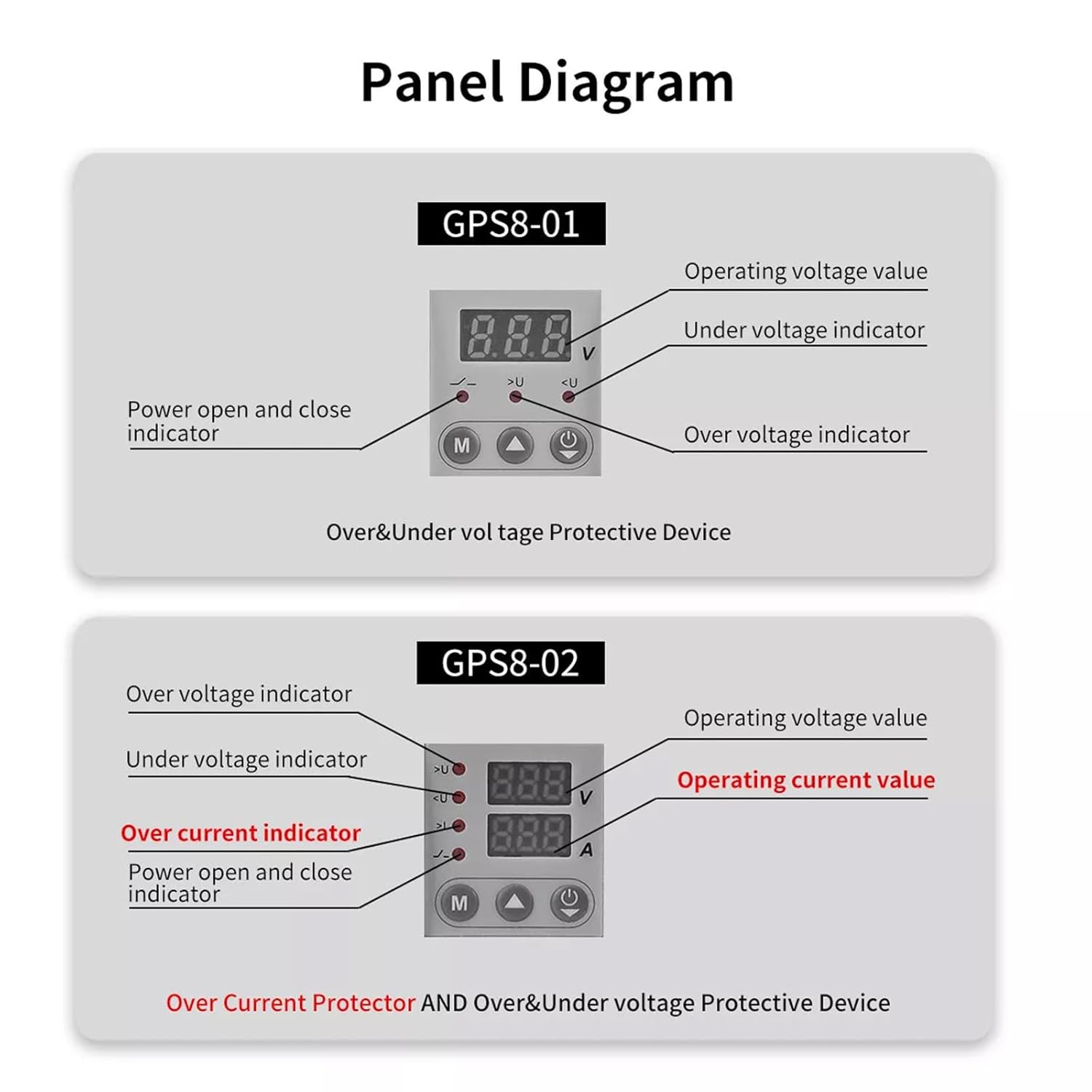
Image 5.1: Panel layout for GPS8-01 and GPS8-02. GPS8-01 displays operating voltagה, תחת כרךtage indicator, over voltage indicator, and power open/close indicator. GPS8-02 adds over current indicator and operating current value.
- כרך הפעלהtage ערך: מציג את כרך הנוכחיtage.
- מעל כרךtage Indicator (>U): Lights up when overvoltagמצב זה מזוהה.
- תחת כרךtage Indicator (
- Power Open and Close Indicator: מציין את מצב המתח של המכשיר.
5.2 הגדרת פרמטר
To adjust the protection parameters, press and hold the 'M' button for 3 seconds to enter the parameter setting interface. Use the up and down arrow buttons to navigate and adjust values. Short presses of the arrow buttons can quickly add and drop parameters. If no key is operated for 60 seconds, the device will automatically exit the setting mode.

Image 5.2: Parameter setting flow for GPS8-01 and GPS8-02. For GPS8-01, settings include Overvoltage (230V-300V), Undervoltage (145V-210V), and Reset Time (2s-900s).
GPS8-01 Adjustable Parameters:
- Overvoltagהגדרה דואר: Range 230V-300V (Factory default: 275V).
- תחתוןtagהגדרה דואר: Range 145V-210V (Factory default: 175V).
- Reset Time Setting: Range 2s-900s (Time before the device automatically resets after a fault).
6. ממדים
The compact design of the GPS8-01 allows for easy integration into electrical panels.
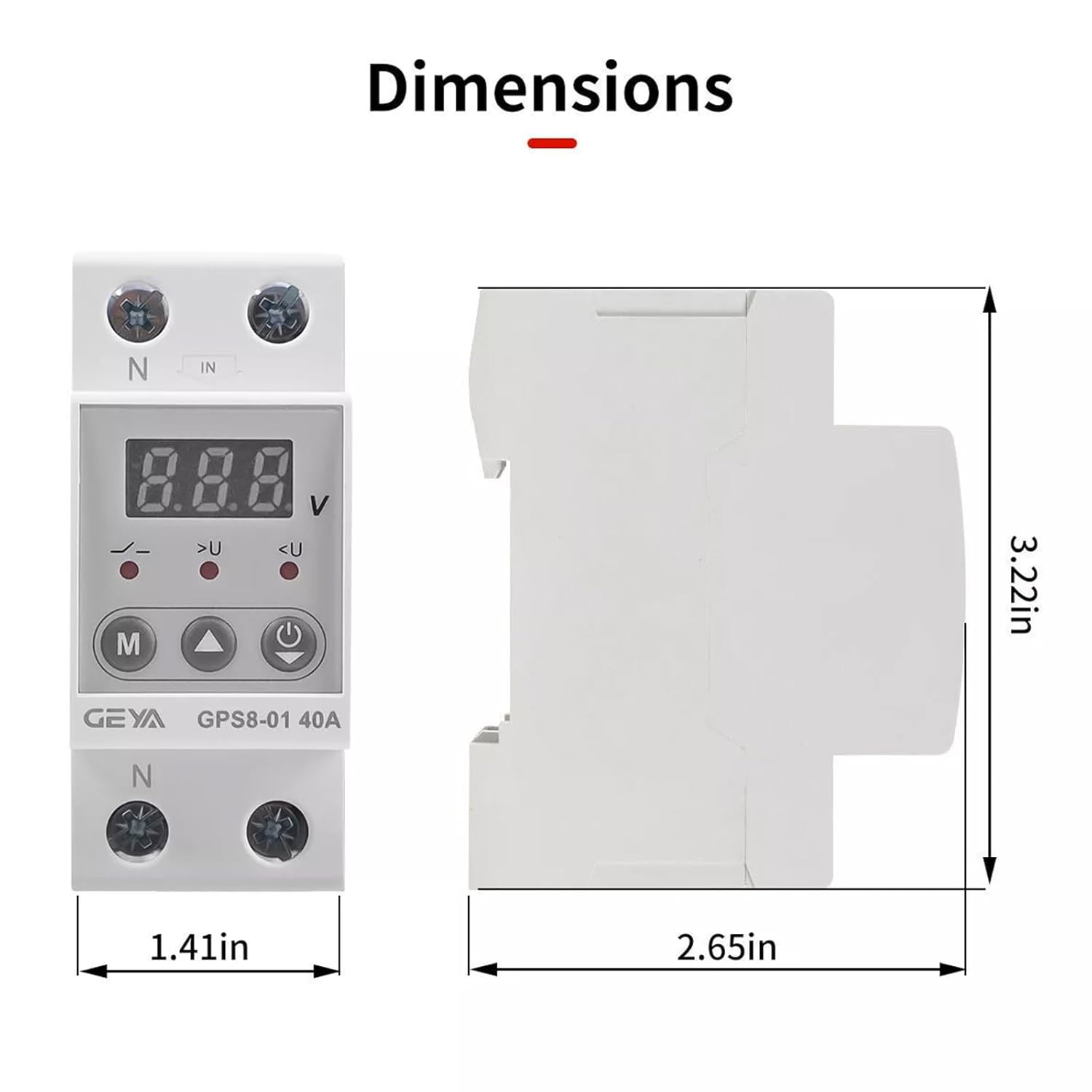
Image 6.1: Dimensions of the GEYA GPS8-01 device. Width: 1.41in (36mm), Height: 3.22in (82mm), Depth: 2.65in (68mm).
7. מפרט טכני
Detailed technical parameters for the GEYA GPS8-01 protective device.
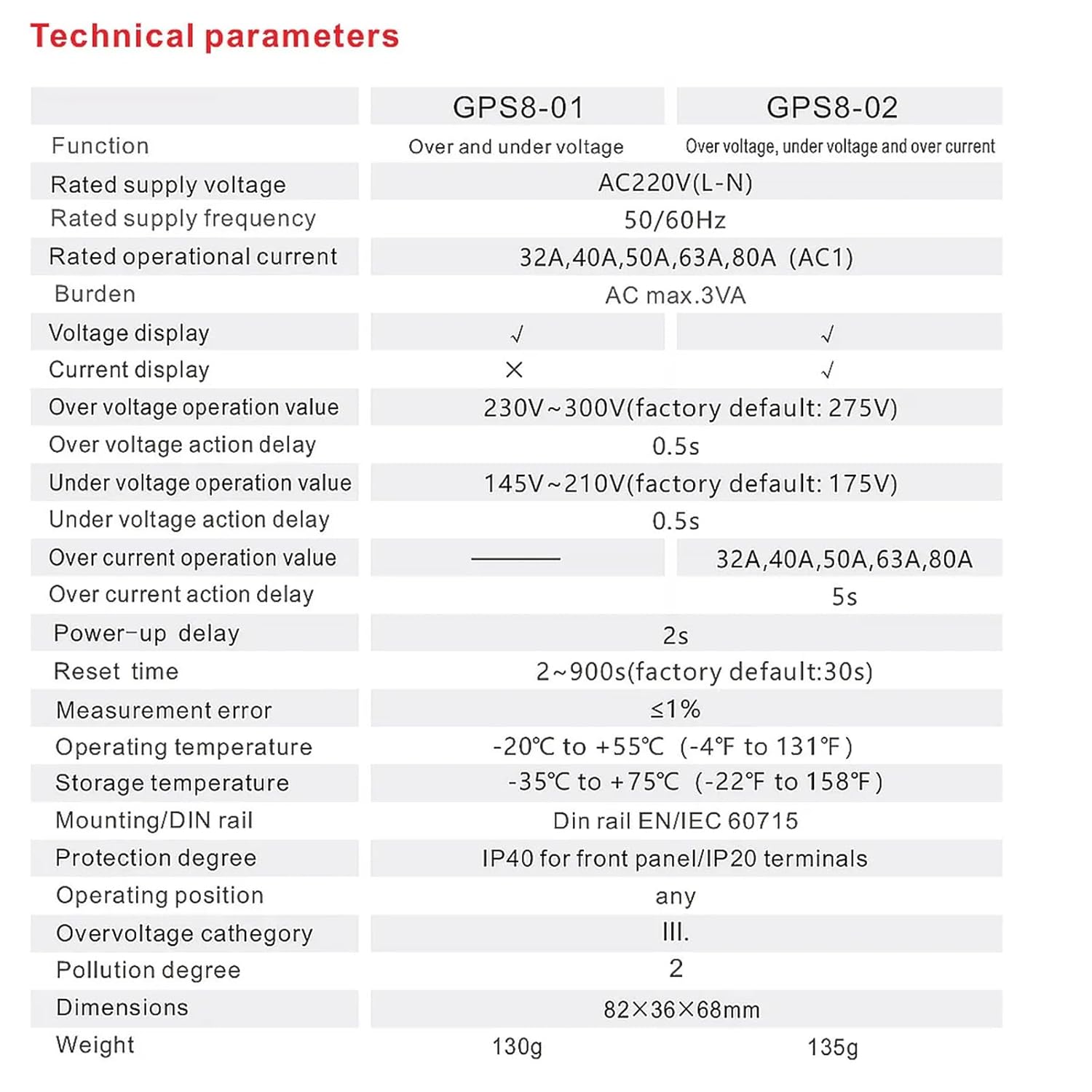
Image 7.1: Technical specifications table comparing GPS8-01 and GPS8-02 models.
| פָּרָמֶטֶר | GPS8-01 (Over and Under Voltage) |
|---|---|
| אספקה מדורגת כרךtage | AC220V (L-N) |
| תדירות אספקה מדורגת | 50/60 הרץ |
| זרם תפעולי מדורג | 32A, 40A, 50A, 63A, 80A (AC1) |
| עוֹל | זרם חילופין מקסימלי 3VA |
| כרך ידtagואת התצוגה | ✓ |
| תצוגה נוכחית | ✗ |
| מעל כרךtage operation value | 230V~300V (factory default: 275V) |
| מעל כרךtage action delay | שנות ה-0.5 |
| תחת כרךtage operation value | 145V~210V (factory default: 175V) |
| תחת כרךtage action delay | שנות ה-0.5 |
| Over current operation value | — |
| Over current action delay | — |
| Power-up delay | 2s |
| אפס זמן | 2~900s (factory default: 30s) |
| טעות מדידה | ≤1% |
| טמפרטורת הפעלה | -20°C עד +55°C (-4°F עד 131°F) |
| טמפרטורת אחסון | -35°C עד +75°C (-22°F עד 158°F) |
| הרכבה/מסילת DIN | מסילת דין EN/IEC 60715 |
| דרגת הגנה | IP40 עבור פאנל קדמי/מסופי IP20 |
| עמדת הפעלה | כֹּל |
| Overvoltagקטגוריה e | III. |
| דרגת זיהום | 2 |
| מידות | 82×36×68 מ"מ |
| מִשׁקָל | 130 גרם |
8. פתרון תקלות
אם המכשיר אינו פועל כמצופה, יש לשקול את הדברים הבאים:
- אין תצוגה/כוח: Check the main power supply and ensure all wiring connections are secure.
- מעידות תכופות: Verify that the set overvoltage/undervoltage thresholds are appropriate for your electrical system. Excessive voltage fluctuations in your area might require consultation with an electrician.
- Device Not Resetting: Check the 'Reset Time Setting' parameter. If the fault condition persists, the device will not reset until the condition is cleared.
- כרך שגויtagקריאה אלקטרונית: Ensure proper wiring and that the device is correctly rated for your supply voltage.
For issues not resolved by these steps, contact qualified technical support.
9. תחזוקה
The GEYA GPS8-01 device requires minimal maintenance. Regular checks can help ensure optimal performance:
- בדקו את המכשיר מעת לעת לאיתור נזקים גלויים או חיבורים רופפים.
- Keep the device clean and free from dust and debris. Use a dry, soft cloth for cleaning.
- אין להשתמש בחומרי ניקוי שוחקים או ממסים.
10. אחריות ותמיכה
GEYA products are manufactured to high-quality standards. For warranty information and technical support, please refer to the official GEYA webאתר או צרו קשר עם המפיץ המקומי שלכם. שמרו את קבלת הרכישה כהוכחת קנייה.