
1. הקדמה
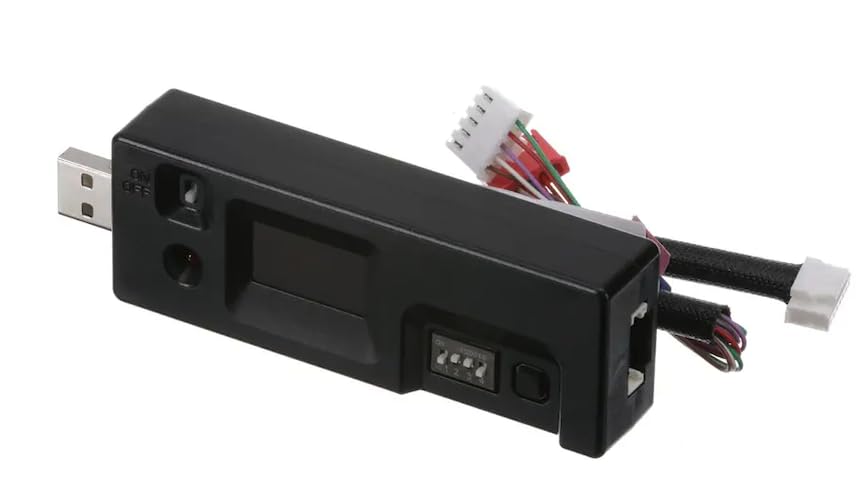
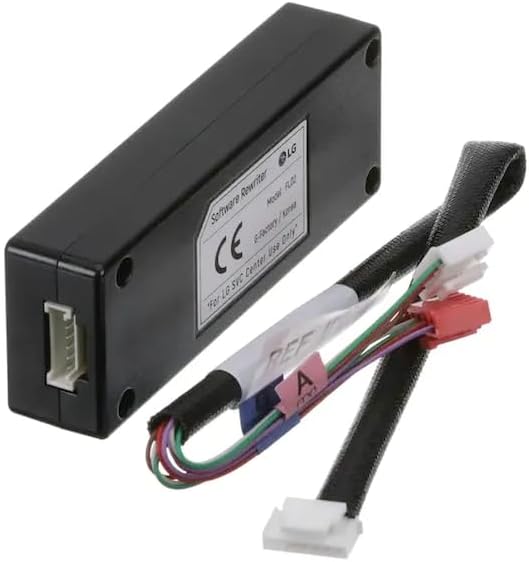
The Budora CJT30000002 Software Rewriter Assembly is a specialized tool designed for updating the electrical control boards in LG refrigerators. This device facilitates the necessary software rewrites to ensure optimal performance and functionality of your appliance. It is compatible with various LG models and equivalent brands such as Sears and Kenmore that utilize LG components.
2. מידע בטיחות
Always prioritize safety when working with electrical appliances. This device is intended for use by qualified technicians or individuals with a thorough understanding of appliance repair and electrical systems. Failure to follow safety guidelines can result in personal injury or damage to the appliance.
- נתק חשמל: Always unplug the refrigerator from its power source before attempting any service or connection of the rewriter assembly.
- חיבורים מתאימים: Ensure all connections are secure and correctly oriented to prevent electrical shorts or damage to the control board.
- תנאים סביבתיים: Use the device in a dry environment, away from water or excessive humidity.
- טפל בזהירות: The rewriter assembly contains sensitive electronic components. Avoid dropping or subjecting it to physical shock.
3. תכולת החבילה
Verify that all components are present upon opening the package:
- 1 x Budora CJT30000002 Software Rewriter Assembly
4. התקנה
Before connecting the software rewriter, ensure the refrigerator is completely disconnected from its power supply.
- Locate the Control Board: Identify the main control board within your LG refrigerator. Refer to your refrigerator's service manual for the exact location.
- זיהוי יציאת חיבור: Locate the designated service port on the control board for software updates. This port is typically a multi-pin connector.
- Connect the Rewriter: Carefully connect the cable from the CJT30000002 Software Rewriter Assembly to the service port on the refrigerator's control board. Ensure a firm and correct connection.
5. הוראות הפעלה
Once the rewriter assembly is securely connected to the refrigerator's control board, proceed with the software rewrite process.
- הפעלה: Turn on the software rewriter assembly using its power switch. The device may have an indicator light or a small display to confirm it is powered on.
- Select Settings (if applicable): Some models of the rewriter assembly may feature DIP switches or buttons for selecting specific rewrite modes or software versions. Consult the refrigerator's service documentation for the correct settings required for your specific update.

- Initiate Rewrite: Follow the specific instructions provided by LG service documentation or the rewriter's display to initiate the software rewrite process. This may involve pressing a button on the device or observing a sequence of lights.
- מעקב אחר התקדמות: Allow the rewriter to complete the software update. Do not disconnect the device or interrupt the power supply during this process. The duration of the rewrite can vary.
- סִיוּם: Once the rewrite is complete, the device will typically indicate success through a light pattern or message on its display. Disconnect the rewriter assembly from the control board.
- Test Refrigerator: Reconnect the refrigerator to its power source and test its functionality to ensure the software update was successful.
6. תחזוקה
The Budora CJT30000002 Software Rewriter Assembly requires minimal maintenance to ensure its longevity and reliable operation.
- ניקוי: Use a soft, dry cloth to wipe the exterior of the device. Do not use liquid cleaners or solvents.
- אִחסוּן: Store the rewriter assembly in a cool, dry place, away from direct sunlight and extreme temperatures. Keep it in its original packaging or a protective case to prevent damage.
- בדיקת כבלים: Periodically inspect the connecting cables for any signs of wear, cuts, or damage. Replace if necessary.
7. פתרון תקלות
If you encounter issues while using the software rewriter assembly, refer to the following common problems and solutions:
| בְּעָיָה | סיבה אפשרית | פִּתָרוֹן |
|---|---|---|
| המכשיר לא נדלק | No power supply; faulty power switch; internal fault | Ensure the refrigerator is plugged in (if the rewriter draws power from it) or check the rewriter's internal power source. Verify the power switch is in the 'ON' position. |
| Rewrite process fails or freezes | Incorrect connection; incorrect settings; incompatible software; power interruption | Verify all cable connections are secure. Double-check DIP switch settings against service documentation. Ensure the correct software version is being applied. Do not interrupt power during the process. |
| Refrigerator does not function after rewrite | Incomplete or failed rewrite; incorrect software applied; control board damage | Repeat the rewrite process carefully. Verify the software version is correct for your refrigerator model. If issues persist, consult a professional technician. |
8. מפרטים
| תכונה | פְּרָט |
|---|---|
| יַצרָן | בודורה |
| מספר חלק | PL-CJT30000002 |
| מספר דגם של פריט | PL-CJT30000002 |
| משקל פריט | 3.2 אונקיות |
| מידות המוצר | 5 x 2 x 2 אינץ' |
| רכיבים כלולים | Software Rewriter Assembly |
| סוללות כלולות | לֹא |
| סוללות נדרשות | לֹא |
| תְאִימוּת | LG, Sears, Kenmore (and others using LG components) |
9. מידע על אחריות
This Budora CJT30000002 Software Rewriter Assembly comes with a 1 שנות אחריות from the date of purchase. This warranty covers defects in materials and workmanship under normal use. For warranty claims or further details, please retain your proof of purchase and contact the seller or manufacturer.
10. תמיכת לקוחות
For technical assistance, troubleshooting beyond this manual, or warranty inquiries, please contact the retailer or manufacturer directly. Provide your product model number (PL-CJT30000002) and a detailed description of the issue to facilitate prompt support.