
1. הקדמה
This manual provides essential instructions for the safe and efficient use of your Meizu Note 21 Pro smartphone. Please read this manual thoroughly before operating the device and retain it for future reference.
2. מה בקופסה
- Meizu Note 21 Pro Smartphone
- מתאם מתח
- (Other accessories such as USB cable, SIM ejector tool, and documentation may vary by region.)
3. פריסת מכשיר
Familiarize yourself with the physical components of your Meizu Note 21 Pro.
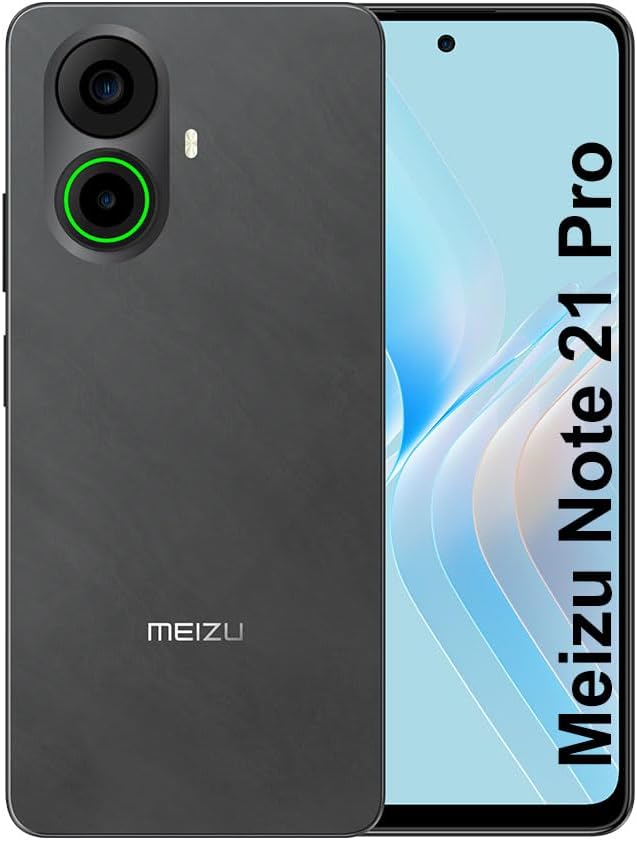
תמונה 3.1: מלפנים ומאחור view of the Meizu Note 21 Pro. The front displays the screen with a punch-hole camera. The rear shows the dual camera module with a green accent ring on one lens, a flash, and the "MEIZU" logo at the bottom.
- תצוגה קדמית: 6.78-inch FHD+ screen with a 120Hz refresh rate.
- מצלמה קדמית: ממוקם בחלק העליון במרכז התצוגה.
- מצלמות אחוריות: Dual camera system, including a 64MP main camera.
- חיישן טביעות אצבע צדדי: Integrated for secure access.
- יציאת USB: לטעינה והעברת נתונים.
- שקע שמע 3.5 מ"מ: עבור אוזניות.
- מגש כרטיס SIM/MicroSD: Supports Dual Nano SIM and MicroSD cards.
4. התקנה
4.1. הכנסת כרטיסי SIM ו-MicroSD
- אתר את מגש כרטיס ה-SIM בצד המכשיר.
- הכנס את כלי חילוץ ה-SIM לחור הקטן שליד המגש ודחף בעדינות עד שהמגש ייצא החוצה.
- הכנס את כרטיס/י ה-Nano SIM ו/או כרטיס ה-MicroSD לחריצים המיועדים לכך במגש. ודא שהמגעים המוזהבים פונים כלפי מטה.
- הכנס בזהירות את המגש בחזרה למכשיר עד שייכנס למקומו בנקישה.
4.2. הפעלה והתקנה ראשוניים
- Press and hold the Power button until the Meizu logo appears.
- פעל לפי ההנחיות שעל המסך כדי לבחור את השפה שלך, להתחבר לרשת Wi-Fi ולהגדיר את חשבון Google שלך.
- During setup, you will be guided to configure security features such as a PIN, pattern, or password.
4.3. Fingerprint Recognition Setup
- נווט אל הגדרות > אבטחה ופרטיות > ביטול נעילה בטביעת אצבע.
- Follow the on-screen instructions to register your fingerprint by repeatedly touching the side-mounted sensor.
- Ensure your finger covers the entire sensor area during registration for optimal performance.
5. הפעלת המכשיר שלך
5.1. תצוגה וניווט
- The 6.78-inch FHD+ display operates at a 120Hz refresh rate for smooth visuals.
- Navigate the Android 14 operating system using touch gestures: tap, swipe, pinch-to-zoom.
- גש להגדרות מהירות על ידי החלקה כלפי מטה מראש המסך.
5.2. פונקציות המצלמה
- פתח את אפליקציית המצלמה ממסך הבית או ממגירת האפליקציות.
- The rear camera system features a 64MP main sensor for high-resolution photos and a 2MP depth-of-field camera for portrait effects.
- The 13MP front-facing camera is suitable for selfies and video calls.
- Tap on the screen to focus, and use the on-screen shutter button to capture images. Explore various modes like Portrait, Night, and Pro within the camera app.
5.3. ביצועים ואחסון
- The MediaTek G99 Octa Core processor ensures efficient performance for applications and multitasking.
- The device comes with 256GB of internal storage and 8GB of RAM.
- Storage can be expanded using a MicroSD card (sold separately).
5.4. סוללה וטעינה
- The Meizu Note 21 Pro is equipped with a 5000mAh battery.
- Use the provided Power Adapter for 30W fast charging.
- To charge, connect the USB cable to the phone's USB port and the power adapter, then plug the adapter into a wall outlet.
5.5. קישוריות
- 4G LTE: Supports various LTE FDD and TDD bands for cellular data. Note: This international version works on T-Mobile in the USA and globally with other carriers.
- Wi-Fi 5: התחבר לרשתות אלחוטיות לצורך גישה לאינטרנט.
- בלוטות': ניתן לחבר עם אביזרים אלחוטיים כמו אוזניות ורמקולים.
- NFC: לתשלומים ללא מגע וצימוד מהיר עם מכשירים תואמים.
- GPS: עבור שירותי מיקום וניווט.
6. תחזוקה
- ניקוי: השתמשו במטלית רכה ונטולת סיבים כדי לנקות את המסך וגוף המכשיר. הימנעו משימוש בכימיקלים חזקים או בחומרים שוחקים.
- טיפול בסוללה: Avoid extreme temperatures. Do not fully discharge the battery frequently. For optimal battery longevity, keep the charge between 20% and 80%.
- עדכוני תוכנה: בדוק באופן קבוע אם קיימים עדכוני מערכת והתקן אותם כדי להבטיח ביצועים ואבטחה אופטימליים. עבור אל הגדרות > מַעֲרֶכֶת > עדכון מערכת.
7. פתרון תקלות
| לְהַנפִּיק | פתרון אפשרי |
|---|---|
| המכשיר לא נדלק | Ensure the battery is charged. Connect the device to the power adapter and try again. If unresponsive, press and hold the Power button for 10-15 seconds to force a restart. |
| אות רשת גרוע | Check if the SIM card is correctly inserted. Move to an area with better network coverage. Restart the device. Verify with your carrier that your plan is active. |
| אפליקציות איטיות או קורסות | Close background applications. Clear app cache (הגדרות > אפליקציות > בחר אפליקציה > אחסון ומטמון > נקה את המטמוןהפעל מחדש את המכשיר. ודא שיש מספיק מקום אחסון. |
| חיישן טביעות האצבע לא עובד | Ensure your finger and the sensor are clean and dry. Re-register your fingerprint in settings. |
8. מפרטים
- דֶגֶם: Meizu Note 21 Pro
- מַעֲרֶכֶת הַפעָלָה: אנדרואיד 14
- מעבד: MediaTek G99 Octa Core (2.2GHz)
- לְהַצִיג: 6.78 inches FHD+ (1080 x 2160 resolution), 120Hz Refresh Rate
- אַיִל: 8 ג'יגה-בייט
- אחסון פנימי: 256 ג'יגה-בייט
- מצלמה אחורית: 64MP Main + 2MP Depth
- מצלמה קדמית: 13MP
- סוֹלְלָה: 5000mAh, טעינה מהירה של 30W
- קישוריות: 4G LTE (FDD:1,2,3,4,5,7,8,12,17,18,19,20,26,28,66; TDD:38,40,41), 3G WCDMA, 2G Quad Band, Wi-Fi 5, Bluetooth, NFC, GPS
- שקע אודיו: 3.5 מ"מ
- מידות: 6.64 x 2.96 x 0.33 אינץ'
- מִשׁקָל: 1.1 פאונד
9. אחריות ותמיכה
For warranty information and technical support, please refer to the warranty card included with your product or visit the official Meizu webאתר. שמור את הוכחת הרכישה שלך לצורך תביעות אחריות.
For further assistance, you may contact Meizu customer service through their official channels.