
1. הקדמה
This manual provides detailed instructions for the VIKYLIN 8MP Fixed Dome PoE IP Camera Outdoor, Model VK-YC2583I-28. This camera features 4K Ultra HD resolution, full-color night vision, human/vehicle detection, a built-in microphone, and Power over Ethernet (PoE) for simplified installation. Please read this manual thoroughly before installation and operation to ensure proper use and optimal performance.
2. תכולת החבילה
ודא שכל הפריטים המפורטים להלן כלולים בחבילה שלך. אם פריטים חסרים או פגומים, אנא צור קשר עם תמיכת הלקוחות.
- 1x 4K PoE IP Dome Camera
- 1x Base Sticker
- 1x מדריך הוראות
- 1x Screw Bag (containing screws for mounting)
- 1x Waterproof Kit

Image: Package contents of the VIKYLIN 8MP Fixed Dome PoE IP Camera.
3. תכונות מוצר
- רזולוציית 4K Ultra HD: Provides clear image quality with 8MP (3840 × 2160) resolution at 20 frames per second, featuring a 1/2.8” 8 Megapixel Scan CMOS sensor and a 2.8mm fixed lens for a 112° ultra-wide viewזווית ing.
- ראיית לילה בצבע מלא: Equipped with F1.6 aperture and soft supplemental lighting, this camera provides detailed full-color video even in extremely dark scenes.
- אור כפול חכם: The camera intelligently switches between IR (infrared) and warm light illumination based on detection, ensuring optimal night vision while deterring intruders with a warm light flash.
- זיהוי אדם/רכב: Advanced detection functions reduce false alarms by accurately identifying human and vehicle movement. Detection areas and sensitivity can be adjusted.
- מיקרופון מובנה: Capture clear audio from the camera's vicinity, allowing for one-way audio monitoring and recording.
- Power over Ethernet (PoE): Simplifies installation by providing both power and data connection through a single Cat 5 or Cat 6 Ethernet cable.
- עיצוב עמיד: IP67 weatherproof and IK10 vandal-proof rating ensures reliable outdoor performance in various conditions.
- דחיסה יעילה: Utilizes H.265+/H.264 encoding technology to save bandwidth and storage space without compromising video quality.
Feature Demonstrations
Video: Demonstration of the camera's UltraHD 4K picture display quality.

Image: Smart Dual Illuminators in action, providing full-color night vision when a target is detected.
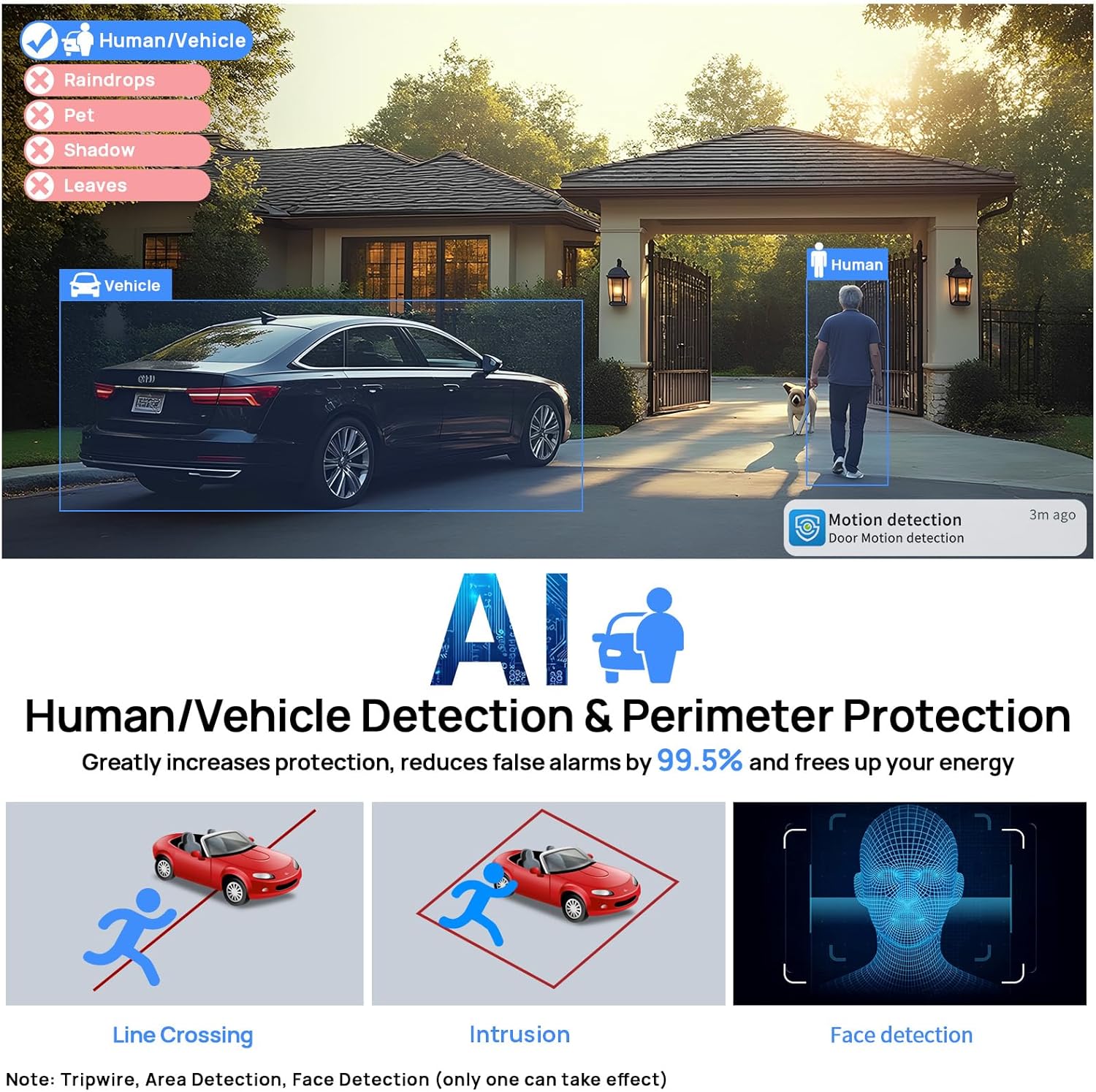
Image: Human and Vehicle Detection capabilities, highlighting reduced false alarms.
Video: Full Color Camera Night Vision demonstration, showcasing clear imaging in low-light conditions.

Image: Built-in microphone feature allowing for one-way audio communication.
4. התקנה והתקנה
The VIKYLIN 8MP Fixed Dome PoE IP Camera is designed for easy installation using Power over Ethernet (PoE). A single Ethernet cable provides both power and data connectivity.
4.1 התקנה פיזית
- בחר מיקום: Select a suitable indoor or outdoor location for mounting. The camera is IP67 rated for weather resistance and IK10 for vandal resistance.
- הַרכָּבָה: Use the provided base sticker as a template to mark drill holes. Secure the camera using the included screws.
- חיבור כבל: Connect a Cat 5 or Cat 6 Ethernet cable from the camera to a PoE injector, PoE switch, or PoE NVR. Ensure the waterproof kit is properly installed for outdoor use.

Image: Camera's IP67 weatherproof and IK10 vandal-proof design.
4.2 תצורה ראשונית
After physical installation, configure the camera using the web ממשק או אפליקציה סלולרית.
- התחבר לרשת: Ensure the camera is connected to your network via PoE.
- גלה את המצלמה: Use a PC software like VMS or SADP Tool to search for the camera device on your network.
- גִישָׁה Web מִמְשָׁק: פתח א web browser and enter the camera's IP address. Log in using the default credentials (usually admin/admin or admin/12345).
- Enable P2P: Navigate to Configuration > Network > P2P and enable the P2P function. Scan the QR code to add the device to your mobile app.
Video: Detailed guide on configuring the 4K Full Color PoE IP Dome Camera, including human/vehicle detection settings and night vision options.
5. הוראות הפעלה
Operate your VIKYLIN IP camera using the 'Remoteeyes' mobile app or compatible PC software.
5.1 Mobile App (Remoteeyes)
- הורד אפליקציה: Download the 'Remoteeyes' app from the Apple App Store or Google Play Store.
- הוסף מכשיר: Use the P2P function (QR code scan) to add your camera to the app.
- לִחיוֹת View: Access live video feeds from your camera anytime, anywhere.
- השמעה: Review foo מוקלטtage with smart playback features.
- אודיו חד כיווני: Utilize the built-in microphone for one-way audio communication.
- התראות: Receive real-time video/snapshot alerts on your mobile phone when human or vehicle detection is triggered.
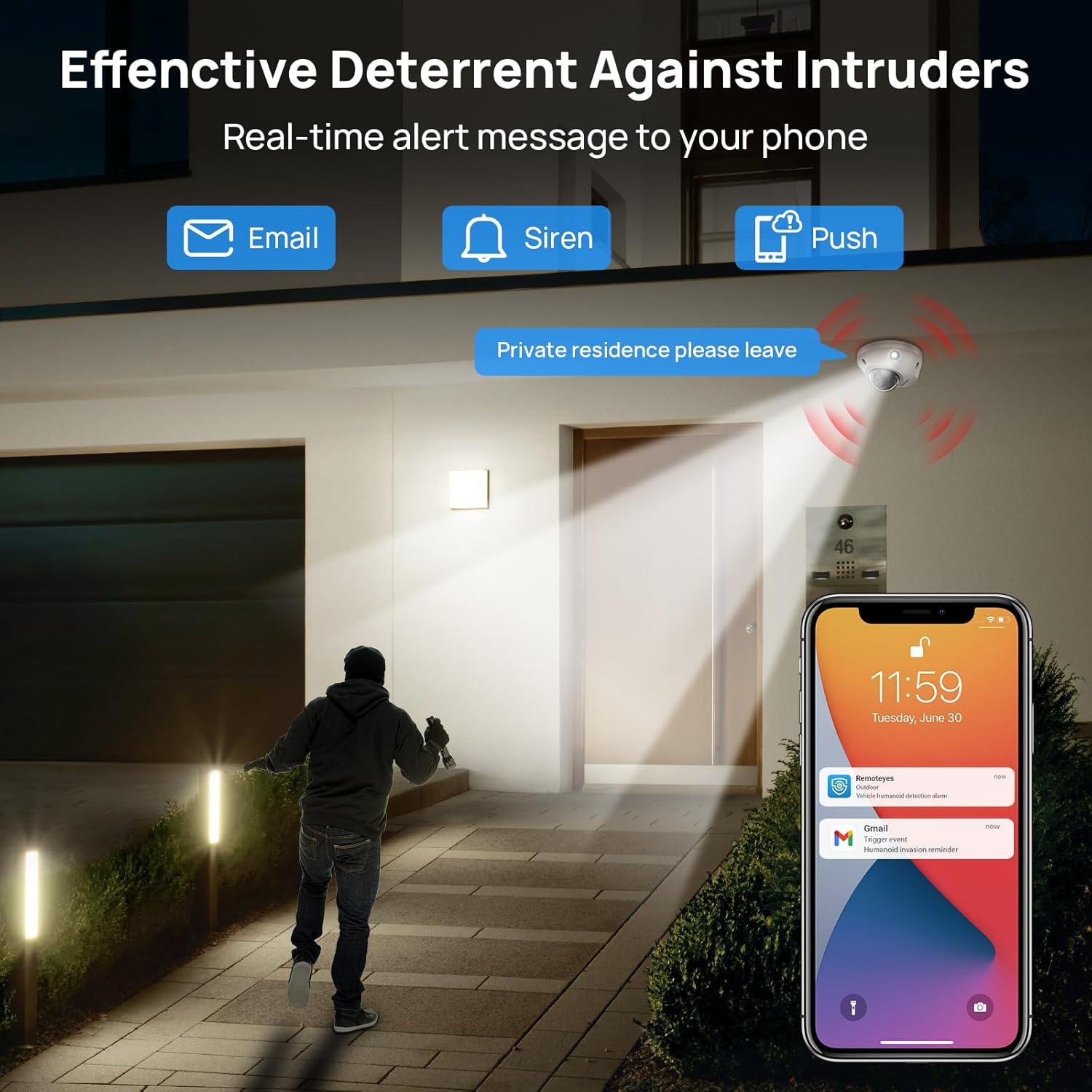
Image: Real-time alerts and deterrent features in action.
5.2 PC Software and Third-Party Compatibility
The camera is compatible with free PC software (VMS) and third-party monitoring software such as Blue Iris, iSpy, and VLC. It supports the Open Network Video Interface protocol (ONVIF) and RTSP for integration with various systems.
Local PC/NVR/NAS video storage is supported, with options for 24/7 recording or motion-triggered video to NVR or FTP.
6. תחזוקה
To ensure optimal performance and longevity of your VIKYLIN IP Camera, consider the following maintenance tips:
- ניקוי רגיל: נקו מעת לעת את עדשת המצלמה ואת ביתה בעזרת מטלית רכהamp מטלית להסרת אבק ופסולת. הימנעו מחומרי ניקוי שוחקים.
- עדכוני קושחה: בדוק את זה של היצרן website or app for available firmware updates to ensure your camera has the latest features and security enhancements.
- בדיקת כבלים: Regularly inspect the Ethernet cable and connections for any signs of wear or damage, especially for outdoor installations.
- ניהול אחסון: If using local storage (Micro SD card, NVR, NAS), ensure sufficient storage space is available and manage recordings as needed.
7. פתרון תקלות
If you encounter issues with your VIKYLIN 8MP Fixed Dome PoE IP Camera, refer to the following common troubleshooting steps:
- אין חשמל/חיבור:
- Verify the Ethernet cable is securely connected to both the camera and the PoE source (NVR, switch, or injector).
- ודא שמקור ה-PoE דולק ופועל כראוי.
- בדוק את הכבל לאיתור נזק.
- Cannot Access Camera:
- Confirm the camera's IP address using the SADP Tool or VMS software.
- Ensure your computer or mobile device is on the same network as the camera.
- Check firewall settings on your computer or router that might be blocking access.
- Reset the camera to factory defaults if you have forgotten the password (a reset button is available on the camera).
- איכות תמונה ירודה:
- נקה את עדשת המצלמה.
- Check network bandwidth; insufficient bandwidth can affect streaming quality.
- Adjust image settings (brightness, contrast, WDR) in the camera's web ממשק או אפליקציה.
- אזעקות שווא:
- Adjust the sensitivity of human/vehicle detection.
- Define specific detection zones to exclude areas with irrelevant motion (e.g., trees swaying).
For further assistance, please contact VIKYLIN customer support.
8. מפרטים
| תכונה | פְּרָט |
|---|---|
| שם הדגם | 4K Dual-light Built-in Microphone PoE IP Dome Camera (VK-YC2583I-28-N) |
| מספר דגם של פריט | VK-YC2583I-28 |
| רזולוציית סטילס אפקטיבית | 8 MP (3840 x 2160) |
| קצב פריימים | 20 פריימים לשנייה |
| עֲדָשָׁה | 2.8mm fixed lens, F1.6 Super Aperture |
| Viewזווית | 112° רחב במיוחד |
| טווח ראיית לילה | 98 Feet (Full Color / IR View) |
| טכנולוגיית תאורה נמוכה | Night Color / IR, Smart Dual Light |
| שֶׁמַע | Built-in Mic (One-way Audio) |
| איתור | זיהוי אדם/רכב |
| טכנולוגיית קישוריות | Ethernet (PoE) |
| מקור כוח | חשמל חוטי (PoE) |
| אִחסוּן | Local PC/NVR/NAS Video Storage, supports up to 256GB Micro SD card (not included) |
| תְאִימוּת | PoE NVR, ONVIF, Blue Iris, iSpy, VLC, Remoteeyes App (iOS/Android), VMS PC software |
| דירוג הגנה בינלאומי | IP67 (עמיד למים) |
| הגנה מפני השפעה | IK10 (עמיד בפני ונדליזם) |
| טמפרטורת הפעלה | -30°C עד 60°C (-22°F עד 140°F) |
| לַחוּת | < 90% |
| חוֹמֶר | מַתֶכֶת |
| מידות המוצר | 5.51 x 5.51 x 3.94 אינץ' |
| משקל פריט | 1.17 פאונד |

Image: Technical specifications overview של המצלמה.
9. אחריות ותמיכה
VIKYLIN provides comprehensive support for its products.
- אַחֲרָיוּת: המוצר כולל אחריות לשנה.
- תמיכה טכנית: תמיכה טכנית לכל החיים זמינה.
- מידע ליצירת קשר: For any questions or issues, please contact our support team via email at cairo@vikylin.com.
- תוכניות הגנה: Extended protection plans are available for purchase separately (e.g., 2-Year Protection Plan, 3-Year Protection Plan, Complete Protect).