
Edifier x2
מדריך למשתמש באוזניות האלחוטיות Edifier X2
דגם: X2
1. הקדמה
The Edifier X2 True Wireless Earbuds offer a superior audio experience with advanced Bluetooth 5.1 connectivity, ensuring stable and fast connections. Designed for comfort and durability, these earbuds feature an IP54 water resistance rating, making them suitable for various activities. Enjoy crystal-clear calls with dual microphones and extended listening sessions thanks to their impressive 28-hour battery life with the charging case.

Image: Edifier X2 Earbuds showcasing key features such as Bluetooth V5.1, 28 hours of playtime, touch controls, comfortable fit, super lightweight design, and dust & water resistance.
2. מה בקופסה
Your Edifier X2 True Wireless Earbuds package includes the following items:
- Edifier X2 True Wireless Earbuds (Left and Right)
- נרתיק טעינה
- כבל טעינה USB-C
- מדריך למשתמש
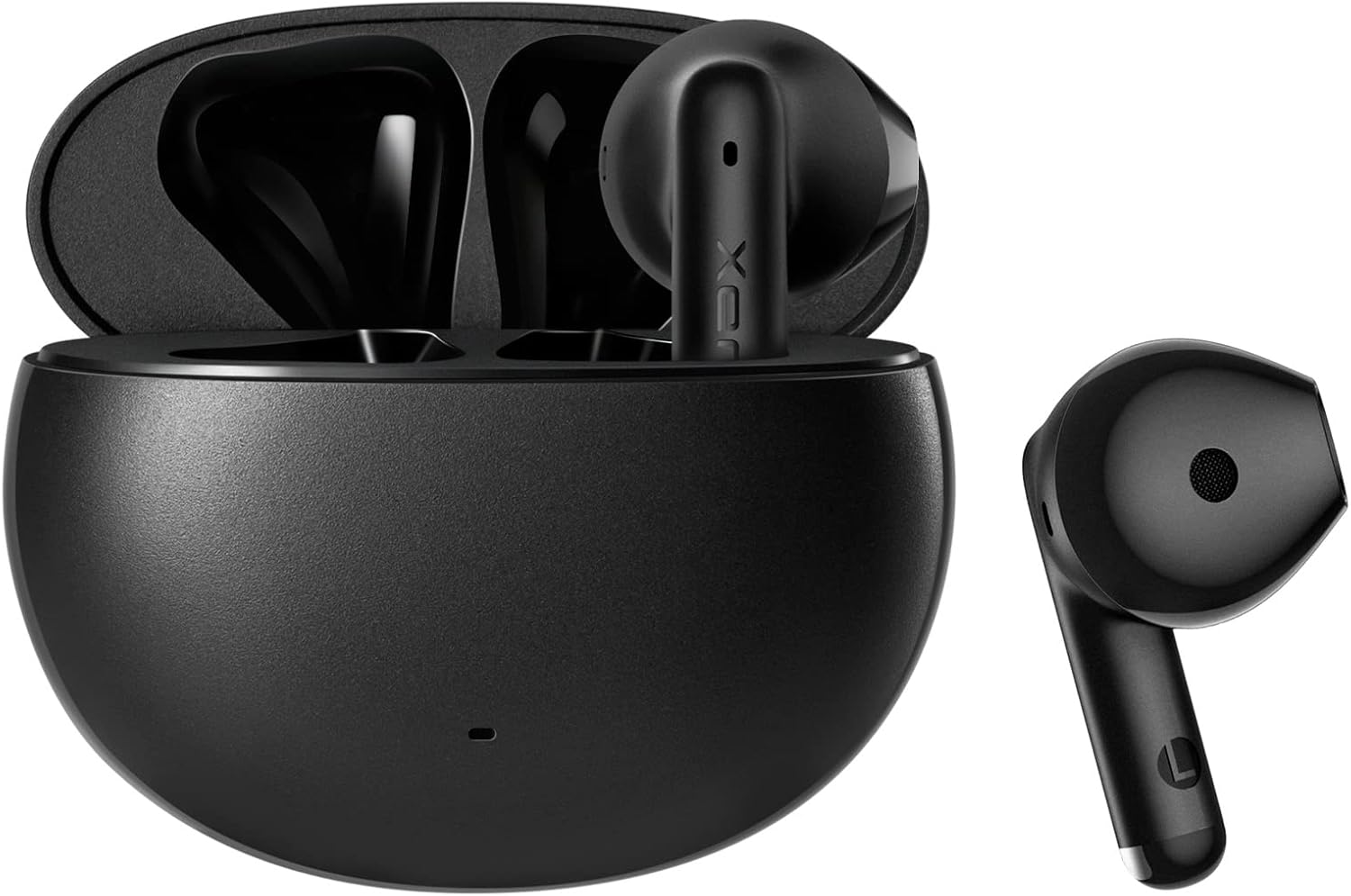
Image: The Edifier X2 True Wireless Earbuds, showing both earbuds and their compact charging case.
3. הגדרה וצימוד
Follow these steps to set up and pair your Edifier X2 earbuds with your device:
- התאמה ראשונית: Take both earbuds out of the charging case. The red and blue LEDs on the earbuds will blink rapidly, indicating they are in pairing mode.
- התחבר למכשיר: בטלפון החכם, בטאבלט או במחשב שלך, עבור אל הגדרות ה-Bluetooth. חפש and select "EDIFIER X2" from the list of available devices to connect.
- חיבור אוטומטי מחדש: לשימוש נוסף, האוזניות יתחברו אוטומטית למכשיר האחרון שצומד לאחר הוצאתן מהמארז.

Image: A visual guide demonstrating the simple pairing process of the Edifier X2 earbuds with a mobile phone's Bluetooth settings.
4. הוראות הפעלה
The Edifier X2 earbuds feature intuitive touch controls for easy management of your audio and calls:
- השהיה/הפעל: לחץ פעמיים על האוזניה השמאלית או הימנית.
- Accept/End a Call: לחץ פעמיים על האוזניה השמאלית או הימנית.
- מצב משחק: לחץ שלוש פעמים על האוזניה השמאלית.
- הרצועה הבאה: לחץ שלוש פעמים על האוזניה הימנית.
- דחה שיחה: לחץ והחזק את האוזניה השמאלית או הימנית למשך 3 שניות.
- עוזר קולי: Triple-click the left or right earbud.
The earbuds support seamless switching between one-ear and two-ear modes, allowing for flexible usage.

Image: A visual representation of the touch control functions on the Edifier X2 earbuds, detailing actions for music playback, call handling, and special modes.

תמונה: תקריב view of an earbud highlighting its touch-sensitive area for control inputs.
5. חיי סוללה וטעינה
The Edifier X2 earbuds provide extended listening time:
- עד 7 שעות נגינה בטעינה אחת.
- An additional 21 hours of battery life with the charging case, totaling 28 hours.
- The charging case can be fully charged in approximately 2 hours via USB-C.

Image: An infographic detailing the battery performance of the Edifier X2 earbuds, including single charge playtime and total playtime with the charging case.

Image: A visual cue indicating the charging time required for the earbuds to reach a full charge.
6. Water Resistance (IP54 Rated)
The Edifier X2 earbuds are IP54 rated, meaning they are protected against dust ingress and splashing water from any direction. This makes them suitable for workouts and light rain, but they are not designed for submersion in water.

Image: The Edifier X2 earbuds shown with water droplets, emphasizing their IP54 water-resistant capabilities.

Image: Another depiction of the earbuds with water splashes, highlighting their resistance to moisture.
7. Call Quality and Noise Reduction
Equipped with two built-in microphones (one on each earbud) and a sensitivity of -37±2dB, the Edifier X2 earbuds ensure clear and crisp call quality. They feature real-time ambient noise reduction to minimize background distractions during phone calls, providing a better communication experience.

Image: A woman wearing the Edifier X2 earbuds, with graphic overlays demonstrating the real-time ambient noise reduction feature for clear calls.

Image: A graph illustrating the effectiveness of noise reduction, comparing audio signals before and after the noise reduction process.
8. איכות הצליל
The Edifier X2 earbuds are engineered for excellent sound quality, featuring a 13mm large dynamic driver that ensures a wide soundstage and balanced audio. With Bluetooth 5.1, they provide fast and stable wireless transmission for an immersive listening experience.

תמונה: פנימי view diagram of the Edifier X2 earbud, highlighting the 13mm large driver and integrated Bluetooth 5.1 chip for superior sound.

Image: A graphic emphasizing the powerful audio performance from the compact design, featuring the 13mm large driver and Bluetooth V5.1.
9. תחזוקה
To ensure the longevity and optimal performance of your Edifier X2 earbuds, follow these maintenance tips:
- ניקוי: יש לנקות באופן קבוע את האוזניות ואת נרתיק הטעינה בעזרת מטלית רכה, יבשה ונטולת סיבים. יש להימנע משימוש בחומרים שוחקים או כימיקלים חזקים.
- אִחסוּן: כאשר אינן בשימוש, אחסנו את האוזניות בנרתיק הטעינה שלהן כדי להגן עליהן מפני אבק ונזק.
- טְעִינָה: Use the provided USB-C cable for charging. Avoid exposing the charging port to moisture.
- הימנע מתנאים קיצוניים: Do not expose the earbuds to extreme temperatures, high humidity, or direct sunlight for prolonged periods.
10. פתרון תקלות
If you encounter issues with your Edifier X2 earbuds, refer to the following common solutions:
| בְּעָיָה | פתרון אפשרי |
|---|---|
| אוזניות לא מתאימות | Ensure earbuds are fully charged. Place them back in the case, then take them out to re-enter pairing mode. Check your device's Bluetooth settings and forget previous connections if necessary. |
| אין צליל מאוזניה אחת | ודא ששתי האוזניות טעונות. נסה להחזיר את שתיהן למארז ולהוציא אותן שוב. התאם אותן שוב למכשיר שלך. |
| עוצמת קול נמוכה או איכות צליל ירודה | Clean any debris from the earbud grilles. Adjust volume on both your device and the earbuds. Ensure a secure fit in your ears. |
| בעיות טעינה | Check the USB-C cable and charging adapter. Ensure the charging contacts on the earbuds and case are clean and free of obstruction. |
11. מפרטים
Detailed technical specifications for the Edifier X2 True Wireless Earbuds:
| תכונה | פְּרָט |
|---|---|
| שם הדגם | X2 |
| טכנולוגיית קישוריות | אלחוטי (Bluetooth) |
| גרסת בלוטות' | 5.1 |
| טווח בלוטות' | 10 מטר |
| סוג מנהל התקן שמע | מנהל התקן דינמי |
| טווח תדרים | 20Hz עד 20KHz |
| חיי סוללה (אוזניות) | עד 7 שעות |
| חיי סוללה כוללים (עם מארז) | עד 28 שעות |
| זמן טעינה (מארז) | כ. 2 שעות |
| רמת עמידות במים | IP54 (עמיד בפני אבק והתזות) |
| מיקרופונים | 2 (one on each earbud) |
| שיטת בקרה | לָגַעַת |
| מיקום אוזניים | אין אוזן |
| צֶבַע | שָׁחוֹר |
| חוֹמֶר | סיליקון |
| UPC | 667261544935 |
12. סרטון מוצר רשמי
צפו בסרטון המוצר הרשמי לקבלת הצצה חזותיתview of the Edifier X2 True Wireless Earbuds:
סרטון: סרטון רשמי של מוצרasing the Edifier X2 True Wireless Earbuds, highlighting their design and features.
13. אחריות ותמיכה
Edifier products are designed for reliability and performance. For warranty information, technical support, or service inquiries, please refer to the warranty card included in your product packaging or visit the official Edifier website. You can also contact Edifier customer service for assistance.
Edifier Online Store: בקר בחנות
Ask a question about this manual
Ask about setup, troubleshooting, compatibility, parts, safety, or missing instructions. Manuals+ will review the question and use this page’s manual context to help answer it.