
מָבוֹא
This manual provides essential information for setting up, operating, maintaining, and troubleshooting your Alienware X16 Gaming Laptop. Designed for high-performance gaming, this laptop features cutting-edge components and advanced cooling solutions to deliver an immersive experience.

Figure 1: Alienware X16 Gaming Laptop, showcasing its high-refresh-rate display and powerful graphics capabilities.
מה יש בקופסה
Upon unboxing your Alienware X16 Gaming Laptop, verify that all components are present:
- מחשב נייד Alienware X16 R2
- Power Adapter (330W Small Form Factor)
- כבל חשמל
- תיעוד (כולל מדריך זה)
הגדרה
הפעלה ראשונית
- חבר את מתאם החשמל: Plug the power adapter into the Power/DC-in Port on the rear of the laptop. Connect the power cord to the adapter and then to a wall outlet.
- פתח את המחשב הנייד: הרם בזהירות את מכסה הצג.
- הפעלה: לחץ על לחצן ההפעלה, הממוקם בדרך כלל על גבי לוח המקשים.
- פעל לפי ההוראות על המסך: The laptop will guide you through the initial Windows 11 Pro setup process, including language selection, network connection, and user account creation.
חיבור ציוד היקפי
The Alienware X16 offers a variety of ports for connecting external devices:
- יציאות USB 3.2 דור 1 (x2): עבור התקני USB סטנדרטיים כמו עכברים, מקלדות או כוננים חיצוניים.
- USB-C 3.2 Gen 2 Port with DisplayPort: For modern USB-C devices and external displays.
- Thunderbolt 4 Port with Power Delivery and DisplayPort: High-speed connectivity for advanced peripherals, external GPUs, and charging.
- יציאת HDMI 2.1: לחיבור למסכים חיצוניים או טלוויזיות.
- Headset (Headphone and Microphone Combo) Port: עבור קלט/פלט שמע.
- חריץ לכרטיס microSD: להרחבת אחסון או העברה files מכרטיסי זיכרון.

Figure 2: Rear port configuration of the Alienware X16, detailing connectivity options.
הפעלת המחשב הנייד
תצוגה ויזואליה
The Alienware X16 features a 16.0" QHD+ (2560 x 1600) display with a 240Hz refresh rate and 3ms response time, ensuring smooth and vibrant visuals. It supports 100% DCI-P3 color gamut, ComfortView Plus for reduced blue light, and NVIDIA G-SYNC + Advanced Optimus for tear-free gaming.

Figure 3: The integrated FHD HDR IR Camera supports facial recognition and provides clear video quality.
מקלדת וקלט
The English US AlienFX RGB backlit (per-key) Alienware X Series keyboard offers a responsive typing and gaming experience. The AlienFX lighting zones are programmable with up to 16.8 million distinct colors, allowing for extensive customization.
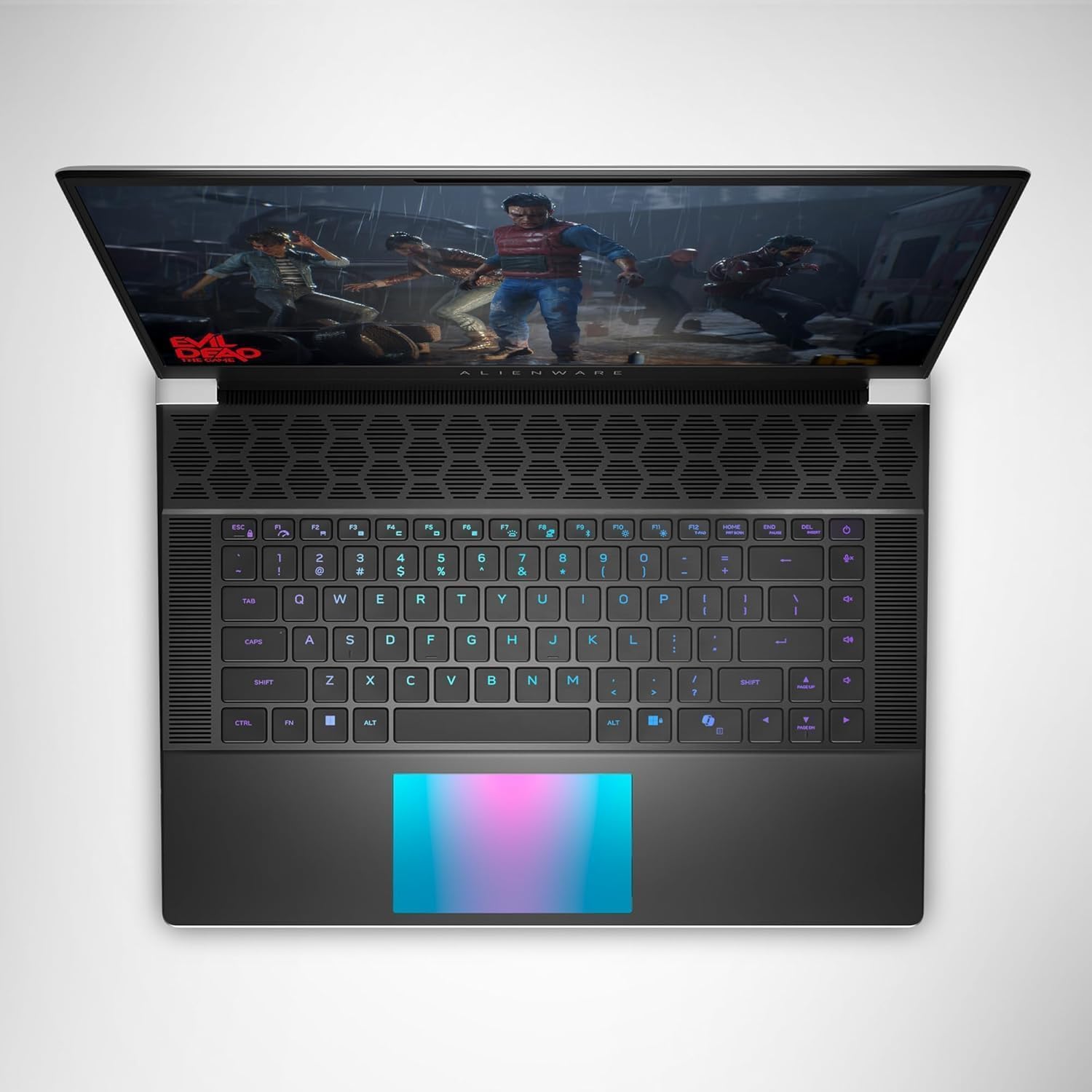
איור 4: למעלה view of the Alienware X16, highlighting the customizable RGB keyboard and touchpad.
מרכז פיקוד של Alienware
Utilize the Alienware Command Center software to customize your gaming experience. This application allows you to manage performance presets, monitor system vitals, and configure AlienFX lighting effects and combinations for a personalized setup.

Figure 5: Alienware Command Center interface for system control and customization.
תַחזוּקָה
מערכת קירור
The Alienware X16 incorporates advanced Alienware Cryo-tech™ cooling technology, featuring six laser-welded flat end heat pipes. To ensure optimal performance and longevity, regularly check and clean the ventilation grilles to prevent dust accumulation, which can impede airflow.
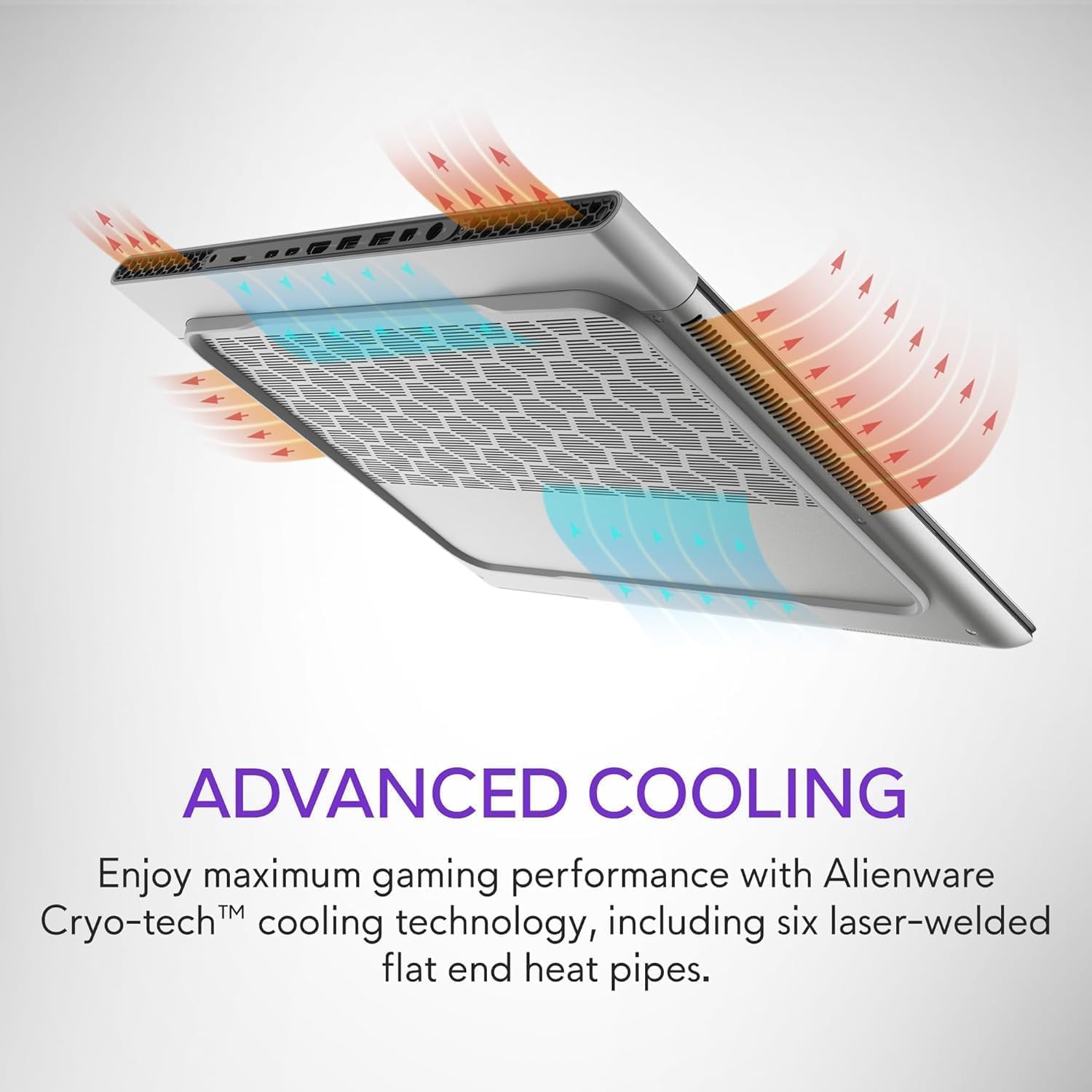
Figure 6: Illustration of the Alienware Cryo-tech™ advanced cooling system.
טיפול כללי
- Keep the laptop on a flat, stable surface to ensure proper ventilation.
- הימנע מחשיפת המחשב הנייד לטמפרטורות קיצוניות, אור שמש ישיר או לחות גבוהה.
- נקו את המסך בעזרת מטלית רכה ונטולת סיבים המיועדת במיוחד למכשירים אלקטרוניים.
- Use compressed air to clear dust from keyboard keys and ports.
פתרון בעיות
בעיות נפוצות ופתרונות
| בְּעָיָה | סיבה אפשרית | פִּתָרוֹן |
|---|---|---|
| המחשב הנייד לא נדלק. | אין בעיה עם חשמל, מתאם פגום או סוללה. | Ensure power adapter is securely connected to laptop and wall outlet. Check wall outlet with another device. Try a different power outlet. |
| התצוגה ריקה או מהבהבת. | Incorrect display settings, driver issue, or hardware problem. | Restart the laptop. Update graphics drivers. If using an external monitor, check cable connections. |
| Poor performance during gaming. | Overheating, outdated drivers, or background applications. | Ensure proper ventilation. Update graphics and chipset drivers. Close unnecessary background applications. Adjust power settings to high performance. |
| בעיות חיבור Wi-Fi. | Driver issue, router problem, or interference. | Restart the laptop and router. Update wireless drivers. Check router settings. |
For more complex issues, refer to the official Alienware support webאתר או צור קשר עם שירות הלקוחות.
מפרטים
| רְכִיב | פְּרָט |
|---|---|
| מעבד | Intel® Core™ Ultra 9 processor 185H (24MB cache, 16 cores, 2.30 to 5.10 GHz P-Core) |
| מַעֲרֶכֶת הַפעָלָה | Windows 11 Pro |
| כרטיס מסך | כרטיס מסך NVIDIA GeForce RTX 4090 בנפח 16GB GDDR6 |
| לְהַצִיג | 16.0" QHD+ (2560 x 1600) 240Hz 3ms, 100% DCI-P3, ComfortView Plus, NVIDIA G-SYNC + Advanced Optimus |
| זֵכֶר | 32GB, 2x16GB, LPDDR5X, 7467MT/s |
| אִחסוּן | 2 TB, M.2, PCIe NVMe, SSD |
| מִקלֶדֶת | English US AlienFX RGB backlit (per-key) Alienware X Series keyboard |
| אַלחוּט | Intel Killer™ 1750 2x2 and Bluetooth 5.4 Wireless Card with Wifi 7 Ready |
| מַצלֵמָה | 1080p at 30fps, FHD HDR RGB+IR camera; Dual-array microphones |
| שֶׁמַע | Tweeter speaker: 2W x 2; Woofer speaker: 3W x 4 |
| נמלים | 2 USB 3.2 Gen 1, 1 USB-C 3.2 Gen 2 (DP), 1 Thunderbolt 4 (PD, DP), 1 Headset, 1 HDMI 2.1, 1 microSD-card slot |
| סוֹלְלָה | 6 Cell, 90 Wh |
| מידות (HxWxD) | 18.57 מ"מ (0.73 אינץ') x 364.81 מ"מ (14.36 אינץ') x 289.98 מ"מ (11.41 אינץ') |
| משקל (מינימום) | 2.66 ק"ג (5.86 פאונד) |
אחריות ותמיכה
Your Alienware X16 Gaming Laptop comes with a standard manufacturer's warranty. For detailed warranty terms and conditions, please refer to the documentation included in the box or visit the official Alienware support webאֲתַר.
לקבלת סיוע טכני, הורדות מנהלי התקנים או תמיכה נוספת, אנא בקרו באתר Alienware Official Store או פורטל התמיכה הייעודי שלהם.