
1. הקדמה
Thank you for choosing the Hama DR2002BT Digital Radio. This device offers a comprehensive audio experience with FM, DAB/DAB+ digital radio reception, and Bluetooth connectivity. Its user-friendly design, featuring large buttons and a clear 4.3-inch TFT color display, makes it suitable for all users. This manual will guide you through the setup, operation, and maintenance of your new digital radio.
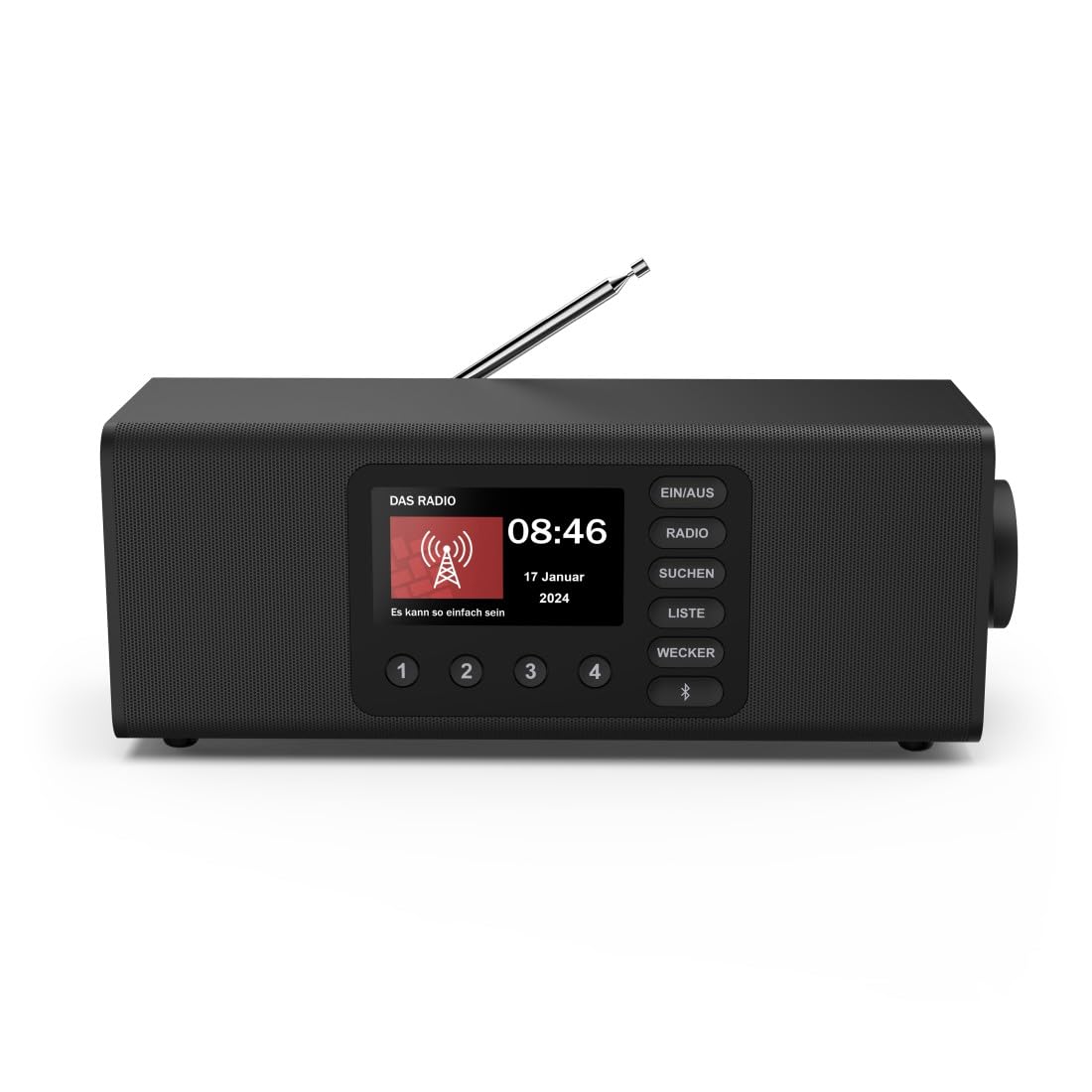
תמונה: חזית view of the Hama DR2002BT Digital Radio, showcasinכפתורי התצוגה והבקרה שלו.
2. מידע בטיחות
אנא קרא בעיון את הוראות הבטיחות לפני השימוש במכשיר. שמור מדריך זה לעיון עתידי.
- אין לחשוף את המכשיר ללחות, גשם או טמפרטורות קיצוניות.
- הימנע מהצבת המכשיר בקרבת מקורות חום או באור שמש ישיר.
- אל תפתח את המכשיר גasinז. תיקונים יבוצעו אך ורק על ידי אנשי מקצוע מוסמכים.
- השתמש רק במתאם החשמל המצורף.
- הקפידו על אוורור נאות סביב המכשיר.
3. תכולת החבילה
ודא שכל הפריטים נמצאים בעת הוצאת האריזה:
- Hama DR2002BT Digital Radio
- מתאם מתח
- מדריך למשתמש
4. המוצר נגמרview
4.1 פקדים ותצוגה בלוח הקדמי

Image: Front panel of the radio highlighting the display and control buttons, with icons for Bluetooth, DAB+, and Alarm functions.
The front panel features a 4.3-inch TFT color display, large control buttons, and a rotary knob for easy navigation and selection. Key buttons include:
- EIN/AUS (ON/OFF): מדליק או מכבה את המכשיר.
- רָדִיוֹ: Switches between FM and DAB/DAB+ modes.
- SUCHEN (SEARCH): מתחיל סריקת תחנות.
- LISTE (LIST): גישה לרשימת התחנות הזמינות.
- WECKER (ALARM): Configures alarm settings.
- לחצן בלוטות': מפעיל את מצב צימוד Bluetooth.
- כפתורים מוגדרים מראש (1-4): גישה מהירה לתחנות מועדפות שנשמרו.
- כפתור סיבובי (LAUTSTÄRKE/NAVIGIEREN): Controls volume and navigates menus.
4.2 חיבורי לוח אחורי
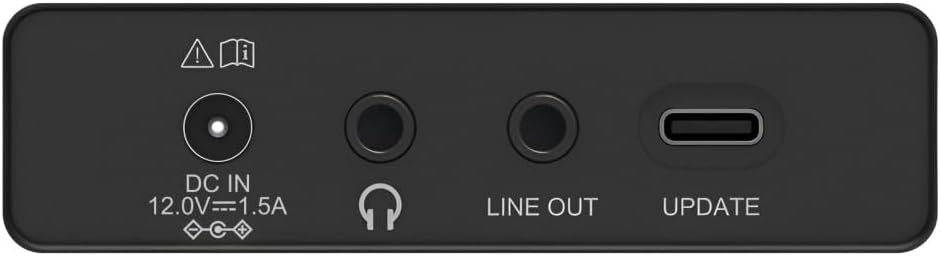
Image: Close-up of the rear panel showing the DC IN, Headphone, Line Out, and UPDATE (USB-C) ports.
הפאנל האחורי מספק אפשרויות קישוריות חיוניות:
- DC IN 12.0V --- 1.5A: Power input for the external adapter.
- שקע אוזניות (3.5 מ"מ): להאזנה פרטית.
- יציאת קו: פלט שמע לחיבור למכשיר חיצוני ampמחצבים או רמקולים.
- UPDATE (USB-C): לעדכוני קושחה.
- אנטנה טלסקופית: For FM and DAB/DAB+ reception.

תמונה: אחורי view of the Hama DR2002BT Digital Radio with its telescopic antenna extended for optimal signal reception.
5. התקנה
5.1 חיבור מתח
- חבר את מתאם החשמל המצורף ל DC IN יציאה בחלק האחורי של הרדיו.
- חבר את מתאם החשמל לשקע חשמל מתאים.
- The radio will power on automatically or enter standby mode.
5.2 מיקום אנטנה
For optimal FM and DAB/DAB+ reception, fully extend the telescopic antenna. Position the radio near a window if reception is poor.
5.3 הגדרה ראשונית (שימוש ראשון)
Upon first power-on, the radio may guide you through an initial setup process, including language selection and an automatic DAB station scan. Follow the on-screen prompts.
6. הוראות הפעלה
6.1 הפעלה/כיבוי
הקש על EIN/AUS כפתור כדי להפעיל או לכבות את הרדיו.
מצב רדיו DAB/DAB+ 6.2
- הקש על רָדִיוֹ לחצן לבחירת מצב DAB.
- If this is the first time in DAB mode or if you want to rescan, press סוכן כדי לבצע סריקה מלאה אחר תחנות זמינות.
- Use the rotary knob to navigate through the station list. Press the knob to select a station.
- אֶל view the station list, press the הרשימה לַחְצָן.
מצב רדיו 6.3 FM
- הקש על רָדִיוֹ לחצן לבחירת מצב FM.
- לִלְחוֹץ סוכן to automatically scan for the next available FM station.
- Alternatively, use the rotary knob to manually tune to a frequency.
6.4 אחסון וקריאה מחדש של הגדרות קבועות מראש
The radio allows you to store up to 4 favorite stations using the dedicated preset buttons (1-4).
- כוון לתחנה הרצויה (DAB או FM).
- Press and hold one of the preset buttons (1-4) until the display confirms the station has been saved.
- To recall a preset station, simply press the corresponding preset button (1-4).
6.5 תפעול בלוטות'

תמונה: חזית view of the radio with Bluetooth and stereo speaker icons, indicating its wireless audio streaming capability.
The Hama DR2002BT can stream audio from your smartphone, tablet, or laptop via Bluetooth 5.0.
- Press the Bluetooth button on the front panel to enter Bluetooth pairing mode. The display will show a pairing indicator.
- On your external device (smartphone, tablet), enable Bluetooth and search for available devices.
- Select "Hama DR2002BT" from the list of devices to pair.
- Once paired, you can play audio from your device, and it will be output through the radio's speakers.
6.6 פונקציית שעון מעורר

Image: A person waking up with the Hama DR2002BT Digital Radio placed on a bedside table, illustrating its alarm clock functionality.
The radio features two independent alarm settings.
- הקש על ווקר כפתור כדי לגשת להגדרות האזעקה.
- Use the rotary knob to select Alarm 1 or Alarm 2.
- Configure the alarm time, source (buzzer or radio station), and repetition (once, daily, weekdays, weekends, or specific days).
- Press the rotary knob to confirm each setting.
- To quickly activate/deactivate an alarm, press the ווקר button and use the rotary knob to toggle the alarm status.

Image: A person interacting with the Hama DR2002BT Digital Radio, demonstrating its ease of use for setting functions like alarms or tuning stations.
7. תחזוקה
To ensure the longevity and optimal performance of your Hama DR2002BT Digital Radio, follow these maintenance guidelines:
- ניקוי: השתמשו במטלית רכה, יבשה ונטולת סיבים לניקוי החלק החיצוני של הרדיו. אין להשתמש בחומרי ניקוי שוחקים, שעווה או ממסים.
- אָבָק: Regularly dust the device to prevent accumulation in vents and ports.
- אִחסוּן: אם מאחסנים את הרדיו לתקופה ממושכת, נתקו אותו מאספקת החשמל ואחסנו אותו במקום קריר ויבש.
- אַנטֶנָה: טפלו באנטנה הטלסקופית בזהירות כדי למנוע כיפוף או שבירה.
8. פתרון תקלות
אם נתקלת בבעיות עם הרדיו שלך, עיין בבעיות הנפוצות ובפתרונות הבאות:
| בְּעָיָה | סיבה אפשרית | פִּתָרוֹן |
|---|---|---|
| אין כוח | Power adapter not connected; Power outlet faulty | Check power adapter connection; Try a different power outlet. |
| קליטת רדיו גרועה (DAB/FM) | אנטנה לא מורחבת; אזור אות חלש; הפרעות | Fully extend the telescopic antenna; Reposition the radio (e.g., near a window); Perform a new station scan. |
| צימוד Bluetooth נכשל | Bluetooth not enabled on external device; Radio not in pairing mode; Device too far | Ensure Bluetooth is on and visible on your device; Press the Bluetooth button on the radio; Move devices closer (within 10m). |
| אין קול | עוצמת קול נמוכה מדי; השתקה מופעלת; נבחר מקור שגוי | Increase volume using the rotary knob; Check if mute is active; Ensure the correct mode (DAB, FM, Bluetooth) is selected. |
| אזעקה לא נשמעת | Alarm not activated; Incorrect alarm time/day set | Verify alarm is enabled in settings; Check alarm time and repetition settings. |
9. מפרטים

Image: Diagram showing the dimensions of the Hama DR2002BT Digital Radio: 35 cm (width), 12.5 cm (depth), and 13 cm (height).
| תכונה | פְּרָט |
|---|---|
| מספר דגם | DR2002BT (00054298) |
| קַבָּלָה | DAB, DAB+, FM |
| גרסת בלוטות' | 5.0 |
| כוח פלט (RMS) | 10 W (Stereo) |
| לְהַצִיג | צג TFT צבעוני בגודל 4.3 אינץ' |
| חיבורים | 3.5mm Jack (Headphone), USB-C (Update), Line Out, DC IN |
| ספק כוח | מתאם חשמל חיצוני |
| מידות (ב x D x H) | 35 x 12.5 x 13 ס"מ |
| מִשׁקָל | 1788 גרם |
| חוֹמֶר | פּלָסטִי |
| צֶבַע | שָׁחוֹר |
| תכונות נוספות | Alarm Function (2 alarms), Direct Selection Keys |
10. אחריות ותמיכה
Hama GmbH & Co KG provides a warranty for this product. Please refer to the warranty card included in your package or visit the official Hama webבאתר לקבלת תנאי האחריות המפורטים.
For technical support, troubleshooting assistance, or spare parts, please contact Hama customer service or visit their website. The availability of spare parts in the EU is guaranteed for 7 years.
- יַצרָן: Hama GmbH & Co KG
- ארץ מוצא: גֶרמָנִיָה
- זמינות חלקי חילוף באיחוד האירופי: 7 שנים