
1. הקדמה
This manual provides essential information for the safe and effective use of your ARROWMAX SGS MINI PLUS Electric Engraving Pen. This cordless rotary tool is designed for light-duty tasks such as engraving, polishing, carving, and sanding on various materials including metal, wood, glass, and plastic. Please read these instructions thoroughly before operation and retain for future reference.
2. תכולת החבילה
ודא שכל הפריטים המפורטים להלן כלולים בחבילה שלך:
- 1 x ARROWMAX SGS MINI PLUS Engraving Pen
- 24 x ביטים לחריטה
- 12 x ביטים לליטוש
- 1 x שקית אחסון
- 1 x בסיס טעינה
- 1 x כבל טעינה USB
- מדריך למשתמש אחד (מסמך זה)

The image above displays the engraving pen, various bits, the charging base, USB cable, and storage bag, illustrating the comprehensive kit provided.
3. המוצר נגמרview
Familiarize yourself with the main components of the ARROWMAX SGS MINI PLUS Engraving Pen:

- יציאת טעינה מגנטית: Located at the top, this port facilitates easy charging with the magnetic charging base.
- מחוון מצב עבודה: מציג את רמת הסוללה ואת כיוון הסיבוב.
- לחצן הפעלה: משמש להפעלה וכיבוי של המכשיר.
- גוף סגסוגת אלומיניום: מספק עמידות ואחיזה נוחה.
- צ'אק: The mechanism at the tip for securely holding engraving and polishing bits.
4. התקנה
4.1 טעינת המכשיר
Before first use, fully charge the engraving pen. The device is powered by a 5V rechargeable battery, offering up to 90 minutes of runtime on a full charge.
- Connect the USB charging cable to the charging base and a suitable USB power source.
- Place the engraving pen onto the magnetic charging base. The working status indicator lights will show charging progress.
- A full charge is indicated when all four indicator lights are solid.

The magnetic charging base allows for convenient and secure charging of the pen.
4.2 Attaching Bits
The kit includes 24 engraving bits and 12 polishing bits for various applications.
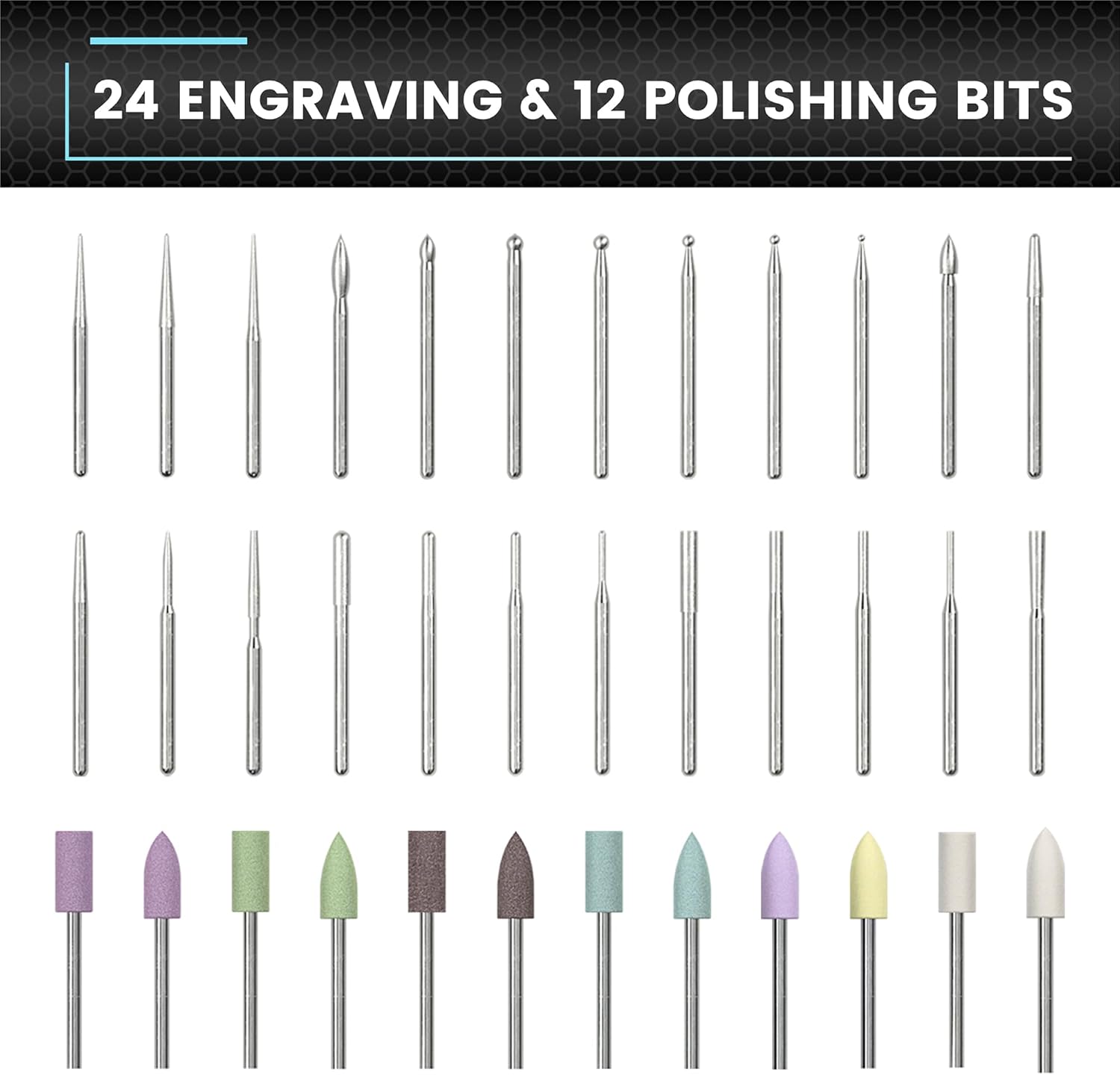
This image displays the variety of bits available for different tasks.
- ודא שעט החריטה כבוי.
- Gently insert the desired bit into the chuck until it is firmly seated. Do not force the bit.
- כדי להסיר, משכו את הביט ישר החוצה מהצ'אק.
4.3 חיבור לאפליקציה (אופציונלי)
For enhanced control, the engraving pen can be connected to a smartphone app (compatible with Android and iOS).
- הורידו את אפליקציית ARROWMAX מחנות האפליקציות של המכשיר שלכם.
- הפעל Bluetooth בטלפון החכם שלך.
- Open the ARROWMAX app and follow the on-screen instructions to pair with your SGS MINI PLUS.
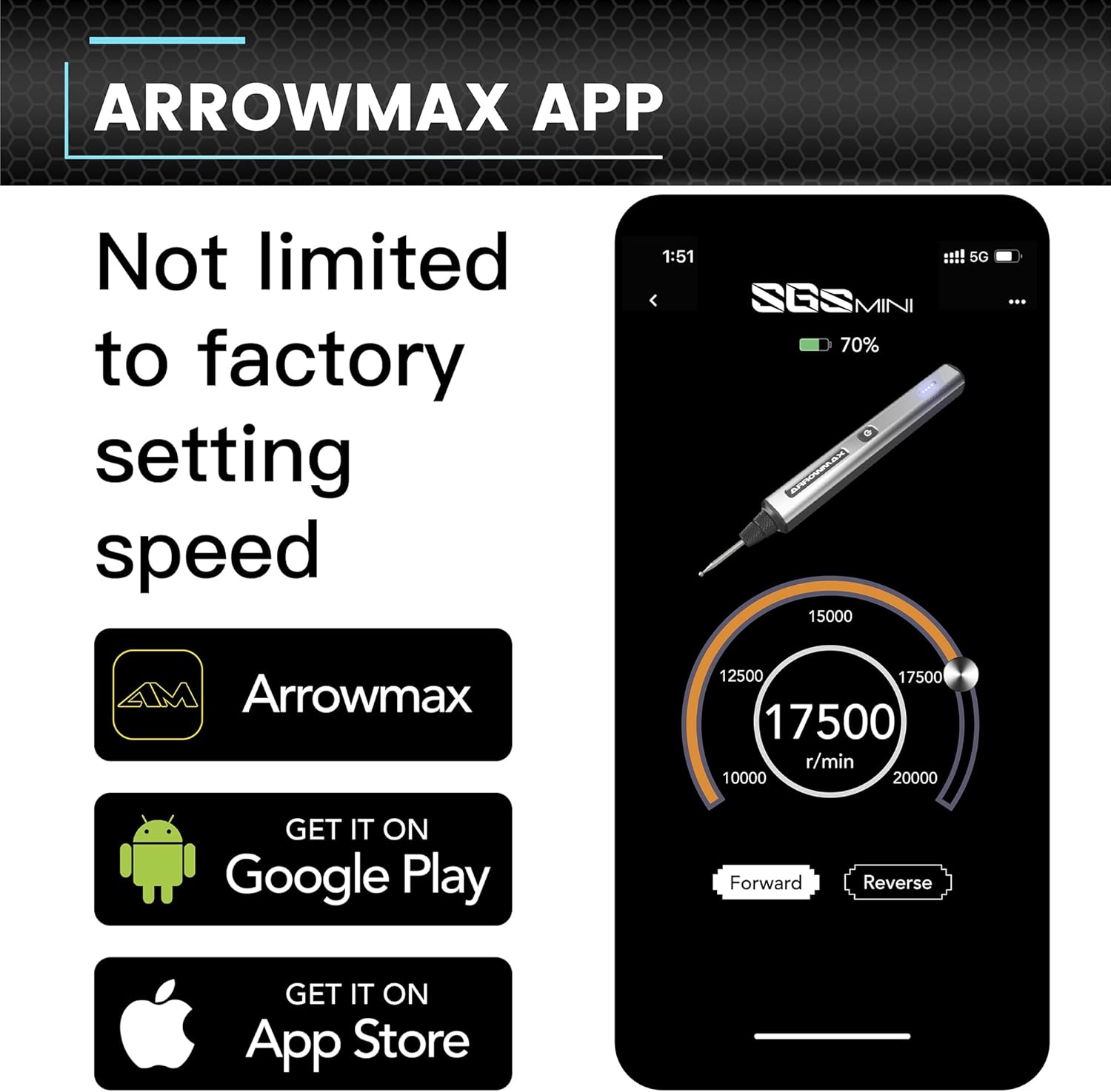
The app provides precise control over speed and rotation direction.
5. הוראות הפעלה
5.1 הפעלה/כיבוי
Press the Power Button once to turn the device on. Press it again to turn it off.
5.2 Speed Control and Rotation Direction
The engraving pen offers adjustable speeds from 10,000 RPM to 20,000 RPM. You can also toggle between forward and reverse modes.
- שימוש באפליקציה: Connect the pen to the ARROWMAX app. Use the app interface to precisely adjust the speed in increments of 1000 RPM and change the rotation direction.
- שליטה ידנית: (If applicable, refer to specific model features for manual speed adjustment if not using the app.)
5.3 שימוש כללי
The SGS MINI PLUS is suitable for various crafting and detailing tasks.

This image demonstrates the pen's versatility across different materials.
- חֲרִיטָה: Use appropriate engraving bits for detailed work on metal, wood, glass, or plastic.
- מֵרוּט: Attach polishing bits for smoothing surfaces or adding a finish.
- שיוף/השחזה: Select suitable bits for light sanding or grinding tasks.
Always wear appropriate safety gear, such as eye protection, when operating the tool.
Video 5.1: Demonstration of the ARROWMAX SGS MINI electric cordless engraving pen in use for model making and grinding. This short clip illustrates the tool's application in fine detail work.
סרטון 5.2: נגמרview of the ARROWMAX SGS MINI mini electric engraving pen. This video provides a general demonstration of the pen's features and operation.
6. תחזוקה
6.1 ניקוי
Regular cleaning ensures optimal performance and longevity of your tool.
- After each use, wipe the pen body with a soft, dry cloth.
- Carefully remove any dust or debris from the chuck area using a small brush or compressed air.
- Ensure the charging contacts on both the pen and the base are clean.
6.2 Bit Storage
Store bits in the provided storage bag or a suitable container to prevent damage and loss.
7. פתרון תקלות
- המכשיר לא נדלק: Ensure the battery is fully charged. Connect to the charging base and check the indicator lights.
- ביצועים/מהירות מופחתים: Check battery level. Ensure the bit is securely inserted and not worn out. Clean the chuck area to remove any obstructions. If using the app, verify speed settings.
- Bits not effective on material: Ensure you are using the correct type of bit for the material (e.g., engraving bits for hard surfaces, polishing bits for finishing). Some materials may require specific bit types not included in this kit.
- בעיות קישוריות לאפליקציות: Ensure Bluetooth is enabled on your smartphone and the pen is within range. Try restarting both the app and the engraving pen.
8. מפרטים
| תכונה | פְּרָט |
|---|---|
| מותג | ARROWMAX |
| דֶגֶם | SGS MINI PLUS |
| מקור כוח | מופעל על סוללה |
| שימושים מומלצים | Engraving, Sanding, Grinding, Polishing |
| צֶבַע | אָפוֹר |
| תכונות מיוחדות | Cordless, Rechargeable, Magnetic USB Charging, App Control (Optional) |
| רכיבים כלולים | 1 engraving pen, 24 engraving bits, 12 polish bits, 1 storage bag, 1 manual, 1 charging base, 1 USB charging cable |
| מהירות סיבוב מקסימלית | 20000 סל"ד |
| סוג סוללה | סוללת ליתיום פולימר אחת (כלול) |
| משקל פריט | 1.28 פאונד |
| מידות חבילה | 10.71 x 5.67 x 2.01 אינץ' |
9. אחריות ותמיכה
For warranty information or technical support, please refer to the contact details provided with your product packaging or visit the official ARROWMAX webאתר. שמור את קבלת הרכישה כהוכחת קנייה.