
1. הקדמה
This manual provides essential instructions for the safe and efficient operation, setup, maintenance, and troubleshooting of your Elation Professional Magmatic Magma Fog 1500IP-II Fog Machine. Please read this manual thoroughly before operating the device to ensure proper function and to prevent damage or injury. Keep this manual for future reference.
The Magma Fog 1500IP-II is a high-performance, 1500W water-based fog machine designed for professional applications. It features an IP67 rating, making it suitable for outdoor use, and offers a maximum output of 60,000 cubic feet per minute (CFM). Control options include an onboard LCD touchscreen and DMX-512/RDM.
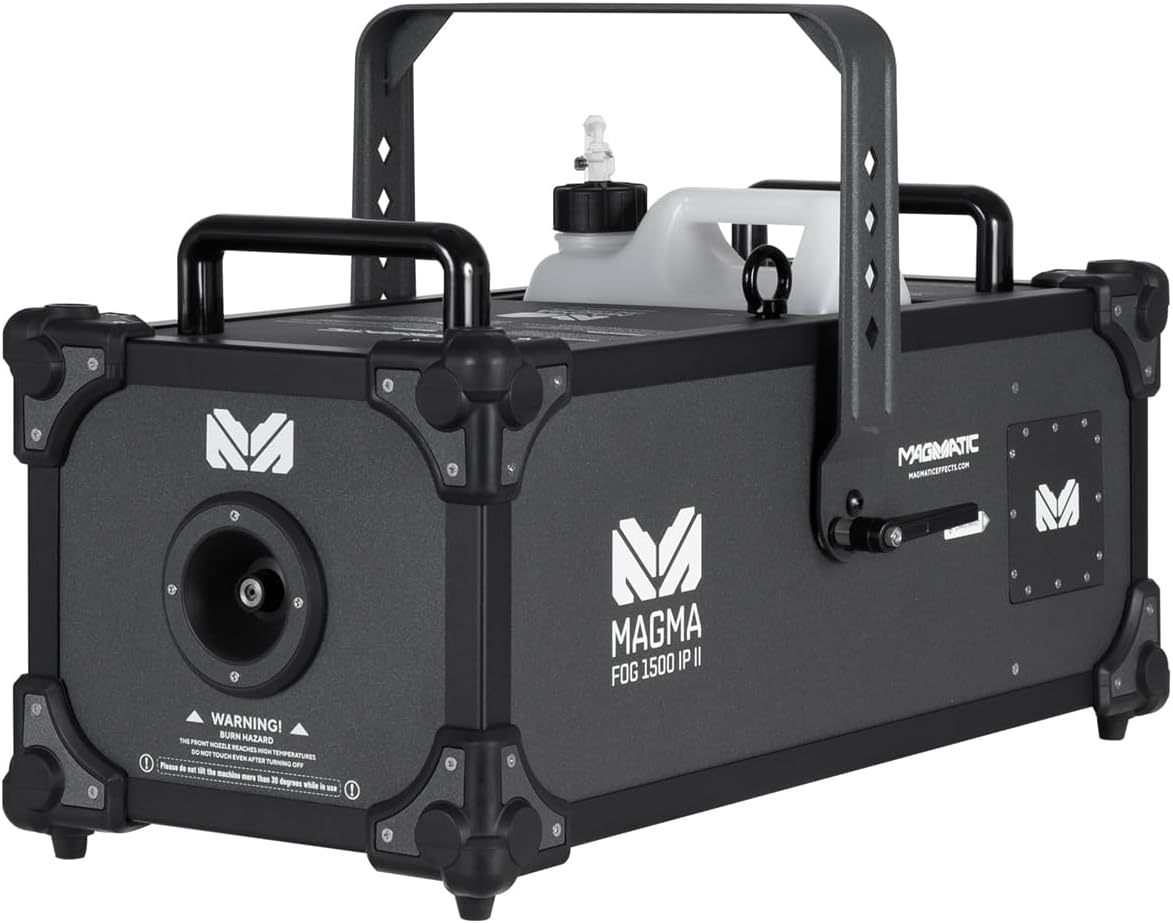
איור 1.1: צד קדמי view of the Magmatic Magma Fog 1500IP-II Fog Machine, showcasing its robust design and integrated fluid tank.
2. מידע בטיחות
Always observe the following safety precautions to reduce the risk of electrical shock, fire, or personal injury.
- בטיחות חשמל: Ensure the unit is connected to a grounded power outlet with the correct voltage (120V, 60Hz). Disconnect power before performing any maintenance or cleaning.
- סכנת צריבה: The front nozzle and surrounding areas become extremely hot during operation. WARNING! BURN HAZARD! THE FRONT NOZZLE REACHES HIGH TEMPERATURES. DO NOT TOUCH NOZZLE AFTER POWERING OFF. Allow sufficient cooling time (at least 30 minutes) after use.
- Fluid Safety: Use only approved water-based fog fluid. Do not ingest fog fluid. In case of contact with skin or eyes, rinse thoroughly with water. Keep out of reach of children.
- אוורור: Ensure adequate ventilation around the machine. Do not block air vents.
- מיקום: Do not tilt the machine more than 30 degrees while in use. Place the machine on a stable, level surface. Keep flammable materials away from the unit.
- שימוש חיצוני: The unit is IP67 rated for outdoor use, but ensure all connections are properly sealed and protected from direct water spray into openings.

איור 2.1: חזית view highlighting the burn hazard warning label near the fog output nozzle. Always observe this warning.
3. המוצר נגמרview
The Magma Fog 1500IP-II is engineered for reliability and performance. Key components include:
- זרבובית פלט ערפל: Located at the front, where fog is emitted.
- מיכל נוזלים: A 5-liter (1.32 gallon) removable tank for fog fluid.
- לוּחַ בַּקָרָה: Onboard LCD touchscreen for direct control and settings adjustment.
- קלט כוח: IP65 locking power connector.
- DMX In/Out: IP65 locking 5-pin XLR connectors for DMX-512 and RDM control.
- קלט מרחוק: For optional wired or wireless remote control.
- ידיות נשיאה: Two heavy-duty handles for transport.
- תושבת תלייה: For truss mounting applications.

איור 3.1: אחורי view of the unit, displaying the LCD touchscreen control panel, power input, DMX connections, and remote input.
4. התקנה
4.1 פירוק
- הוציאו בזהירות את מכונת הערפל מהאריזה שלה.
- Inspect the unit for any signs of damage during shipping. Contact your dealer immediately if damage is found.
- שמור את האריזה המקורית להובלה או אחסון עתידיים.
4.2 Fluid Tank Installation and Filling
- Locate the fluid tank compartment on the top of the unit.
- Remove the empty fluid tank.
- מלא את המיכל עם Magmatic brand water-based fog fluid only. Using other fluid types may damage the unit and void the warranty.
- Securely replace the fluid tank, ensuring the fluid hose is properly submerged and connected.
4.3 חיבור מתח
- Connect the supplied IP65 locking power cable to the power input on the rear of the unit.
- Connect the other end of the power cable to a suitable grounded electrical outlet (120V, 60Hz).
4.4 חיבור DMX (אופציונלי)
- For DMX control, connect a 5-pin DMX cable from your DMX controller to the DMX IN port on the fog machine.
- To daisy-chain multiple units, connect a DMX cable from the DMX OUT port of the first unit to the DMX IN port of the next unit.
- Ensure all DMX cables are IP65 rated for outdoor use if applicable.
4.5 הרכבה
The unit includes a hanging bracket for truss mounting. Ensure the mounting surface or truss system can safely support the weight of the unit (74.3 lbs / 33.7 kg) and any accessories. Use appropriate clampוכבלי בטיחות (לא כלולים) להתקנה מאובטחת.
5. הוראות הפעלה
5.1 הפעלה וחימום
- After connecting power, the unit will begin its initial warm-up sequence.
- The thermally protected heat exchanger requires approximately 14 minutes to reach optimal operating temperature.
- The LCD touchscreen will display the warm-up status. The unit is ready for operation once the status indicates 'Ready'.
5.2 Onboard LCD Touchscreen Control
The intuitive LCD touchscreen allows direct control over various functions:
- Manual Fog Output: Activate fog output manually.
- הגדרות טיימר: Program timed fog bursts and intervals.
- בקרת עוצמת הקול: Adjust the fog output intensity.
- כתובת DMX: Set the DMX start address for remote control.
- מידע מערכת: View operational data and status.
5.3 DMX-512 and RDM Control
The Magma Fog 1500IP-II supports DMX-512 and RDM (Remote Device Management) for integration into professional lighting and effects systems. Refer to the DMX chart in the appendix (if provided separately) for specific channel assignments and control values. RDM allows for remote configuration and monitoring of the device.
5.4 שלט רחוק אופציונלי
The unit is compatible with optional wired and wireless remote controls (sold separately). Connect the remote to the 'REMOTE IN' port on the rear of the unit. Consult the remote control's manual for specific operating instructions.
6. תחזוקה
תחזוקה שוטפת מבטיחה ביצועים אופטימליים ומאריכה את תוחלת החיים של מכונת הערפל שלכם.
6.1 ניקוי
- חִיצוֹנִי: נגב את החלק החיצוני של ה-casinז עם רך, דamp בַּד. אין להשתמש בחומרי ניקוי שוחקים או ממסים.
- זַרבּוּבִית: Periodically check the fog nozzle for any blockages. If necessary, gently clean with a small brush after the unit has completely cooled.
- Fluid System: It is recommended to run a cleaning solution (specifically designed for fog machines) through the system every 200 hours of operation or before long periods of storage to prevent clogs.
6.2 Fluid Handling and Storage
- Always store fog fluid in a cool, dark place, away from direct sunlight and extreme temperatures.
- Ensure the fluid tank is securely capped when not in use.
- If storing the machine for an extended period (more than 30 days), empty the fluid tank and run a cleaning solution through the system.
7. פתרון תקלות
This section addresses common issues you might encounter. If a problem persists, contact qualified service personnel.
| בְּעָיָה | סיבה אפשרית | פִּתָרוֹן |
|---|---|---|
| אין פלט ערפל | No power; insufficient warm-up; empty fluid tank; clogged nozzle/pump | Check power connection; wait for 'Ready' status; refill fluid tank; clean nozzle/run cleaning solution. |
| תפוקת ערפל חלשה | Low fluid level; partial clog; incorrect fluid type; low operating temperature | Refill fluid; run cleaning solution; ensure correct fluid; allow full warm-up. |
| DMX control not working | כתובת DMX שגויה; כבל DMX פגום; בעיה בבקר DMX | Verify DMX address on unit and controller; test DMX cable; check DMX controller settings. |
| היחידה לא נדלקת | No power from outlet; faulty power cable; internal fuse blown | Check power source; test power cable; consult service technician for fuse replacement. |
8. מפרטים
Detailed technical specifications for the Magmatic Magma Fog 1500IP-II.
| תכונה | מִפרָט |
|---|---|
| מספר דגם של פריט | MSF047 |
| צריכת חשמל | 1500W |
| נפח פלט | 60,000 CFM (cu ft/min) |
| זמן חימום | בערך 14 דקות |
| שיעור צריכת נוזלים | 6.76 oz (200 ml/min) |
| קיבולת מיכל נוזלים | 5 ליטר (1.32 גלונים) |
| לִשְׁלוֹט | Onboard LCD Touchscreen, DMX-512, RDM, Optional Wired/Wireless Remote |
| דירוג IP | IP67 |
| מידות (L x W x H) | 25.5 x 14.6 x 16.2 אינץ' (64.8 x 37.1 x 41.1 ס"מ) |
| משקל פריט | 74.3 פאונד (33.7 ק"ג) |
| חומר דיור | אלומיניום עמיד |
9. אחריות ותמיכה
For warranty information and technical support, please refer to the official Elation Professional webאתר או צור קשר עם הסוכן המורשה שלך. שמור את קבלת הרכישה כהוכחת קנייה לתביעות אחריות.
Elation Professional Customer Support: לקבלת סיוע, בקרו באתר www.elationlighting.com/support או פנה למפיץ המקומי שלך.