
מָבוֹא
This manual provides detailed instructions for the AULCMEET RC80B replacement remote control, designed for use with Edifier R1280DBs active speakers. Please read this manual carefully to ensure proper operation and to maximize your experience with the product.
המוצר נגמרview
The AULCMEET RC80B remote control offers a comprehensive set of functions for your Edifier R1280DBs speakers. Its ergonomic design ensures comfortable handling and intuitive button placement.
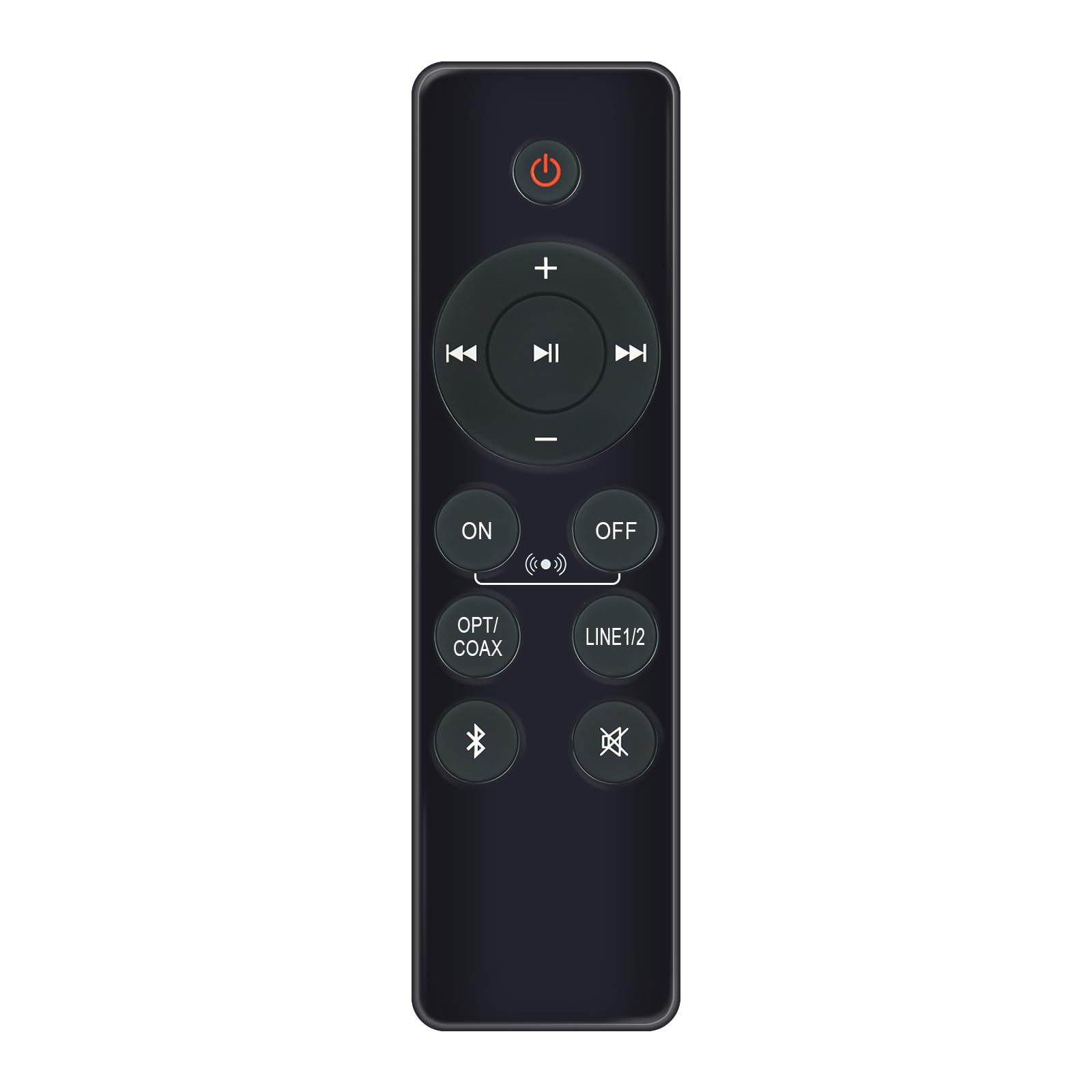
Image: AULCMEET RC80B Replacement Remote Control. The remote measures approximately 13.8 cm (5.43 inches) in length and 3.8 cm (1.5 inches) in width.
פונקציות כפתור:
- כפתור הפעלה (⏻): Turns the speakers ON or OFF.
- Volume Up (+) / Volume Down (-): Adjusts the speaker volume.
- רצועה קודמת (⏮) / Next Track (⏭): Skips to the previous or next audio track.
- הפעל/השהה (⏯): מנגן או משהה את השמעת השמעה.
- ON / OFF (Input Selection): Toggles between different input modes.
- OPT/COAX: Selects Optical or Coaxial input.
- קו 1/2: Selects Line In 1 or Line In 2 input.
- בלוטות (☋): Activates or selects Bluetooth input.
- השתק (🛇): Mutes or unmutes the speaker audio.
הגדרה
The AULCMEET RC80B remote control is designed for immediate use without complex setup procedures. Simply install the batteries, and it is ready to operate your compatible Edifier R1280DBs speakers.
התקנת סוללה:
- אתר את תא הסוללות בגב השלט הרחוק.
- פתח את מכסה תא הסוללות.
- Insert two AAA alkaline batteries, ensuring the correct polarity (+ and -) as indicated inside the compartment.
- סגור היטב את מכסה תא הסוללות.
פֶּתֶק: No programming or pairing is required for this replacement remote control. It functions directly with the specified Edifier R1280DBs active speakers.
הוראות הפעלה
To operate your Edifier R1280DBs speakers using the AULCMEET RC80B remote control, point the remote directly towards the speakers' infrared receiver. Ensure there are no obstructions between the remote and the speakers.
- הפעלה/כיבוי: לחץ על ⏻ button to turn the speakers on or off.
- התאמת עוצמת הקול: השתמש ב + ו - כפתורים כדי להגביר או להנמיך את עוצמת הקול.
- בחירת קלט: לחץ על הפעלה/כיבוי, OPT/COAX, קו 1/2, או בלוטות' buttons to switch between the available audio input sources.
- בקרת השמעה: When using Bluetooth or other compatible sources, use the ⏮ (Previous), ⏭ (Next), and ⏯ (Play/Pause) buttons to control media playback.
- פונקציית השתקה: לחץ על 🛇 לחצן כדי להשתיק זמנית את השמע. לחץ עליו שוב כדי להחזיר את השמע.
מפרטים
| מותג | AULCMEET |
| דֶגֶם | RC80B |
| מכשירים תואמים | Edifier R1280DBs Active Speakers |
| צֶבַע | שָׁחוֹר |
| תכונות | עיצוב ארגונומי |
| ממשק תקשורת | אינפרא אדום (IR) |
| מספר כפתורים | 30 |
| טווח מקסימלי | בערך 33 רגל (10 מטר) |
| סוג סוללה | 2 סוללות אלקליין AAA (לא כלולות) |
| מידות (L x W) | 13.8 ס"מ x 3.8 ס"מ (5.43 אינץ' x 1.5 אינץ') |
פתרון בעיות
If you encounter issues with your AULCMEET RC80B remote control, please refer to the following common solutions:
- מרחוק לא מגיב: Ensure the batteries are correctly installed and are not depleted. Replace batteries if necessary.
- טווח פעולה קצר: Check for any obstructions between the remote and the speaker's IR receiver. Ensure the remote is pointed directly at the speakers. Low battery power can also reduce range.
- כפתור ספציפי לא עובד: Clean the remote control surface and buttons. If the issue persists, the button may be faulty, or the remote may require battery replacement.
- Speakers not responding to any remote: Ensure the speakers are powered on and functioning correctly. Try using the manual controls on the speaker unit if available.
תַחזוּקָה
Proper care and maintenance will extend the lifespan of your remote control:
- ניקוינגבו את השלט הרחוק בעזרת מטלית רכה ויבשה. אין להשתמש בחומרי ניקוי שוחקים או ממסים.
- טיפול בסוללה: Remove batteries if the remote control will not be used for an extended period to prevent leakage.
- אִחסוּן: Store the remote control in a cool, dry place, away from direct sunlight and extreme temperatures.
- הימנע מטיפותיש להגן על השלט מפני פגיעות פיזיות, שכן נפילות עלולות לגרום נזק לרכיבים פנימיים.
אחריות ותמיכה
Specific warranty information for this AULCMEET RC80B replacement remote control is not provided in the product details. For warranty claims, technical support, or further assistance, please contact the seller or manufacturer directly through your purchase platform. Keep your purchase receipt or order number handy for faster service.