
1. הקדמה
This manual provides detailed instructions for the installation, operation, and maintenance of the Yitouniu EWeLink 2-Channel Smart WiFi Switch Relay. This device enables remote control of household appliances and electronic devices via a mobile application, RF remote control, and voice commands through smart assistants like Alexa and Google Home. It supports various operating modes and timing functions to enhance smart home automation.
2. מידע בטיחות
- יש לוודא ניתוק החשמל לפני התקנה או תחזוקה כדי למנוע התחשמלות.
- Installation should be performed by qualified personnel or under strict adherence to electrical safety guidelines.
- אל תחרוג מהזרם והנפח המרבייםtagדירוגי e שצוינו עבור המכשיר.
- הרחק את המכשיר ממים, לחות וטמפרטורות קיצוניות.
- ודא שכל חיבורי החיווט מאובטחים ותקינים לפני חידוש אספקת החשמל.
3. המוצר נגמרview
The Yitouniu EWeLink Smart WiFi Switch Relay is a compact, 2-channel device designed for integrating traditional appliances into a smart home system. It features WiFi and Bluetooth connectivity for app control and supports RF 433MHz for remote control.

תמונה 3.1: חזית view of the Yitouniu EWeLink Smart WiFi Switch Relay. The device is white with branding and connection labels visible.

תמונה 3.2: תקריב view of the Yitouniu EWeLink Smart WiFi Switch Relay, showing input terminals (N, L), output terminals (NO, COM, NC), and model information.

Image 3.3: The compact size of the Yitouniu EWeLink Smart WiFi Switch Relay, held in a hand for scale.
4. מפרטים
| פָּרָמֶטֶר | עֵרֶך |
|---|---|
| קלט כרךtage | AC/DC 85-250V, Micro USB 5V input |
| מקס הנוכחי | 10A |
| מקסימום כוח | 2200W |
| תקן WiFi | WiFi 2.4GHz b/n/g + Bluetooth (IEEE 802.11b/g/n) |
| טמפרטורת הפעלה | -20 מעלות צלזיוס עד 70 מעלות צלזיוס |
| חוֹמֶר | מעכב בעירה ABS |
| מידות המוצר | 2.76 x 1.77 x 1.1 אינץ' |
| משקל פריט | 1.76 אונקיות |
| סוג איש קשר | בדרך כלל פתוח |
| דירוג הגנה בינלאומי | IP65 |
| הסמכה | FCC |
5. התקנה והתקנה
5.1 הוראות חיווט
The device supports both AC/DC 85-250V input and Micro USB 5V input. Ensure correct wiring based on your application. The relay has Normally Open (NO), Common (COM), and Normally Closed (NC) contacts for controlling external devices.
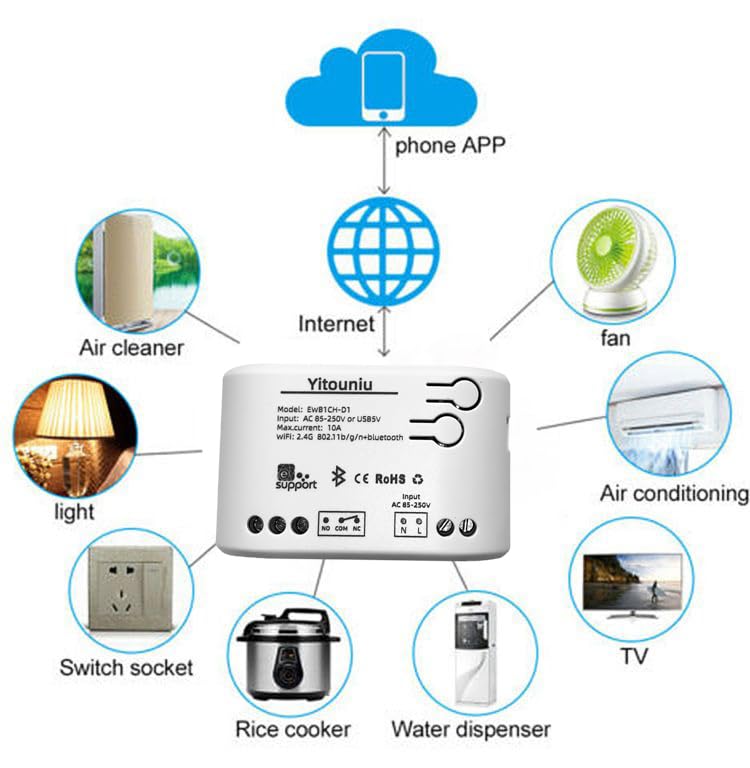
Image 5.1: Diagram illustrating the connectivity of the Yitouniu EWeLink Smart WiFi Switch Relay to various household appliances like lights, fans, and air conditioners, all controlled via a phone app and the internet.
5.2 הורדת אפליקציה וצימוד
- הורד את ה eWeLink אפליקציה מ-Apple App Store או Google Play Store.
- רשום חשבון והיכנס.
- Power on the Smart WiFi Switch Relay.
- Open the eWeLink app, tap the '+' icon to add a device.
- Follow the on-screen instructions to connect the device to your 2.4GHz WiFi network.

Image 5.2: Screenshots of the eWeLink app interface, showing controls for a garage door (ON/OFF) and a scheduling function for setting specific times.
6. מצבי הפעלה
The device supports three operating modes: self-locking, interlocking, and inching (micromotion). These modes can typically be configured within the eWeLink app or via physical buttons on the device, depending on the specific model variant.
- מצב נעילה עצמית: Each channel operates independently. Pressing the button (or app control) turns the relay ON, pressing it again turns it OFF.
- מצב נעילה: When one channel is turned ON, all other channels are automatically turned OFF. This is useful for applications where only one device should be active at a time.
- Inching (Micromotion) Mode: The relay turns ON for a set duration (e.g., 0.5 seconds to 1 hour) and then automatically turns OFF. This is suitable for momentary actions like garage door openers or pulse controls.
7. בקרת אפליקציה ובקרת קול
7.1 eWeLink App Features
The eWeLink app provides comprehensive control over your Smart WiFi Switch Relay:
- הפעלה/כיבוי מרחוק: Control connected devices from anywhere with an internet connection.
- פונקציות תזמון: Set schedules, countdowns, or recurring timers for automatic on/off operations.
- בקרה עצמאית: Each of the two channels can be controlled independently.
- שיתוף מכשיר: שתף את השליטה במכשירים שלך עם בני משפחה.
- בקרה קבוצתית: Organize multiple smart devices into groups for simultaneous control.

Image 7.1: A user remotely controlling home lighting via the eWeLink mobile application, demonstrating the convenience of app-based control.

Image 7.2: Illustration of the eWeLink app's group control and sharing functions, allowing multiple users to manage devices across different rooms.

Image 7.3: The timing function interface within the eWeLink app, enabling users to set specific on/off times for connected appliances.
7.2 שילוב בקרת קול
The Yitouniu Smart WiFi Switch Relay is compatible with popular voice assistants, including Amazon Alexa and Google Home/Nest. To enable voice control:
- Ensure your Smart WiFi Switch Relay is successfully paired with the eWeLink app.
- פתחו את אפליקציית Alexa או Google Home.
- נווטו אל הקטע 'מיומנויות' או 'עובד עם גוגל'.
- חפש and enable the 'eWeLink Smart Home' skill/service.
- קשר את חשבון eWeLink שלך כשתתבקש לעשות זאת.
- Discover devices. Your Smart WiFi Switch Relay should now be controllable via voice commands.
Exampפקודות le:
- "אלכסה, תדליקי את האור בסלון."
- "היי גוגל, כבה את המאוורר."

Image 7.4: A user interacting with voice assistants like Amazon Alexa and Google Home to control smart devices, highlighting the voice control capability of the relay.
8. תחזוקה
The Yitouniu Smart WiFi Switch Relay requires minimal maintenance. Follow these guidelines:
- ניקוי: Wipe the device with a dry, soft cloth. Do not use liquid cleaners or solvents.
- בדיקת חיבור: בדקו מעת לעת את חיבורי החיווט כדי לוודא שהם נשארים מאובטחים.
- עדכוני קושחה: Keep the eWeLink app updated to receive the latest firmware for the device, which may include performance improvements and new features.
9. פתרון תקלות
- המכשיר לא מתחבר ל-WiFi:
- ודא שרשת ה-WiFi שלך היא 2.4GHz. המכשיר אינו תומך ברשתות 5GHz.
- בדוק אם סיסמת ה-WiFi שהוזנה באפליקציה נכונה.
- Move the device closer to your WiFi router.
- הפעל מחדש את המכשיר ואת הנתב שלך.
- מכשיר במצב לא מקוון באפליקציה:
- Verify your home internet connection is active.
- בדוק אם יש חשמל למכשיר.
- הפעל מחדש את המכשיר.
- שליטה קולית לא עובדת:
- Confirm the eWeLink skill/service is enabled and linked in your Alexa or Google Home app.
- Ensure the device is named clearly in the eWeLink app and discovered by your voice assistant.
- בדוק את חיבור האינטרנט שלך.
- Device not responding to RF remote:
- Ensure the RF remote is paired with the switch. Refer to the RF pairing instructions (if applicable to your specific remote).
- Check the battery in the RF remote.
10. מה בקופסה
עם פתיחת אריזת המוצר, עליך למצוא את הפריטים הבאים:
- 1 x Yitouniu Wifi 2-Channel Relay Switch
- 1 x מדריך הוראות (מסמך זה)
11. אחריות ותמיכה
This product comes with a standard manufacturer's warranty. For specific warranty terms, conditions, and duration, please refer to the documentation included with your purchase or contact Yitouniu customer support. For technical assistance or further inquiries, please visit the official Yitouniu webאתר או צרו קשר עם ערוצי שירות הלקוחות שלהם.