
1. הקדמה
The APEX VR70 Pro FPV Drone Kit is designed for both beginners and experienced pilots, offering an immersive First-Person View (FPV) flight experience. This manual provides essential information for safe operation, setup, and maintenance of your drone kit. Please read it thoroughly before first use.
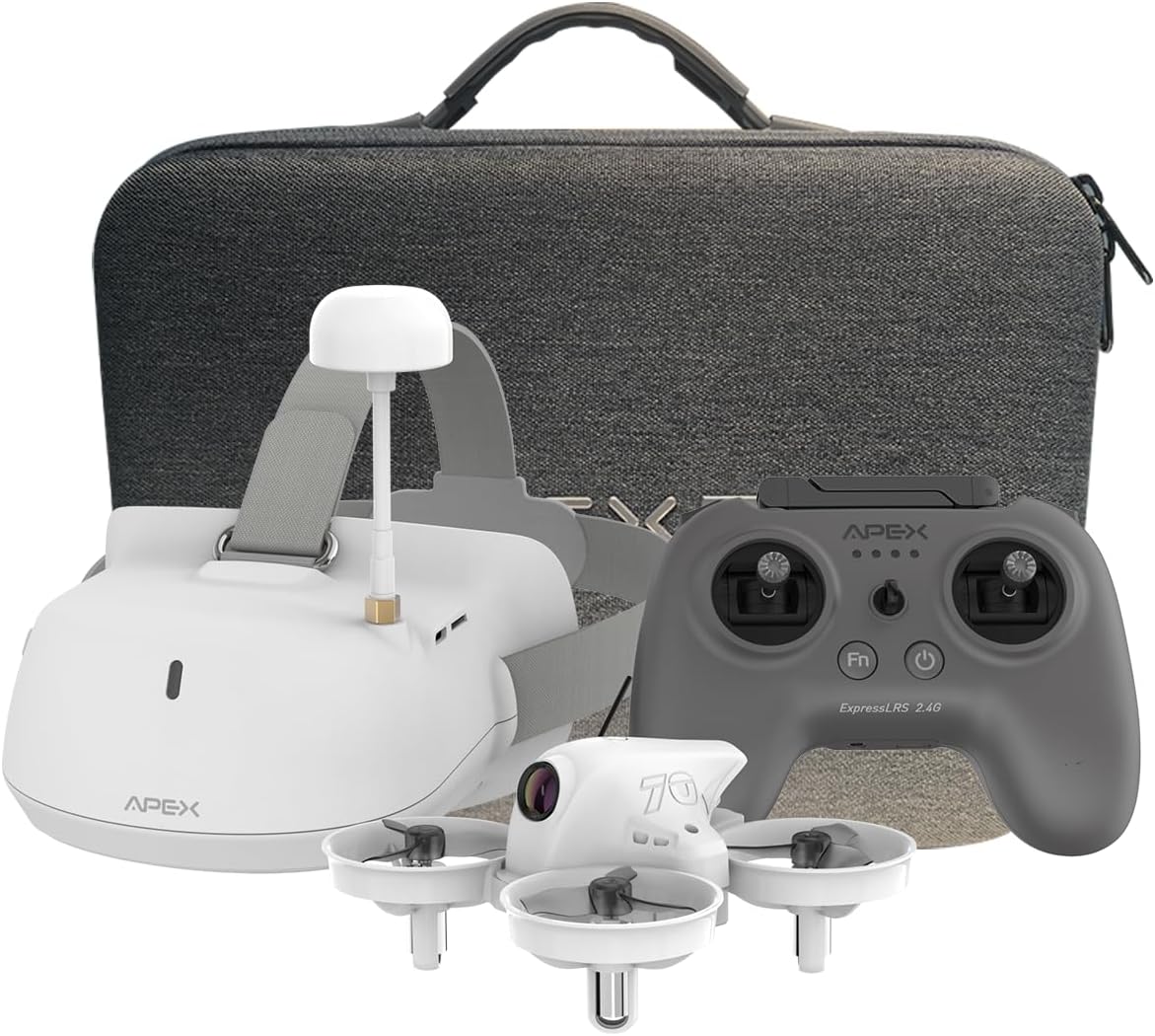
Image: The APEX VR70 Pro FPV Drone Kit, showcasing the drone, remote control, and FPV goggles.
2. מה בקופסה
Your APEX VR70 Pro FPV Drone Kit includes the following components:
- 1 x VR70 Pro Brushless Quadcopter
- 1 x ELRS Edition Remote Control
- 1 x FPV VR Goggles
- 2 x 3.75V 400mAh LiPo Batteries
- 1 x כבל טעינה USB (סוג C)
- 1 x 3.5mm Male-to-Male AUX Audio Cable
- 1 x כלי להסרת מדחף
- 4 x 3-Blade Propellers (spare)
- 1 x נרתיק טעינה
- 1 x מדריך למשתמש
- 1 x תיק נשיאה נייד

Image: All components of the APEX VR70 Pro FPV Drone Kit neatly arranged in the carrying case.
3. תכונות מוצר
- FPV VR70 Pro Kit: Designed for beginners and teenagers, offering stable hovering capabilities for safe and easy flight.
- High-Precision Barometer: Integrated for altitude detection and automatic hovering, ensuring high stability.
- Head Tracking Motion Control: FPV VR goggles allow control of drone direction by tilting the head, providing an immersive experience.
- מצב צב: Advanced technology to flip the drone back upright if it lands upside down.
- Enhanced Transmitter: Offers extended range, joystick calibration, and firmware updates. Supports FPV simulator practice.
- 5.8G Video Transmission: High-power, low-latency video transmission for stable real-time FPV.
- Multifunctional Drone: Features include image/video transmission, one-button takeoff/landing, headless mode, one-button return, altitude hold, 3 speeds, and 3 flight modes (Beginner, ATTI, Manual).
- Built-in Buzzer: Helps locate the drone if connection is lost or it lands in tall grass.

Image: The APEX VR70 Pro drone hovering indoors, demonstrating its stable flight capabilities.
4. הנחיות בטיחות
Always prioritize safety when operating the APEX VR70 Pro FPV Drone Kit. Failure to follow these guidelines may result in injury, damage to property, or legal issues.
- בדיקה לפני טיסה: Ensure all components are in good working order, batteries are charged, and propellers are securely attached.
- מודעות סביבתית: טוס בשטחים פתוחים, הרחק מאנשים, בעלי חיים, מבנים וקווי חשמל. הימנע מטיסה ברוחות חזקות או בתנאי מזג אוויר קשים.
- קו הראיה: Maintain visual line of sight with the drone at all times, even when using FPV goggles.
- בטיחות סוללה: Use only approved chargers and batteries. Do not overcharge or puncture batteries.
- כבד את הפרטיות: Be mindful of privacy laws and avoid flying over private property without permission.
- המלצת גיל: This product is recommended for teenagers and above. Adult supervision is advised for younger users.
5. התקנה
5.1 טעינת הסוללות
Ensure all batteries (drone, remote control, FPV goggles) are fully charged before use.
- Connect the USB charging cable to the charging case.
- Insert the drone batteries into the charging case. The indicator light will show charging status.
- Plug the USB charging cable into the remote control's charging port. The display light will indicate charging status.
- Plug the USB charging cable into the FPV VR goggles' charging port. The indicator light will show charging status.
Note: The display light on the remote control will be solid green when fully charged. The FPV VR goggles will show a red light during charging and turn off when fully charged.
5.2 Drone and Remote Control Pairing
- Connect the drone battery power cord into the drone interface. The LED lights on the drone will flash.
- Press and hold the power-on key on the remote control to turn it on.
- The drone and remote control will automatically pair. The drone's LED lights will stop flashing and remain solid when paired.
5.3 Drone Calibration
The drone must be calibrated on a horizontal plane to ensure stable flight. Otherwise, it may affect flight performance.
- הנח את הרחפן על משטח ישר ואופקי.
- Simultaneously push both joysticks of the remote control to the lower right for calibration. The drone's lights will flash rapidly during calibration.
- Once calibration is complete, the drone's lights will become solid.
- If the drone's lights continue to flash, gently shake the drone several times to enter the calibrate state (LED lights flashing). Then, long press the calibrate key on the remote control to re-proofread.
5.4 FPV VR Goggles Setup
- Press and hold the power-on key on the FPV VR goggles to start them.
- Use the "+" and "-" keys to manually change the channel until you find the drone's video feed.
- Alternatively, long press the "-" key to automatically search for channels. Wait a moment for the calibration to complete.
Video: A comprehensive tutorial demonstrating unboxing, function of keys, charging procedures, flight operation, and FPV VR glasses tutorial for the APEX VR70 Pro FPV Drone Kit.
6. הוראות הפעלה
6.1 המראה ונחיתה
- After pairing and calibration, pull down both joysticks and press the FN key simultaneously. The drone will take off.
- To land, press the one-button landing key on the remote control.
6.2 בקרות טיסה בסיסיות
- Fly Upward/Downward: Use the left joystick to control altitude.
- Fly Left/Right: Use the right joystick to move the drone horizontally left or right.
- פנה שמאלה/ימינה: השתמש בג'ויסטיק השמאלי כדי לסובב את הרחפן שמאלה או ימינה.
6.3 Flight Modes and Speed
The drone offers 3 flight modes and 3 speed settings:
- מצב מתחיל: For new pilots, offering maximum stability and ease of control.
- מצב ATTI: Provides altitude hold but allows more manual control over horizontal movement.
- מצב ידני: For experienced pilots, offering full manual control without stabilization assistance.
Press the speed key on the remote control to cycle through the 3 available speeds.

Image: Illustration of the drone's 360-degree rotation capability.
6.4 פונקציות מיוחדות
- פונקציית היפוך: Long press the speed key, then push the direction joystick down to perform a flip.
- Head Tracking Control: When wearing the FPV VR goggles, tilt your head to control the drone's direction.
- מצב צב: If the drone lands upside down, activate Turtle Mode via the transmitter to flip it back over.
- Built-in Buzzer: If the drone loses connection, it will emit a beeping sound to assist in locating it.
6.5 Recording and Photography (FPV Goggles)
- In video recording mode, press the "OK" key to start recording. Press "OK" again to stop.
- Press and hold the "OK" key to switch to photo mode. Press "OK" to take a photo.
- Press the "M" key for 3 seconds to enter the photo album to view photos and videos. Use "+" and "-" keys to select. Press "OK" to confirm.
- Press the "M" key to return to the main menu.
Video: A dynamic demonstration of the APEX VR70 Pro FPV Drone in flight, showcasing its features like head tracking, turtle mode, and OSD interface upgrade.
7. תחזוקה
- ניקוי: Use a soft, dry cloth to clean the drone, remote control, and FPV goggles. Avoid using harsh chemicals.
- בדיקת מדחף: Regularly check propellers for damage. Replace any bent or broken propellers using the provided tool.
- אחסון סוללה: Store batteries in a cool, dry place, partially charged (around 50%) if not used for extended periods.
- עדכוני קושחה: בדוק את זה של היצרן webאתר עבור עדכוני קושחה זמינים לקבלת ביצועים מיטביים.

Image: Illustration emphasizing the drone's 360-degree protection against impacts.
8. פתרון תקלות
- רחפן לא נדלק: Ensure the battery is fully charged and correctly connected to the drone.
- השלט רחוק לא מתחבר: Ensure both the drone and remote control are powered on and within range. Re-attempt the pairing process.
- טיסה לא יציבה: Perform a drone calibration on a flat surface. Check for damaged propellers and replace if necessary.
- No FPV video feed: Ensure FPV VR goggles are powered on and correctly tuned to the drone's channel (manual or auto-search).
- Drone lands upside down: Activate Turtle Mode via the remote control to flip the drone.
- Lost drone: Listen for the built-in buzzer if the drone loses connection.
9. מפרטים
| תכונה | מִפרָט |
|---|---|
| מותג | שִׂיא |
| שם הדגם | VR70 Pro |
| טווח גילאים (תיאור) | בני נוער |
| צֶבַע | BIANCO (לבן) |
| רזולוציית לכידת וידאו | 720p |
| טכנולוגיית קישוריות | Wi-Fi, Radio Frequency (Remote Control), 5.8G (Wireless Communication) |
| רמת מיומנות | מַתחִיל |
| Max Battery Power | 400 מיליampשעה (mAh) |
| פורמט לכידת וידאו | MP4 |
| סוג בקרה | בקרת מחוות |
| הרכב תא הסוללה | ליתיום פולימר |
| פורמט תמונה נתמך | JPEG |
| רזולוציית פלט וידאו | 720p |
| טכנולוגיית חיישן אופטי | CMOS |
| סוג מדיה | מיקרו SD |
| חוֹמֶר | ABS |
| משקל פריט | 1400 גרם |
| מידות פריט (L x W x H) | 8L x 8l x 5H cm |
10. אחריות ותמיכה
The APEX VR70 Pro FPV Drone Kit is designed for durability and performance. For any product issues, please contact our customer support team immediately. We are committed to resolving any problems you may encounter.
אנא עיין במסמכי הרכישה שלך לקבלת תנאי האחריות הספציפיים. שמור את הוכחת הרכישה שלך לצורך תביעות אחריות.