
1. הקדמה
This manual provides detailed instructions for the installation, operation, and maintenance of your Denash 4 Channel Car Recorder. Please read this manual thoroughly before using the device to ensure proper functionality and to maximize its performance. Keep this manual for future reference.
2. תכולת החבילה
Carefully unpack the box and ensure all items listed below are present and in good condition. If any items are missing or damaged, please contact your retailer.
- 1 x Front and Left and Right Integrated Camera (Main Unit)
- 1 x מצלמה אחורית
- 1 x סוגר כוס יניקה
- 1 x Cigarette Lighter Port Power Cable
- 1 x Rear Camera Connection Cable
- 1 x מדבקה
- 2 x ברגים

Image: All components included in the Denash 4 Channel Car Recorder package, including the main unit, rear camera, cables, and mounting accessories.

Image: A different perspective of the Denash 4 Channel Car Recorder's package contents, showing the main unit, rear camera, suction cup mount, power cable, and other accessories.
3. המוצר נגמרview
The Denash 4 Channel Car Recorder is designed to provide comprehensive video surveillance for your vehicle. It features a main unit with a 3-inch HD display and integrated front, left, and right cameras, complemented by a separate rear camera. Key features include:
- 360-Degree Panoramic Video Recording: Captures video from the front, back, left, and right, covering the entire driving process.
- איכות תמונה באיכות HD: 5MP camera with 1080P image resolution for clear video.
- Emergency Save Function (G-Sensor): Automatically saves recordings during sudden impacts or collisions, preventing overwriting.
- הדלקה/כיבוי אוטומטי: Powers on and off automatically with the vehicle's ignition.
- ראיית לילה אינפרא אדום: Enhances recording clarity in low-light conditions and at night.

Image: The main unit of the car recorder, highlighting its central 3-inch HD display and the two rotatable side cameras.

תמונה: קדמי ואחורי views of the main camera unit, showing the primary lens, ventilation, and connection ports.

תמונה: מפורט view of the main unit's front-facing camera lens and surrounding ventilation slots.
4. התקנה
Follow these steps to properly install your Denash 4 Channel Car Recorder in your vehicle.
4.1 הכנס כרטיס זיכרון
Before installation, insert a compatible memory card (up to 32GB, not included) into the designated slot on the main unit. Ensure the card is inserted correctly until it clicks into place.
4.2 Mount the Main Unit
- Clean the area on your windshield where you intend to mount the recorder.
- Attach the suction cup bracket to the main unit.
- Press the suction cup firmly against the windshield and engage the locking mechanism to secure it. Adjust the angle of the main unit for optimal front view.
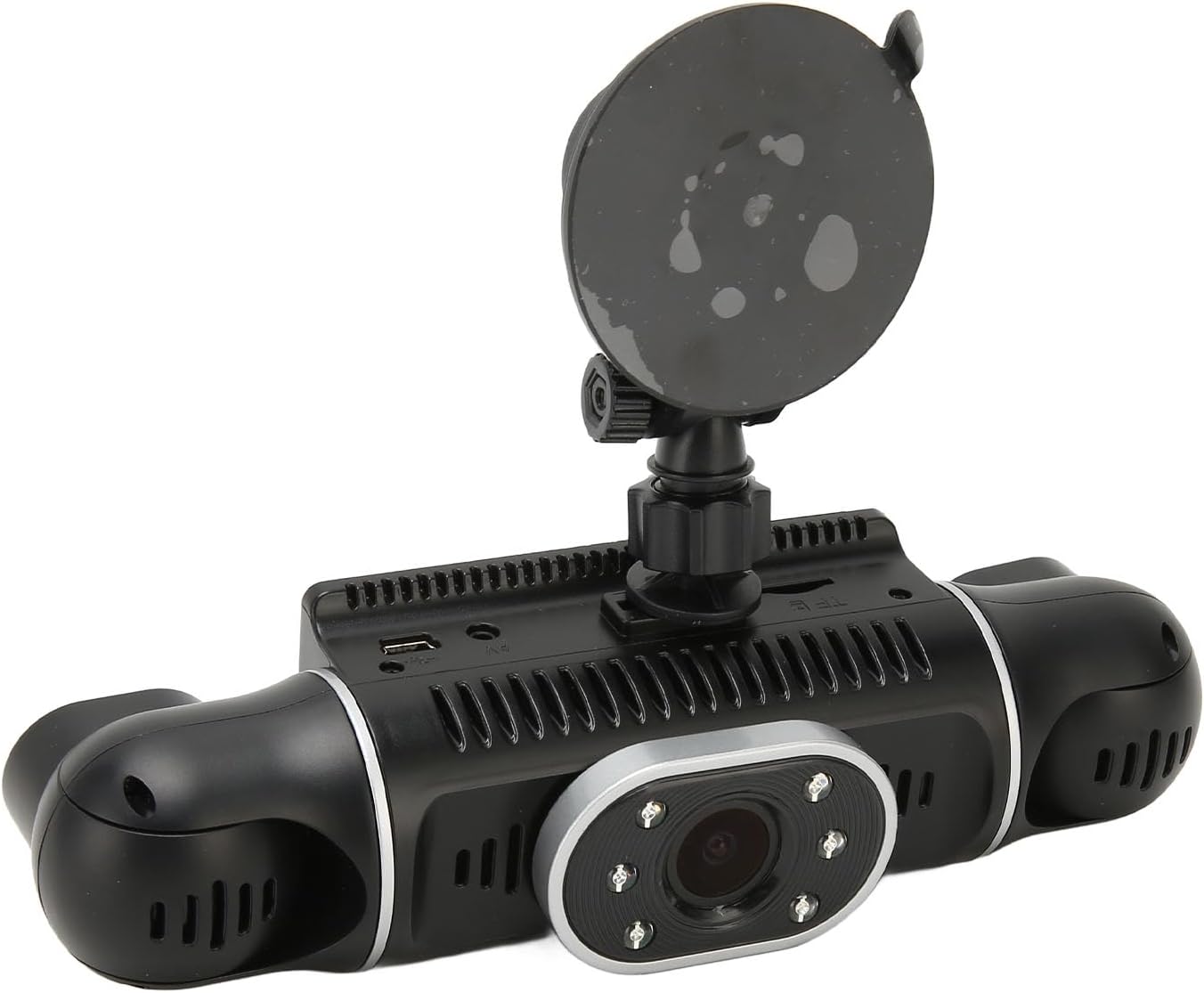
Image: The main unit of the car recorder with the suction cup bracket securely attached, ready for mounting.
4.3 Connect the Rear Camera
- Identify a suitable location for the rear camera, typically on the rear windshield or near the license plate.
- Use the provided rear camera connection cable to link the rear camera to the main unit. Route the cable discreetly along the vehicle's interior trim.
- Secure the rear camera using the provided sticker or screws.
4.4 חיבור מתח
- Connect the cigarette lighter port power cable to the main unit.
- חבר את הקצה השני של כבל החשמל לשקע מצת הסיגריות 12V של הרכב שלך.

Image: The car recorder mounted on the windshield, showing the view from the driver's seat, with the road ahead visible on the display.
5. הוראות הפעלה
Once installed and powered, the Denash 4 Channel Car Recorder operates largely automatically.
5.1 הקלטה אוטומטית
The device supports automatic ignition on and off. When your vehicle's ignition is turned on, the recorder will automatically power on and begin recording. When the ignition is turned off, it will save the current recording and power off.
5.2 G-Sensor (Emergency Save)
The built-in G-sensor detects sudden impacts or rapid deceleration/acceleration. In such events, the current video segment will be automatically locked and saved to a protected folder, preventing it from being overwritten by normal loop recording. This ensures critical footage from accidents is preserved.
5.3 זיהוי תנועה
If enabled in the settings, the motion detection function allows the recorder to start recording automatically when motion is detected in front of the vehicle while parked. This feature requires continuous power supply.
5.4 סנכרון זמן
The device supports time synchronization (Y/M/D/H/M). Ensure the date and time are set correctly in the device settings for accurate timestampעל ההקלטות שלך.
5.5 Viewהקלטות
אתה יכול view recorded videos directly on the 3-inch HD display of the main unit. Navigate through the menu using the device's buttons. For larger viewing or backup, remove the memory card and insert it into a computer or compatible device.

Image: The car recorder actively displaying the road view, as seen from the driver's perspective during operation.
6. תחזוקה
Regular maintenance helps ensure the longevity and optimal performance of your car recorder.
- ניקוי: Use a soft, dry cloth to clean the camera lenses and the display screen. Avoid using abrasive cleaners or solvents.
- ניהול כרטיסי זיכרון: Periodically format the memory card (at least once a month) to prevent data corruption and ensure smooth recording. Back up important files before formatting. Replace old or slow memory cards as needed.
- טֶמפֶּרָטוּרָה: Avoid exposing the device to extreme temperatures for extended periods.
- עדכוני קושחה: בדוק את זה של היצרן webבקר באתר מעת לעת כדי לבדוק עדכוני קושחה זמינים לשיפור הביצועים או הוספת תכונות.
7. פתרון תקלות
If you encounter issues with your Denash 4 Channel Car Recorder, refer to the following common problems and solutions:
- המכשיר לא נדלק:
- Ensure the power cable is securely connected to both the device and the vehicle's cigarette lighter socket.
- Check if the vehicle's cigarette lighter socket is functioning (e.g., by testing with another device).
- The internal battery might be depleted; connect to power and allow it to charge for a few minutes.
- ההקלטה נעצרת או קופאת:
- The memory card may be full. Format the memory card (after backing up important fileס).
- The memory card may be too slow or corrupted. Try using a high-speed (Class 10 or U1/U3) memory card or replace the existing one.
- ודא שהקושחה של המכשיר מעודכנת.
- איכות וידאו ירודה:
- Clean the camera lenses and the windshield area.
- ודא שהסרט המגן הוסר מהעדשות.
- Check settings to confirm 1080P resolution is selected.
- חיישן G רגיש מדי/לא רגיש מספיק:
- Adjust the G-sensor sensitivity setting in the device's menu.
- מצלמה אחורית לא מציגה:
- Check the connection cable between the main unit and the rear camera for proper seating and damage.
8. מפרטים
| תכונה | מִפרָט |
|---|---|
| רזולוציית מצלמה | 5MP |
| רזולוציית תמונה | 1080P |
| גודל מסך LCD | צג HD בגודל 3 אינץ' |
| חיישן G | Built-in (Emergency Save) |
| File פוּרמָט | MOV |
| Recorded Video Format | H.264 |
| קוֹל | AAC (Built-in Stereo Sound) |
| הפעלה/כיבוי אוטומטי | Support Auto Ignition On/Off |
| Motion זיהוי פונקציה | תְמִיכָה |
| סנכרון זמן | Support (Y/M/D/H/M) |
| פורמט תמונה | JPEG |
| כרטיס זיכרון | Memory Card (Up to 32GB, Not Included) |
| מִיקרוֹפוֹן | תְמִיכָה |
| ראיית לילה אינפרא אדום | תְמִיכָה |
| סוג סוללה | Built-in 200mAh Lithium Ion Battery |
| מידות המוצר | 7.87 x 4.33 x 2.76 אינץ' |
| משקל פריט | 1.04 פאונד |
| מספר דגם | Denashx4y37hmq02 |
| יַצרָן | דנאש |
9. מידע על אחריות
Specific warranty details for the Denash 4 Channel Car Recorder are not provided within this manual. Please refer to the product packaging, the retailer's purchase terms, or the official Denash webאתר לקבלת מידע מקיף על האחריות.
10. מידע תמיכה
For technical assistance, customer service, or further inquiries regarding your Denash 4 Channel Car Recorder, please consult the contact information provided on the product packaging or visit the official Denash support website. Keep your purchase receipt handy when contacting support.