
מָבוֹא
The Beghelli Salvalavita SLV20 Plus is a mobile phone specifically designed for seniors, prioritizing ease of use, safety, and clear communication. It features large backlit keys, a high-volume speaker, a bright 2.8-inch color display, and a dedicated SOS button for emergencies. This manual provides detailed instructions to help you set up, operate, and maintain your device.
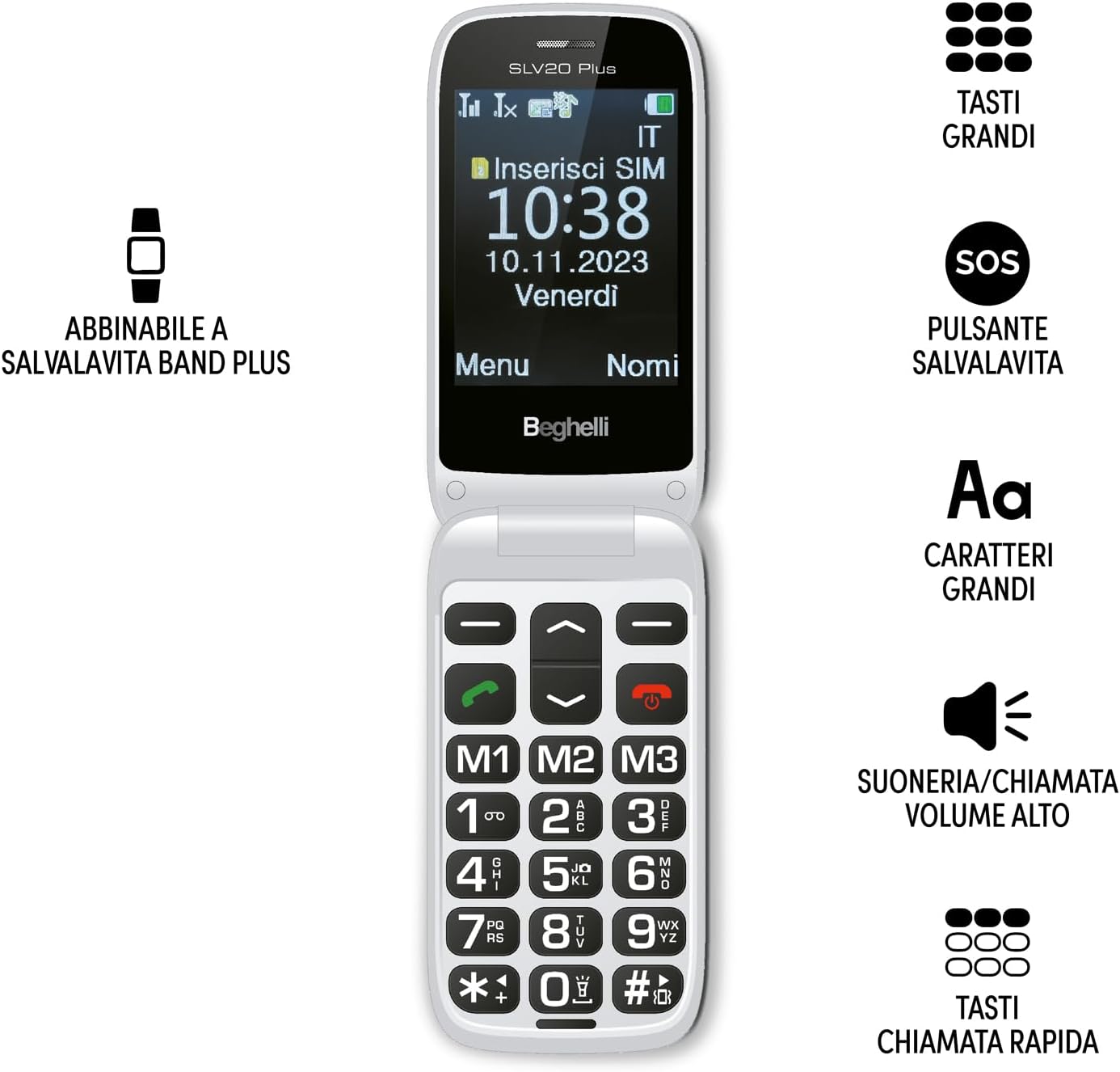
Image: The Beghelli Salvalavita SLV20 Plus, shown open to highlight its large, easy-to-read keys and clear display, designed for user convenience.
הגדרה
1. פתיחת האריזה ורכיבים
לפני שתתחיל, ודא שכל הרכיבים נמצאים באריזה:
- Beghelli Salvalavita SLV20 Plus Mobile Phone
- סוללת ליתיום-יון נטענת
- בסיס טעינה
- מתאם מתח
- מדריך למשתמש (מסמך זה)

Image: The included charging base and power adapter for the Beghelli Salvalavita SLV20 Plus, facilitating easy and convenient recharging.
2. התקנת כרטיס SIM
- כבה את הטלפון והסר את הכיסוי האחורי.
- אתר את חריץ כרטיס ה- SIM.
- Insert your activated SIM card into the slot, ensuring the gold contacts face downwards and the cut corner aligns correctly.
- דחף בעדינות את כרטיס ה-SIM עד שייכנס למקומו בנקישה.
- החזר את הכיסוי האחורי למקומו.
3. התקנה וטעינה של הסוללה
- With the back cover removed, insert the rechargeable Lithium-ion battery into its compartment, aligning the contacts.
- החזר את הכיסוי האחורי למקומו.
- חבר את מתאם החשמל לבסיס הטעינה.
- Place the phone into the charging base. Ensure the phone is correctly seated and the charging indicator appears on the screen.
- For first use, charge the phone for at least 4 hours to ensure optimal battery performance.
4. הפעלה ראשונית
Press and hold the Power/End Call button (usually marked with a red phone icon) until the screen lights up and the Beghelli logo appears. The phone will then guide you through any initial setup steps, such as setting the language or time.
הוראות הפעלה
1. פונקציות טלפון בסיסיות
- להתקשר: Dial the desired number using the large keypad and press the Green Call button.
- קבלת שיחה: כאשר הטלפון מצלצל, לחץ על כפתור השיחה הירוק כדי לענות.
- סיום שיחה: לחץ על כפתור סיום השיחה האדום.
- כוונון עוצמת הקול: Use the dedicated volume keys on the side of the phone during a call or to adjust ringtone volume. The phone features high volume for clear audio.
- שליחת SMS: Navigate to the 'Messages' menu, select 'New Message', type your text using the keypad, and select the recipient from your contacts or enter a number.
2. SOS Button Functionality
The SOS button is a critical safety feature. In an emergency, press and hold the SOS button located on the back of the phone for a few seconds. The phone will automatically:
- Initiate calls to up to 5 pre-programmed emergency numbers in sequence until one is answered.
- Send a pre-set emergency SMS message to these same 5 numbers.
תכנות מספרי חירום: Refer to the phone's settings menu under 'SOS Settings' to add or modify emergency contact numbers and the emergency SMS message.
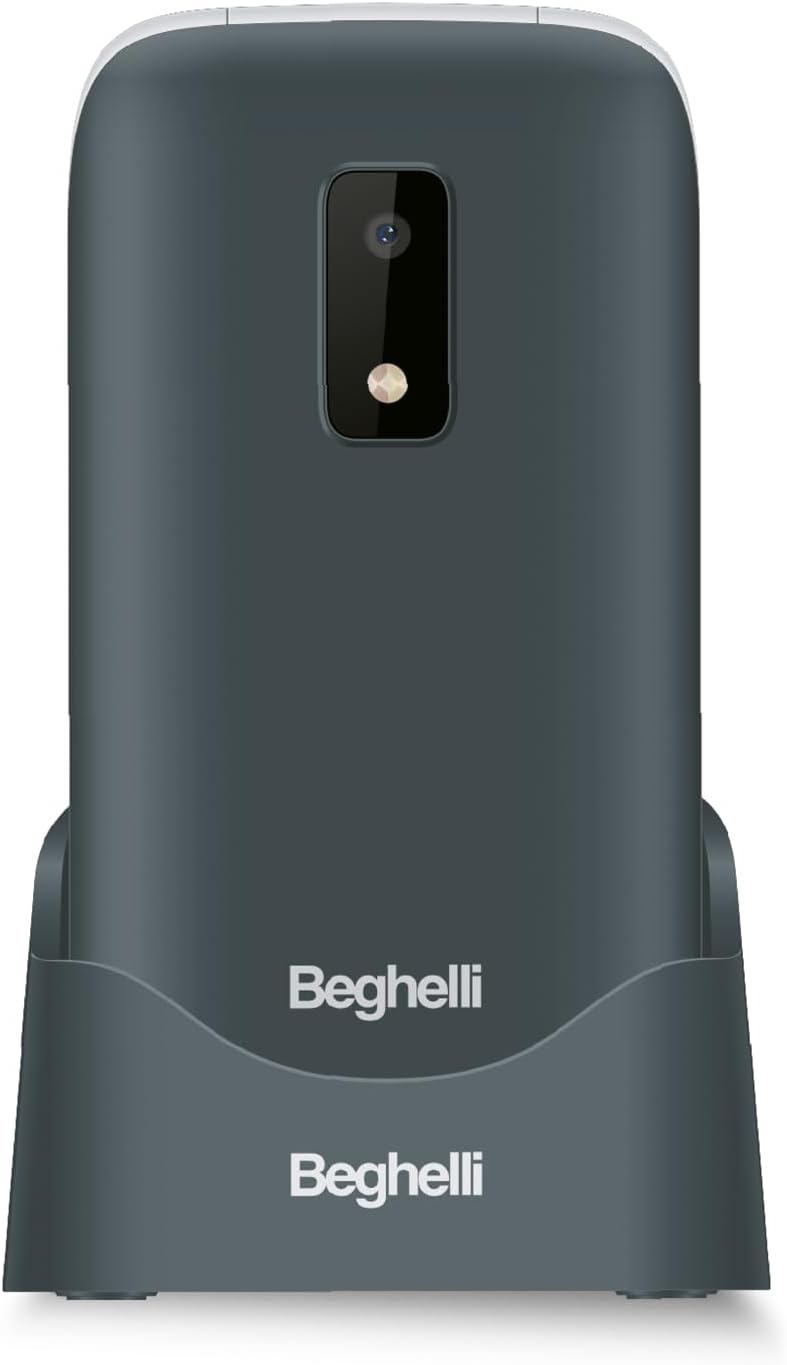
תמונה: החלק האחורי view of the Beghelli Salvalavita SLV20 Plus, highlighting the prominent SOS button and integrated camera, designed for quick access to emergency features.
3. Quick Dial Keys (M1, M2, M3)
The M1, M2, and M3 keys allow for quick dialing of frequently contacted numbers. To program these keys:
- עבור לתפריט 'הגדרות'.
- Select 'Speed Dial' or 'Quick Dial Settings'.
- Choose M1, M2, or M3 and assign a contact from your phonebook or enter a new number.
- Once programmed, simply press and hold the M1, M2, or M3 key to dial the assigned number.
4. תכונות נוספות
- מַצלֵמָה: Access the camera from the main menu to take photos. Photos are saved to the phone's memory or an inserted SD card (if applicable).
- פָּנַס כִּיס: Activate the built-in flashlight via a dedicated button or menu option for convenience in low-light conditions.
- רדיו FM: Tune into your favorite FM radio stations. Headphones may be required to act as an antenna.
5. Optional Salvalavita 24/7 Service
The Beghelli Salvalavita SLV20 Plus can be connected to the optional Salvalavita 24/7 Center service. This service provides constant support and protection by connecting your SOS button directly to a monitoring center. For more information on subscribing to this service, please refer to the documentation provided with the service or visit the official Beghelli webאֲתַר.
תַחזוּקָה
- ניקוי: השתמשו במטלית רכה ויבשה לניקוי החלק החיצוני של הטלפון. הימנעו משימוש בחומרי ניקוי נוזליים או בחומרים שוחקים.
- טיפול בסוללה: כדי להאריך את חיי הסוללה, הימנעו מטמפרטורות קיצוניות. אל תותירו את הטלפון פריק לחלוטין למשך פרקי זמן ממושכים.
- אִחסוּן: אם מאחסנים את הטלפון למשך זמן רב, טען את הסוללה לכ-50% ואחסן אותה במקום קריר ויבש.
פתרון בעיות
| בְּעָיָה | פתרון אפשרי |
|---|---|
| הטלפון לא נדלק. | ודא שהסוללה הוכנסה כראוי ונטענת. חבר את הטלפון למטען ונסה שוב. |
| אין אות רשת. | Check if the SIM card is properly inserted. Ensure you are in an area with network coverage. Contact your service provider if the issue persists. |
| Cannot hear calls clearly. | Adjust the call volume using the side keys. Ensure the speaker is not obstructed. |
| כפתור SOS לא עובד. | Verify that emergency numbers are correctly programmed in the SOS settings. Ensure the phone has network signal. |
If you encounter issues not listed here or if the suggested solutions do not resolve the problem, please contact Beghelli customer support for assistance.
מפרטים
| תכונה | פְּרָט |
|---|---|
| מספר דגם | SLV20 Plus |
| מידות (L x W x H) | 10.9 x 5.5 x 1.9 ס"מ |
| מִשׁקָל | 100 גרם |
| סוג סוללה | סוללת ליתיום-יון אחת (כלולה) |
| גודל תצוגה | 2.8 אינץ' |
| תכונות מפתח | Large Backlit Keys, SOS Button, High Volume, Flashlight, FM Radio, Camera, Quick Dial Keys |
אחריות ותמיכה
The Beghelli Salvalavita SLV20 Plus typically comes with a manufacturer's warranty. Please refer to the warranty card included in your product packaging for specific terms and conditions. Generally, spare parts availability is indicated for 2 years from the date of purchase.
In case of product defects or issues, a refund or replacement policy is usually available for 30 days from the purchase date, subject to retailer terms.
For technical support, service, or warranty claims, please contact Beghelli customer service through their official website or the contact information provided in your product documentation. Always have your model number (SLV20 Plus) and proof of purchase ready when contacting support.