
T-Wolf GG-G530
T-Wolf RoboCop Competitive Gaming Mouse GG-G530 User Manual
Model: GG-G530
מָבוֹא
This manual provides essential information for the setup, operation, and maintenance of your T-Wolf RoboCop Competitive Gaming Mouse GG-G530. Please read this manual thoroughly before using the product to ensure optimal performance and longevity.
תוכן החבילה
- 1 x T-Wolf RoboCop Competitive Gaming Mouse GG-G530
- מדריך למשתמש אחד (מסמך זה)
תכונות המוצר
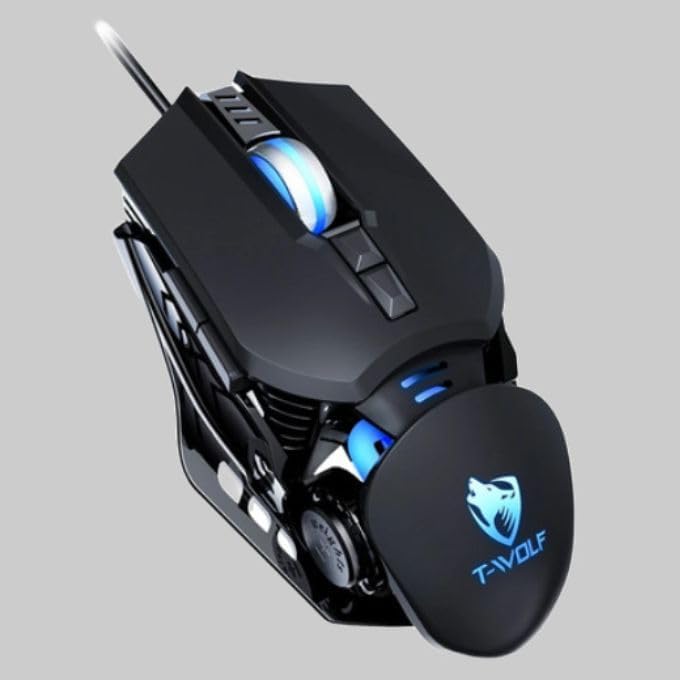
The T-Wolf RoboCop Competitive Gaming Mouse GG-G530 is designed for precision and comfort, suitable for both gaming and office use. Key features include:
- Optical Engine Design: Ensures stable operation and high sensitivity.
- Mechanical Armored Modeling: Distinctive and robust design.
- Symmetrical DIY Counterweight: Allows for adaptable weight adjustment.
- 7 כפתורים: Includes left click, right click, scroll wheel, DPI switcher, and additional programmable buttons.
- קישוריות חכמה: Plug-and-play functionality with automatic driver installation.
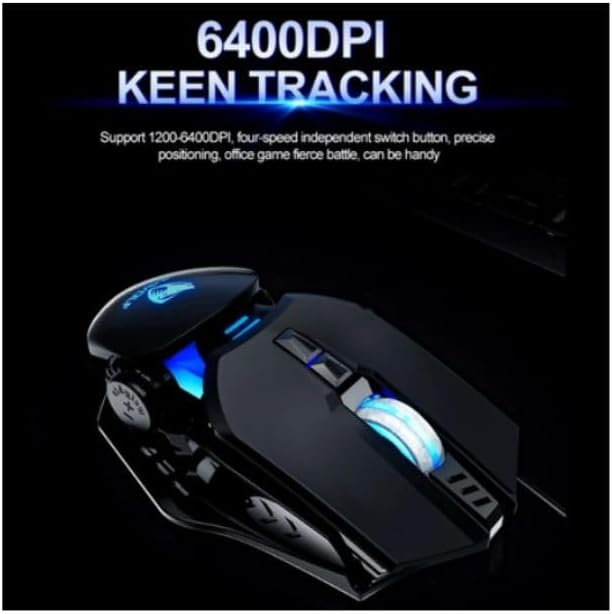
- DPI מתכוונן: Four levels of sensitivity (1200/2400/3200/6400 DPI) for precise control.
- עיצוב ארגונומי: Provides comfortable use for extended periods without fatigue.
- Four-Color Light Effect: Dynamic lighting for visual appeal.
- חיבור קווי: Reliable USB interface with a 150cm cable.
- תאימות מערכת: תומך במערכות הפעלה Windows ו-Mac.
הגדרה
- חבר את העכבר: Insert the USB connector of the T-Wolf RoboCop Gaming Mouse into an available USB port on your computer.
- התקנה אוטומטית של מנהל התקן: The operating system will automatically detect the mouse and install the necessary drivers. This process typically takes a few moments. No manual driver installation is required.
- מוכן לשימוש: לאחר התקנת הדרייברים, העכבר מוכן לשימוש מיידי.
הוראות הפעלה
The T-Wolf RoboCop Gaming Mouse features 7 buttons for various functions. Familiarize yourself with their basic operations:
- כפתור לחיצה שמאלי: בחירה ראשונית ואינטראקציה.
- כפתור לחיצה ימנית: Accesses contextual menus and secondary functions.
- גלגל גלילה: גלילה בין מסמכים ו web דפים. יכול גם לתפקד ככפתור לחיצה אמצעית.
- DPI Switcher Button: מתאים את רגישות העכבר (DPI).
- כפתורים נוספים: The remaining buttons can be assigned specific functions through your operating system's mouse settings or compatible third-party software (note: no macro programming is natively supported by the mouse hardware).

התאמת DPI
The mouse features an adjustable DPI (Dots Per Inch) setting, allowing you to change the cursor sensitivity on the fly. This is particularly useful for different tasks, such as precise aiming in games or fast navigation in general use.
- אתר את DPI Switcher Button, typically positioned behind the scroll wheel.
- Press the DPI Switcher Button to cycle through the available DPI settings: 1200 DPI, 2400 DPI, 3200 DPI, and 6400 DPI.
- Each press will change the sensitivity, allowing you to find the setting that best suits your current activity.
תַחזוּקָה
To ensure the longevity and optimal performance of your T-Wolf RoboCop Gaming Mouse, follow these simple maintenance guidelines:
- ניקוי: השתמשו במטלית רכה ויבשה כדי לנגב את פני השטח של העכבר. במקרה של לכלוך עיקש, נגבו מעטampשטפו את המטלית במים או בתמיסת ניקוי עדינה. הימנעו מכימיקלים חזקים או מחומרים שוחקים.
- חיישן אופטי: Periodically clean the optical sensor on the underside of the mouse with a cotton swab to prevent dust buildup, which can affect tracking performance.
- טיפול בכבלים: הימנעו מכיפוף או משיכה חדה של כבל ה-USB כדי למנוע נזק פנימי.
- אִחסוּן: כאשר אינו בשימוש, יש לאחסן את העכבר בסביבה נקייה ויבשה הרחק מטמפרטורות קיצוניות.
פתרון בעיות
If you encounter issues with your T-Wolf RoboCop Gaming Mouse, refer to the following common solutions:
- עכבר לא מגיב:
- ודא שכבל ה-USB מחובר היטב ליציאת USB תקינה במחשב שלך.
- נסה לחבר את העכבר ליציאת USB אחרת.
- הפעל מחדש את המחשב.
- תנועת הסמן אינה יציבה או קופצנית:
- נקו את החיישן האופטי בחלק התחתון של העכבר.
- Ensure you are using the mouse on a clean, non-reflective, and uniform surface. Mouse pads are recommended.
- DPI Adjustment Not Working:
- Ensure you are pressing the correct DPI switcher button.
- The mouse cycles through fixed DPI settings; there is no visual indicator on the mouse itself for the current DPI level, only the change in cursor speed.
- כפתורים לא פועלים:
- Check your operating system's mouse settings to ensure buttons are enabled and configured correctly.
- Test the mouse on another computer to rule out a software or system issue.
מפרטים
| דֶגֶם | GG-G530 |
| חוֹמֶר | ABS + Electroplating |
| מערכת מעקב | אוֹפּטִי |
| קֶשֶׁר | חוטי |
| אורך כבל | 150 ס"מ |
| סוג ממשק | USB |
| הגדרות DPI | 1200 / 2400 / 3200 / 6400 (ניתן להתאמה) |
| מספר כפתורים | 7 |
| חיי שירות | Approximately three years |
| שיטת עבודה | הפוטואלקטרי |
| אפקט אור | Four-color cycling |
| גודל פריט | 130 x 80 x 35 מ"מ |
| משקל פריט | 160 גרם |
| מערכות נתמכות | Windows, Mac |
אחריות ותמיכה
Your T-Wolf RoboCop Competitive Gaming Mouse GG-G530 comes with a אחריות יצרן ל-6 חודשים מתאריך הרכישה.
This warranty covers defects in materials and workmanship under normal use. It does not cover damage caused by accident, misuse, abuse, unauthorized modification, or external causes such as liquid damage.
לתביעות אחריות או תמיכה טכנית, אנא צרו קשר עם הקמעונאי או עם נקודת הרכישה. אנא שמרו את הוכחת הרכישה שלכם לצורך אימות האחריות.

Ask a question about this manual
Ask about setup, troubleshooting, compatibility, parts, safety, or missing instructions. Manuals+ will review the question and use this page’s manual context to help answer it.