מָבוֹא
This manual provides instructions for the goopow T97 Mini Karaoke Machine. This portable Bluetooth speaker, accompanied by wireless microphones, is designed for audio playback and interactive singing. Please read this manual thoroughly before operating the device to ensure proper use and maintenance.
תוכן החבילה
- goopow T97 Mini Karaoke Machine Speaker
- מיקרופונים אלחוטיים (2 כלולים)
- כבל טעינה מסוג USB מסוג C
- מדריך למשתמש (מסמך זה)
המוצר נגמרview
Familiarize yourself with the components and features of your goopow T97 Mini Karaoke Machine.

תמונה 1: The goopow T97 Mini Karaoke Machine speaker and two wireless microphones. The speaker features a blue fabric top and a white base with a colorful LED light ring around the control panel. The microphones are blue with black grilles.
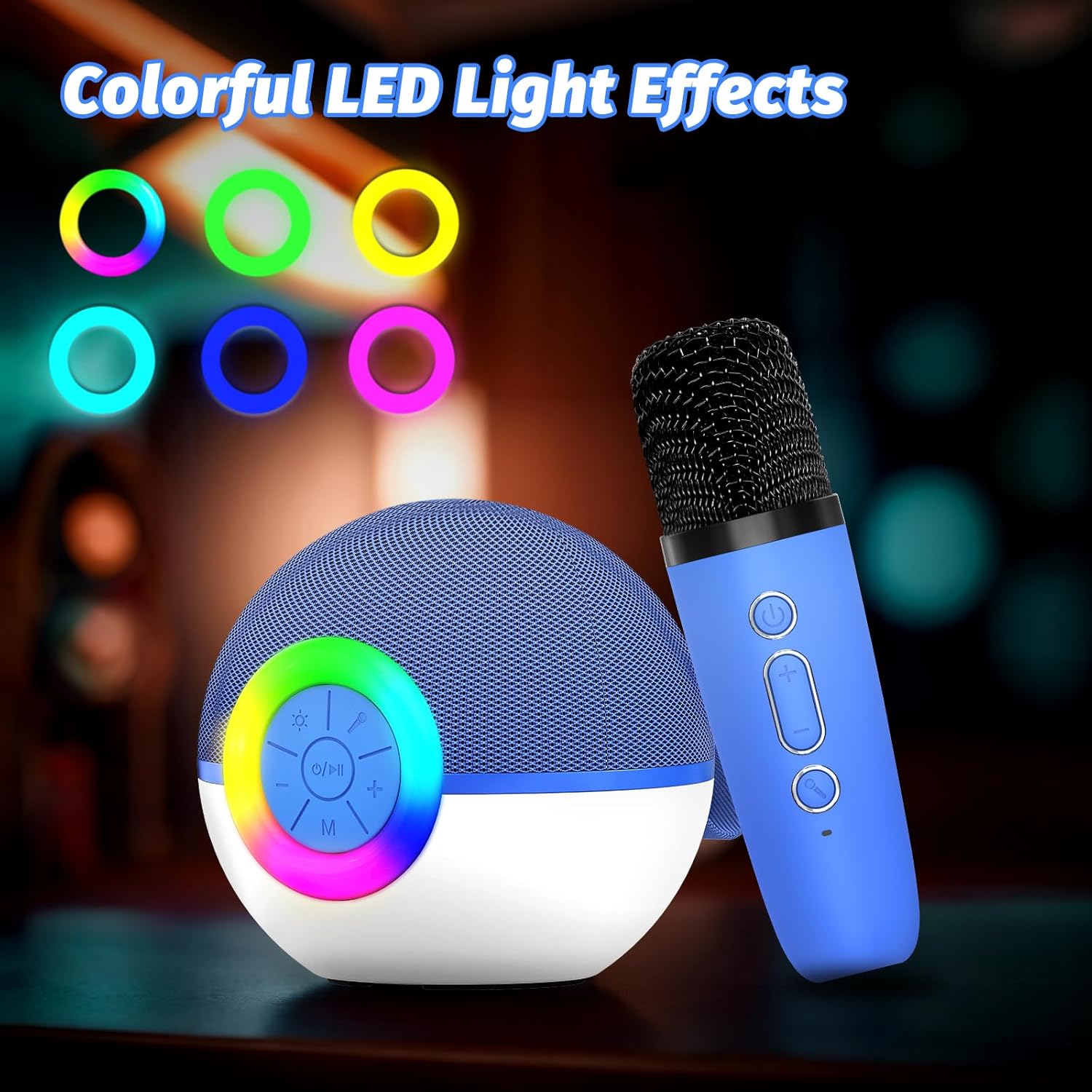
תמונה 2: Detail of the speaker's control panel. It includes buttons for power/play/pause, volume up/next track, volume down/previous track, and mode selection. The surrounding ring illuminates with various LED colors.

תמונה 3: אֲחוֹרִי view of the speaker, highlighting the AUX input, USB Type-C charging port, and TF (Micro SD) card slot for various audio input options.

תמונה 4: This image demonstrates the Bluetooth connectivity of the karaoke machine, showing it paired with a smartphone, laptop, and tablet. It also indicates support for TF Card and AUX input.

תמונה 5: Two wireless microphones are shown in use, highlighting the dual microphone capability for duets or shared singing experiences.

תמונה 6: The compact size of the goopow T97 speaker and microphone is illustrated, emphasizing its portability for various settings.
הגדרה
1. טעינה ראשונית
Before first use, fully charge the karaoke machine speaker and both microphones. Connect the provided USB Type-C cable to the charging port on the speaker and a compatible USB power adapter (not included). The charging indicator will show the charging status. A full charge typically takes 2-3 hours.
2. הפעלה / כיבוי
- To power on the speaker: Press and hold the power button (O/I) on the speaker's control panel until the LED lights illuminate.
- To power on the microphones: Press and hold the power button on each microphone.
- To power off: Repeat the steps above for both the speaker and microphones.
3. זיווג Bluetooth
- Ensure the speaker is powered on and in Bluetooth pairing mode (indicated by a flashing blue light or an audible prompt).
- במכשיר הנייד שלך (סמארטפון, טאבלט, מחשב נייד), הפעל את Bluetooth וחפש מכשירים זמינים.
- Select "goopow T97" from the list of devices.
- לאחר הצימוד, הרמקול יספק אישור קולי, ונורית חיווי ה-Bluetooth תידלק באופן קבוע.
The microphones automatically connect to the speaker when both are powered on and within range.
הוראות הפעלה
1. השמעת מוזיקה
- בלוטות': After successful pairing, play music from your connected device.
- כרטיס TF: הכנס כרטיס Micro SD (TF) עם אודיו MP3 files into the TF card slot on the speaker. The speaker will automatically switch to TF card mode and begin playback.
- כניסת AUX: Connect an external audio device using a 3.5mm AUX cable (not included) to the AUX port on the speaker.
2. בקרות רמקול
- הפעלה/הפעל/השהה: הקש על O/I button once to play or pause music. Press and hold to power on/off.
- הגברת עוצמת הקול/הרצועה הבאה: לִלְחוֹץ + button to increase volume. Press and hold to skip to the next track.
- הורדת עוצמת הקול/הרצועה הקודמת: לִלְחוֹץ - button to decrease volume. Press and hold to go to the previous track.
- מצב (M): הקש על M button to switch between Bluetooth, TF Card, and AUX input modes.
- נורות LED: Press the light button (sun icon) to cycle through different LED light modes or turn them off.
3. בקרות מיקרופון
- כּוֹחַ: Press and hold the power button on the microphone to turn it on or off.
- עוצמת הקול של המיקרופון: השתמש ב- + ו - buttons on the microphone to adjust its volume.
- אפקטים קוליים: Press the voice effect button (microphone icon) to cycle through available voice changing effects (e.g., Monster Voice, Female Voice, Male Voice, Robot Voice, Baby Voice).
טְעִינָה
The goopow T97 Mini Karaoke Machine and its microphones are equipped with rechargeable batteries. Use the provided USB Type-C cable for charging.
- טעינת רמקול: Connect the USB Type-C cable to the speaker's charging port and a 5V/1A USB power source.
- טעינת מיקרופון: Each microphone has its own USB Type-C charging port. Connect them individually to a 5V/1A USB power source.
- זמן טעינה: כ-2-3 שעות לטעינה מלאה.
- זמן משחק: The speaker provides approximately 4-6 hours of playtime on a full charge. Actual playtime may vary based on volume level, audio content, and usage of LED lights.
תַחזוּקָה
- הרחק את המכשיר ממים, לחות וטמפרטורות קיצוניות.
- נקו את המכשיר בעזרת מטלית רכה ויבשה. אין להשתמש בחומרי ניקוי שוחקים או ממסים.
- אחסן את המכשיר במקום קריר ויבש כאשר אינו בשימוש.
- הימנע מלהפיל את המכשיר או לחשוף אותו למכות חזקות.
פתרון בעיות
| בְּעָיָה | פתרון אפשרי |
|---|---|
| המכשיר לא נדלק. | ודא שהמכשיר טעון במלואו. חבר למקור חשמל ונסה שוב. |
| אין קול מהרמקול. | Check speaker volume and the volume on your connected device. Ensure the correct input mode (Bluetooth, TF Card, AUX) is selected. |
| המיקרופון לא עובד. | Ensure the microphone is powered on and fully charged. Verify it is within range of the speaker. Adjust microphone volume. |
| התאמת Bluetooth נכשלה. | Ensure the speaker is in pairing mode. Turn off Bluetooth on other nearby devices. Try restarting both the speaker and your device's Bluetooth. |
| איכות צליל ירודה. | Ensure the speaker and connected device are within close range without obstructions. Check the audio source quality. |
מפרטים
| תכונה | פְּרָט |
|---|---|
| מספר דגם | T97 |
| מותג | גופואו |
| טכנולוגיית קישוריות | בלוטות' |
| קלט שמע | Wireless Microphone, Bluetooth |
| מקור כוח | מופעל על סוללה |
| סוג מחבר | USB סוג C |
| חוֹמֶר | פּלָסטִי |
| משקל פריט | 14.5 אונקיות (410 גרם) |
| מידות המוצר (L x W x H) | 3.66 x 3.66 x 3.62 אינץ' |
| מספר ערוצים | 1 |
| תגובת תדר | 10 KHz |
| סוללות | סוללה אחת לא סטנדרטית (כלולה) |
אחריות ותמיכה
Specific warranty details are not provided in the product information. For warranty claims, technical support, or further assistance, please contact the manufacturer directly or refer to the official goopow webאֲתַר.
Note: Keep your purchase receipt as proof of purchase for any warranty-related inquiries.