
1. הקדמה
This manual provides detailed instructions for the installation, operation, and maintenance of your darkFlash DPW90 ATX Mid-Tower PC Case. Please read this manual thoroughly before beginning assembly to ensure proper setup and optimal performance. This PC case is designed for enthusiasts seeking a blend of aesthetics, performance, and ease of use, featuring a unique back plug-in BTF motherboard compatibility and a full-view curved glass design.
2. תכונות עיקריות
- Advanced Back-Mounted Motherboard Design: Supports BTF motherboards for a streamlined interior and simplified cable management. Also compatible with standard ATX, M-ATX, and ITX motherboards.
- Innovative Curved Glass Views: Features a 270° panoramic tempered glass panel with a natural R-angle transition for a modern aesthetic.
- Enhanced Cooling Efficiency: Optimized airflow with support for up to 10 fans and dual 360mm radiators, ensuring effective heat dissipation.
- Spacious Interior & Easy Installation: Accommodates high-end components, including large GPUs (up to 445mm length) and multiple storage options. The design facilitates hassle-free upgrades and maintenance.
- Type-C Port & Durable Materials: Equipped with a high-speed I/O panel featuring a Type-C interface for fast data transfer. Constructed from premium metal and tempered glass for durability.
3. תכולת החבילה
Verify that all components are present before proceeding with installation. If any items are missing or damaged, please contact customer support.
- darkFlash DPW90 ATX Mid-Tower PC Case
- 4 x 120mm ARGB Fans (Pre-installed)
- קופסת אביזרים (ברגים, מעמדים, אזיקוני כבלים וכו')
- מדריך למשתמש (מסמך זה)
4. התקנה והתקנה
Follow these steps for assembling your PC components within the darkFlash DPW90 case.
4.1. הכנה
- Unpack the PC case and place it on a stable, flat surface.
- Remove the side panels by gently pulling them off. The curved glass panel is designed for quick removal.

Figure 1: Upgraded Design with Removable Panels
4.2. התקנת לוח אם
The DPW90 supports both standard and back plug-in BTF motherboards.
- For Standard Motherboards (ATX, M-ATX, ITX): Secure your motherboard to the pre-installed standoffs using the provided screws.
- For Back Plug-in BTF Motherboards (ATX, M-ATX, ITX): Align the motherboard with the rear-mounted connectors and secure it. This design routes cables to the back of the case for a cleaner look.

איור 2: תאימות לוח אם
4.3. התקנת מאוורר ורדיאטור
המארז תומך בתצורות קירור נרחבות.
- The case comes with 4 pre-installed 120mm ARGB fans.
- It supports up to 10 fans in total.
- Dual 360mm liquid radiators can be installed for advanced cooling. Refer to the diagram for optimal placement.
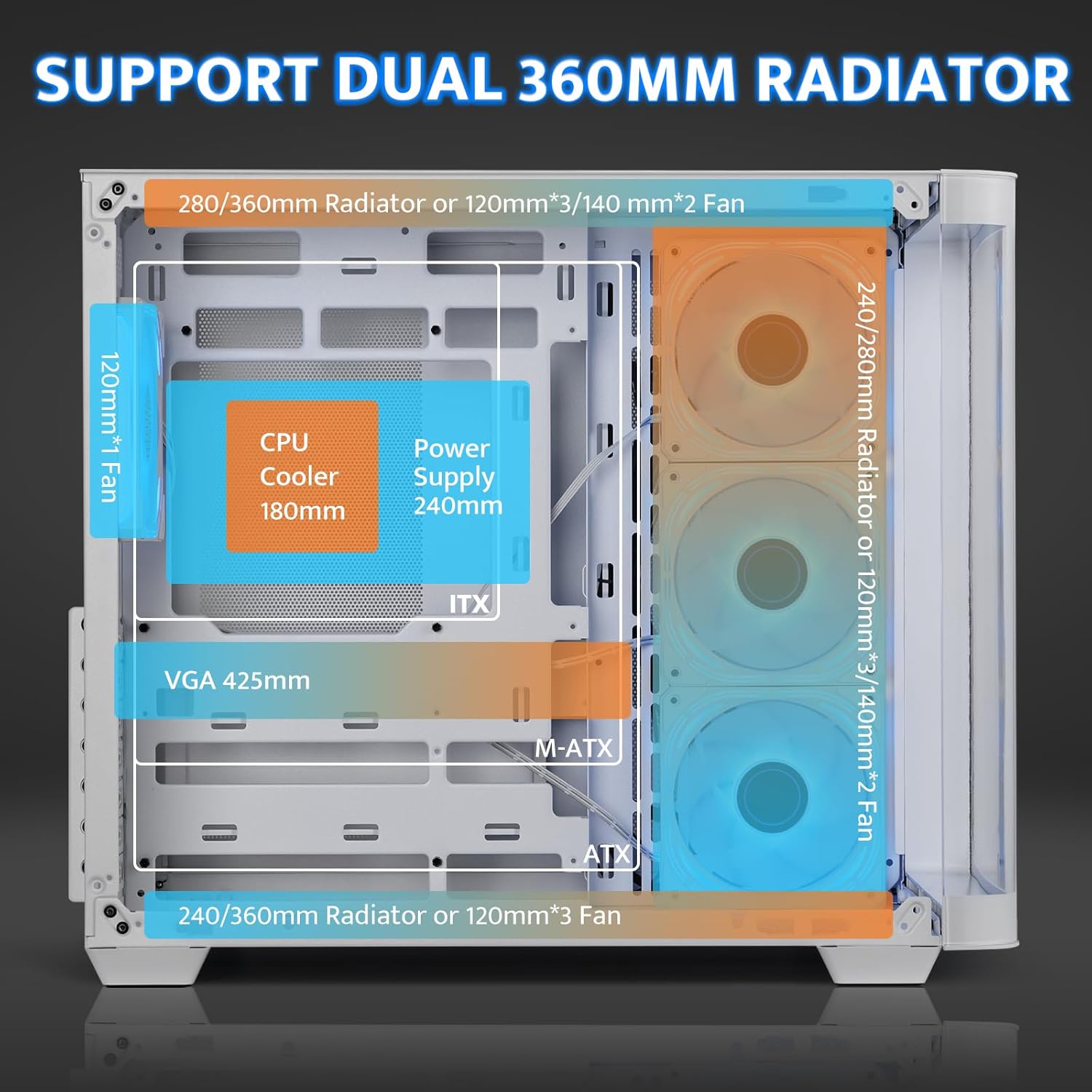
Figure 3: Cooling System Support
4.4. GPU and PSU Installation
- GPU: The case accommodates GPUs up to 445mm in length. Utilize the 7 PCI slots for installation.
- PSU: Install the power supply unit (PSU) in the rear-mounted compartment. The maximum supported PSU length is 240mm.
4.5. התקנת אחסון
The multi-function bracket supports multiple storage drives.
- Install up to 3 x 2.5" SSDs and 2 x 3.5" HDDs.
- Ensure proper orientation for SATA and power connections, especially for 2.5" drives, to avoid re-installation.

Figure 4: Multi-Function Storage Bracket
4.6. חיבורי לוח קלט/פלט קדמי
Connect the front panel cables to your motherboard according to your motherboard's manual.
- USB 3.0: יציאה 1
- USB 2.0: יציאה 1
- Type-C: 1 port (1280MB/s)
- אודיו באיכות HD: Headphone and Microphone jacks
- לחצן איפוס
- לחצן בקרת LED

Figure 5: High-Speed I/O Panel
5. הוראות הפעלה
5.1. הפעלה/כיבוי
Press the power button on the front I/O panel to turn your system on or off.
5.2. בקרת מאוורר ARGB
The pre-installed ARGB fans feature a 5V 3Pin ARGB interface. Connect these to a compatible motherboard header or an external ARGB controller (not included) to customize lighting effects. The case includes an LED control button on the I/O panel for basic lighting adjustments if connected to a compatible hub.

Figure 6: Infinity Mirror ARGB Fans
6. תחזוקה
6.1. ניקוי מסנני אבק
The darkFlash DPW90 includes magnetic dust filters to prevent dust buildup. Regularly remove and clean these filters to maintain optimal airflow and cooling performance.
- Gently pull off the magnetic dust filters located on the top and side panels.
- Clean the filters using compressed air or a soft brush.
- Reattach the filters.
6.2. ניקיון כללי
השתמש רך, דamp cloth to clean the exterior surfaces of the case. Avoid abrasive cleaners or solvents that may damage the finish or tempered glass.
7. פתרון תקלות
סעיף זה עוסק בבעיות נפוצות שאתה עשוי להיתקל בהן.
7.1. Fans Not Spinning or RGB Not Working
- בדוק חיבורים: Ensure all fan power cables and ARGB cables are securely connected to the motherboard or an ARGB controller.
- מקור כוח: Some included fans may run directly off a SATA power connector. Verify this connection is secure.
- Software/BIOS Settings: If using a motherboard header, check your motherboard's BIOS/UEFI settings or companion software for fan speed and RGB control.
- RGB Hub: Note that an RGB Hub Controller is not included. If advanced control is desired, a separate controller may be needed.
7.2. Limited Space for Cable Management
- Utilize Rear Compartment: The back-mounted motherboard design provides space behind the motherboard tray for cable routing.
- קשרי כבלים: Use the included cable ties to bundle and secure cables, optimizing space.
- Modular PSU: If upgrading, consider a modular power supply to reduce unnecessary cable clutter.
7.3. Difficulty Installing Storage Drives
- 2.5" Drive Orientation: For 2.5" SSDs, ensure the SATA data and power ports are facing upwards before securing them to the multi-function bracket.
- סדר התקנה: Install 2.5" drives before 3.5" drives if space is constrained.
8. מפרטים
| תכונה | מִפרָט |
|---|---|
| שם הדגם | DPW90 |
| מותג | כהה פלאש |
| סוג מקרה | מגדל אמצע |
| תאימות לוח אם | ATX, Micro ATX, ITX (including Back Plug-in BTF) |
| חוֹמֶר | מתכת, זכוכית מחוסמת |
| צֶבַע | לָבָן |
| מידות המוצר (LxWxH) | 11.22 x 18.11 x 15.6 אינץ' (285 x 460 x 398 מ"מ) |
| משקל פריט | 18.9 פאונד |
| גובה קירור המעבד (מקסימום) | 180 מ"מ |
| אורך GPU (מקסימלי) | 445 מ"מ |
| אורך ספק כוח (מקסימלי) | 240 מ"מ |
| שיטת קירור | אוויר, מים |
| תמיכת מעריצים | Up to 10 fans (4 x 120mm ARGB pre-installed) |
| תמיכת רדיאטור | Dual 360mm |
| מפרצי אחסון | 3 כונני SSD בגודל 2.5 אינץ', 2 כונני קשיחים בגודל 3.5 אינץ' |
| יציאות קלט / פלט קדמיות | 1 x USB 3.0, 1 x USB 2.0, 1 x Type-C, HD Audio, Reset, LED |
9. אחריות ותמיכה
9.1. מידע על אחריות
darkFlash products are manufactured to high-quality standards. For specific warranty details regarding your DPW90 PC case, please refer to the warranty card included in your package or visit the official darkFlash webאתר. האחריות מכסה בדרך כלל פגמי ייצור בתנאי שימוש רגילים.
9.2. תמיכת לקוחות
If you encounter any issues or have questions not covered in this manual, please contact darkFlash customer support through their official website or the retailer from whom you purchased the product. Have your product model (DPW90) and purchase information ready when contacting support.
For more information, visit the official darkFlash store: darkFlash Store on Amazon