
1. הקדמה
This manual provides essential information for the setup, operation, and maintenance of your AWOL VISION LTV-3500 Pro Ultra Short Throw Triple Laser Projector and 120" Motorized Floor Rising Screen. Please read this manual thoroughly before use to ensure optimal performance and safety.
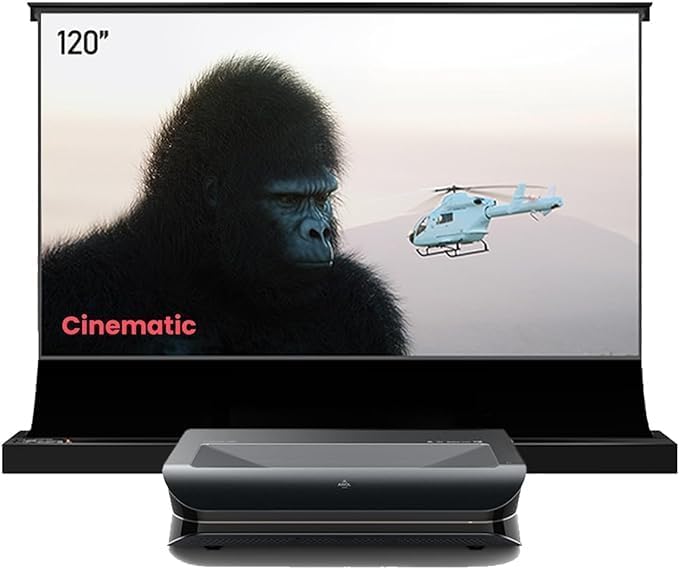
Image: AWOL VISION LTV-3500 Pro Projector positioned in front of its 120-inch Motorized Floor Rising Screen, displaying a cinematic scene.
2. תכונות עיקריות
- 4K UHD Resolution & Triple Color Laser Technology: Delivers sharp, vibrant images with 107% BT.2020 color gamut coverage.
- HDR10+ & Dolby Vision Support: Dynamically optimizes color, contrast, and brightness for unparalleled image quality.
- אודיו דולבי אטמוס: מספק חוויית שמע סוחפת.
- Cinematic 3D Display: Compatible with active shutter 3D glasses for immersive 3D films.
- בהירות גבוהה: 3000 ISO lumens for clear viewing even in bright ambient light, especially when paired with an ALR screen.
- PJLink IP Control: Enables integration with home automation systems like Control 4.

Image: Close-up of the LTV-3500 Pro projector with key specifications like 3000 ISO lumens, 4K UHD, HDR10+, Dolby Atmos, and 3D capabilities highlighted.
3. התקנה
3.1. ביטול האגרוף
Carefully remove all components from the packaging. Ensure the projector, motorized screen, remote control, power cables, and instruction manuals are present.
3.2. מיקום המקרן
The LTV-3500 Pro is an ultra-short throw projector designed to be placed close to the projection surface. Refer to the table below for recommended throw distances based on screen size.

Image: Diagram and table illustrating recommended projector placement distances from the screen for various screen sizes (80"-150").
3.3. Screen Assembly & Installation
The 120" Motorized Floor Rising Screen requires assembly. Follow the detailed instructions provided in the screen's dedicated manual. Ensure the frame is securely assembled and the screen material is properly tensioned. For visual guidance, refer to the official setup videos.
Video: Official AWOL VISION video demonstrating the setup and operation of the Floor Rising ALR Screen.
Video: Official NothingProjector video providing guidance on creating a home theater with an ALR screen, including setup tips.
3.4. קישוריות
Connect your external devices (e.g., Blu-ray player, gaming console, streaming device) to the projector using HDMI cables. The projector supports HDMI connectivity.
4. הפעלה
4.1. הפעלה/כיבוי
Press the power button on the remote control or the projector to turn it on or off. The motorized screen can be synchronized to rise/lower with the projector's power cycle.

Image: Diagram illustrating the synchronization of the motorized screen with the projector's power cycle.
4.2. ניווט
Use the remote control to navigate the projector's Android operating system. Access settings, input sources, and installed applications.
4.3. הגדרות תמונה
The LTV-3500 Pro offers various picture modes and adjustments. Explore settings for color space (107% BT.2020), white balance, gamma, and HDR modes (HDR Standard, Vivid, Sport, Movie, User) to optimize your viewing experience. Dolby Vision is supported for enhanced dynamic range.
4.4. הגדרות צליל
The projector features built-in 36W stereo speakers with Dolby Atmos and DTS Virtual X support. For a full cinematic experience, an external sound system is recommended.
4.5. 3D Playback
To enjoy 3D content, you will need active shutter 3D glasses. The projector supports various 3D modes including Frame Packing, Side-by-Side, and Top-and-Bottom. Ensure your Blu-ray player and discs are 3D-capable.
Video: Official AWOL VISION video demonstrating how to watch 3D movies with AWOL VISION 3D glasses.
4.6. מצב משחק
Activate Turbo Mode for reduced input lag, offering 15ms at 4K@60Hz and 8ms at 1080P@120Hz, ideal for gaming.
4.7. Screen Share/Casting
The projector supports screen sharing features, allowing you to cast content from compatible devices.
5. תחזוקה
5.1. ניקיון
Use a soft, dry cloth to clean the projector's exterior. For the lens, use a specialized lens cleaning cloth and solution. Avoid abrasive materials. For the screen, follow the cleaning instructions provided in its dedicated manual.
5.2. רעש מאוורר
The projector operates with a low fan noise level of ≤30dB, ensuring a quiet viewסביבה.
6. פתרון תקלות
- אין תמונה: Check power connections, input source selection, and HDMI cable integrity.
- תמונה מעוותת: Verify projector placement, focus settings, and keystone correction.
- בעיות סאונד: Ensure audio cables are connected correctly and check projector/external audio device volume settings.
7. מפרטים
- מותג: AWOL VISION
- דֶגֶם: LTV-3500 Pro
- סוג תצוגה: Laser (Triple Color Laser Technology)
- רזולוציית תצוגה: 3840 x 2160 (4K UHD)
- בְּהִירוּת: 3000 ISO לומן
- סולם צבעים: 107% BT.2020
- תמיכה ב-HDR: HDR10+, דולבי ויז'ן
- תמיכה באודיו: Dolby Atmos, DTS Virtual X
- קישוריות: HDMI
- רעש מאוורר: ≤30dB
8. אחריות ותמיכה
Your AWOL VISION LTV-3500 Pro comes with 2 Years Product Support. For technical assistance or warranty claims, please contact AWOL VISION customer service:
- טלפון / וואטסאפ: +1 (888) 891-6866
- אֶלֶקטרוֹנִי: support@awolvision.com