
מָבוֹא
This manual provides essential information for the safe and efficient use of your Candy RapidÓ Inverter Washer Dryer Combo. Please read these instructions carefully before installing and operating the appliance. Keep this manual for future reference.

איור 1: חֲזִית view of the Candy RapidÓ Inverter Washer Dryer Combo. This image shows the appliance with its dark grey finish, large circular door, and control panel located at the top front.
מידע בטיחות
יש להקפיד תמיד על אמצעי זהירות בסיסיים בעת שימוש במכשירים חשמליים כדי להפחית את הסיכון לשריפה, התחשמלות ופציעות אדם.
- ודא שהמכשיר מקורק כהלכה.
- אל תאפשר לילדים לשחק על המכשיר או בתוכו.
- הרחק את חומרי האריזה מהישג ידם של ילדים.
- אין להתקין או לאחסן את המכשיר במקום שבו הוא יהיה חשוף למזג האוויר.
- אל תפעיל כל מכשיר עם כבל או תקע פגומים.
- נתק את המכשיר תמיד לפני ניקוי או ביצוע תחזוקה.
- אין לנסות לתקן או להחליף אף חלק של המכשיר אלא אם כן מומלץ במפורש במדריך זה.
התקנה והתקנה
1. פורקים
- Remove all packaging materials, including the polystyrene base and any inserts inside the drum.
- Remove the transport bolts located at the rear of the appliance. Keep these bolts for future transport.
- Cover the holes left by the transport bolts with the plastic caps provided.
2. מיקום ויישור
- Place the appliance on a firm, flat floor.
- Adjust the feet to ensure the appliance is perfectly level. A level appliance reduces vibration and noise during operation.
3. חיבור מים
- חברו את צינור כניסת המים לברז מים קרים עם הברגה של 3/4 אינץ'.
- ודא שהצינור מהודק היטב כדי למנוע דליפות.
- Do not reuse old inlet hoses. Always use the new hoses supplied with the appliance.
4. Drainage Connection
- Position the drain hose at a height between 60 cm and 100 cm from the floor.
- ודאו שצינור הניקוז אינו מקופל או חסום.
5. קשר חשמלי
- חבר את תקע החשמל לשקע חשמלי מוארק כראוי.
- ודא את הכרךtagה-e והתדר תואמים למפרטים המופיעים על לוחית הדירוג של המכשיר.
- אין להשתמש בכבלים מאריכים או במתאמים מרובים.
6. שימוש ראשון
- Before the first wash, run a short cycle without laundry and detergent to clean the drum.
הוראות הפעלה
1. לוח הבקרה נגמרview

איור 2: מְפוֹרָט view of the control panel. This image highlights the digital display showing temperature, spin speed, and program selection, along with various function buttons.
The control panel features a program selector dial, a digital display, and various function buttons for temperature, spin speed, delay start, and special options. Refer to the detailed diagram in your printed manual for specific button functions.
2. העמסת כביסה
- פתחו את הדלת והכניסו כביסה לתוף. אל תעמיסו את המכונה יתר על המידה; ודאו שיש מספיק מקום לבגדים להתגלגל בחופשיות.
- For washing, the maximum capacity is 9kg. For drying, the maximum capacity is 6kg.
- סגור את הדלת בחוזקה.
3. הוספת חומר ניקוי
- משוך החוצה את מגירת מתקן חומרי הניקוי.
- הוסיפו אבקת כביסה לתא הכביסה העיקרי ומרכך כביסה לתא המיועד לכך.
- Refer to detergent packaging for recommended dosages.
- דחפו את מגירת המתקן בחזרה פנימה עד הסוף.
4. בחירת תוכנית

איור 3: Program selector dial with various cycle options. This image shows the dial with icons for different fabric types and rapid wash times, indicating the machine's versatility.
Turn the program selector dial to choose the desired wash or wash & dry program. The machine offers 16 standard programs, including 9 rapid programs that complete in less than 1 hour. Additional programs are available via the Simply-Fi App.
- Rapid Programs: Utilize the 9 rapid programs for quick washing needs.
- טמפרטורה ומהירות סיבוב: Adjust these settings using the dedicated buttons if desired.
- עיכוב התחלה: Use the delay start function to postpone the cycle start by up to 24 hours.
5. התחלת מחזור
- לחץ על כפתור התחל/השהה כדי להתחיל את התוכנית שנבחרה.
- התצוגה תציג את הזמן שנותר.
6. Using Drying Functions
- After a wash cycle, you can select a drying program.
- Ensure the load size is appropriate for drying (max 6kg).
- Choose the desired drying level (e.g., iron dry, cupboard dry) or time.
- לחץ על לחצן התחל/השהה כדי להתחיל לייבוש.
7. תכונות מיוחדות
פונקציית Steam
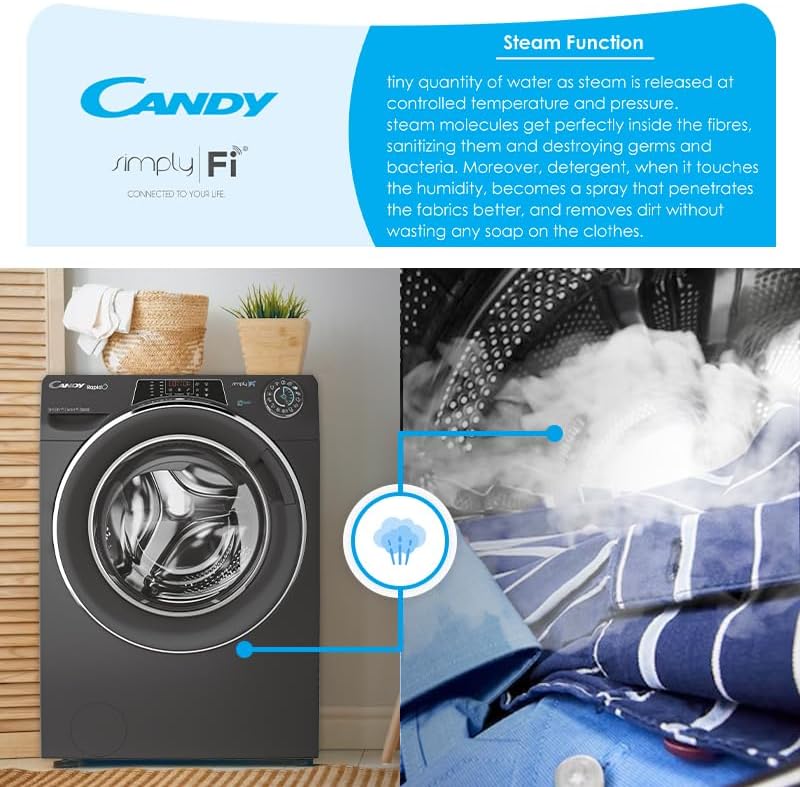
איור 4: Visual representation of the steam function in action. This image shows steam being released into the drum, illustrating its sanitizing and wrinkle-reducing benefits.
The steam function helps to sanitize clothes, reduce wrinkles, and refresh garments. Select programs with steam options for enhanced fabric care.
Simply-Fi App (WiFi & Bluetooth Connectivity)
Connect your appliance to the Candy Simply-Fi App via WiFi or Bluetooth for advanced remote control and additional features:
- Snap & Wash: Take a photo of your laundry, and the app will suggest the best program, temperature, and spin speed.
- Access over 40 additional programs.
- Receive washing tips and support.
- Monitor cycle status and energy consumption.
תַחזוּקָה
Regular maintenance ensures optimal performance and extends the lifespan of your appliance. Always unplug the machine before performing any maintenance.
1. ניקוי מתקן חומר הניקוי
- Remove the dispenser drawer by pressing the release lever.
- שטפו אותו תחת מים זורמים כדי להסיר שאריות חומר ניקוי.
- נקו את בית מגירת המתקן בעזרת מברשת.
- הכנס את המגירה מחדש.
2. ניקוי המסנן
- Locate the filter at the bottom front of the appliance.
- הניחו מיכל רדוד מתחת כדי לאסוף את המים.
- Carefully unscrew the filter cover and remove the filter.
- Clean the filter under running water and remove any lint or debris.
- Reinsert the filter and screw the cover back on securely.
3. ניקוי התוף
- הפעילו מחזור כביסה תחזוקה (למשל, כביסה חמה ללא כביסה וחומר להסרת אבנית) מעת לעת כדי למנוע ריחות והצטברות אבנית.
- Wipe the inside of the drum and the door seal after each use to prevent mold growth.
4. ניקוי חיצוני
- נגב את המשטחים החיצוניים עם רך, דamp בַּד.
- אין להשתמש בחומרי ניקוי שוחקים או ממסים.
פתרון בעיות
לפני פנייה לשירות הלקוחות, אנא בדקו את הבעיות הנפוצות והפתרונות הבאות:
| בְּעָיָה | סיבה אפשרית | פִּתָרוֹן |
|---|---|---|
| המכשיר לא מופעל | Power plug not inserted; door not closed; program not selected; Start/Pause button not pressed. | בדוק את חיבור החשמל; ודא שהדלת סגורה היטב; בחר תוכנית; לחץ על התחל/השהה. |
| מים לא מתמלאים | ברז מים סגור; צינור הכניסה מקופל; אספקת המים מנותקת. | פתחו את ברז המים; יישרו את הצינור; בדקו את אספקת המים הביתית. |
| מים לא מתנקזים | Drain hose kinked or blocked; filter blocked. | Straighten drain hose; clean the filter (refer to Maintenance section). |
| רעידות/רעש מוגזמות | Transport bolts not removed; appliance not level; load unbalanced. | הסירו את ברגי ההובלה; כוונו את רגליות היישור; פזרו מחדש את הכביסה בתוף. |
| תוצאות כביסה גרועות | Incorrect detergent dosage; wrong program selected; overloading. | Adjust detergent amount; select appropriate program; reduce load size. |
מפרטים
- מספר דגם: 31010249
- כושר כביסה: 9 ק"ג
- כושר ייבוש: 6 ק"ג
- דירוג אנרגיה: B
- סוג מנוע: Inverter BPM motor
- מהירות הסיבוב: 1400 סל"ד
- קישוריות: WiFi + Bluetooth (Simply-Fi App compatible)
- תוכניות: 16 standard programs, 9 rapid programs, 40+ additional via app
- מאפיינים מיוחדים: Steam function, Snap & Wash, 6D LED Display
- חומר תוף: נירוסטה
- רמת רעש: 80 dBA
- משקל פריט: 70 ק"ג
אחריות ותמיכה
מידע על אחריות
This Candy RapidÓ Inverter Washer Dryer Combo comes with a 3 שנות אחריות. Please retain your proof of purchase for warranty claims. The warranty covers manufacturing defects under normal household use. For full terms and conditions, refer to the warranty card included with your appliance or contact Candy customer service.
תמיכת לקוחות
If you encounter issues that cannot be resolved using the troubleshooting guide, or for any service inquiries, please contact Candy customer support. Contact details can typically be found on the manufacturer's webבאתר או בתיעוד המצורף למכשיר שלך.