
1. הקדמה
This manual provides detailed instructions for the installation, operation, and maintenance of your Alarm.com ADC-VC728PF Pro Series 4MP Bullet PoE Camera. This camera is designed for both indoor and outdoor surveillance, offering advanced features such as a motorized varifocal lens, 4MP video resolution, and intelligent analytics for enhanced security monitoring.
אנא קרא מדריך זה בעיון לפני שתנסה להתקין או להפעיל את המכשיר כדי להבטיח תפקוד ובטיחות תקינים.
2. תכולת החבילה
ודא שכל הפריטים נמצאים בחבילה שלך:
- Alarm.com ADC-VC728PF Camera
- חומרת הרכבה
- Weather Resistant RJ45 Cap
- מדריך התקנה
- מפתח ברגים
3. המוצר נגמרview
The Alarm.com ADC-VC728PF is a robust Power over Ethernet (PoE) bullet camera featuring a 4MP sensor and a motorized varifocal lens. This design allows for flexible installation and remote adjustment of the camera's field of view without compromising image quality. It supports 24/7 recording to an optional onboard microSD card or a Commercial-Grade Stream Video Recorder (CSVR126), and integrates advanced analytics for object detection and business activity tracking.
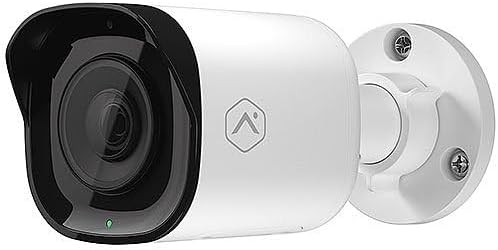
חֲזִית view of the Alarm.com ADC-VC728PF Pro Series 4MP Bullet PoE Camera, showing the lens, LED indicator, and the adjustable mounting base.
תכונות עיקריות:
- 4MP WDR and HDR Video: Delivers high-resolution video with Wide Dynamic Range and High Dynamic Range capabilities (4MP recording supported on Commercial SVR).
- עדשה וריפוקלית ממונעת: Allows remote adjustment of the camera's field of view (3.2-9.8 מ"מ).
- Power over Ethernet (PoE): מפשט את ההתקנה על ידי אספקת חשמל ונתונים דרך כבל Ethernet יחיד.
- SD Card Local Storage: Supports optional onboard microSD card for 24/7 continuous recording.
- חזון לילה IR: Provides clear video surveillance in low-light or no-light conditions.
- Perimeter Guard: Supports LED and Audio Alert features (requires firmware version 0.6.3.601+).
- Business Activity Analytics: Enables intelligent object detection and tracking for commercial applications.
- שימוש בפנים/חוץ: Designed for versatile deployment in various environments.
4. התקנה והתקנה
בצע את השלבים הבאים להתקנה נכונה של המצלמה שלך.
4.1 הרכבת המצלמה
- בחר מיקום: Choose a suitable indoor or outdoor location for wall mounting. Ensure the area provides a clear field of view and is within reach of your network infrastructure.
- הכן את המשטח: Use the included mounting hardware to secure the camera base to the chosen surface. Drill pilot holes if necessary.
- צרף את המצלמה: Securely attach the camera to the mounting base. The adjustable ball joint allows for flexible positioning.
4.2 חיווט וקישוריות
- חיבור כבל אתרנט: Connect a standard Ethernet cable from your PoE-enabled network switch or injector to the camera's RJ45 port.
- Apply Weather Resistant Cap: For outdoor installations, use the included weather-resistant RJ45 cap to protect the Ethernet connection from environmental elements.
- הפעלה: Once connected to a PoE source, the camera will power on automatically. The status LED on the camera will indicate its operational status.
- תצורת רשת: Access the Alarm.com platform or your network management interface to discover and configure the camera. Refer to the Alarm.com documentation for specific network setup procedures.
5. תפעול
After successful installation and network configuration, you can begin operating your ADC-VC728PF camera.
5.1 Varifocal Lens Adjustment
- The motorized varifocal lens can be adjusted remotely through the Alarm.com app or web מִמְשָׁק.
- Navigate to the camera settings to widen or narrow the field of view to optimize surveillance coverage.
5.2 SD Card Recording
- If an optional microSD card is installed, the camera supports 24/7 continuous recording.
- גישה foo מוקלטtage via the Alarm.com platform. Ensure the microSD card is properly formatted as per Alarm.com guidelines.
5.3 אנליטיקה חכמה
- Configure object detection and business activity tracking settings within the Alarm.com platform.
- Utilize the Perimeter Guard feature for LED and audio alerts, if supported by your camera's firmware version.
6. תחזוקה
תחזוקה שוטפת מבטיחה ביצועים אופטימליים ואורך חיים של המצלמה שלך.
- ניקוי: נקו מעת לעת את עדשת המצלמה ואת ביתה בעזרת מטלית רכהamp בַּד. הימנע מחומרי ניקוי שוחקים.
- עדכוני קושחה: Ensure your camera's firmware is up to date. Firmware updates are typically managed through the Alarm.com platform and provide performance enhancements and new features.
- בדיקת כבלים: Regularly inspect all cables and connections for wear or damage, especially in outdoor environments.
7. פתרון תקלות
עיין בטבלה שלהלן לקבלת בעיות נפוצות ופתרונותיהן.
| לְהַנפִּיק | סיבה אפשרית | פִּתָרוֹן |
|---|---|---|
| אין חשמל / המצלמה לא נדלקת | No PoE connection; Faulty Ethernet cable; PoE switch issue. | Verify Ethernet cable connection; Ensure PoE source is active; Try a different cable or PoE port. |
| אין עדכון וידאו | Network connectivity issue; Incorrect camera configuration; Firewall blocking. | Check network connection; Verify camera settings in Alarm.com; Ensure network allows camera traffic. |
| איכות תמונה ירודה | Dirty lens; Incorrect focus (varifocal); Low light conditions; Network bandwidth. | Clean the lens; Adjust varifocal lens remotely; Ensure adequate lighting or check IR functionality; Verify network bandwidth. |
| SD Card Recording Not Working | SD card not installed; SD card full or corrupted; Incorrect recording settings. | Install a compatible microSD card; Format or replace SD card; Check recording settings in Alarm.com. |
8. מפרטים
Detailed technical specifications for the Alarm.com ADC-VC728PF camera.
| תכונה | מִפרָט |
|---|---|
| שם הדגם | Alarm.com VC728PF |
| רזולוציית סטילס אפקטיבית | 4 מגה פיקסל |
| רזולוציית לכידת וידאו | 1080p, 1920p |
| סוג עדשה | עדשה וריטפוקלית ממונעת (3.2-9.8 מ"מ) |
| טכנולוגיית קישוריות | קווית (אתרנט) |
| מקור כוח | PoE (Power over Ethernet) |
| שימוש בפנים/חוץ | פנימי, חיצוני |
| סוג הרכבה | מתקן קיר |
| גורם צורה | כַּדוּר |
| מידות (L x W x H) | 6.8 x 3 x 3 אינץ' |
| משקל פריט | 1.86 פאונד |
| UPC | 850010773322 |
| תכונות מיוחדות | PoE, 4MP, WDR, HDR, IR Night Vision, Business Activity Analytics, Perimeter Guard |
9. אחריות ותמיכה
For warranty information, technical support, or service inquiries, please contact Alarm.com directly or refer to their official webאתר. שמור את קבלת הרכישה שלך לאימות האחריות.
- תמיכה מקוונת: Visit the official Alarm.com support portal for FAQs, troubleshooting guides, and software downloads.
- צור קשר עם שירות לקוחות: Refer to your Alarm.com service provider for direct customer support.