
מָבוֹא
This manual provides detailed instructions for the setup, operation, and maintenance of your KEFEYA S6 15.6-inch Portable Monitor. Please read this manual thoroughly before using the product to ensure proper functionality and to maximize your user experience. Keep this manual for future reference.

Image: KEFEYA S6 Portable Monitor in a triple-screen configuration with a laptop.
תוכן החבילה
ודא שכל הפריטים המפורטים להלן כלולים בחבילה שלך. אם פריטים חסרים או פגומים, אנא צור קשר עם תמיכת הלקוחות.
Image: KEFEYA S6 Portable Monitor and its main components.
- Triple Screen Monitor
- תיק נשיאה
- מדריך להתחלה מהירה
- מדריך למשתמש
- מעמד מסך
- HDMI to TYPE-C Cable (for video only) x 1
- TYPE-C to TYPE-C Cable x 2
- USB-A to TYPE-C Cable x 2
המוצר נגמרview
The KEFEYA S6 Portable Monitor is designed to extend your laptop's display, offering enhanced productivity and versatility. It features a 15.6-inch FHD 1080P IPS display with 120% sRGB color gamut, providing vibrant and accurate visuals.
תכונות עיקריות:
- תצוגה באיכות גבוהה: 15.6-inch FHD (1920x1080) IPS panel with 120% sRGB color coverage, 300 nits brightness, and 1000:1 contrast ratio.
- Flexible and Portable Design: Supports 11 DIY configurations, horizontal/vertical rotation, and a foldable stand for stability and easy transport.
- פקדים ארגונומיים: Multifunctional adjustment button for brightness, tint, and volume.
- מצבי תצוגה מרובים: Supports copy, extend, and mirror modes for various multitasking needs.
- תאימות אוניברסלית: Plug and Play with Windows, macOS, Chrome, Xbox, PS5, Switch via HDMI, USB-C, and USB-A.

Image: Display specifications of the KEFEYA S6 Portable Monitor.

Image: Flexibility and stability features of the monitor, showing rotation capabilities.

Image: Detachable monitor feature, allowing for single or dual screen use.

Image: Enhanced productivity with the KEFEYA S6 Portable Monitor.
הגדרה וחיבור
Follow these steps to connect your KEFEYA S6 Portable Monitor to your device.
Installation for All Laptop Sizes:
The monitor is designed for easy installation. Simply stretch the portable display to match the width of your laptop and attach it. No permanent fixation is required on your laptop.

Image: Installation guide for attaching the monitor to a laptop.
שיטות חיבור:
The KEFEYA S6 supports various connection types for broad compatibility.
Image: Connection setup for the KEFEYA S6 Portable Monitor.
- For Laptops with 2 Full Function Type-C Ports: Use the provided Type-C to Type-C cables to connect directly from your laptop's Type-C ports to the monitor's Type-C ports. This typically provides both video and power.
- For Laptops with HDMI and USB-A/USB-C:
- Connect one screen to the monitor using a Type-C cable (if your laptop has a full-featured Type-C port).
- Connect the other screen using an HDMI to Type-C cable for video, and a USB-A to Type-C cable for power.
- פֶּתֶק: Ensure the HDMI cable is connected to the USB-C and DP ports on the extender for proper functionality.
The monitor is Plug & Play, meaning no additional drivers are typically required for most operating systems (Windows, macOS, Chrome OS).
הוראות הפעלה
The KEFEYA S6 offers various display modes and adjustable settings to optimize your viewניסיון.
מצבי תצוגה:
Enhance your workflow with multiple display configurations:
- תצוגת מראה: Duplicates your laptop's screen content on the portable monitor.
- תצוגה מורחבת: מרחיב את שולחן העבודה שלך על פני מסכים מרובים, ומאפשר מרחב עבודה גדול יותר.
- תצוגה לאורך: Rotate the monitor to a vertical orientation for tasks like coding, document review, or social media feeds.
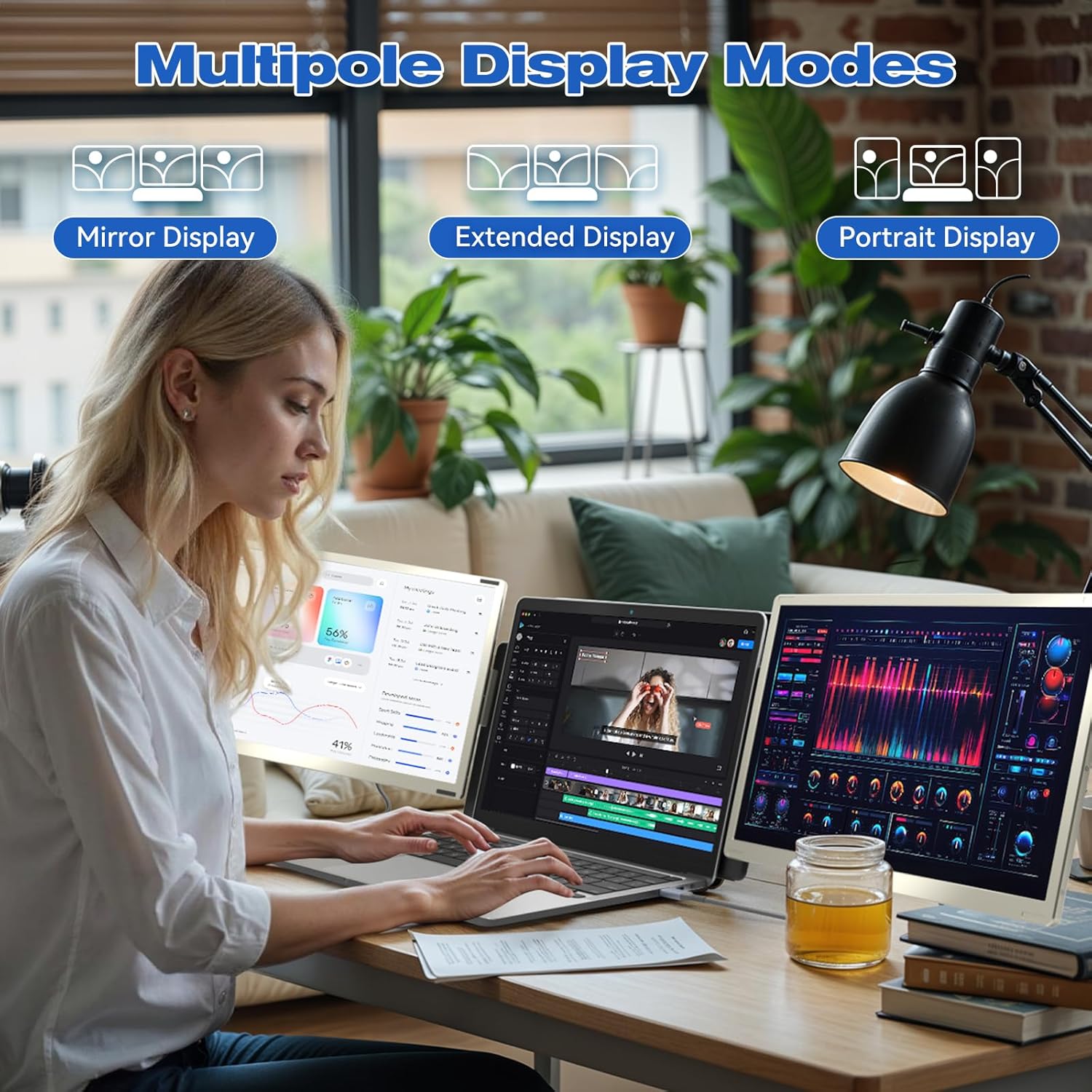
תמונה: דוגמהamples of Mirror, Extended, and Portrait display modes.

Image: Multiple configurations for different usage scenarios.

Image: Usage scenarios for the KEFEYA S6 Portable Monitor.
התאמות:
Use the multifunctional adjustment button on the monitor to customize settings:
- בְּהִירוּת: Adjust the screen's luminance for optimal viewבתנאי תאורה שונים.
- לִצְבּוֹעַ: Fine-tune color balance.
- כֶּרֶך: Control the audio output if the monitor's built-in speakers are used.
תַחזוּקָה
To ensure the longevity and optimal performance of your KEFEYA S6 Portable Monitor, follow these maintenance guidelines:
- ניקוי: השתמשו במטלית רכה ונטולת סיבים כדי לנגב בעדינות את המסך והחלק החיצוני. במקרה של סימנים עקשניים, נקו קלותampשטפו את המטלית במים או בחומר ניקוי המתאים למסכים. הימנעו מכימיקלים חזקים או מחומרים שוחקים.
- אִחסוּן: When not in use, store the monitor in its provided carrying bag to protect it from dust, scratches, and impacts.
- טיפול: Handle the monitor with care. Avoid dropping it or subjecting it to excessive force.
- סְבִיבָה: Operate and store the monitor in a dry environment, away from extreme temperatures, direct sunlight, and high humidity.
פתרון בעיות
If you encounter issues with your KEFEYA S6 Portable Monitor, refer to the following common solutions:
- אין אות / מסך שחור:
- Ensure all cables (USB-C, HDMI, USB-A for power) are securely connected to both the monitor and your laptop.
- Verify that your laptop's display settings are configured to detect and extend/mirror to an external display.
- If using HDMI, ensure the USB-C cable is also connected for power.
- Try connecting to a different port on your laptop or a different device to rule out port or device issues.
- Compatibility Issues (e.g., MacBook M1/M2/M3):
- MacBook M1/M2/M3 models may require a docking station or a compatible H5-T hub cable for dual-screen functionality. Contact customer support for assistance with compatible accessories.
- Image Quality Issues (Flickering, Distorted Colors):
- בדוק את חיבורי הכבלים לאיתור רופף או נזק.
- Adjust the monitor's settings (brightness, contrast, tint) using the multifunctional button.
- ודא שמנהלי ההתקן הגרפיים של המחשב הנייד שלך מעודכנים.
- אין אודיו:
- Increase the monitor's volume using the adjustment button.
- Check your laptop's audio output settings to ensure the monitor is selected as the playback device.
אם שלבים אלה אינם פותרים את הבעיה, אנא עיין בסעיף האחריות והתמיכה לקבלת סיוע נוסף.
מפרטים
| תכונה | מִפרָט |
|---|---|
| מותג | KEFEYA |
| מספר דגם | S6 |
| גודל מסך | 15.6 אינץ' |
| סוג מסך | LCD או LED |
| הַחְלָטָה | 1920 x 1080 (FHD 1080p) |
| יחס גובה-רוחב | 16:9 |
| יחס ניגודיות | 1000:1 |
| זמן תגובה | 2 מילישניות |
| קצב רענון | 60 הרץ |
| סולם צבעים | 120% sRGB |
| בְּהִירוּת | 300 ניטים |
| ממשק חומרה | HDMI, USB, USB Type C |
| מספר יציאות HDMI | 1 |
| מספר יציאות USB 3.0 | 2 |
| סוג מחבר | HDMI, USB Type A, USB Type C |
| מכשירים תואמים | מחשב נייד |
| מידות (L x W x H) | 36 x 21.6 x 4.5 סנטימטרים |
| משקל המוצר | 2.39 קילוגרם |
| תכונות מיוחדות | 120% sRGB, Energy Efficiency, Blue Light Filter, Anti-glare Screen |
אחריות ותמיכה
The KEFEYA S6 Portable Monitor comes with a one-year warranty from the date of purchase. For any product-related inquiries, technical assistance, or warranty claims, please contact KEFEYA customer support.
We offer 24/7 online assistance to resolve compatibility issues, signal problems, or dual-screen configurations. If you require specific accessories like the H5-T cable, please reach out to our customer service team.
לתמיכה, אנא בקרו באתר הרשמי שלנו website or contact us via the details provided in your Quick Start Guide.