
nubia V60 (Model Number: 123439101056)
מדריך למשתמש של סמארטפון ZTE nubia V60
Model: V60 (123439101056) | Brand: nubia
1. הקדמה
Welcome to the user manual for your new ZTE nubia V60 smartphone. This guide provides essential information to help you set up, operate, maintain, and troubleshoot your device. Please read this manual thoroughly to ensure optimal performance and longevity of your smartphone.
The nubia V60 features a 6.72-inch FHD+ display, a powerful 50MP AI rear camera, a 32MP front camera, 8GB RAM (expandable with 12GB Dynamic RAM), 256GB ROM, a 5000mAh battery with 22.5W fast charging, NFC, fingerprint recognition, and DTS sound effects.
2. הגדרה ראשונית
2.1. פתיחת הקופסה ותכולת האריזה
לפני שתתחילו, ודאו שכל הפריטים נמצאים באריזה:
- ZTE nubia V60 Smartphone
- מתאם מתח
- כבל USB
- כלי להוצאת כרטיס ה-SIM (עשוי להשתנות בהתאם לאזור)
- מדריך התחלה מהירה (מסמך זה משמש כמדריך מקיף)
2.2. הכנסת כרטיס ה-SIM וכרטיס ה-microSD
- אתר את מגש כרטיס ה-SIM בצד המכשיר.
- הכנס את כלי חילוץ ה-SIM לחור הקטן שליד המגש ולחץ בחוזקה עד שהמגש ייצא החוצה.
- הנח את כרטיס/י ה-Nano-SIM ו/או כרטיס ה-microSD (אם רלוונטי) במגש כאשר המגעים הזהובים פונים כלפי מטה, וודא שהם מיושרים כהלכה.
- דחפו בעדינות את המגש בחזרה לתוך החריץ עד שיינעל במקומו בנקישה.

תמונה: צד view of the nubia V60, illustrating the location of the SIM card tray and physical buttons.
2.3. טעינת הסוללה
Before first use, fully charge your device. Connect the USB cable to the power adapter and then to the phone's charging port. Plug the power adapter into a wall outlet. The device supports 22.5W fast charging.
2.4. הפעלה ותצורה ראשונית
- לחץ והחזק את לחצן ההפעלה (הממוקם בצד ימין) עד שהמסך יידלק.
- Follow the on-screen instructions to select your language, connect to Wi-Fi, set up your Google account, and configure security features like fingerprint recognition.
3. הפעלת המכשיר שלך
3.1. ניווט בסיסי
The nubia V60 operates on Android 13.0. Use touch gestures such as tap, swipe, pinch-to-zoom, and long-press to navigate the interface. The power button and volume buttons are located on the right side of the device.

תמונה: חזית view of the nubia V60, showcasing its 6.72-inch FHD+ display.
3.2. תכונות המצלמה
Your device is equipped with a 50MP AI Rear Camera and a 32MP Front Camera.
- הפעלת המצלמה: הקש על סמל המצלמה במסך הבית או במסך הנעילה.
- צילום תמונות/סרטונים: Tap the shutter button to capture an image or switch to video mode to record.
- שיפורי בינה מלאכותית: The AI features automatically optimize settings for various scenes and subjects.
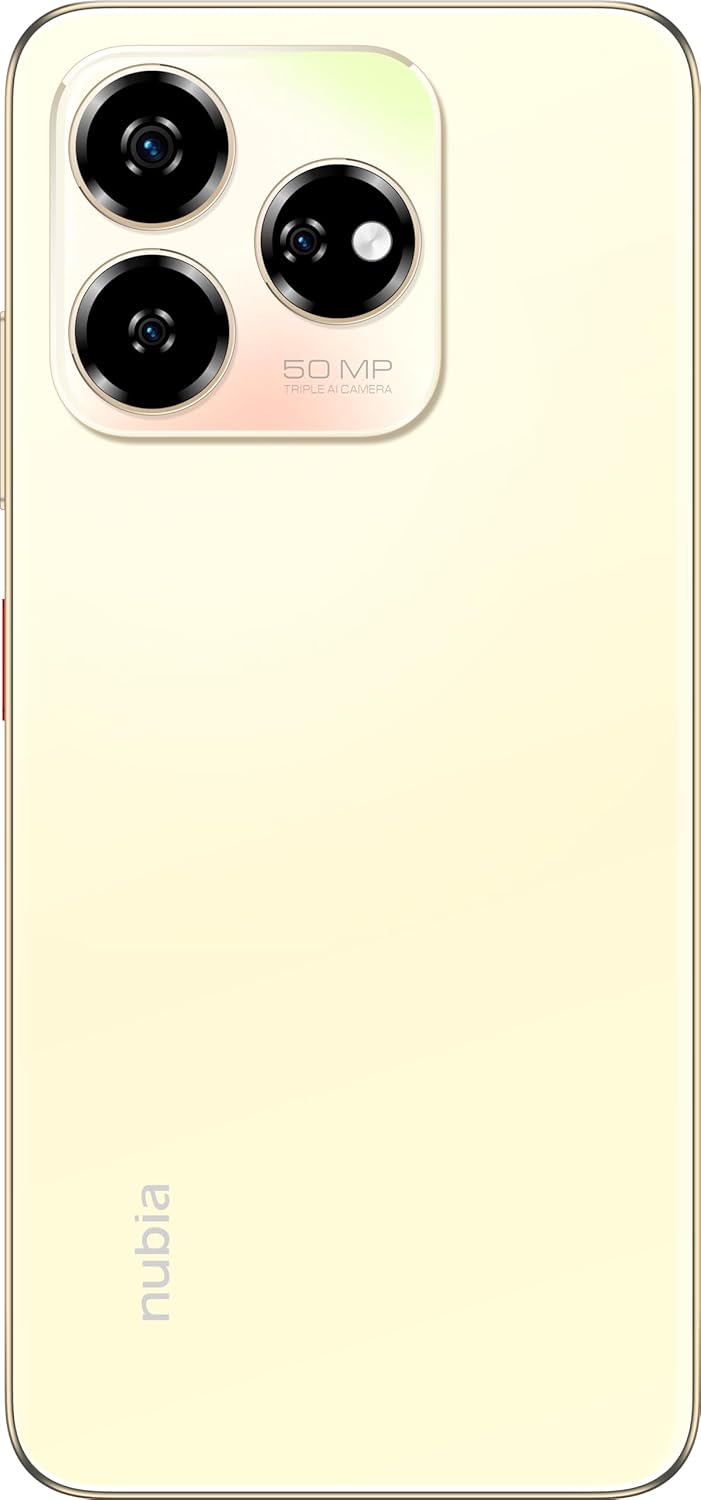
תמונה: אחורי view of the nubia V60, highlighting the 50MP triple AI camera module.
3.3. זיהוי טביעת אצבע
The device features a side-mounted fingerprint sensor for secure and quick unlocking. To set up:
- עבור אל הגדרות > אבטחה > טביעת אצבע.
- פעל לפי ההנחיות שעל המסך כדי לרשום את טביעת האצבע/ות שלך.
3.4. פונקציונליות NFC
NFC (Near Field Communication) allows for quick data exchange and contactless payments. To use NFC:
- ודא ש-NFC מופעל ב הגדרות > מכשירים מחוברים > העדפות חיבור > NFC.
- Tap your phone to another NFC-enabled device or payment terminal to initiate a connection or transaction.
3.5. DTS Sound Effect
Experience enhanced audio quality with DTS sound effects. This feature can be configured in your device's sound settings to optimize audio for various media types.
3.6. Live Island
The Live Island feature provides dynamic notifications and quick access to certain functions around the front camera cutout. Explore its functionalities through your device's display settings or by interacting with notifications.
4. תחזוקה וטיפול
4.1. ניקוי המכשיר
השתמשו במטלית רכה ונטולת סיבים כדי לנקות את המסך וגוף הטלפון. הימנעו משימוש בכימיקלים חזקים או בחומרים שוחקים שעלולים לפגוע בגימור או בציפוי המסך.
4.2. עדכוני תוכנה
בדוק באופן קבוע אם קיימים עדכוני תוכנה והתקן אותם כדי לוודא שהמכשיר שלך כולל את התכונות, תיקוני האבטחה ושיפורי הביצועים העדכניים ביותר. עבור אל הגדרות > מערכת > עדכון מערכת.
4.3. טיפול בסוללה
- הימנעו מטמפרטורות קיצוניות, שכן הן עלולות לפגוע בחיי הסוללה.
- השתמשו רק באביזרי טעינה מקוריים או מאושרים.
- להשגת תקינות סוללה אופטימלית, הימנעו מפריקה מלאה של הסוללה באופן תכוף או מהשארתה ב-100% למשך תקופות ממושכות.
4.4. ניהול אחסון
מעת לעת מחדשview your device's storage (256GB ROM) and clear unnecessary files, apps, or media to maintain optimal performance. You can check storage usage in הגדרות > אחסון.
5. פתרון תקלות
This section addresses common issues you might encounter with your nubia V60.
5.1. המכשיר לא נדלק
- ודא שהסוללה טעונה. חבר את המטען והמתן מספר דקות לפני שתנסה להפעיל.
- לחץ והחזק את לחצן ההפעלה למשך 10-15 שניות לפחות כדי לאלץ הפעלה מחדש.
5.2. בעיות טעינה
- Verify that the charging cable and adapter are securely connected and undamaged.
- Try using a different power outlet or charging accessory.
- Clean the charging port gently with a soft, dry brush to remove any debris.
5.3. בעיות קישוריות רשת
- בדוק אם כרטיס ה-SIM שלך מוכנס כראוי ומופעל.
- הפעל וכבה את מצב טיסה.
- הפעל מחדש את המכשיר שלך.
- עבור אל הגדרות > רשת ואינטרנט > רשת סלולרית וודאו שסוג הרשת המועדף עליכם נבחר.
5.4. אפליקציות קורסות או קופאות
- סגור ופתח מחדש את האפליקציה.
- נקה את המטמון והנתונים של האפליקציה ב הגדרות > אפליקציות > [שם אפליקציה] > אחסון ומטמון.
- ודא שהאפליקציה מעודכנת לגרסה העדכנית ביותר שלה.
- הפעל מחדש את המכשיר שלך.
5.5. איפוס להגדרות יצרן (מוצא אחרון)
אזהרה: איפוס להגדרות היצרן ימחק את כל הנתונים בטלפון שלך. גבה נתונים חשובים לפני שתמשיך.
כדי לבצע איפוס להגדרות היצרן, עבור אל הגדרות > מערכת > אפשרויות איפוס > מחק את כל הנתונים (איפוס להגדרות היצרן) ופעל לפי ההוראות.
6. מפרט טכני
| תכונה | מִפרָט |
|---|---|
| שם הדגם | V60 |
| מספר דגם של פריט | 123439101056 |
| מותג | נוביה |
| מַעֲרֶכֶת הַפעָלָה | אנדרואיד 13.0 |
| גודל מסך | 6.72 אינץ' |
| גודל זיכרון RAM מותקן | 8 GB (Additional 12GB Dynamic RAM) |
| קיבולת אחסון זיכרון | 256 ג'יגה-בייט |
| מהירות מעבד | 1.8 גיגה-הרץ |
| מצלמה אחורית | מצלמת AI 50MP |
| מצלמה קדמית | 32MP |
| דירוג כוח הסוללה | 5000 מיליאמפר/שעה |
| טעינה מהירה | 22.5W |
| טכנולוגיות תקשורת אלחוטית | NFC |
| טכנולוגיות קישוריות | NFC |
| טכנולוגיה סלולרית | 4G |
| GPS | GLONASS |
| ג'ק אודיו | אין שקע אוזניות |
| גורם צורה | בַּר |
| צֶבַע | Sunlit Gold |
| משקל פריט | 510 גרם |
| מידות חבילה | 18 x 8.6 x 5.6 ס"מ |
| מה יש בקופסה | מתאם חשמל, כבל USB |
7. מידע על אחריות
Your ZTE nubia V60 smartphone comes with a standard manufacturer's warranty, covering defects in materials and workmanship under normal use. The duration and terms of this warranty may vary by region. Please refer to the warranty card included in your product packaging for specific details.
Additionally, extended warranty and accidental damage protection plans may be available for purchase. For example, options such as a 1-Year Extended Warranty Plan, 2-Years Extended Warranty Plan, and 1-Year Accidental Damage Protection Plan might be offered by authorized retailers.
שמור את הוכחת הרכישה שלך לכל תביעת אחריות.
8. תמיכת לקוחות
For further assistance, technical support, or service inquiries regarding your ZTE nubia V60, please contact nubia customer service through their official webאתר או פרטי הקשר המופיעים בתיעוד המוצר שלך.
You can often find FAQs, troubleshooting guides, and software downloads on the official nubia support website. When contacting support, please have your device model number (V60) and item model number (123439101056) ready.