
מָבוֹא
This manual provides comprehensive instructions for the ProtoArc EK01 Plus Ergonomic Wireless Backlit Keyboard. Please read this guide carefully to ensure proper setup, operation, and maintenance of your device. Keep this manual for future reference.
תוכן החבילה
ודא שכל הפריטים נמצאים בחבילה:
- ProtoArc EK01 Plus Ergonomic Wireless Backlit Keyboard
- משענת פרק כף היד
- כבל טעינה USB-C
- מקלט USB 2.4G
- מדריך למשתמש
המוצר נגמרview
The ProtoArc EK01 Plus is a full-size ergonomic keyboard designed to enhance typing comfort and reduce muscle strain. Its split and curved keyframe design promotes a natural hand and wrist posture.
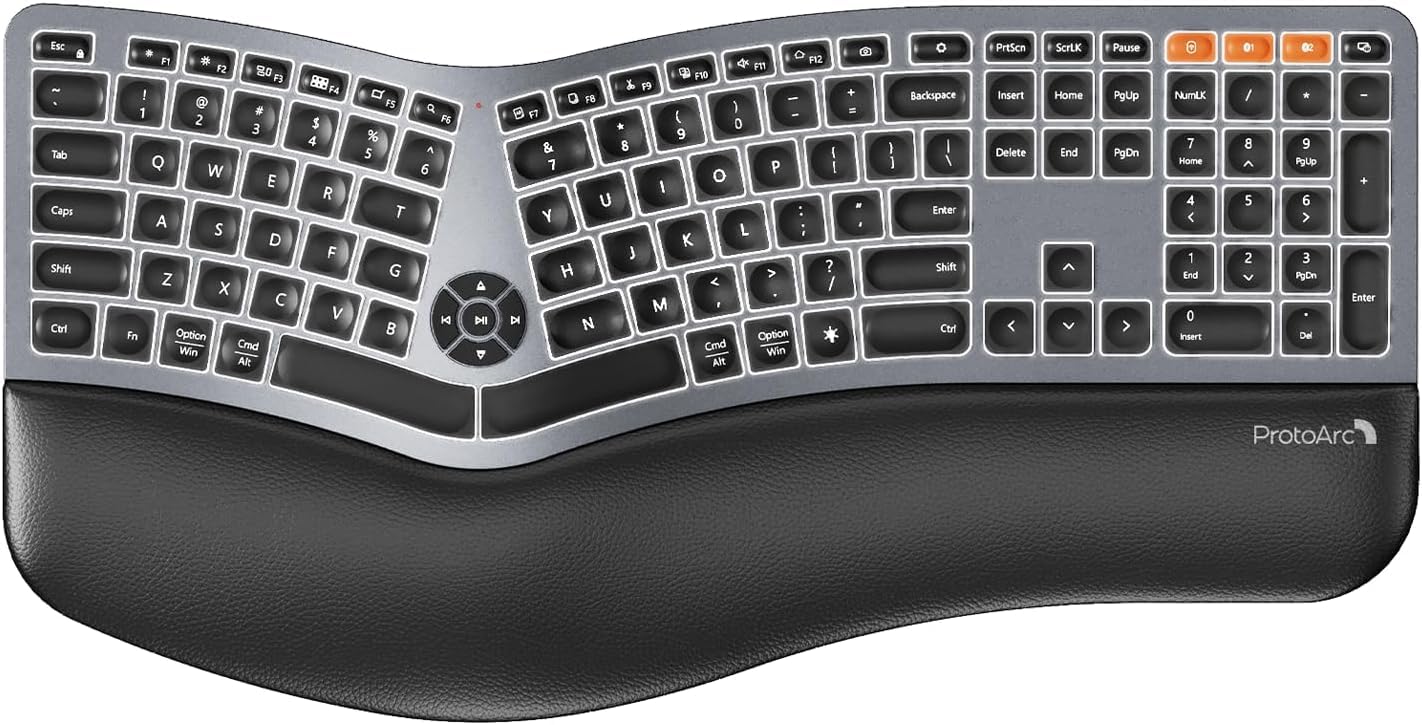
Image 1: ProtoArc EK01 Plus Ergonomic Wireless Backlit Keyboard. This image displays the full keyboard with its split design, integrated wrist rest, and key layout.
תכונות עיקריות:
- Ergonomic Full-Size Design: Features a split, curved keyframe and integrated wrist rest to minimize muscle fatigue and promote proper posture.
- Adjustable Tilt Feet: Four adjustable tilt feet allow customization of the keyboard angle for optimal comfort.
- Adjustable Backlighting: Soft white LED backlighting with three adjustable brightness levels (low-medium-high) for comfortable typing in various lighting conditions.
- קישוריות מרובת מכשירים: Connects to up to three devices simultaneously via Bluetooth and 2.4G USB. Easily switch between devices with a dedicated key.
- USB-C נטענת: Equipped with a 2000 mAh rechargeable lithium battery for extended use.
- מצב שינה אוטומטי: Enters sleep mode after 60 minutes of inactivity to conserve power, waking up within 3 seconds upon key press.
- תְאִימוּת: Widely compatible with Windows 7/8/10, Mac OS X 10.12 or higher, and Android 4.3 or higher.
הגדרה
1. טעינת המקלדת
- Locate the USB-C charging port on the keyboard.
- Connect the provided USB-C cable to the keyboard and the other end to a USB power source (e.g., computer USB port, wall adapter).
- נורית חיווי הטעינה תידלק. לאחר טעינה מלאה, ייתכן שהנורית תשנה צבע או תיכבה.
2. התחברות למכשירים
The keyboard supports both 2.4G USB and Bluetooth connectivity.
2.1. חיבור USB 2.4G
- Locate the 2.4G USB receiver (dongle). It is usually stored in a compartment on the keyboard or in the packaging.
- חבר את מקלט ה-USB ליציאת USB זמינה במחשב שלך.
- הפעל את המקלדת באמצעות מתג ההפעלה.
- המקלדת אמורה להתחבר אוטומטית למכשיר שלך.
2.2. חיבור בלוטות' (עד 3 מכשירים)
- הפעל את המקלדת.
- Press and hold one of the Bluetooth channel keys (e.g., BT1, BT2, או BT3) למשך 3-5 שניות עד שנורית החיווי תהבהב, המציינת מצב צימוד.
- במכשיר שלך (מחשב, טאבלט, סמארטפון), הפעל את Bluetooth וחפש מכשירים חדשים.
- Select "ProtoArc EK01 Plus" (or similar name) from the list of available devices.
- פעל לפי ההנחיות שעל המסך כדי להשלים את תהליך הצימוד. נורית החיווי תפסיק להבהב לאחר החיבור.
- Repeat these steps for up to two additional Bluetooth devices using the other Bluetooth channel keys.
מִבצָע
1. מעבר בין מכשירים
כדי לעבור בין התקנים מחוברים, פשוט לחצו על מקש החיבור המתאים:
- לִלְחוֹץ 2.4G כדי לעבור למכשיר המחובר דרך מקלט ה-USB.
- לִלְחוֹץ BT1 כדי לעבור למכשיר ה-Bluetooth הראשון.
- לִלְחוֹץ BT2 כדי לעבור למכשיר ה-Bluetooth השני.
- לִלְחוֹץ BT3 to switch to the third Bluetooth device.
2. כוונון התאורה האחורית
The keyboard features a soft white LED backlight with three brightness levels.
- To cycle through brightness levels (low, medium, high, off), press the dedicated backlight key (refer to keyboard layout for specific key).
3. Sleep Mode and Power Saving
To conserve battery life, the keyboard will automatically enter sleep mode after 60 minutes of inactivity. To wake the keyboard, press any key. The keyboard will be ready for use within 3 seconds.
4. הטיה מתכווננת
The keyboard includes four adjustable tilt feet. Extend or retract these feet to customize the typing angle to your preference, ensuring comfortable wrist positioning whether sitting or standing.
תַחזוּקָה
1. ניקוי המקלדת
- נתק את המקלדת מכל המכשירים ומקורות החשמל לפני הניקוי.
- השתמש במטלית רכה נטולת מוך מעט דampנגב את פני המקלדת במים או בתמיסת ניקוי עדינה.
- הימנעו משימוש בכימיקלים חזקים, חומרי ניקוי שוחקים או ממסים, מכיוון שאלה עלולים לפגוע בגימור המקלדת.
- לניקוי בין מקשים, השתמשו באוויר דחוס כדי להסיר אבק ופסולת.
2. טיפול בסוללה
- טען את המקלדת באופן קבוע כדי לשמור על תקינות הסוללה.
- הימנעו מפריקת הסוללה באופן מלא לעתים קרובות.
- אם מאחסנים את המקלדת לתקופה ממושכת, טען אותה עד לכ-50% לפני האחסון.
פתרון בעיות
| בְּעָיָה | סיבה אפשרית | פִּתָרוֹן |
|---|---|---|
| המקלדת לא מגיבה | Low battery; Keyboard off; Incorrect connection mode; USB receiver not plugged in (2.4G); Bluetooth not paired. | Charge the keyboard; Turn on the keyboard; Switch to the correct connection mode (2.4G, BT1/2/3); Ensure USB receiver is securely plugged in; Re-pair Bluetooth. |
| Lag or delayed input | הפרעות; מרחק מהמקלט/מכשיר; סוללה חלשה. | Move closer to the receiver/device; Ensure no strong interference sources nearby; Charge the keyboard. |
| תאורה אחורית לא עובדת | תאורת רקע כבויה; סוללה חלשה. | Press the backlight key to adjust brightness; Charge the keyboard. |
| לא ניתן להתחבר באמצעות Bluetooth | Keyboard not in pairing mode; Device Bluetooth off; Already connected to 3 devices. | Ensure keyboard is in pairing mode (flashing indicator); Enable Bluetooth on your device; Disconnect from an existing Bluetooth device if maximum reached. |
מפרטים
| מותג | ProtoArc |
| מספר דגם | EK01 פלוס |
| טכנולוגיית קישוריות | Bluetooth, 2.4G USB |
| תיאור מקלדת | Ergonomic, Full Size, Split Design |
| תכונות מיוחדות | Ergonomic, Full Size, Wrist Rest, Backlit, Rechargeable |
| צֶבַע | אפור חלל |
| תמיכה בצבעי תאורה אחורית | Monochromatic (White LED) |
| חוֹמֶר | פּלָסטִי |
| מקור כוח | מופעל על ידי סוללה (סוללת ליתיום 2000 מיליאמפר/שעה) |
| סוג מתג | קְרוּם |
| פריסת מקלדת | QWERTY (UK layout for this variant) |
| מספר מפתחות | 117 |
| מכשירים תואמים | Laptop, PC, Tablet, Windows/Mac/Android |
| משקל פריט | 1.6 קילוגרם |
| מידות (בערך) | 48 ס"מ (אורך) x 25 ס"מ (רוחב) |
אחריות ותמיכה
For warranty information and technical support, please refer to the ProtoArc official website or contact their customer service. Details are typically provided on the product packaging or the official brand store.
ProtoArc Official Store: Visit ProtoArc Store on Amazon