
1. מידע בטיחות חשוב
Please read these instructions carefully before using your VonHaus Pedestal Fan. Keep this manual for future reference.
- ודאו שהמאוורר ממוקם על משטח יציב ומאוזן.
- אין להכניס אצבעות או חפצים זרים לתוך סורג המאוורר.
- הרחק את המאוורר ממים או נוזלים אחרים.
- Unplug the fan from the power outlet before cleaning or maintenance.
- מכשיר זה אינו מיועד לשימוש על ידי אנשים (כולל ילדים) עם יכולות פיזיות, חושיות או נפשיות מופחתות, או חוסר ניסיון וידע, אלא אם כן הם קיבלו פיקוח או הדרכה לגבי השימוש במכשיר על ידי אדם האחראי לבטיחותם.
- יש לפקח על ילדים כדי להבטיח שהם לא ישחקו עם המכשיר.
2. תכולת החבילה
ודא שכל הרכיבים קיימים לפני ההרכבה.
- Fan Head Assembly (with 5 blades)
- גרילים קדמיים ואחוריים
- Pedestal Pole (Adjustable Height)
- בָּסִיס
- שלט רחוק (עם סוללה)
- מדריך למשתמש
3. התקנה והרכבה
Follow these steps to assemble your VonHaus Pedestal Fan.
- חבר את הבסיס: Securely attach the pedestal pole to the base using the provided screws.
- Assemble the Fan Head:
- Place the rear grille onto the motor housing, aligning the notches.
- Attach the fan blades to the motor shaft, ensuring they are firmly in place.
- Secure the front grille to the rear grille using the clips or screws provided, ensuring it is tightly closed.
- Mount Fan Head to Pedestal: Attach the assembled fan head to the top of the pedestal pole. Ensure it clicks into place or is secured with the locking mechanism.
- התאם גובה: Loosen the height adjustment knob on the pedestal pole, extend or retract the pole to your desired height (up to 128 cm), and then tighten the knob securely.

Image: This diagram illustrates the adjustable features of the fan, including its height range of 110-128 cm, a tilting range of +7 to -15 degrees, and an 80-degree left/right oscillation capability. The fan base is 42 cm wide.
4. הוראות הפעלה
Your VonHaus Pedestal Fan offers multiple settings for personalized comfort.
לוח בקרה ושלט רחוק
The fan can be operated using the touch-sensitive LED display on the unit or the included remote control.

Image: This image displays the fan's LED touch panel, which includes controls for power, speed, mode, timer, and oscillation. It also shows the remote control, which allows for convenient adjustment of all fan functions from a distance.
הפעלה/כיבוי
הקש על כּוֹחַ כפתור בלוח הבקרה או בשלט הרחוק כדי להפעיל או לכבות את המאוורר.
הגדרות מהירות
The fan features מהירויות מתכווננות של 24. השתמש ב- + ו - buttons on the control panel or remote to increase or decrease the airflow intensity.

Image: This image highlights the fan's powerful DC motor and its capability to provide 24 different airflow speeds, allowing users to select their desired cooling level. It also references a 15-hour timer function.
מצבי הפעלה
בחר מתוך 3 programmed modes to suit your preference:
- מצב נוחות: Provides a steady, consistent airflow.
- מצב טבעי: מדמה בריזה טבעית על ידי שינוי מהירות המאוורר.
- מצב לילה: Operates at a lower speed with reduced noise (minimum 35 dB) and dims the LED display for undisturbed sleep.

Image: This image depicts the fan in a bedroom, illustrating its three programmed modes: Comfort, Natural, and Night. It emphasizes that the digital display dims in Night mode and the fan operates at a minimum noise level of 35 dB.
תְנוּדָה
הקש על תְנוּדָה button to activate or deactivate the 80° left-to-right oscillation feature, distributing air across a wider area.
פונקציית טיימר
The fan includes a טיימר 15 שעות. הקש על שָׁעוֹן עֶצֶר button repeatedly to set the desired operating duration in 1-hour increments. The fan will automatically turn off after the set time.
הטיה מתכווננת
Manually adjust the fan head's vertical tilt within a range of +7° to -15° to direct airflow precisely where needed.
5. תחזוקה
ניקוי ותחזוקה קבועים יבטיחו ביצועים אופטימליים ואורך חיים של המאוורר שלכם.
ניקוי
- נתק תמיד את המאוורר לפני הניקוי.
- השתמש רך, דamp מטלית לניגוב המשטחים החיצוניים. אין להשתמש בחומרי ניקוי שוחקים או ממסים.
- To clean the fan blades, carefully remove the front grille (refer to assembly instructions for reverse steps). Wipe the blades with a damp cloth. Ensure blades are dry before reattaching the grille.
- אין לטבול את המאוורר במים או לאפשר למים לטפטף לתוך בית המנוע.
אִחסוּן
כאשר המאוורר אינו בשימוש למשך תקופות ממושכות, יש לאחסן אותו במקום קריר ויבש, רצוי באריזתו המקורית, כדי להגן עליו מפני אבק ונזק.
6. פתרון תקלות
If you encounter any issues with your fan, refer to the following common problems and solutions.
- המאוורר לא נדלק:
- בדוק אם כבל החשמל מחובר היטב לשקע חשמלי תקין.
- Ensure the power button has been pressed.
- ודא שסוללת השלט רחוק אינה ריקה.
- זרימת אוויר חלשה:
- הגבר את הגדרת המהירות.
- Ensure the fan grilles and blades are clean and free from dust buildup.
- Check for any obstructions blocking the airflow.
- המאוורר רועש:
- Ensure the fan is on a stable, level surface.
- Check if any parts are loose or vibrating. Tighten if necessary.
- Clean the fan blades and grilles to remove any debris that might cause imbalance.
- השלט רחוק לא עובד:
- החלף את הסוללה בשלט הרחוק.
- ודא שאין חסימות בין השלט למקלט של המאוורר.
- Point the remote directly at the fan's control panel.
If the problem persists after trying these solutions, please contact VonHaus customer support.
7. מפרטים
| תכונה | פְּרָט |
|---|---|
| מספר דגם | 8100085 |
| מותג | VonHaus |
| מידות (L x W x H) | 42 x 42 x 128 ס"מ |
| מִשׁקָל | 6.22 ק"ג |
| כּוֹחַ | 50 וואט |
| מספר מהירויות | 24 |
| מצבי הפעלה | 3 (Comfort, Natural, Night) |
| תְנוּדָה | 80° (Left/Right) |
| התאמת הטיה | +7° / -15° |
| שָׁעוֹן עֶצֶר | עד 15 שעות |
| שיטת בקרה | שלט רחוק, לוח מגע |
| מספר להבים | 5 |
| חוֹמֶר | מַתֶכֶת |
| צֶבַע | לָבָן |
| שימוש פנימי/חיצוני | מקורה |
| רכיבים כלולים | שְׁלַט רָחוֹק |
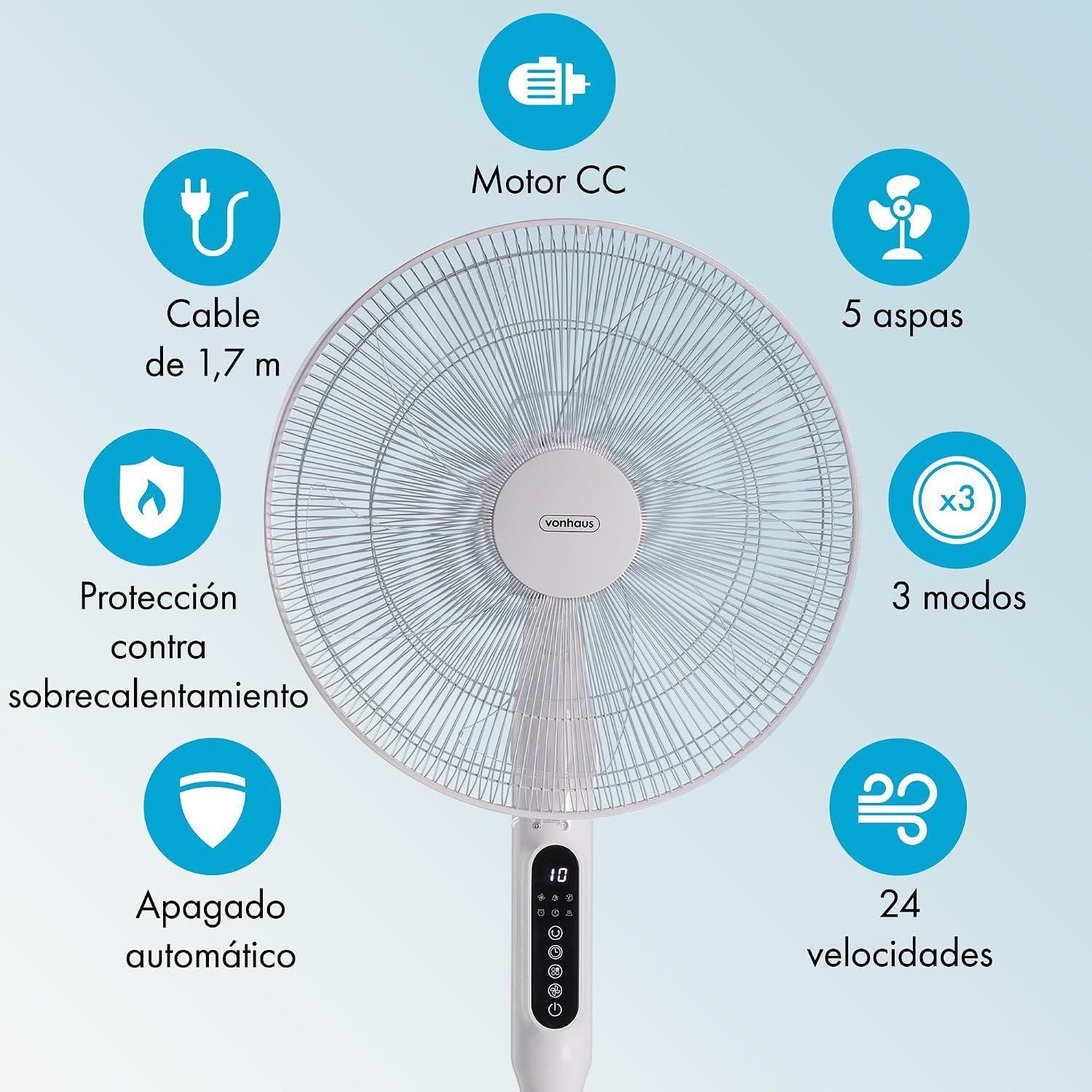
Image: This graphic summarizes the fan's main features, including a DC motor, 5 blades, 3 operating modes, 24 speeds, 1.7m cable, overheat protection, and automatic shut-off.
8. אחריות ותמיכה
All VonHaus products come with a minimum אחריות לשנה. This warranty covers manufacturing defects and ensures that we are available to assist you if any issues arise with your product.
For technical support, troubleshooting assistance, or warranty claims, please contact VonHaus customer service through the retailer where you purchased the product or visit the official VonHaus webאתר ליצירת קשר.
אנא שמור את הוכחת הרכישה שלך לצורכי אחריות.