
מקש רווח QIG-D01
מדריך למשתמש של מסיר לחות Spacekey QIG-D01
Model: QIG-D01
1. הקדמה
Thank you for choosing the Spacekey QIG-D01 Dehumidifier. This manual provides essential information for the safe and efficient operation of your new appliance. Please read it thoroughly before use and retain it for future reference. This dehumidifier is designed to reduce excess moisture in areas up to 850 square feet, such as basements, bedrooms, bathrooms, RVs, and closets, improving air quality and comfort.

איור 1: חזית view of the Spacekey QIG-D01 Dehumidifier, showing its white and black design with a digital display and visible water tank.

Figure 2: Visual representation of the dehumidifier's effectiveness in reducing room humidity.

Figure 3: Common issues resolved by maintaining optimal humidity levels with the dehumidifier.
2. הוראות בטיחות חשובות
כדי להפחית את הסיכון לשריפה, התחשמלות או פציעה, יש להקפיד תמיד על אמצעי הזהירות הבסיסיים הבאים:
- קרא את כל ההוראות לפני השימוש במכשיר.
- אין להפעיל את מסיר הלחות עם כבל או תקע פגומים.
- ודא ששקע החשמל מוארק כהלכה.
- אין לחסום את כניסות או יציאות האוויר.
- הרחיקו את המכשיר ממים ונוזלים אחרים.
- נתקו את מסיר הלחות מהחשמל לפני ניקוי או ביצוע כל תחזוקה.
- אל תאפשר לילדים להפעיל את המכשיר ללא השגחה.
- This appliance is equipped with a 45° tip-over protection feature. If the unit is tilted beyond 45 degrees, it will automatically shut off to prevent damage or spills.

Figure 4: Illustration of the dehumidifier's 45° tip-over protection, demonstrating automatic shutdown for safety.
3. המוצר נגמרview
3.1 Components and Design Features
- יחידה ראשית עם לוח בקרה
- Water Tank (3.0L / 106 oz capacity)
- מסנן אוויר רחיץ
- כבל חשמל
- Integrated Handles for portability
- Visual Water Tank for easy monitoring
- 45° Tip-over Protection
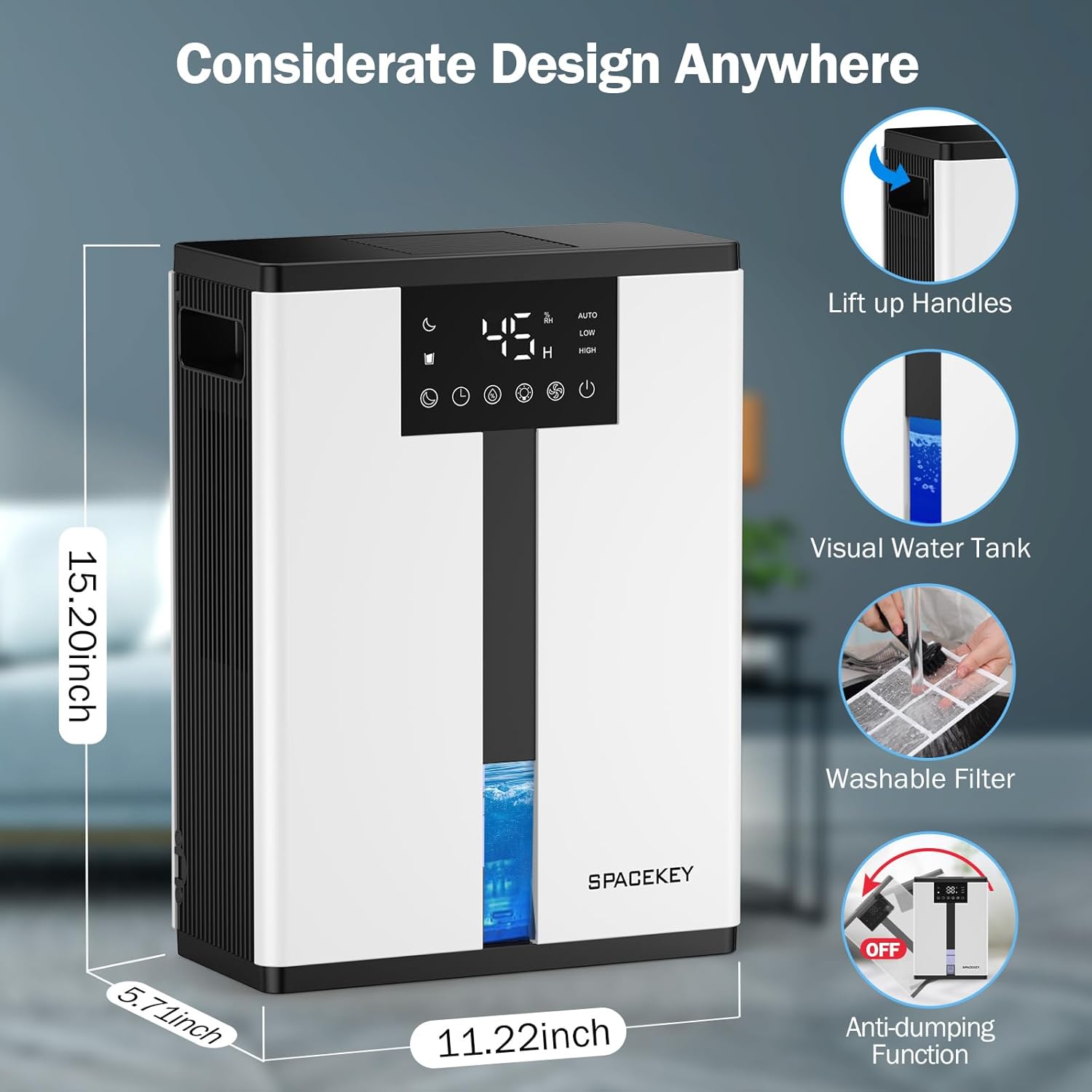
Figure 5: Key design elements and dimensions of the Spacekey QIG-D01 Dehumidifier.
3.2 Advanced Dehumidification Technology
The Spacekey QIG-D01 utilizes semiconductor condensation technology with dual fans and dual semiconductor condensers for enhanced efficiency in moisture removal.
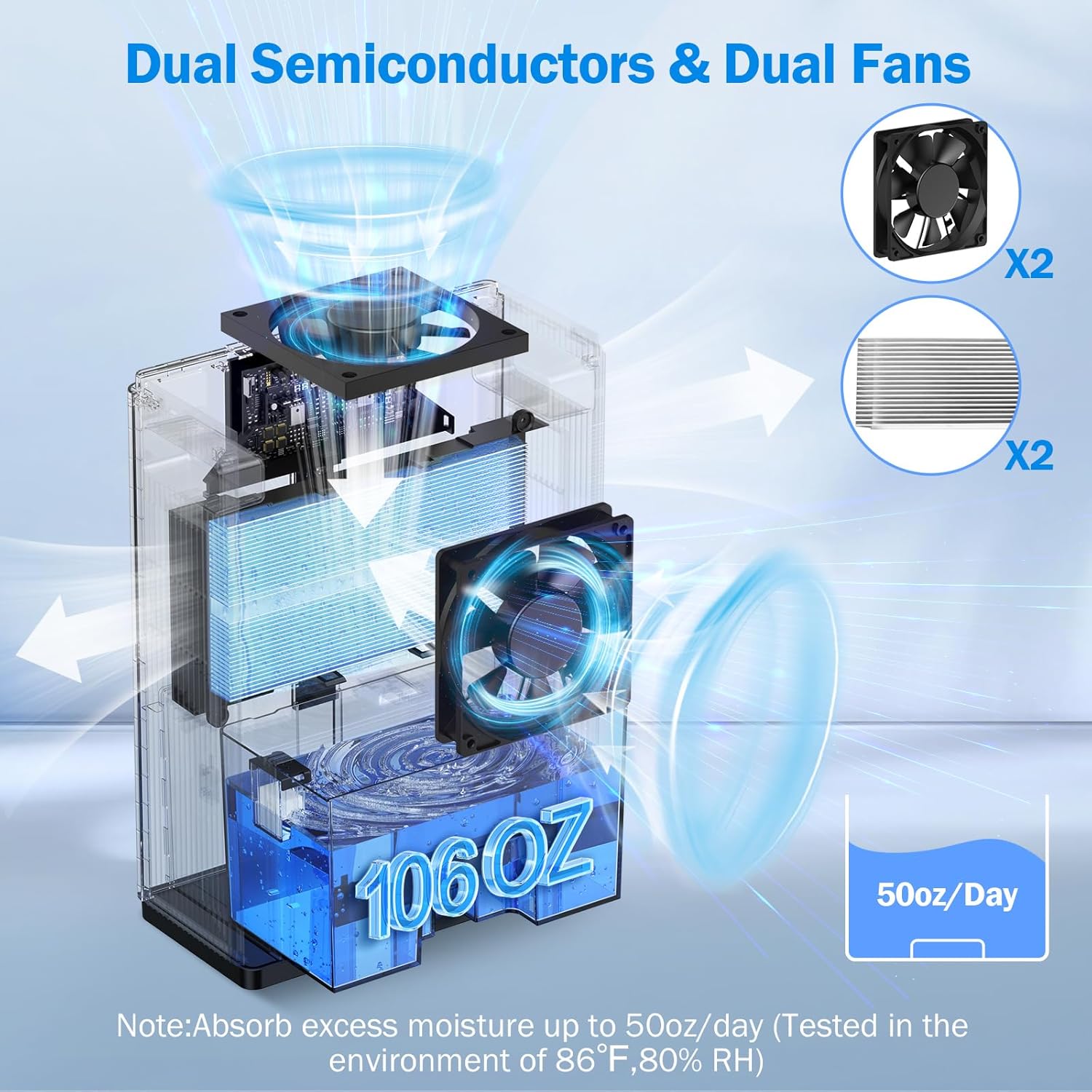
איור 6: פנימי view of the dual semiconductor and dual fan system for efficient dehumidification.
3.3 לוח בקרה
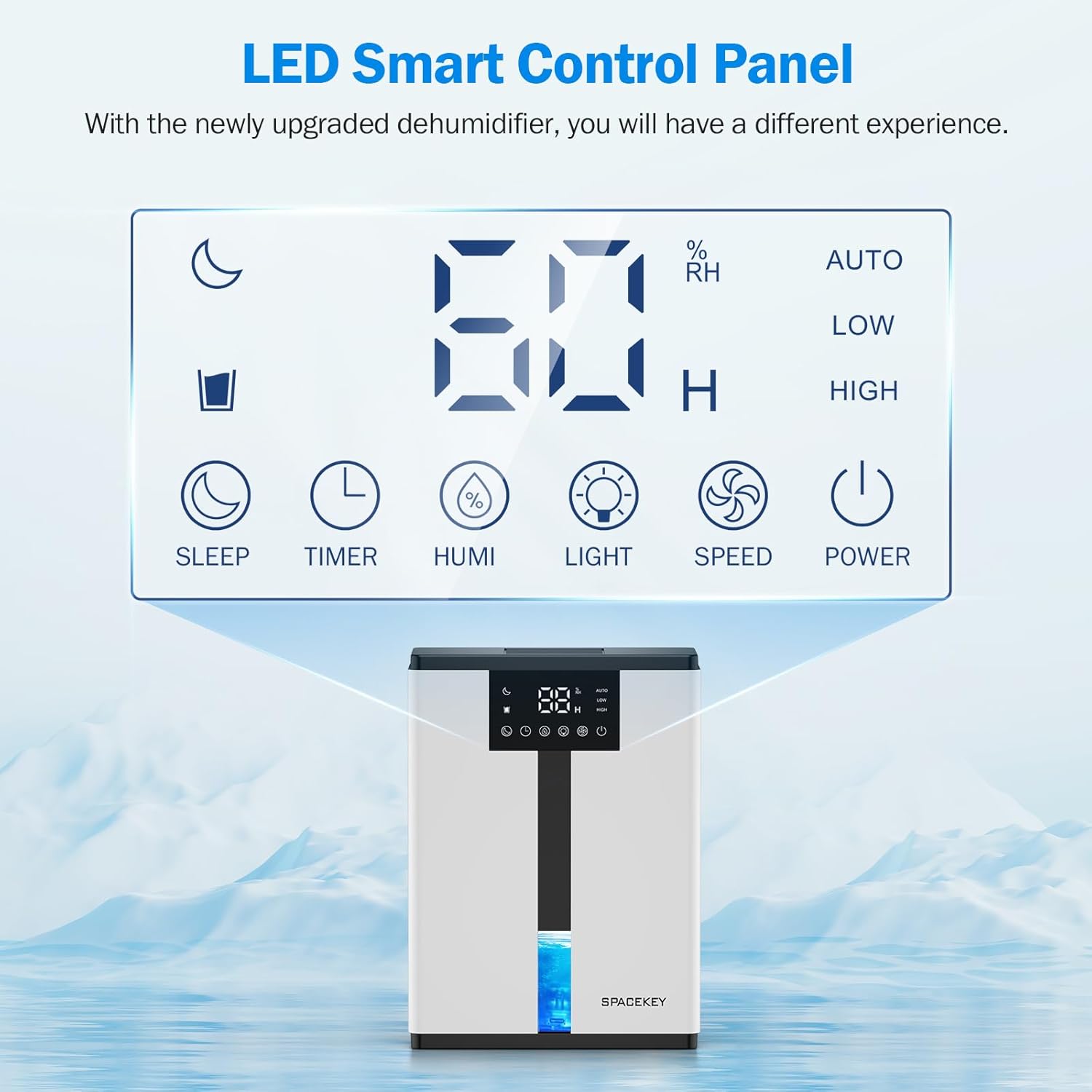
Figure 7: The LED Smart Control Panel, displaying current humidity and various function buttons.
The intuitive LED display shows real-time humidity. Buttons include:
- מצב שינה: Activates quiet operation and can be used with colorful lights.
- שָׁעוֹן עֶצֶר: Sets operating duration (2H, 4H, 6H, 8H, 12H).
- HUMI: Adjusts target humidity (45%, 55%, 65%, or continuous '00').
- אוֹר: Controls the 7-color ambient light.
- מְהִירוּת: Selects fan speed (Auto, Low, High).
- כּוֹחַ: מפעיל/מכבה את היחידה.
4. הוראות התקנה
- לִפְרוֹק: הוציאו בזהירות את מסיר הלחות מאריזתו.
- מיקום: Place the unit on a flat, stable surface in the desired location. Ensure there is at least 8 inches (20 cm) of space around the air inlets and outlets for proper airflow.
- חיבור חשמל: חבר את כבל החשמל לשקע חשמל מוארק.
- בדיקה ראשונית: Ensure the water tank is correctly inserted and empty before starting operation.

Figure 8: Recommended placement areas for the dehumidifier, highlighting its suitability for various indoor environments.
5. הוראות הפעלה
5.1 הפעלה/כיבוי
הקש על כּוֹחַ לחצן כדי להפעיל או לכבות את מסיר הלחות.
5.2 הגדרת רמת לחות
הקש על חום button to cycle through desired humidity levels: 45%, 55%, 65%. The unit will operate until the set humidity is reached, then pause. If set to '00', the unit will operate continuously.

Figure 9: Setting the target humidity level using the HUMI button.
5.3 כוונון מהירות המאוורר
הקש על מְהִירוּת button to select between Auto, Low, and High fan speeds. Auto mode adjusts fan speed based on current humidity.
5.4 פונקציית טיימר
הקש על שָׁעוֹן עֶצֶר button to set an operating duration of 2, 4, 6, 8, or 12 hours. The unit will automatically turn off after the set time.

Figure 10: Using the Timer function to set the operating duration.
5.5 Sleep Mode & Colorful Lights
הקש על לִישׁוֹן button to activate sleep mode for ultra-quiet operation (approx. 30dB). Press the אוֹר button to cycle through 7 colorful ambient lights or select a static color. This feature can be used independently or in conjunction with sleep mode.
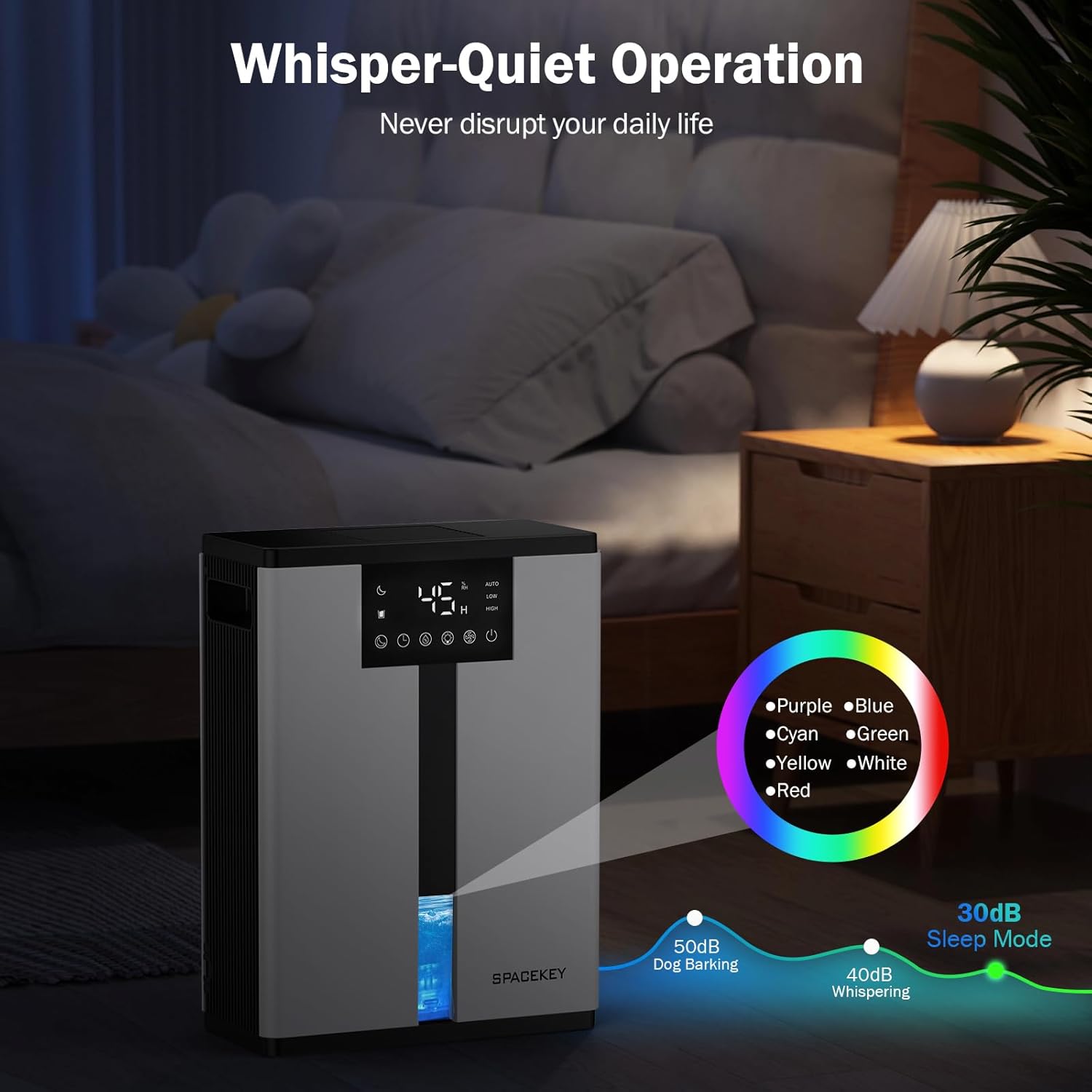
Figure 11: Dehumidifier in Sleep Mode with ambient lighting for a peaceful environment.
5.6 כיבוי אוטומטי
The dehumidifier will automatically shut off and flash a red light with an audible beep when the water tank is full. Empty the water tank to resume operation.
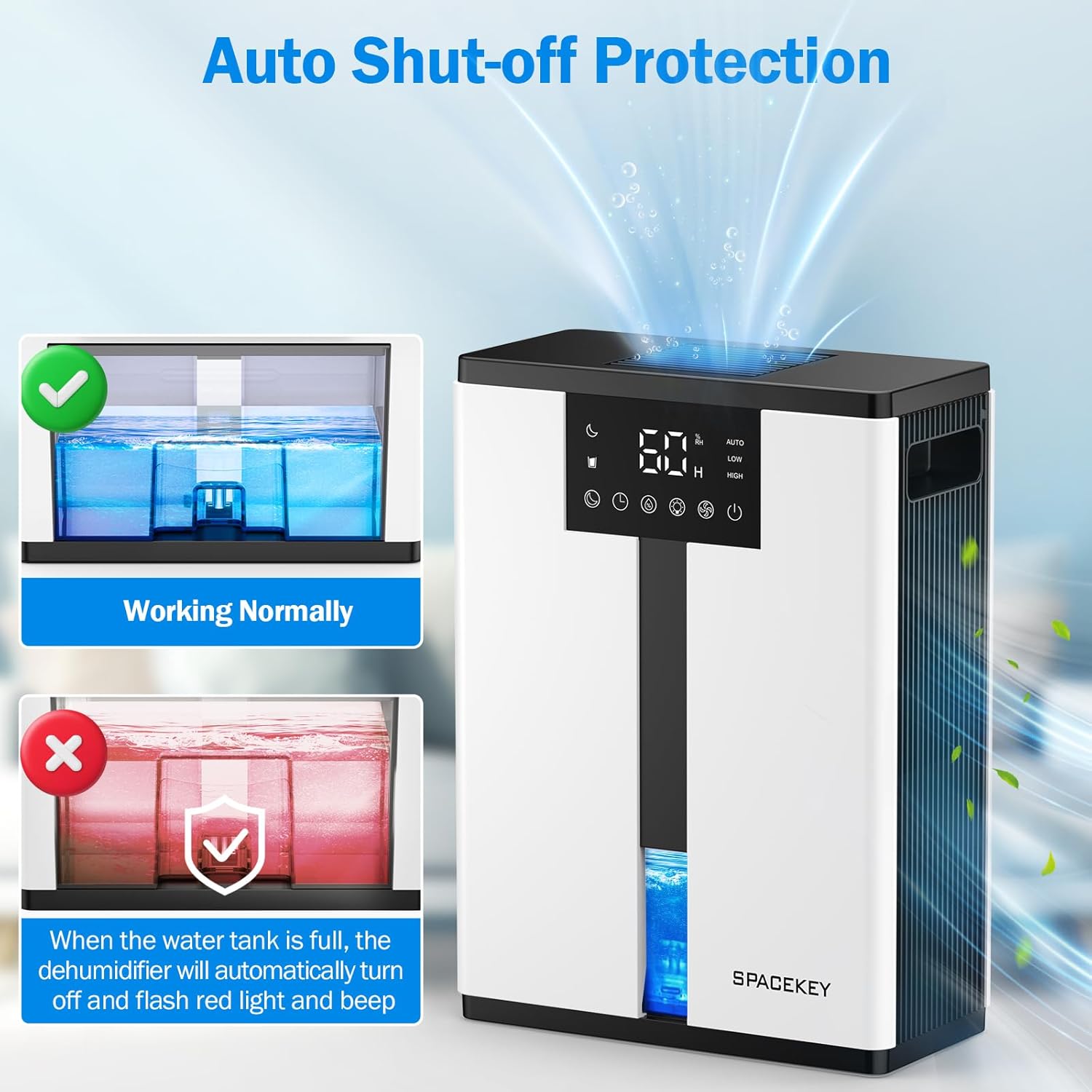
Figure 12: Automatic shut-off mechanism when the water tank is full.
6. תחזוקה
6.1 ריקון מיכל המים
- משכו בעדינות את מיכל המים מחזית היחידה.
- הסר את מכסה המיכל.
- שפכו את המים שנאספו.
- Replace the lid and reinsert the water tank firmly into the dehumidifier.

Figure 13: Step-by-step guide to emptying the water tank.
6.2 ניקוי מסנן האוויר
The washable filter should be cleaned regularly (every 2-4 weeks, depending on usage) to maintain optimal performance.
- נתק את מסיר הלחות.
- הסר את המסנן מגב היחידה.
- שטפו את המסנן תחת מים זורמים כדי להסיר אבק ופסולת.
- יש לאפשר למסנן להתייבש לחלוטין באוויר לפני הכנסתו מחדש.
- אין להפעיל את מסיר הלחות ללא המסנן.

Figure 14: Instructions for removing and washing the air filter.
6.3 ניקוי החלק החיצוני
נגב את החלק החיצוני של מסיר הלחות בחומר רך, דamp בַּד. אין להשתמש בחומרי ניקוי שוחקים או ממסים.
7. פתרון תקלות
| בְּעָיָה | סיבה אפשרית | פִּתָרוֹן |
|---|---|---|
| מסיר הלחות לא נדלק. | אין חשמל; כבל החשמל לא מחובר; מיכל המים מלא או מוכנס בצורה שגויה. | בדקו את חיבור החשמל; רוקנו והכניסו מחדש את מיכל המים בצורה נכונה. |
| אין איסוף מים או ייבוש לחות נמוך. | Room humidity is already low; air filter is clogged; ambient temperature is too low; unit size is too small for the space. | Ensure humidity is above target; clean air filter; operate in recommended temperature range; consider unit placement or additional units for larger spaces. |
| היחידה רועשת. | Fan speed is set to High; unit is not on a flat surface. | Switch to Low or Sleep mode; ensure unit is on a stable, flat surface. |
| Red light flashing and beeping. | מיכל המים מלא. | Empty the water tank and reinsert it. |
8. מפרטים
| תכונה | פְּרָט |
|---|---|
| שם הדגם | QIG-D01 |
| מותג | מקש רווח |
| יכולת לחות | Up to 50 oz (approx. 3 pints) per 24 hours (at 86°F, 80% RH) |
| קיבולת מיכל מים | 3.0 ליטר (106 אונקיות נוזל) |
| אזור כיסוי | עד 850 רגל מרובע |
| צריכת חשמל | 70 Watts (not more than 1.68 kWh/Day) |
| רמת רעש | Approx. 30dB (in Sleep Mode) |
| מידות (D x B x H) | 5.71" D x 11.22" W x 15.2" H |
| משקל פריט | 8.91 פאונד |
| תכונות מיוחדות | Automatic Shutoff, Intelligent Humidity Control, 4 Fan Speeds, Timer, 7 Colorful Lights, 45° Tip-over Protection, Washable Filter |
9. אחריות ותמיכת לקוחות
Spacekey offers the following support for your dehumidifier:
- החזר תוך 30 יום: For any dissatisfaction.
- 2-Year Replacement: For product defects or malfunctions.
- שירות לקוחות לכל החיים: Dedicated support for any questions or issues.
If you have any questions or require assistance, please do not hesitate to contact Spacekey customer support. We aim to reply within 24 hours.


איור 15: מעלview of Spacekey's customer support and warranty policies.
Ask a question about this manual
Ask about setup, troubleshooting, compatibility, parts, safety, or missing instructions. Manuals+ will review the question and use this page’s manual context to help answer it.