
1. הקדמה
Thank you for choosing the HOWENS 15.6 Inch Portable Touchscreen Monitor. This device is designed to enhance your productivity and entertainment with its Full HD 1920x1080 IPS display, 10-point multi-touch functionality, and versatile connectivity options. Its compact and lightweight design makes it ideal for various applications, from extending your laptop's display to serving as an industrial control interface.

תמונה 1.1: חזית view of the HOWENS 15.6 Inch Portable Touchscreen Monitor.
2. מידע בטיחות
Please read all safety instructions carefully before using this product. Failure to follow these instructions may result in electric shock, fire, or damage to the device.
- אין לחשוף את הצג לגשם, לחות או טמפרטורות קיצוניות.
- הימנעו מהצבת הצג בקרבת מקורות חום או באור שמש ישיר.
- השתמש רק במתאם החשמל שסופק עם המכשיר.
- Do not attempt to disassemble or repair the monitor yourself. Contact qualified service personnel for assistance.
- הרחק את הצג משדות מגנטיים חזקים.
- ודא אוורור נאות סביב הצג כדי למנוע התחממות יתר.
3. מה בקופסה
החבילה כוללת את הפריטים הבאים:
- Portable Touchscreen Monitor 15.6 inch
- כבל HDMI
- USB cable (for touch functionality)
- מתאם מתח DC
- שְׁלַט רָחוֹק
- מדריך הפעלה
4. המוצר נגמרview
4.1 תכונות עיקריות
- FHD 1080P Display: Features a 1920x1080 resolution with a 60Hz refresh rate and IPS panel for 178° wide viewing angles. Brightness of 300 cd/m² and 72% NTSC color gamut ensure vibrant and accurate colors.
- 10-Point Touch Screen: Advanced multi-touch functionality for intuitive interaction. Connect via a Type-A to Type-B USB cable for touch support.
- תאימות רחבה: Supports Laptops, PCs, Mini PCs, Raspberry Pi, PS5/4, Xbox, and various industrial devices via HDMI, DVI, and VGA connections.
- Multi-Function Display Modes: Supports expansion, mirror, second-screen-only, horizontal, and vertical display modes.
- Standard VESA Mount: Equipped with a 75x75mm VESA hole for wall or desktop mounting (stand not included).
- רמקולים כפולים מובנים: Enjoy stereo audio directly from the monitor.
4.2 Port Parameters
The monitor features a variety of ports for diverse connectivity:
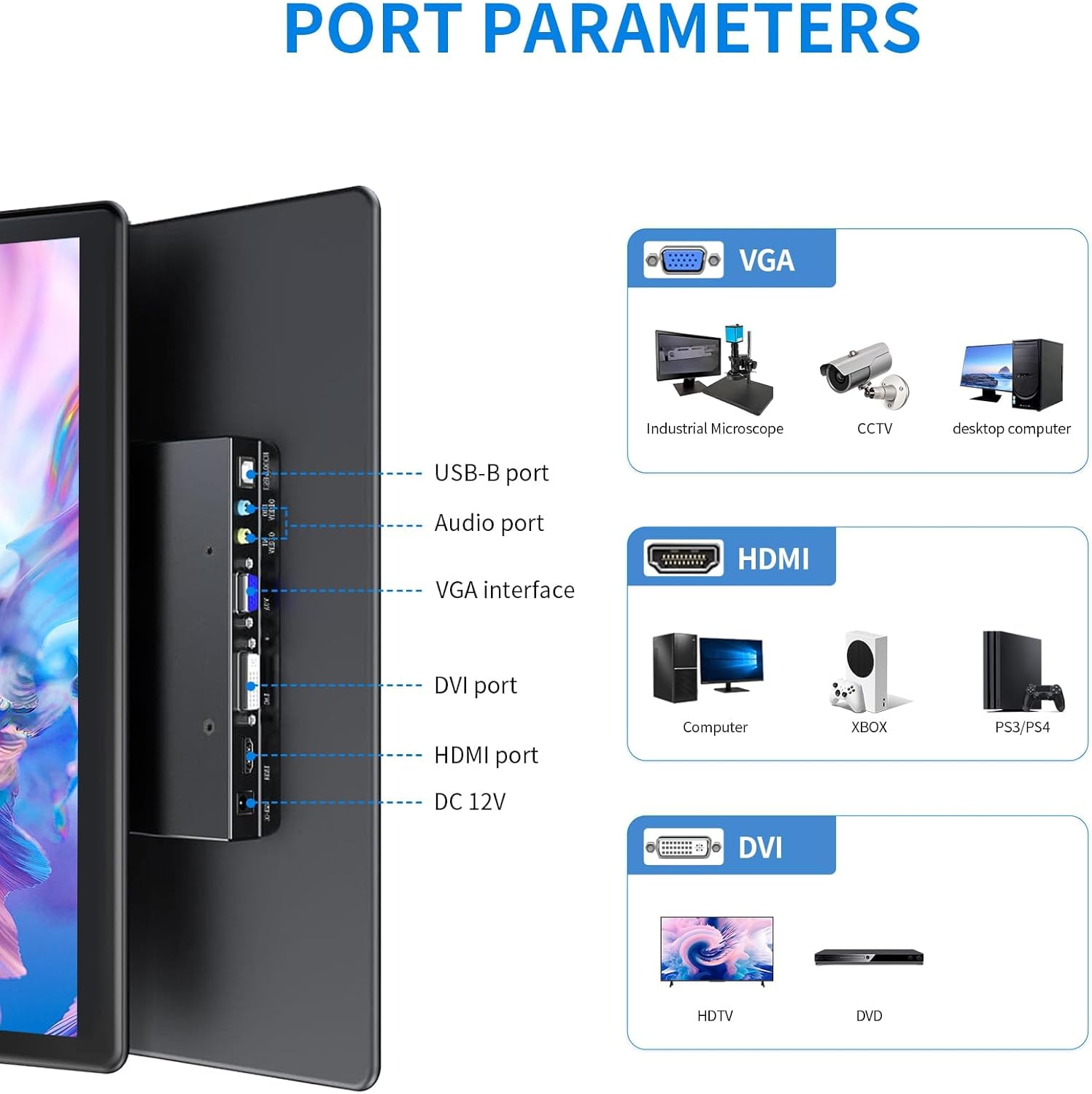
תמונה 4.1: מפורט view of the monitor's input/output ports.
- יציאת USB-B: For touch functionality connection to a host device.
- יציאת שמע: עבור קלט/פלט שמע.
- VGA Interface: For video input from devices like industrial microscopes, CCTV, and desktop computers.
- יציאת DVI: For video input from devices such as HDTVs and DVD players.
- יציאת HDMI: For high-definition video and audio input from computers, Xbox, PS5/4, and other compatible devices.
- DC 12V: יציאת כניסת חשמל.
4.3 מאפייני תצוגה

Image 4.2: Visual representation of key display features.
The monitor's IPS panel provides a 178° wide viewing angle, ensuring consistent image quality from various perspectives. The 1920x1080 resolution delivers sharp and clear visuals, while the 72% NTSC color gamut offers rich and accurate color reproduction.
4.4 Dimensions and VESA Mount

Image 4.3: Product dimensions and VESA mounting details.
The monitor features a standard 75x75mm VESA mounting pattern, allowing for flexible installation on compatible wall mounts or desktop stands (sold separately).
5. הגדרה וחיבור
Follow these steps to connect your HOWENS portable touchscreen monitor to your device:
- Connect Video Signal: Use the provided HDMI cable to connect the monitor's HDMI port to your laptop, PC, or gaming console's HDMI output. Alternatively, use a DVI or VGA cable if your device supports those interfaces.
- Connect Touch Functionality (Optional): For touchscreen features, connect the provided USB-A to USB-B cable from your host device's USB-A port to the monitor's USB-B port.
Note: Touch input is not enabled on devices with strict security protocols, such as Nintendo Switch, iPhones, or iPads.
- חבר חשמל: Plug the DC power adapter into the monitor's DC 12V port and then into a power outlet.
- הפעלה: Press the power button on the monitor or use the remote control to turn on the device.
Video 5.1: Demonstration of connecting the monitor to a laptop, including HDMI, USB for touch, and power connections, and showcasing touch functionality and remote control use.
5.1 הרכבה של VESA
The monitor is compatible with 75x75mm VESA mounts. To mount the monitor, attach a compatible VESA arm or bracket to the four screw holes on the back of the monitor. Ensure the mount can support the weight of the monitor.
6. הפעלת המוניטור
6.1 פונקציונליות מסך מגע
Once the USB-A to USB-B cable is connected to a compatible device, the 10-point multi-touch feature will be active. You can use gestures such as tapping, swiping, pinching, and zooming directly on the monitor screen for intuitive control.
שלט רחוק 6.2
The included remote control allows you to navigate the monitor's On-Screen Display (OSD) menu to adjust settings such as brightness, contrast, color temperature, and input source. Point the remote control towards the infrared receiver on the monitor.
6.3 מצבי תצוגה
The monitor supports various display modes to suit your needs:

תמונה 6.1: דוגמה חזותיתamples of multiple display modes.
- מצב מורחב: מרחיב את שולחן העבודה שלך על פני שני המסכים, ומספק מרחב עבודה גדול יותר.
- מצב מראה: Duplicates your primary display onto the portable monitor.
- מצב מסך שני בלבד: Displays content only on the portable monitor, turning off the primary display.
- Horizontal/Vertical Mode: Adjust the display orientation to landscape or portrait as required. This can usually be configured in your operating system's display settings.
6.4 אודיו

Image 6.2: Location of built-in dual speakers.
The monitor includes built-in dual speakers for stereo audio output. You can adjust the volume using the remote control or through your connected device's audio settings.
7. תחזוקה
- ניקוי המסך: נגבו בעדינות את המסך בעזרת מטלית רכה ונטולת סיבים. במקרה של סימנים עקשניים,ampשטפו את המטלית מעט במים או בתמיסת ניקוי מסכים. הימנעו משימוש בכימיקלים חזקים או בחומרים שוחקים.
- ניקוי ה-Casing: השתמש במטלית רכה ויבשה כדי לנקות את הצג.asing.
- אִחסוּן: כאשר הצג אינו בשימוש למשך תקופות ממושכות, יש לאחסן אותו במקום קריר ויבש, רצוי באריזתו המקורית או בשרוול מגן.
8. פתרון תקלות
אם אתם נתקלים בבעיות עם הצג שלכם, אנא עיינו בפתרונות הנפוצים הבאים:
- אין כוח:
- Ensure the DC power adapter is securely connected to the monitor and a working power outlet.
- ודא ששקע החשמל תקין על ידי חיבור מכשיר אחר.
- אין תצוגה/אות:
- Check that the HDMI, DVI, or VGA cable is securely connected to both the monitor and the source device.
- Ensure the correct input source is selected on the monitor using the remote control or OSD menu.
- Try connecting the monitor to a different source device to rule out issues with the original source.
- מסך מגע לא מגיב:
- Confirm the USB-A to USB-B cable is properly connected between the monitor and the host device.
- Restart both the monitor and the host device.
- Ensure your operating system supports touchscreen functionality and that drivers are up to date.
- Remember that some devices (e.g., Switch, iPhones, iPads) do not support touch input with this monitor due to security protocols.
- איכות תמונה ירודה:
- כוונן את הגדרות הבהירות, הניגודיות והצבע דרך תפריט המסך.
- Ensure the display resolution on your source device is set to 1920x1080 for optimal clarity.
9. מפרטים
| תכונה | מִפרָט |
|---|---|
| מותג | האוונס |
| מספר דגם | CXTP-BB |
| גודל מסך | 15.6 אינץ' |
| הַחְלָטָה | FHD 1920 x 1080p |
| יחס גובה-רוחב | 16:9 |
| סוג תצוגה | LCD |
| טכנולוגיית תצוגה | IPS |
| קצב רענון | 60 הרץ |
| בְּהִירוּת | 300 קנדלה |
| יחס ניגודיות | 1000:1 |
| Viewזווית | 178 מעלות |
| סולם צבעים | 72% NTSC |
| טכנולוגיית קישוריות | DVI, HDMI, VGA |
| תכונות נוספות | Built-In Speakers, Energy Efficient, Eye Care, Portable, Touchscreen |
| משקל פריט | 2.33 פאונד |
| סוג הרכבה | Wall Mount (75x75mm VESA) |
10. אחריות ותמיכה
This HOWENS monitor comes with a אחריות יצרן לשנה against defects. For any product issues or technical support, please contact HOWENS customer service. We are committed to resolving any concerns promptly.
For further assistance, please refer to the contact information provided on the HOWENS official webהאתר או מסמכי הרכישה שלך.