
1. המוצר נגמרview
This Kingdder two-button garage door remote control is designed for use with specific Multicode 300MHz garage door and gate openers that utilize 10 DIP switches. It allows for simultaneous control of two different garage doors or gates. Its compact design and included keychain offer convenient portability.

Image: The Kingdder two-button remote control in use, demonstrating its ability to operate a garage door. Three remotes are shown in the bottom right corner.
2. תאימות
This remote is specifically designed for use with Linear Multi-code 300MHz garage door and gate openers that feature 10 DIP switches. Compatible models include Multicode 3089, 3060, 3070, and 3083. It is important to verify that your existing receiver uses 10 DIP switches and operates at 300MHz. This remote is not compatible with systems using 8 or 9 DIP switches.

Image: A visual guide emphasizing compatibility with Linear Multi-code 300MHz 10-dip switch systems (models 3089, 3060, 3070, 4120) and explicitly stating non-compatibility with 8 or 9 dip switch systems.
3. תכולת החבילה
- Kingdder 10 Dip Switch Two Button Garage Door Remote(s)
- Pre-installed 23A 12V Dry Battery(ies)
- Keychain Attachment(s)
4. Setup (Programming)
Before starting the programming process, ensure your garage door opener is completely closed.
- Locate Existing DIP Switches: Find your existing garage door opener's receiver or current remote. Open its casing to expose the 10 DIP switches. Carefully note the ON/OFF positions of each switch.
- Open New Remote: Use a small screwdriver to gently remove the back plate of your new Kingdder remote control.
- Match DIP Switch Settings: Inside the Kingdder remote, you will find 10 small DIP switches. Adjust these switches to precisely match the ON/OFF positions you noted from your existing remote or receiver. The "ON" position corresponds to "OPEN" and the "OFF" position corresponds to "CLOSE".
- שלט מאובטח: Once the DIP switches are set, replace the back plate of the Kingdder remote and secure it with the small screwdriver.
- פעולת בדיקה: Test the remote to ensure it operates your garage door or gate correctly.

Image: A visual sequence demonstrating how to open the remote, locate the DIP switches, and match them to an existing receiver's settings.

תמונה: דוגמהamples of DIP switch configurations for various receiver types (8, 10, 12 switches), illustrating how to set the ON/OFF positions on the new remote to match the original.
5. תפעול
To operate your garage door or gate, simply press the corresponding button on the Kingdder remote control. The remote allows for control of two separate doors/gates if programmed accordingly.
6. תחזוקה (החלפת סוללה)
The remote uses a 23A 12V dry battery. If the remote's LED indicator does not light up when a button is pressed, or if the operating range significantly decreases, the battery may need to be replaced.
- Carefully remove the back plate of the remote using a small screwdriver.
- Remove the old 23A 12V battery from its compartment.
- Insert a new 23A 12V battery, ensuring correct polarity (+ and - terminals).
- Replace the back plate securely.
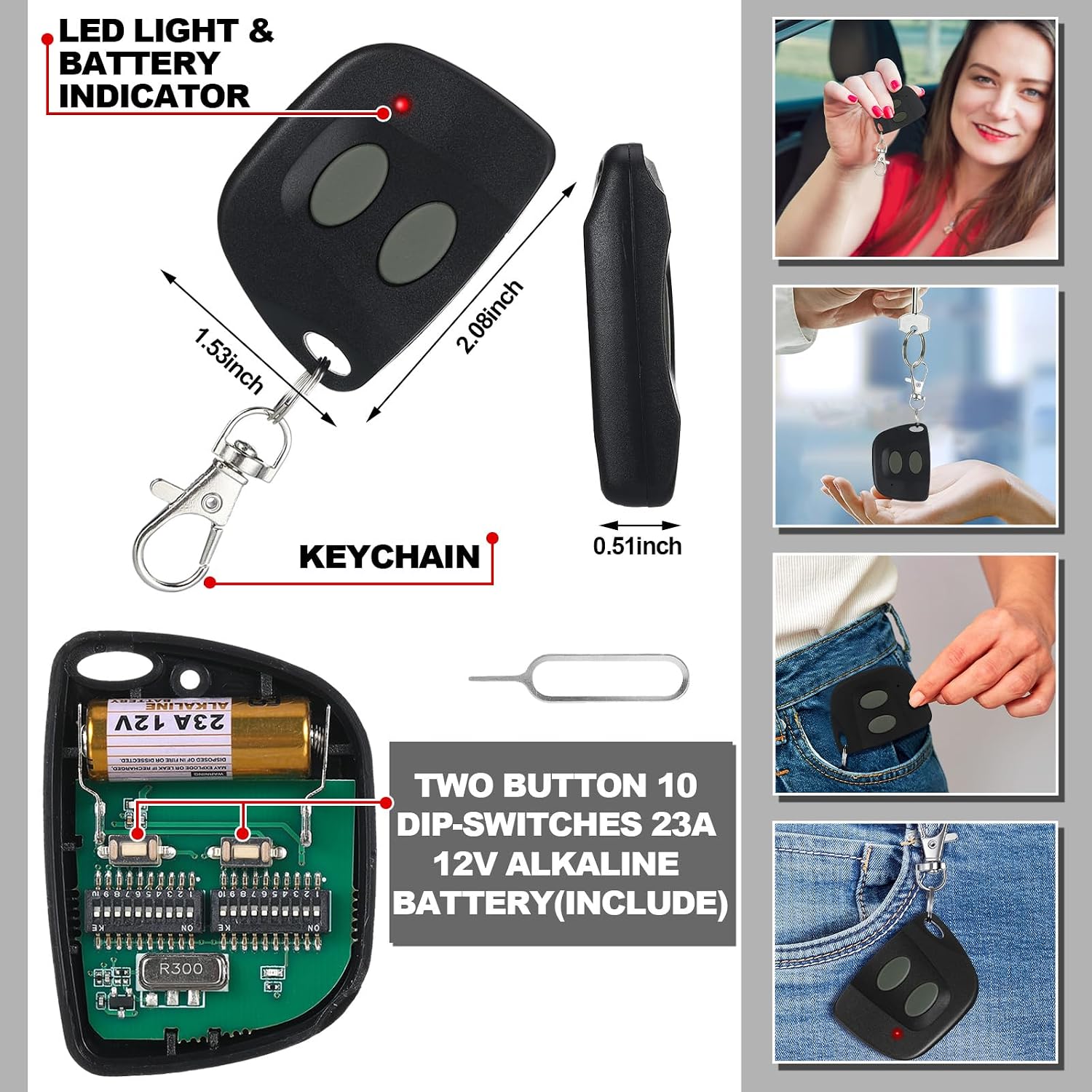
תמונה: פיצוץ view of the remote control, showing the internal components including the 23A 12V battery, 10 DIP switches, LED indicator, and keychain attachment with dimensions.
7. פתרון תקלות
- שלט לא עובד:
- בדוק אם הסוללה מותקנת כראוי ויש בה מספיק טעינה. החלף במידת הצורך.
- Verify that the 10 DIP switch settings inside the remote precisely match those of your garage door opener's receiver.
- Confirm that your garage door opener is a compatible Linear Multi-code 300MHz system with 10 DIP switches.
- טווח פעולה קצר:
- Replace the battery with a new 23A 12V battery.
- Ensure there are no significant sources of radio interference in the vicinity of the garage door opener or the remote.
8. מפרטים
| מותג | Kingdder |
| סִמוּל | 10 מתגי DIP |
| תֶדֶר | 300 מגה-הרץ |
| כפתורים | 2 |
| סוג סוללה | 1x 23A 12V Dry Battery (included) |
| קישוריות | תדר רדיו |
| טווח משוער | עד 120 רגל (36.5 מטר) |
| צֶבַע | אפור, שחור |
| מִשׁקָל | משקל כולל של כ-0.21 גרם (95 פאונד) |

Image: The remote control in use, with text highlighting its security features (Security+ 2.0 technology) and a long operating range of 120 feet.
9. מידע בטיחות
- הרחיקו את השלט הרחוק מהישג ידם של ילדים.
- Do not operate the garage door or gate if there are people, pets, or objects in the path of the door.
- Always ensure the door is fully visible when operating the remote.
- השלך סוללות משומשות בצורה אחראית בהתאם לתקנות המקומיות.
10. אחריות ותמיכה
For warranty information, please refer to the retailer where the product was purchased or visit the official Kingdder website. For technical support or further assistance, please contact Kingdder customer service through their official channels.