
ASD A-SFL-20WH-SC
מצלמת אבטחה חיצונית ASD - מצלמת הצפה חכמה, דגם A-SFL-20WH-SC מדריך למשתמש
הוראות מקיפות להתקנה, הפעלה ותחזוקה.
1. הקדמה
Thank you for choosing the ASD Security Flood Light Camera Outdoor. This smart floodlight camera is designed to provide enhanced security and illumination for your outdoor spaces. Featuring a 180° motion sensor, adjustable light heads, and smart app control, it integrates seamlessly with your smart home ecosystem, including Alexa and Google Assistant. This manual provides essential information for safe installation, operation, and maintenance of your device.
2. מידע בטיחות חשוב
אנא קרא בעיון את כל ההוראות לפני ההתקנה והשימוש. שמור מדריך זה לעיון עתידי.
- בטיחות חשמל: ההתקנה חייבת להתבצע על ידי חשמלאי מוסמך או אדם בעל ידע בחשמל. יש לוודא שהחשמל כבוי במפסק החשמל לפני ההתקנה או הטיפול.
- כרך ידtage: This product is designed to operate on 120V circuits.
- הַרכָּבָה: Mount the fixture securely to a junction box. Ensure the mounting surface can support the weight of the fixture.
- מקומות רטובים: This product is Wet Locations rated (IP54), suitable for outdoor use. However, avoid submerging the unit in water.
- חוֹם: Do not operate the fixture near flammable materials. Allow the fixture to cool before handling.
- עדשת מצלמה: Avoid touching the camera lens directly to prevent smudges or damage.
3. תכולת החבילה
ודא שכל הרכיבים קיימים לפני תחילת ההתקנה:
- ASD Security Flood Light Camera Outdoor (1 unit)
- Mounting Crossbar
- ברגי הרכבה
- אגוזי תיל
- Pad EVA
- מדריך למשתמש (מסמך זה)
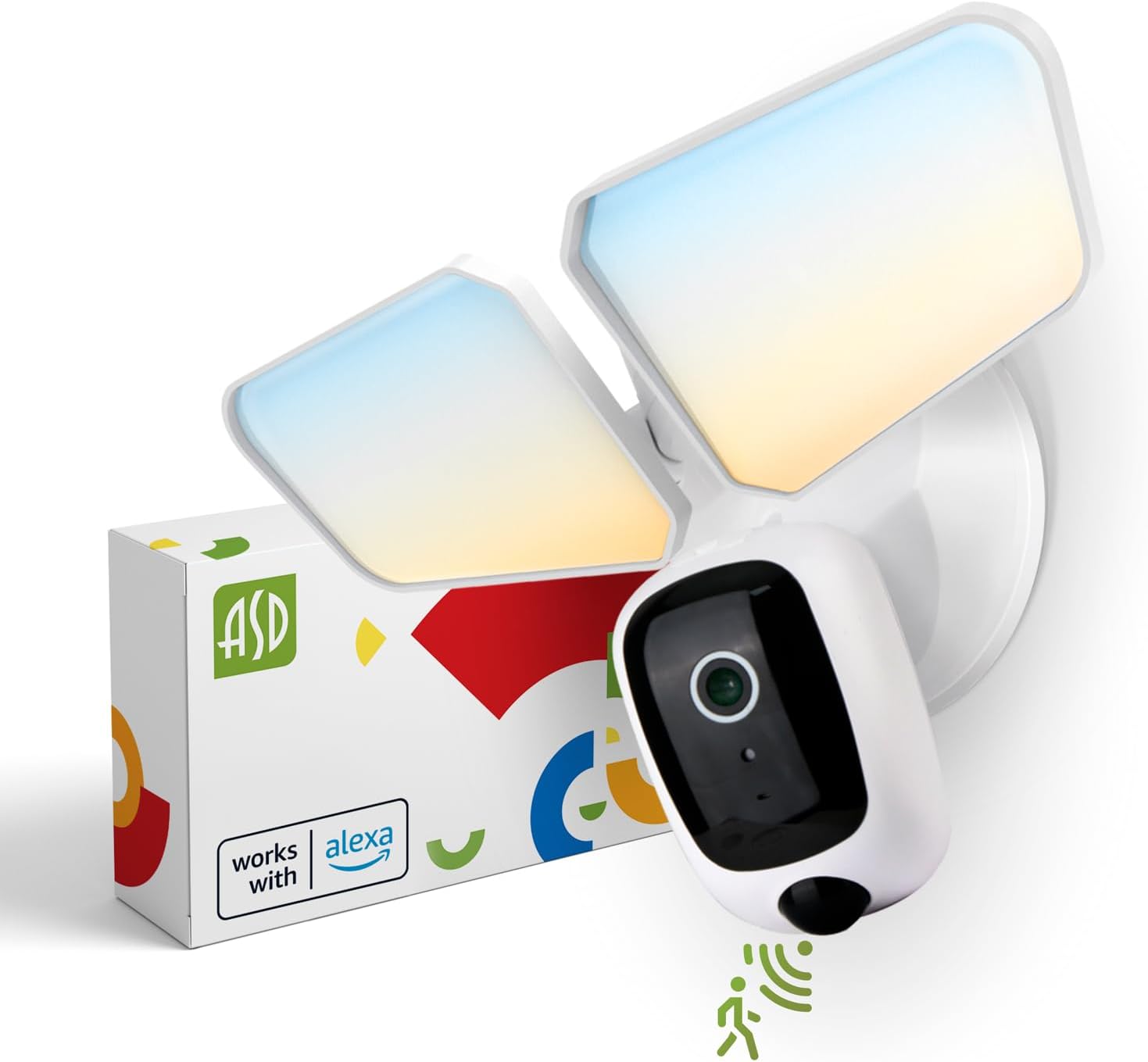
Image 1: ASD Security Flood Light Camera Outdoor and its packaging.
4. תכונות מוצר
- ראשי תאורה מתכווננים: Side-to-side (150°) and up-and-down (180°) rotatable light heads for directional illumination.
- Integrated Smart Camera: Monitor, record, and engage in two-way audio communication.
- 180° Motion Sensor: Automatically activates light and camera recording upon motion detection.
- Dusk-to-Dawn Photocell: מדליק את האור באופן אוטומטי עם רדת החשיכה ומכבה אותו עם שחר.
- צבע לבחירה: Choose from 5 color temperatures: 2700K (Soft White), 3000K (Warm White), 3500K (Neutral White), 4000K (Cool White), or 5000K (Daylight).
- שילוב בית חכם: תואם לאמזון אלקסה ולגוגל אסיסטנט לשליטה קולית.
- בקרת אפליקציה: Manage settings, view live feed, and receive motion-activated push notifications via the dedicated app.
- אפשרויות אחסון: Records can be stored on a Micro SD card (not included) or in a Cloud service (subscription may be required).
- בנייה עמידה: Made from Aluminum and Polycarbonate.
- הסמכות: UL and DLC Premium certified, ensuring quality and safety.

Image 2: Key features of the ASD Security Flood Light Camera.
5. מפרט טכני
| מִפרָט | פְּרָט |
|---|---|
| מספר דגם | A-SFL-20WH-SC |
| מקור כוח | קשיח |
| כרך ידtage | 120 וולט |
| מהtage | 20 וואט |
| סוג מקור אור | LED |
| טמפרטורת צבע (CCT) | 2700K, 3000K, 3500K, 4000K, 5000K (ניתן לבחירה) |
| זווית זיהוי חיישן תנועה | 180° |
| מרחק זיהוי חיישן תנועה | 16.4-32.9 רגל (5-10 מ') |
| זווית קרן | 100° |
| חוֹמֶר | אלומיניום, פוליקרבונט |
| מידות המוצר | אורך 10.24 אינץ', רוחב 4.45 אינץ', גובה 7.68 אינץ' |
| משקל פריט | 1.2 פאונד |
| שימוש בפנים/חוץ | בָּחוּץ |
| סיווג תאורת אזור | IP54 (Wet Locations Rated) |
| פרוטוקול קישוריות | Wi-Fi |
| סוג בקר | Amazon Alexa, Google Assistant, אפליקציה |
| תוחלת חיים | 145,000 שעות |

תמונה 3: מפרט ומידות מפורטות של המוצר.
6. שלבי התקנה
לפני שתתחיל: Turn off power at the circuit breaker. Ensure you have the necessary tools (screwdriver, wire strippers, etc.).
- הכן את המתקן:
Attach the crossbar to the outlet box using two mounting screws. Remove the cover on the top of the camera. Insert a Micro SD card (sold separately) into the slot until it clicks. Place the cover back on. Change the position of the CCT switch on the housing to the desired color temperature (2700K, 3000K, 3500K, 4000K, or 5000K). - Mount and Wire:
Tear off the EVA pad adhesive and stick it on the rear cover (pay attention to the direction of the gap). Thread the fixture wire through the gasket. Connect the wires: Black to Black, White to White, and Green to Green (ground). Secure the connection with wire nuts. - אבטח את המתקן:
Drive the bracket screw through the center hole of the fixture base to the crossbar and secure it by tightening.

תמונה 4: מדריך חזותי לתהליך ההתקנה.
7. הוראות הפעלה
7.1 פעולת חיישן תנועה
The built-in 180° motion sensor detects movement within its range (16.4-32.9 ft or 5-10 m). When motion is detected, the floodlight will illuminate, and the camera will begin recording. You can adjust the sensitivity and duration settings via the ASD SMART app.

Image 5: The built-in motion sensor detects movement.
7.2 Dusk-to-Dawn Photocell
The integrated photocell automatically senses ambient light levels. It will turn the floodlight on when it gets dark and turn it off when daylight returns, ensuring efficient operation without manual intervention.

Image 6: Built-in dusk-to-dawn photocell for automatic operation.
7.3 Color Temperature Selection (CCT)
Before final installation, you can select your preferred color temperature using the switch located on the fixture's housing. Choose from 2700K (Soft White), 3000K (Warm White), 3500K (Neutral White), 4000K (Cool White), or 5000K (Daylight) to match your aesthetic and lighting needs.

Image 7: Selectable color temperature options.
8. App Control and Smart Integration
8.1 ASD SMART App Setup
To unlock the full potential of your floodlight camera, download and set up the ASD SMART app:
- הורד את ה ASD SMART app מחנות האפליקציות (iOS) או מחנות גוגל פליי (אנדרואיד).
- הירשם או התחבר לחשבונך.
- Select "Add a device" and choose "Camera and lock".
- Follow the on-screen instructions to connect your device to your Wi-Fi network.
- Scan the QR code on your camera when prompted.
For a detailed guide, please refer to the full manual PDF: ASD Security Flood Light Camera Manual PDF
הורד את האפליקציה:
- iOS App Store: ASD SMART on App Store
- Android Google Play: ASD SMART on Google Play

Image 8: App control interface and smart assistant compatibility.
8.2 Remote Monitoring and Two-Way Audio
Through the ASD SMART app, you can:
- View live video feed from your camera anytime, anywhere.
- Engage in two-way audio communication with visitors or deter intruders.
- Receive instant motion-activated push notifications on your smartphone.
8.3 Recording Storage
ניתן לאחסן הקלטות וידאו בשתי דרכים:
- כרטיס מיקרו אס די: הכנס כרטיס Micro SD (עד 128GB, לא כלול) לחריץ המיועד לכך במצלמה לאחסון מקומי.
- שירות ענן: Opt for a cloud storage subscription (available through the app) for secure, remote access to your recordings.

Image 9: Remote monitoring and recording storage options.
8.4 שילוב עוזר חכם
Connect your ASD Security Flood Light Camera to Amazon Alexa or Google Assistant for convenient voice control. Follow the instructions within the ASD SMART app to link your accounts and enable features like turning the light on/off or viewמפעיל את שידור המצלמה בצגים חכמים תואמים.
9. תחזוקה
- ניקוי: ודא שהחשמל כבוי לפני הניקוי. נגב את גוף התאורה בעזרת מטלית רכהamp בַּד. אין להשתמש בחומרי ניקוי שוחקים או ממסים.
- טיפול בעדשה: Gently clean the camera lens with a microfiber cloth to maintain clear image quality.
- בדיקות רגילות: Periodically check for any loose connections or damage to the wiring and housing.
10. פתרון תקלות
| בְּעָיָה | סיבה אפשרית | פִּתָרוֹן |
|---|---|---|
| האור לא נדלק. | No power, faulty wiring, photocell issue, CCT switch not set. | Check circuit breaker. Verify wiring connections. Ensure photocell is not obstructed. Confirm CCT switch is set. |
| חיישן תנועה לא מזהה. | Incorrect sensitivity settings, obstruction, improper installation height. | Adjust motion sensor sensitivity in the app. Clear any obstructions. Ensure installation height is appropriate (approx. 9.8 ft / 3 m). |
| המצלמה לא מתחברת ל-Wi-Fi. | סיסמת Wi-Fi שגויה, אות חלש, בעיות בנתב. | Double-check Wi-Fi password. Move router closer or use a Wi-Fi extender. Restart router. Ensure 2.4GHz Wi-Fi network is used. |
| איכות וידאו ירודה. | Dirty lens, poor Wi-Fi signal, low light conditions. | Clean camera lens. Improve Wi-Fi signal strength. Ensure adequate lighting. |
| שמע דו-כיווני לא עובד. | בעיות במיקרופון/רמקול, הרשאות אפליקציה. | Check app permissions for microphone. Ensure volume is up on your device. |
11. מידע על אחריות
ASD מספקת אחריות מוגבלת לשנה for this Security Flood Light Camera. This warranty covers defects in materials and workmanship under normal use. Please retain your proof of purchase for warranty claims. For full warranty terms and conditions, please refer to the official ASD webאתר או צור קשר עם תמיכת הלקוחות.
12. תמיכת לקוחות
For additional assistance, technical support, or warranty inquiries, please visit the ASD Lighting Corporation website or refer to the comprehensive manual available online.
- ASD Lighting Corporation Store: Visit ASD Store on Amazon
- Full Product Manual (PDF): הורד מדריך PDF
Ask a question about this manual
Ask about setup, troubleshooting, compatibility, parts, safety, or missing instructions. Manuals+ will review the question and use this page’s manual context to help answer it.