
1. הקדמה
The FosPower 5-in-1 Bug Zapper is a versatile device designed for both indoor and outdoor use, offering multiple functionalities to enhance your environment. It combines a powerful bug zapper with various lighting options, a power bank, and an SOS signal for emergencies. Its rugged and water-resistant design ensures reliable performance in diverse conditions.
תכונות עיקריות:
- Bug Zapper: 3,300V grid with 0.3-inch spaced guards for effective and safe insect elimination.
- פָּנַס כִּיס: Integrated side flashlight with multiple brightness settings.
- תאורת קריאה: Adjustable top-mounted light for ambient or focused illumination.
- מקור אנרגיה: High-capacity 29600mWh internal power bank with USB-A output for charging mobile devices.
- אות SOS: Emergency flashing mode for signaling.
- נטענת: Supports both USB and solar charging for extended battery life.
- עיצוב עמיד: Rugged build with IPX3 water resistance.

איור 1: מעלview of the FosPower 5-in-1 Bug Zapper's functionalities.
2. התקנה
2.1 טעינה ראשונית
Before first use, fully charge your FosPower 5-in-1 Bug Zapper. The device can be charged via USB-C or its integrated solar panel.
- טעינת USB-C: Connect the provided USB-C cable to the USB-C input port on the device and to a compatible USB power source (e.g., wall adapter, computer USB port). The power indicator lights will illuminate to show charging progress.
- טעינה סולארית: Place the device with the solar panel facing direct sunlight. The solar panel is located on the top of the device and can be rotated for optimal sun exposure. The power indicator lights will show charging activity.

Figure 2: Charging ports and solar panel location.
2.2 מחוון סוללה
The device features LED indicator lights to display the battery level:
- 4 blue lights: Battery level above 75%.
- 3 blue lights: Battery level between 50% and 75%.
- 2 blue lights: Battery level between 25% and 50%.
- 1 blue light: Battery level between 3% and 25%.
- 1 flashing blue light: Battery level below 3%.
3. תפעול
The FosPower 5-in-1 Bug Zapper features three main control buttons for its various functions.
3.1 Bug Zapper Function
- Locate the button marked with a spider icon.
- Press this button once to activate the bug zapper. The blue UV light grid will illuminate.
- Press the button again to turn off the bug zapper.
Video 1: Demonstrating the bug zapper function and other features of the FosPower 5-in-1 Bug Zapper.
3.2 Flashlight and SOS Signal
- Locate the button marked with a sun icon.
- Press once for low brightness flashlight.
- Press twice for medium brightness flashlight.
- Press three times for high brightness flashlight.
- Press four times to activate the SOS flashing signal.
- Press five times to turn off the flashlight/SOS signal.
3.3 אור קריאה
- Locate the button marked with a light bulb icon.
- Press once to activate the reading light at low brightness.
- Press twice for high brightness reading light.
- Press three times to turn off the reading light.
- The reading light panel can be rotated and adjusted to direct illumination as needed.
3.4 פונקציונליות של סוללת הכוח
- Connect your mobile device or other electronics to the USB-A output port using a compatible charging cable.
- The internal 29600mWh power bank will begin charging your device.
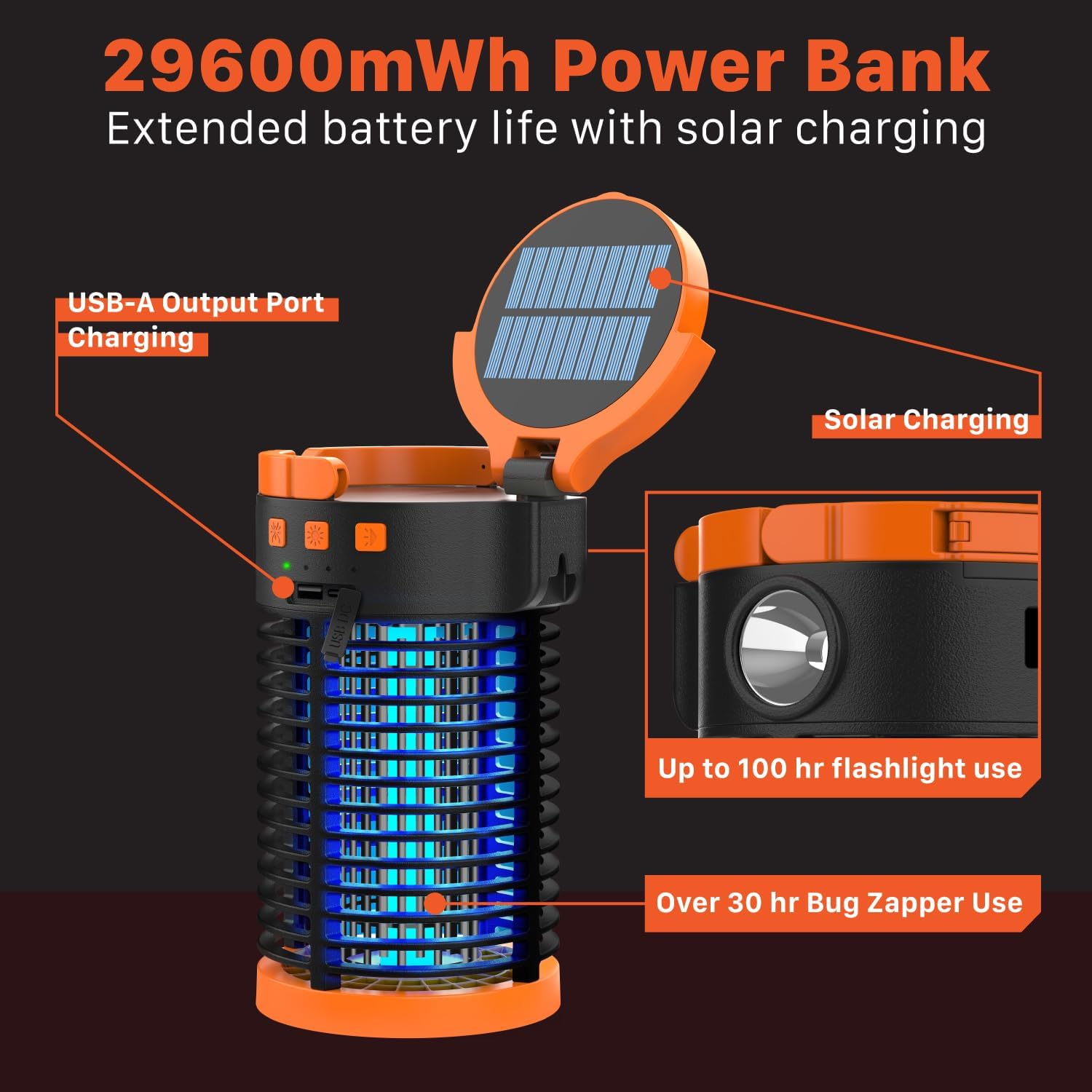
Figure 3: Versatile use of the bug zapper in different environments.
4. תחזוקה
4.1 Cleaning the Bug Collection Tray
Regular cleaning ensures optimal performance of the bug zapper. Always ensure the device is turned off before cleaning.
- Twist the bottom cover of the device counter-clockwise to unlock and remove the bug collection tray.
- Empty any collected insects from the tray.
- Use the provided cleaning brush to gently remove any debris from the bug zapper grid. Do not use water or liquids directly on the grid.
- Reattach the collection tray by aligning it and twisting clockwise until securely locked.

Figure 4: Safety features and grid spacing of the bug zapper.
5. פתרון תקלות
5.1 Bug Zapper Not Activating or Ineffective
- בדוק את רמת הסוללה: Ensure the device is sufficiently charged. Refer to section 2.2 for battery indicator details.
- רשת נקייה: A dirty bug zapper grid can reduce effectiveness. Follow the cleaning instructions in section 4.1.
- מיקום נכון: For outdoor use, place the zapper away from competing light sources and in areas with high insect activity.
5.2 אורות לא פועלים
- בדוק את רמת הסוללה: Ensure the device has enough charge.
- מחזור כוח: Turn the device off and on again, and cycle through the light modes to ensure proper function.
5.3 המכשיר לא נטען
- טעינת USB-C: Verify the USB-C cable is securely connected to both the device and the power source. Try a different cable or power adapter.
- טעינה סולארית: Ensure the solar panel is clean and exposed to direct sunlight. Cloudy conditions or indirect light will significantly reduce charging efficiency.
6. מפרטים
| תכונה | פְּרָט |
|---|---|
| מותג | FosPower |
| מספר דגם | FOSPWB-2444PX |
| משקל פריט | 902 גרם |
| מקור כוח | Battery (Rechargeable USB/Solar) |
| קיבולת סוללה פנימית | 29600mWh |
| Bug Zapper Voltage | 3,300V |
| Bug Zapper Coverage Area | 1,200 מ"ר |
| מפלס עמיד למים | IPX3 |
| שימוש מומלץ | פנים/חוץ |
| מין מטרה | יַתוּשׁ |
7. אחריות ותמיכה
FosPower מציעה אחריות מוגבלת לכל החיים on this product. For warranty claims, technical support, or any inquiries, please contact FosPower customer service.
You can register your product and find more information about the warranty at: fospower.com/warranty
הצטרפו למיליוני לקוחות מרוצים עם אחריות מוגבלת לכל החיים שלנו, המגובה על ידי שירות לקוחות מנוסה ומסור שבסיסו בארה"ב.