
1. מבוא ומידע בטיחותי
This manual provides essential instructions for the installation, operation, and maintenance of your GAMEMAX GX-850 80 Plus Gold Fully Modular Power Supply. Please read this manual thoroughly before installation and retain it for future reference.
1.1 אזהרות בטיחות חשובות
- סכנת התחשמלות: Power supplies contain high voltage components. Do not open the power supply unit. There are no user-serviceable parts inside. Opening the unit will void the warranty.
- הארקה נכונה: Ensure your computer system is properly grounded to prevent electrical hazards.
- נתק חשמל: Always disconnect the AC power cord from the wall outlet before installing, removing, or servicing the power supply or any other computer components.
- אוורור: ודאו אוורור נאות סביב ספק הכוח. אין לחסום פתחי אוורור.
- לחות וטמפרטורה: Do not operate the power supply in high humidity or high-temperature environments. Keep it away from water and heat sources.
- התקנה מקצועית: אם אינך בטוח לגבי שלבי ההתקנה, פנה לעזרה מטכנאי מוסמך.
2. תכולת החבילה
Verify that all items are present in your GAMEMAX GX-850 package:
- GAMEMAX GX-850 80 Plus Gold Fully Modular Power Supply
- Modular Cable Set (including ATX 24-pin, CPU 8-pin, PCIe 6+2-pin, SATA, Peripheral 4-pin cables)
- כבל מתח AC
- ברגי הרכבה
- מדריך למשתמש (מסמך זה)
3. המוצר נגמרview
The GAMEMAX GX-850 is an 850-watt 80 Plus Gold certified fully modular power supply designed for desktop computers. It features an LLC and DC-DC circuit design for high efficiency and stable power delivery, along with an ultra-quiet FDB (Fluid Dynamic Bearing) fan for optimal cooling and low noise.
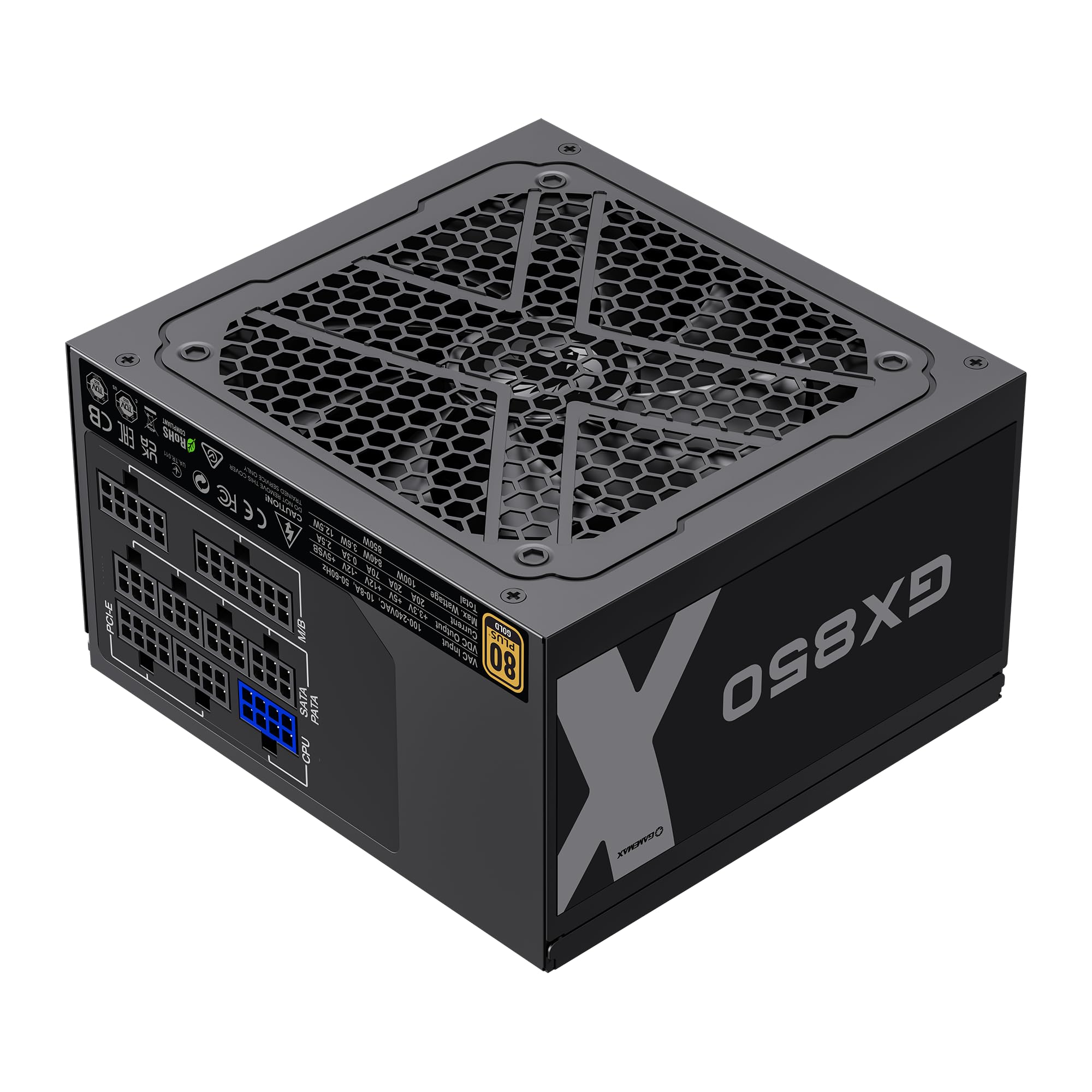
Image: The GAMEMAX GX-850 80 Plus Gold Fully Modular Power Supply, showcasinהגימור השחור והעיצוב המודולרי שלו.
3.1 תכונות עיקריות
- 80 פלוס זהב מוסמך: מבטיח יעילות אנרגיה גבוהה, מפחית עלויות חום ותפעול.
- LLC+DC-DC Circuit: Advanced circuit design for stable voltage output and improved efficiency.
- עיצוב מודולרי לחלוטין: Allows for custom cable management, reducing clutter and improving airflow.
- FDB Fan: Ultra-quiet temperature-controlled Fluid Dynamic Bearing fan for silent operation and extended lifespan.
- 105℃ Mainstream Capacitor: High-quality capacitors ensure long life and smooth power output.
- הגנה מקיפה: Features SIX levels of protection: Over Temperature Protection (OTP), Over Current Protection (OCP), Short Circuit Protection (SCP), Over Voltage Protection (OVP), תחת כרךtage Protection (UVP), and Over Power Protection (OPP).
4. התקנה והתקנה
Follow these steps to properly install your GAMEMAX GX-850 power supply into your computer system.
4.1 שלבי התקנה
- הכן את המערכת שלך: ודא שהמחשב כבוי לחלוטין ומנותק משקע החשמל בקיר. פתח את מארז המחשב.
- הסר את ספק הכוח הישן (אם רלוונטי): נתק את כל הכבלים מספק הכוח הישן שלך והסר אותו מהמארז.
- התקן את ספק הכוח החדש: Carefully place the GAMEMAX GX-850 into the power supply bay of your computer case. Secure it with the provided mounting screws. Ensure the fan is facing the correct direction for optimal airflow (typically facing down if your case has a bottom vent, or up if it's a top-mounted PSU).
- חיבור כבלים מודולריים: Identify the necessary cables for your components. Connect the modular cables to the corresponding ports on the power supply first, then route them to your components.
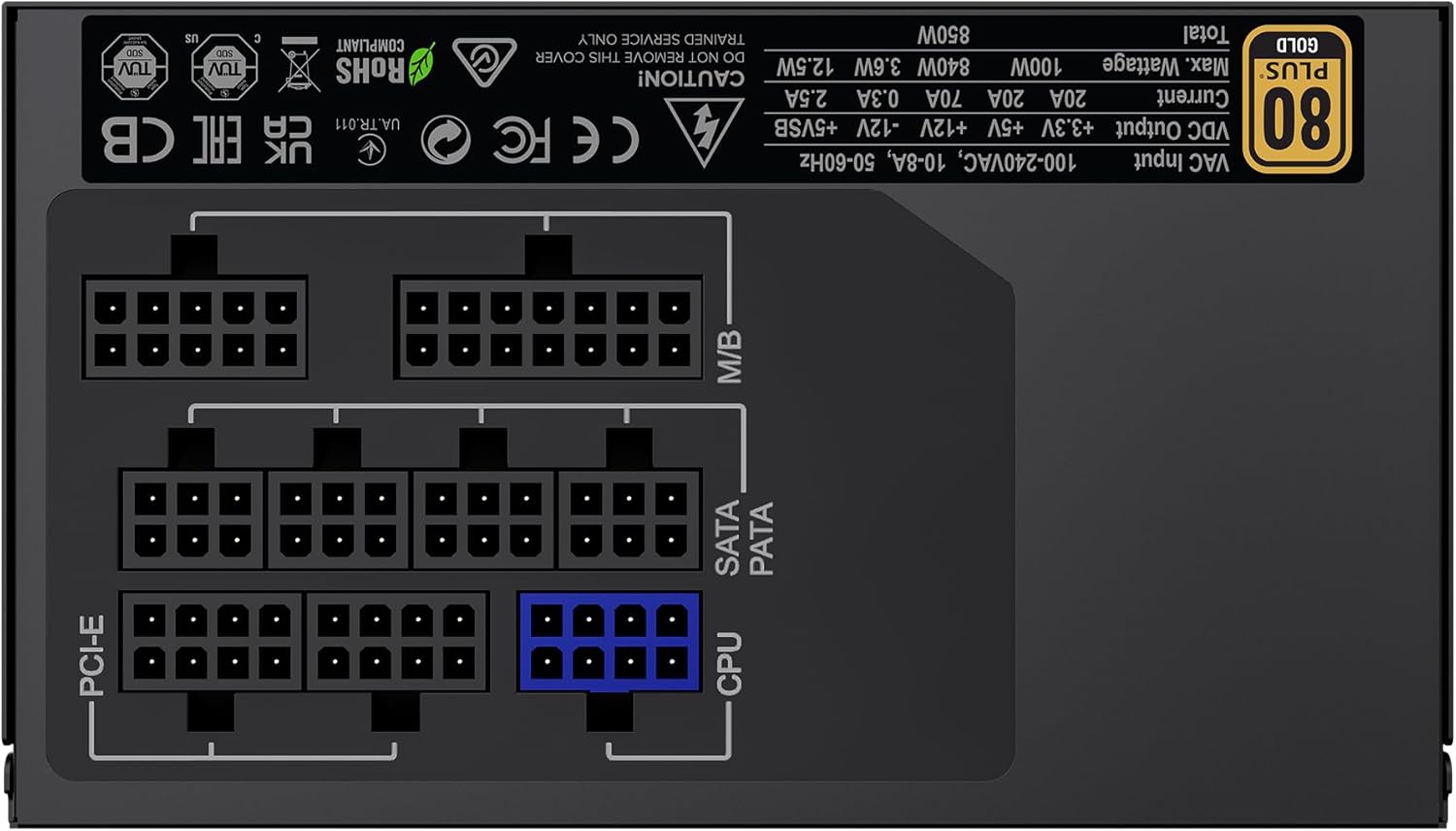
תמונה: אחורי view of the GAMEMAX GX-850 showing the fully modular cable connection ports for PCI-e, M/B (Motherboard), SATA/PATA, and CPU cables.
- Motherboard (M/B): חבר את כבל ה- ATX 24 פינים ללוח האם.
- מעבד: Connect the 8-pin (or 4+4-pin) CPU power cable to the CPU power connector on your motherboard.
- Graphics Cards (PCI-e): Connect the 6+2-pin PCIe power cables to your graphics card(s). Use separate cables for each connector if your GPU requires multiple.
- התקני אחסון (SATA): חבר כבלי חשמל SATA לכונני SSD, כונני HDD וכוננים אופטיים שלך.
- Peripherals (PATA/Molex): Connect peripheral power cables to any other devices requiring them (e.g., fan controllers, older drives).
- ניהול כבלים: נתבו את הכבלים בצורה מסודרת כדי לשפר את זרימת האוויר והאסתטיקה.
- סגור את המארז וחבר את החשמל: Close your computer case. Connect the AC power cord to the power supply and then to a grounded wall outlet.
5. הוראות הפעלה
After successful installation, follow these steps to operate your system.
- מתג הפעלה: Ensure the power switch on the back of the power supply is in the 'ON' (I) position.
- הפעלת המערכת: Press the power button on your computer case to turn on the system.
- System Power Off: To turn off your system, use the operating system's shutdown procedure. For a hard shutdown, hold the case power button for several seconds. For complete power disconnection, switch the PSU's power switch to 'OFF' (O) and unplug the AC cord.
6. תחזוקה
תחזוקה שוטפת מסייעת להבטיח את אורך החיים והביצועים האופטימליים של ספק הכוח שלך.
- ניקוי אבק: Periodically clean the power supply's fan and ventilation grilles using compressed air to prevent dust buildup, which can impede cooling. Ensure the system is powered off and unplugged before cleaning.
- בדיקת כבלים: Occasionally check all modular cable connections to ensure they are securely seated.
- תנאים סביבתיים: שמרו על סביבה נקייה, יבשה ומאווררת היטב עבור המחשב שלכם.
7. פתרון תקלות
אם נתקלת בבעיות עם ספק הכוח שלך, עיין בשלבי פתרון הבעיות הנפוצים הבאים:
- אין כוח:
- Ensure the AC power cord is securely plugged into both the wall outlet and the power supply.
- ודא שמתג ההפעלה בגב ספק הכוח נמצא במצב 'ON' (I).
- Verify that the 24-pin ATX and 8-pin CPU power cables are correctly and firmly connected to the motherboard.
- בדוק את שקע הקיר עם מכשיר אחר כדי לוודא שיש לו חשמל.
- חוסר יציבות מערכת/כיבויים אקראיים:
- Ensure all modular cables are fully seated at both the PSU and component ends.
- Check for proper ventilation and ensure the PSU fan is spinning. Overheating can cause shutdowns.
- If you have recently added new components, ensure your 850W power supply is sufficient for the total system wattage.
- המאוורר לא מסתובב:
- The GX-850 features a temperature-controlled fan. It may not spin at low loads or temperatures. This is normal operation.
- If the fan does not spin under load and the PSU feels hot, ensure there are no obstructions and consider contacting support.
If problems persist after performing these steps, contact GAMEMAX customer support or your retailer for further assistance.
8. מפרטים
Detailed technical specifications for the GAMEMAX GX-850 80 Plus Gold Power Supply:
| תכונה | מִפרָט |
|---|---|
| שם הדגם | GX-850 Modular |
| מותג | GAMEMAX |
| פלט וואטtage | 850 וואט |
| גורם צורה | ATX |
| הסמכת יעילות | 80 פלוס זהב |
| עיצוב ספק כוח | מודולרי מלא |
| שיטת קירור | Air (FDB Fan) |
| מספר המעריצים | 1 |
| מינימום קלט כרךtage | 115 וולט |
| קלט מקסימלי כרךtage | 240 וולט (AC) |
| דירוג טמפרטורה עליון | 105 Degrees Celsius (Capacitors) |
| מכשירים תואמים | מחשב שולחני |
| סוגי מחברים | ATX, PCI-e, SATA |
9. אחריות ותמיכה
GAMEMAX products are manufactured to high-quality standards. For warranty information, please refer to the warranty card included with your product or visit the official GAMEMAX webאתר. תנאי האחריות עשויים להשתנות בהתאם לאזור ולקמעונאי.
For technical support or further inquiries, please contact GAMEMAX customer service through their official webאתר או פרטי הקשר שסופקו על ידי הקמעונאי שלך.