
Angrox NS-RCFNA-21-Upgrade
Angrox Universal TV Remote Control Instruction Manual
Model: NS-RCFNA-21-Upgrade
מותג: אנגרוקס
1. הקדמה
Thank you for choosing the Angrox Universal TV Remote Control. This remote is designed to simplify your entertainment experience by providing a single control solution for a wide range of smart TVs. It offers seamless compatibility and intuitive operation, making it an ideal replacement for lost or broken original remotes.

איור 1.1: חזית view of the Angrox Universal TV Remote Control.
2. מידע בטיחות
- הרחק סוללות מהישג ידם של ילדים. אם נבלע, פנה לטיפול רפואי מיידי.
- אין לערבב סוללות ישנות וחדשות, או סוגים שונים של סוללות.
- הוציאו את הסוללות אם השלט רחוק לא יהיה בשימוש למשך תקופה ממושכת כדי למנוע דליפות.
- Avoid exposing the remote to direct sunlight, heat sources, or excessive moisture.
- אין לנסות לפרק או לשנות את השלט רחוק.
3. תכולת החבילה
החבילה צריכה להכיל את הפריטים הבאים:
- 1 x Angrox Universal TV Remote Control
- 1 x מדריך הוראות (מסמך זה)
Note: 2 AAA batteries are required for operation and are not included in the package.
4. חלקים ותכונות
Familiarize yourself with the buttons and functions of your new remote control.
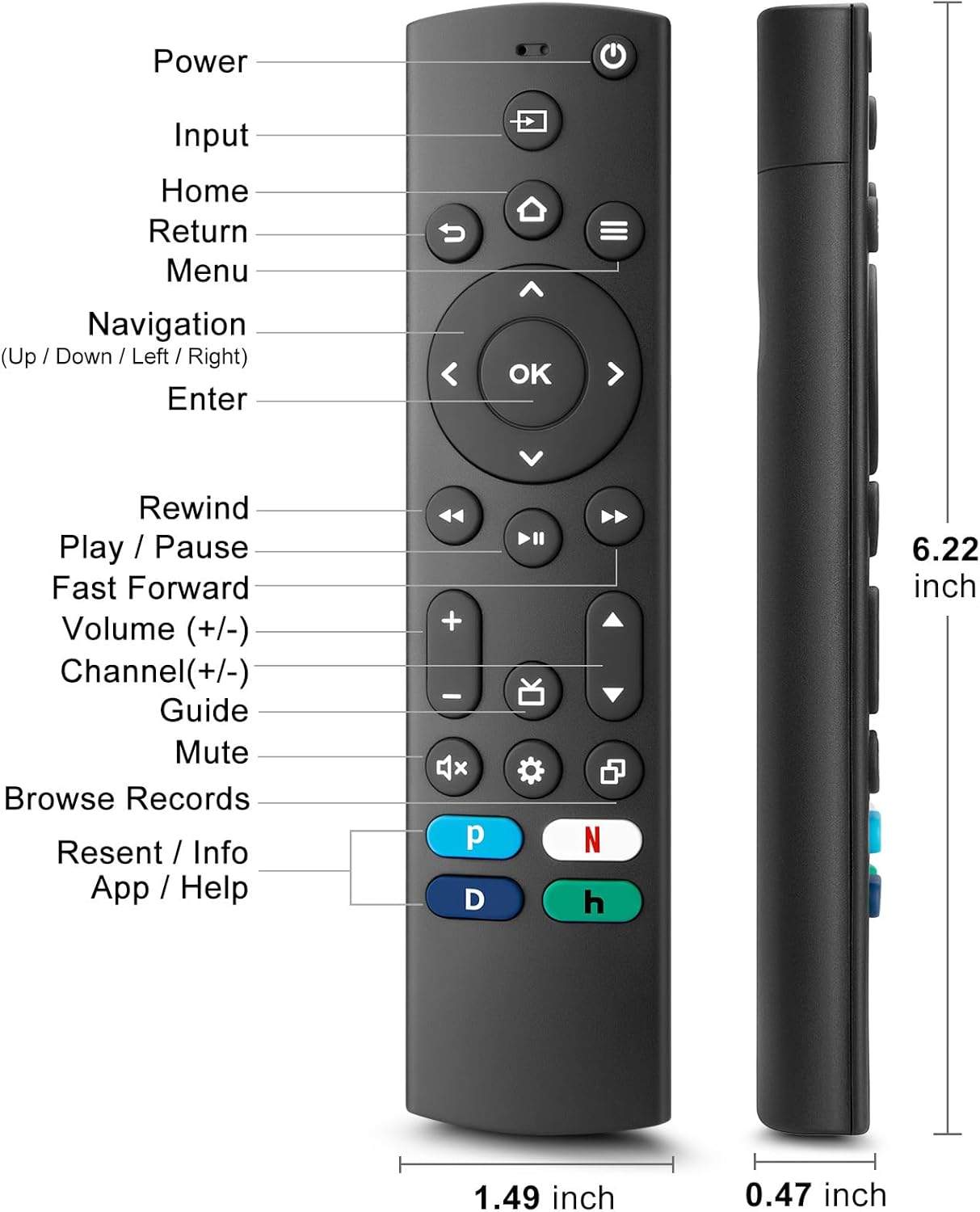
Figure 4.1: Labeled buttons and dimensions of the remote control.
- לחצן הפעלה: מפעיל או מכבה את הטלוויזיה.
- לחצן קלט: בחירת מקור קלט (HDMI, AV וכו').
- כפתור בית: חוזר למסך הבית של הטלוויזיה.
- Navigation Pad (Up/Down/Left/Right) & OK Button: לניווט ובחירה בתפריטים.
- לחצן החזרה: חוזר למסך הקודם.
- לחצן תפריט: Accesses TV settings or options menu.
- Rewind/Play/Pause/Fast Forward Buttons: פקדי הפעלת מדיה.
- עוצמת הקול מעלה/הנמכת: מכוונן את עוצמת הקול של הטלוויזיה.
- ערוץ למעלה/למטה: משנה ערוצי טלוויזיה.
- כפתור השתק: משתיק או מבטל את השתקת צליל הטלוויזיה.
- לחצן הגדרות: Accesses quick settings.
- Dedicated Hotkeys (Netflix, P-Video, Disney+, Hulu): גישה ישירה לשירותי סטרימינג פופולריים.
This remote control utilizes infrared (IR) technology for stable performance and a fast response time of 0.2 seconds, with a control range of up to 40 feet. Please note that this remote does לֹא support voice search functions.

Figure 4.2: Remote's stable performance and precise control features.

Figure 4.3: This remote does not include voice search functionality.
5. התקנה
5.1. התקנת סוללה
- פתח את מכסה תא הסוללה בגב השלט הרחוק.
- Insert two (2) AAA batteries, ensuring the positive (+) and negative (-) terminals align with the markings inside the compartment.
- סגור היטב את מכסה תא הסוללות.
5.2. Initial Pairing and TV Compatibility
This universal remote is designed for easy setup with most major TV brands. Simply press and hold two specific buttons simultaneously to pair it with your TV.

Figure 5.1: Easy 2-button setup for various TV brands.
| מותג טלוויזיה | Button Combination (Press & Hold) | הערות |
|---|---|---|
| טלוויזיה אינסיגניה | OK + Home Button | |
| טלוויזיה של טושיבה | OK + Home Button | |
| Roku TV | OK + Up Arrow | |
| הטלוויזיה של Hisense | OK + Down Arrow | Hulu not supported |
| טלוויזיה TCL | OK + Right Arrow | Hulu not supported |
| טלוויזיה של סמסונג | OK + Return Button | |
| Vizio TV | OK + Menu Button | |
| טלוויזיה של LG | OK + Rewind Button | Hulu not supported |
| טלוויזיה של פיליפס | OK + Play/Pause Button | Prime Video, Disney+, Hulu not supported |
| טלוויזיה של סוני | OK + Fast Forward Button | Hulu not supported |
Once the remote is paired, it should function immediately. No further programming is typically required.
5.3. הערות תאימות
This remote is designed to be a universal replacement for many TV models, including specific Insignia and Toshiba smart TV remotes (e.g., NS-RCFNA-21, NS-RCFNA-19, CT-95018, CT-RC1US-21, CT-RC1US-19). However, it is important to note that it may not be compatible with all specific original remote models or streaming devices, particularly those with unique pairing methods or voice control features.

איור 5.2: דוגמהamples of remote controls and devices that are NOT compatible with this universal remote.

Figure 5.3: This remote is not compatible with TV Cube or TV Stick streaming devices.
For optimal performance, ensure your TV's infrared receiver is unobstructed.
Video 5.1: An official product video demonstrating the features and ease of use of the Angrox Universal TV Remote. This video highlights the remote's compatibility and quick access buttons for streaming services.
6. הפעלת השלט רחוק
Once paired, the Angrox Universal TV Remote operates like a standard TV remote. Point the remote directly at your TV's infrared receiver for best results.
6.1. פונקציות בסיסיות
- כּוֹחַ: הקש על כּוֹחַ פעם אחת כדי להפעיל או לכבות את הטלוויזיה.
- כֶּרֶך: השתמש ב- הגברת עוצמת הקול (+) ו להנמיך קול (-) כפתורים לכוונון רמת הקול.
- עָרוּץ: השתמש ב- ערוץ למעלה (▲) ו ערוץ למטה (▼) לחצנים לשינוי ערוצים.
- ניווט: השתמש ב- למעלה, למטה, שמאלה, ימינה arrows to navigate through menus and options. Press OK כדי לאשר בחירה.
- בַּיִת: הקש על בַּיִת button to return to the main smart TV interface.
- לַחֲזוֹר: הקש על לַחֲזוֹר button to go back to the previous screen or menu.
6.2. Dedicated Hotkeys
The remote features dedicated hotkeys for quick access to popular streaming platforms:
- נטפליקס: Instantly launch the Netflix application.
- P-Video (Prime Video): Instantly launch the Prime Video application.
- דיסני+: Instantly launch the Disney+ application.
- Hulu: Instantly launch the Hulu application.

Figure 6.1: Quick access to streaming services with dedicated hotkeys.
7. תחזוקה
- ניקוי: נגבו את השלט בעזרת מטלית רכה ויבשה. אין להשתמש בחומרי ניקוי שוחקים או ממסים.
- החלפת סוללה: Replace batteries when the remote's response becomes sluggish or it stops functioning. Always replace both batteries at the same time.
- אִחסוּן: יש לאחסן את השלט במקום קריר ויבש, הרחק מאור שמש ישיר וטמפרטורות קיצוניות.
8. פתרון תקלות
| בְּעָיָה | סיבה אפשרית | פִּתָרוֹן |
|---|---|---|
| שלט רחוק לא מגיב לטלוויזיה. | Low or dead batteries. Incorrect pairing. Obstruction between remote and TV. | Replace batteries with new AAA batteries. Re-attempt pairing using the correct button combination for your TV brand (refer to Section 5.2). Ensure no objects are blocking the TV's IR receiver. |
| Specific hotkey (e.g., Hulu) not working. | TV brand incompatibility with specific hotkey functions. | Some TV brands (e.g., Hisense, TCL, LG, Philips, Sony) may not support all dedicated hotkeys. This is a limitation of the TV's software, not the remote. You may need to navigate to these apps manually. |
| No voice control functionality. | This remote does not support voice commands. | The Angrox Universal TV Remote Control is designed for infrared (IR) control and does not include a microphone for voice search. This is an intended feature. |
| Remote feels unresponsive or delayed. | Weak batteries. Remote too far from TV. | Replace batteries. Ensure you are within the effective range (up to 40 feet) and pointing directly at the TV. |
9. מפרטים
| תכונה | פְּרָט |
|---|---|
| מספר דגם | NS-RCFNA-21-Upgrade |
| מותג | אנגרוקס |
| מידות (L x W x H) | 6.22 x 1.49 x 0.47 אינץ' |
| משקל פריט | 1.76 אונקיות |
| מקור כוח | 2 x סוללות AAA (לא כלולות) |
| חוֹמֶר | ABS וסיליקון איכותיים |
| טכנולוגיית בקרה | אינפרא אדום (IR) |
| זמן תגובה | 0.2 שניות |
| טווח שליטה | עד 40 רגל |
| תכונות מיוחדות | Universal, Ergonomic, Lightweight, Pre-Programmed, No Programming Required (for most TVs) |
| צֶבַע | שָׁחוֹר |
| מכשירים תואמים | Television (Insignia, Toshiba, Pioneer, Samsung, TCL, LG, Hisense, Vizio, Sony, Philips, Roku TVs) |
10. אחריות ותמיכה
Angrox products are manufactured with high-quality materials and undergo strict quality control. For information regarding warranty coverage, returns, or technical support, please refer to the product listing page on Amazon or contact Angrox customer service directly through the Amazon platform.
You can visit the official Angrox store on Amazon for more information and contact options: חנות אנגרוקס
Ask a question about this manual
Ask about setup, troubleshooting, compatibility, parts, safety, or missing instructions. Manuals+ will review the question and use this page’s manual context to help answer it.