
מָבוֹא
The Paulmann Batuno LED Cabinet Light Set provides efficient and versatile lighting for your kitchen or other cabinet areas. This set of three lights offers adjustable light color temperatures from warm white to neutral white (2200 K to 4000 K) and dimming capabilities, all controlled via an included remote. The lights are designed for easy installation with a direct 230 V connection via a plug-in transformer, ensuring uniform illumination of work surfaces.

Paulmann Batuno LED cabinet lights installed under kitchen cabinets, illuminating a countertop.
מידע בטיחות
- קרא בעיון את כל ההוראות לפני ההתקנה והשימוש.
- ודא שספק הכוח מנותק לפני כל עבודת התקנה או תחזוקה.
- מוצר זה מיועד לשימוש פנימי בלבד.
- אין לחשוף את האורות ללחות יתר או לטמפרטורות קיצוניות.
- Only use the provided power adapter and components. Using unauthorized parts may void the warranty and pose a safety risk.
- Keep the remote control and small parts out of reach of children.
תוכן החבילה
ודא שכל הפריטים המפורטים להלן כלולים בחבילה שלך:
- 3 x Batuno LED Cabinet Lights
- 1 x שלט רחוק
- 1 x Wall Mount for Remote Control
- 1 x Plug-in Transformer (230V)
- כבלים לחיבור
- Mounting Screws and Adhesive Pads
- הוראות הרכבה (מדריך זה)
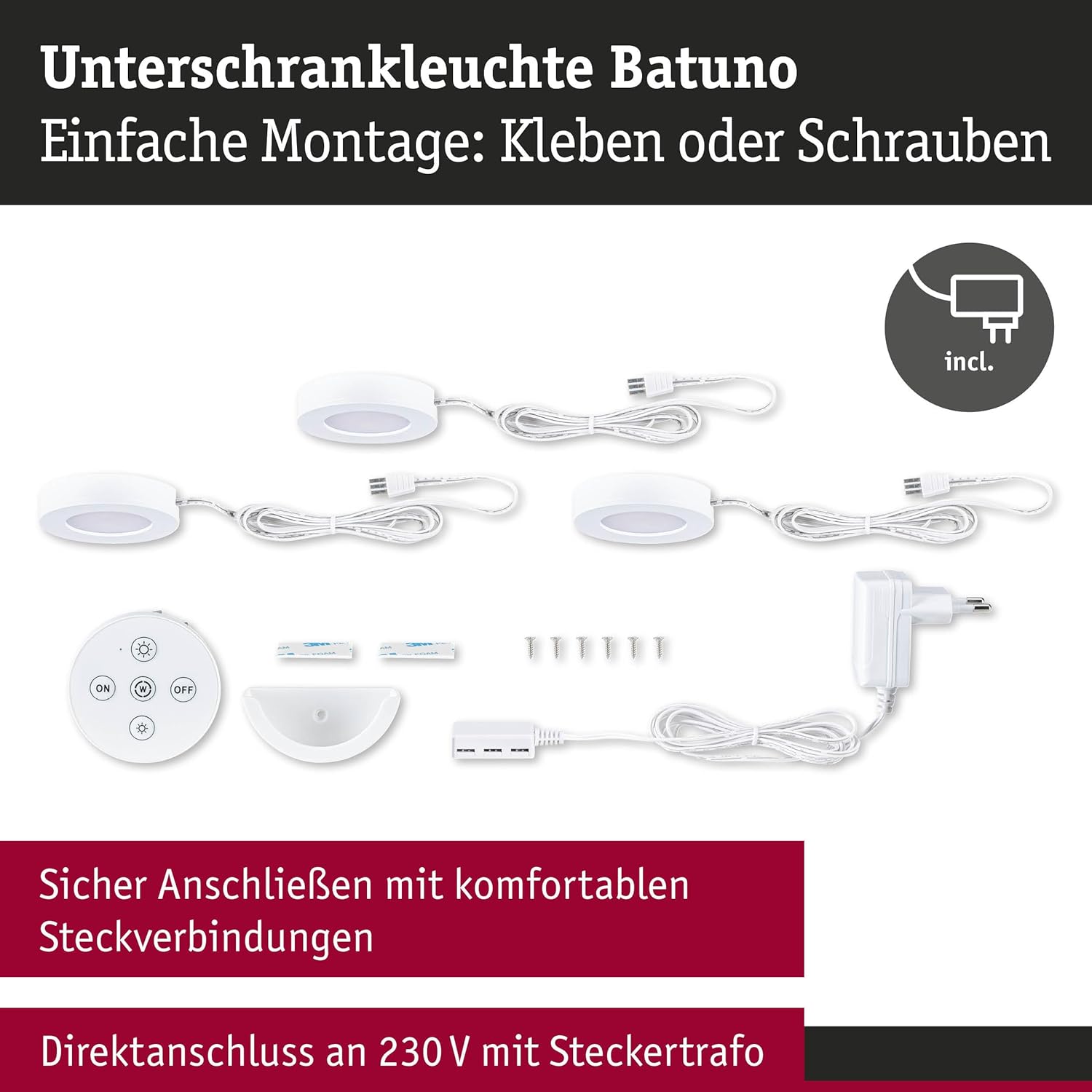
All components included in the Paulmann Batuno LED cabinet light set.
הַתקָנָה
The Batuno LED cabinet lights offer flexible installation options, either by screwing or using adhesive pads.
Step 1: Plan Placement
Determine the desired locations for your three cabinet lights. Ensure they are evenly spaced for optimal illumination of your work surface.
שלב 2: הרכבת האורות
Choose your preferred mounting method:
- הרכבת בורג: Mark the screw positions for each light. Drill small pilot holes if necessary. Secure each light using the provided screws.
- הרכבה דבק: Clean the mounting surface thoroughly to ensure it is dry and free of dust or grease. Apply the adhesive pads to the back of each light and firmly press the lights into position.
Step 3: Connecting the Lights
- Connect the individual LED lights to the provided connection cables.
- Connect the cables from the lights to the plug-in transformer.
- Plug the transformer into a standard 230V wall outlet.
Step 4: Remote Control Wall Mount
The remote control can be stored in its wall mount for easy access. Choose a convenient location near your lights and secure the wall mount using either screws or adhesive pads.
הוראות הפעלה
The Batuno LED cabinet lights are controlled using the included remote control.
פונקציות שלט רחוק:
- לחצן הפעלה/כיבוי: לחץ כדי להדליק או לכבות את האורות.
- Dimming Buttons (Sun icon with + / -): Use these buttons to increase or decrease the brightness of the lights. There are ten dimming levels available.
- White Switch Button (W icon): Press this button to cycle through the four available light color temperatures: warm white (2200 K) to neutral white (4000 K).

Lights set to warm white using the remote control.

Lights set to neutral white using the remote control.
תַחזוּקָה
To ensure the longevity and optimal performance of your Paulmann Batuno LED cabinet lights, follow these simple maintenance guidelines:
- ניקוי: נתק את החשמל לפני הניקוי. השתמש במטלית רכה, יבשה או מעט רטובה.amp cloth to wipe the surfaces of the lights. Do not use abrasive cleaners, solvents, or harsh chemicals, as these can damage the finish or electronic components.
- החלפת נורה: The LED bulbs are integrated and not user-replaceable. If a light fails, the entire unit may need to be replaced.
- אִחסוּן: If storing the lights for an extended period, keep them in a dry, cool place away from direct sunlight.
פתרון בעיות
If you encounter issues with your Batuno LED cabinet lights, refer to the following common problems and solutions:
| בְּעָיָה | סיבה אפשרית | פִּתָרוֹן |
|---|---|---|
| אורות לא נדלקים. | אין ספק כוח. סוללת השלט רחוק מתה. חיבור רופף. | Check if the transformer is properly plugged into a live outlet. החלף את סוללת השלט הרחוק. ודא שכל הכבלים מחוברים היטב. |
| אורות מהבהבים או מתעמעמים באופן בלתי צפוי. | אספקת חשמל לא יציבה. חיבור לקוי. | Ensure the power outlet is stable. Try plugging into a different outlet. בדוק את כל חיבורי הכבלים לאיתנות. |
| השלט רחוק לא מגיב. | סוללת השלט רחוק מתה. חסימה בין השלט רחוק לאורות. Remote not paired (unlikely for this product, but possible). | החלף את סוללת השלט הרחוק. Ensure a clear line of sight between the remote and the lights. Refer to specific pairing instructions if provided (not typically required for this model). |
| Cannot change light color or brightness. | סוללת השלט רחוק חלשה. לחצן לא נכון. | החלף את סוללת השלט הרחוק. Ensure you are pressing the correct 'W' button for color and 'Sun' buttons for brightness. |
If the problem persists after trying these solutions, please contact Paulmann customer support.
מפרטים
| תכונה | פְּרָט |
|---|---|
| מותג | פולמן |
| מספר דגם | 92127 |
| מידות המוצר (L x W x H) | 7 x 7 x 1.5 cm (per light) |
| משקל פריט | 39 g (per light) |
| מספר פריטים | 3 (lights) |
| צֶבַע | לָבָן |
| כרך ידtage | 230 Volts (input), 24 Volts (output to lights) |
| כּוֹחַ | 6.3 Watts (total for 3 lights, 3 x 2.1W) |
| שטף אור | 3 x 180 lm (total 540 lm) |
| תכונות מיוחדות | Dimmable, Adjustable White Color Temperature (2200 K - 4000 K) |
| סוג תקע | AC (with plug-in transformer) |
| סוג התקנה | Under-cabinet (screw or adhesive mount) |
| סוללות נדרשות | No (for lights), Yes (for remote control, not included) |
| ארץ מוצא | סִין |
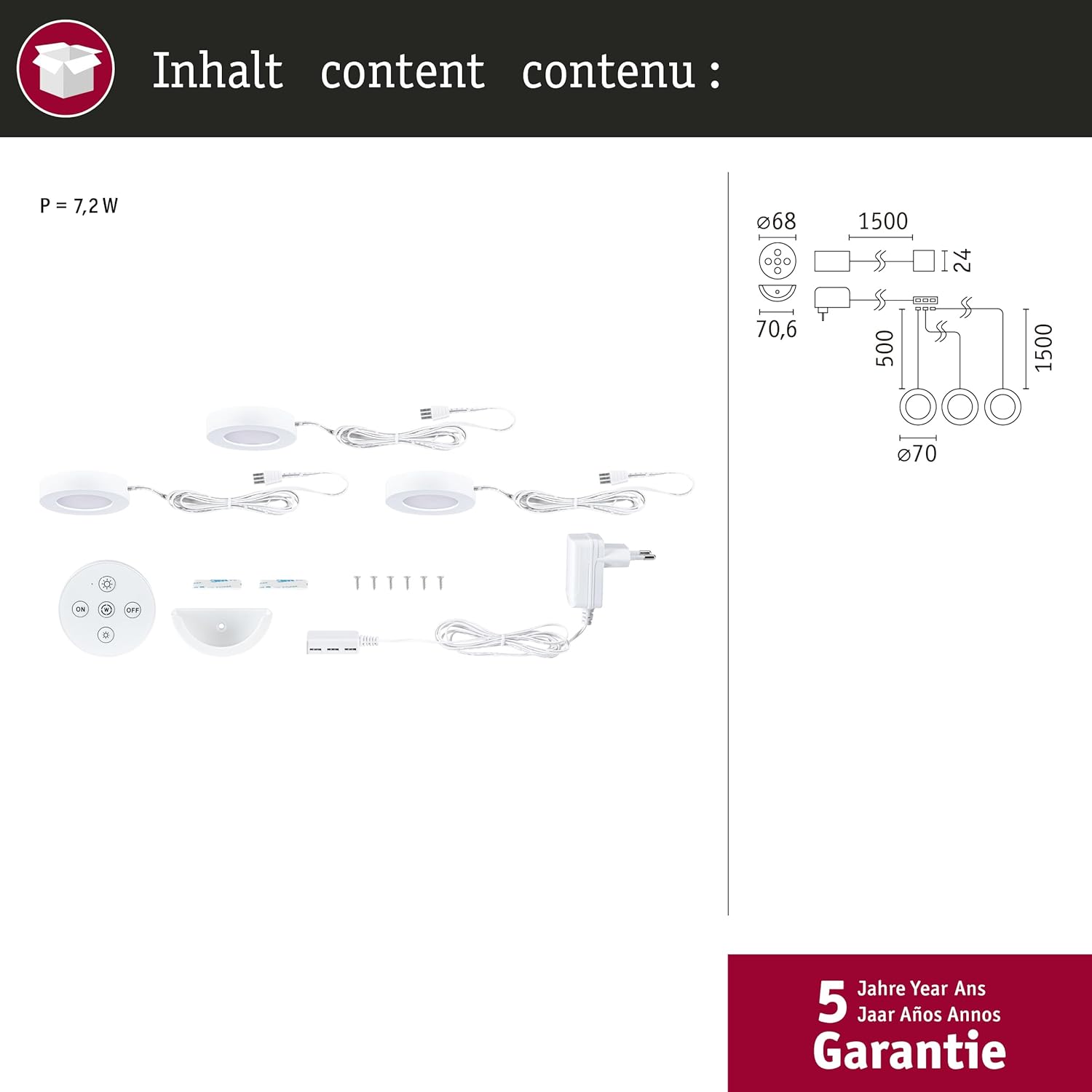
Product dimensions and component overview.
אַחֲרָיוּת
The Paulmann Batuno LED Cabinet Light Set comes with a אחריות לשנה from the date of purchase. This warranty covers manufacturing defects and material faults under normal use. Please retain your proof of purchase for warranty claims. The warranty does not cover damage caused by improper installation, misuse, accidents, or unauthorized modifications.
תמיכת לקוחות
For further assistance, technical support, or warranty inquiries, please contact Paulmann customer service. You can find contact information on the official Paulmann webבאתר או דרך הקמעונאי שלך.