
FREDEES BL-97022-25/29
FREDEES Farmhouse Dresser Instruction Manual
Model: BL-97022-25/29
Brand: FREDEES
1. מידע בטיחות חשוב
אנא קראו והבינו את כל ההוראות לפני ההרכבה והשימוש. שמרו מדריך זה לעיון עתידי.
- מכשיר נגד טיפ: Always install the anti-tip device provided to prevent serious or fatal crushing injuries.
- מגבלות משקל: Do not exceed the maximum weight capacity for the top surface or drawers. Refer to the specifications section for details.
- הַרכָּבָה: Assemble the dresser on a soft, clean surface to prevent scratches. Ensure all parts are securely fastened before use.
- בטיחות ילדים: הרחיקו חלקים קטנים וחומרי אריזה מהישג ידם של ילדים. אין לאפשר לילדים לטפס על השידה או לשחק איתה.
- בטיחות חשמל: When using the charging station, ensure cables are not pinched or damaged. Do not overload the electrical outlets.
2. תכולת החבילה
ודא שכל הרכיבים קיימים לפני תחילת ההרכבה. אם חסרים או פגומים חלקים כלשהם, אנא פנה לתמיכת הלקוחות.

איור 2.1: התפוצץ view of dresser components.
This diagram illustrates the various parts of the dresser, including the frame, 8 wooden drawers, tempered glass tabletop, built-in charging station, retro metal handles, and solid sliding rails. All necessary hardware is included for assembly.
3. הוראות הרכבה
Assembly is required for this product. Follow the step-by-step instructions provided in the included assembly guide. All parts and screws are labeled for easy identification.
- הכן את השטח: Clear a spacious, clean, and soft area for assembly to prevent damage to the dresser components.
- זיהוי חלקים: Unpack all components and hardware. Match each part to the corresponding label in the assembly guide.
- הרכיבו את המסגרת: התחילו בהרכבת המסגרת הראשית של השידה בהתאם לתרשימים. ודאו שכל החיבורים מאובטחים.
- התקנת מסילות מגירה: Attach the drawer slides to the dresser frame and to the drawer boxes as indicated.
- הרכבת מגירות: Construct each of the 8 drawers, ensuring the bottoms are properly seated and the handles are attached.
- Install Tempered Glass Top: Carefully place the tempered glass top onto the dresser frame.
- חיבור רכיבים חשמליים: Follow instructions to connect the LED lighting and charging station. Ensure proper power connection.
- מגירות הכנס: Slide the assembled drawers into their respective slots.
- התקנת ערכת נגד התהפכות: Secure the dresser to the wall using the provided anti-tip kit to prevent tipping.
- בדיקה סופית: Verify that all screws are tightened and the dresser is stable before placing items inside.
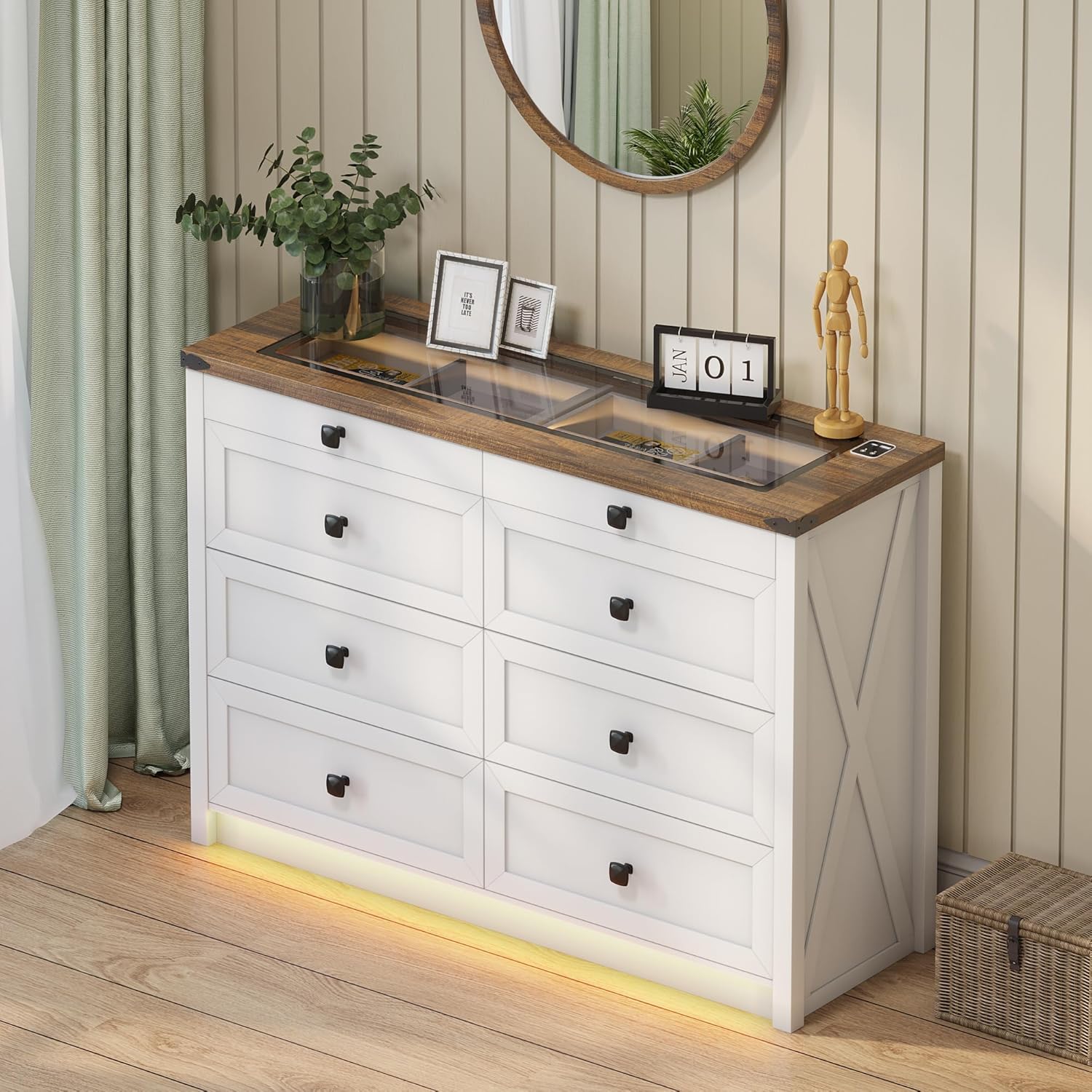
Figure 3.1: Fully assembled dresser.
This image shows the dresser fully assembled and placed in a room, ready for use. Note the integrated LED lighting at the base and the clear glass top.
4. הוראות הפעלה
4.1. מערכת תאורת LED
The dresser features integrated LED lighting with customizable color and brightness settings, along with a human sensor for automatic activation.
- הפעלה/כיבוי: Locate the touch button on the top surface near the charging station. A short press will turn the lights on or off.
- שינוי מצב צבע: With the lights on, short press the touch button repeatedly to cycle through the three available color modes: Warm Light, Natural Light, and White Light.
- התאם את הבהירות: To adjust brightness, long press the touch button. The brightness will gradually increase or decrease. Release the button when the desired brightness is reached.
- Human Sensor: The dresser is equipped with a human sensor. When activated, the lights will automatically turn on when motion is detected nearby and turn off after a period of inactivity. Refer to the specific controls on the dresser for sensor activation/deactivation.

Figure 4.1: LED lighting color options.
This image demonstrates the visual difference between the Natural, White, and Warm light settings of the integrated LED strip, along with a brightness control slider.

Figure 4.2: Tempered glass top with and without illumination.
This visual shows how the transparent black tea-tinted glass top allows visibility of stored items when the internal light is on, and provides privacy when the light is off.
4.2. תחנת טעינה
The dresser is equipped with a convenient 2-in-1 charging station on its surface, featuring both USB and Type-C ports.
- חבר חשמל: Ensure the dresser's power cord is securely plugged into a functional wall outlet.
- התקני טעינה: Connect your smartphone, tablet, or other electronic devices to the available USB (5V/2A) or Type-C ports using their respective charging cables.
- נוֹהָג: The charging station is designed for convenient access to power for your devices while keeping them organized on the dresser top.

איור 4.3: תחנת טעינה משולבת.
A close-up of the dresser's surface, showing the integrated USB and Type-C charging ports, ready for device connection.
5. טיפול ותחזוקה
טיפול נכון יאריך את חיי השידה ומראהה.
- ניקוי: נגבו את משטחי השידה במטלית יבשה ורכה. עבור סימנים עקשניים, נגבו מעטamp ניתן להשתמש במטלית, ולאחר מכן מיד במטלית יבשה. יש להימנע מכימיקלים חזקים או חומרי ניקוי שוחקים.
- משטח זכוכית: Clean the tempered glass top with a glass cleaner and a soft, lint-free cloth.
- נִעוּר: נקו באופן קבוע את כל המשטחים מאבק כדי למנוע הצטברות.
- הימנע מלחות: Do not place hot or wet items directly on the wood or glass surfaces without protection.
- חשיפה לאור השמש: הימנעו מחשיפה ממושכת לאור שמש ישיר כדי למנוע דהייה או שינוי צבע של גימור העץ.
- תחזוקת מגירות: Periodically check drawer slides for smooth operation. If needed, a silicone-based lubricant can be applied sparingly.
6. פתרון תקלות
| בְּעָיָה | סיבה אפשרית | פִּתָרוֹן |
|---|---|---|
| נורות LED לא נדלקות. | Power cord not connected; loose connection; faulty LED strip. | Ensure power cord is securely plugged in. Check all electrical connections. If problem persists, contact customer support. |
| עמדת טעינה לא עובדת. | Power cord not connected; device cable faulty; device not compatible. | Verify dresser is plugged in. Try a different charging cable or device. Ensure device is compatible with USB/Type-C charging. |
| קשה לפתוח/לסגור מגירות. | Overloaded drawer; misaligned slides; loose hardware. | Reduce contents in the drawer. Check if drawer slides are properly aligned. Tighten any loose screws on the drawer or slides. |
| השידה מרגישה רעועה. | Uneven floor; loose assembly hardware; anti-tip kit not installed. | Adjust furniture levelers if present, or place shims under the base. Retighten all assembly screws. Ensure the anti-tip kit is correctly installed and secured to the wall. |
7. מפרט מוצר
- מותג: FREDEES
- שם הדגם: BL-97022-25/29
- מידות המוצר: 15.75" D x 47.24" W x 33.46" H
- צֶבַע: לָבָן
- סוג הרכבה: הר קומה
- מספר מגירות: 8
- מאפיינים מיוחדים: Ample Storage Space, Convenient 2-in-1 Charging Solution (USB & Type-C), Customizable 3-Color Lighting, Tempered Glass Top Design, Human Sensor
- גימור ריהוט: Brown (top) / White (body)
- משקל פריט: 110.2 פאונד
- נדרשת הרכבה: כֵּן
- טיפול במוצר: נגב עם מטלית יבשה
- UPC: 756940843978
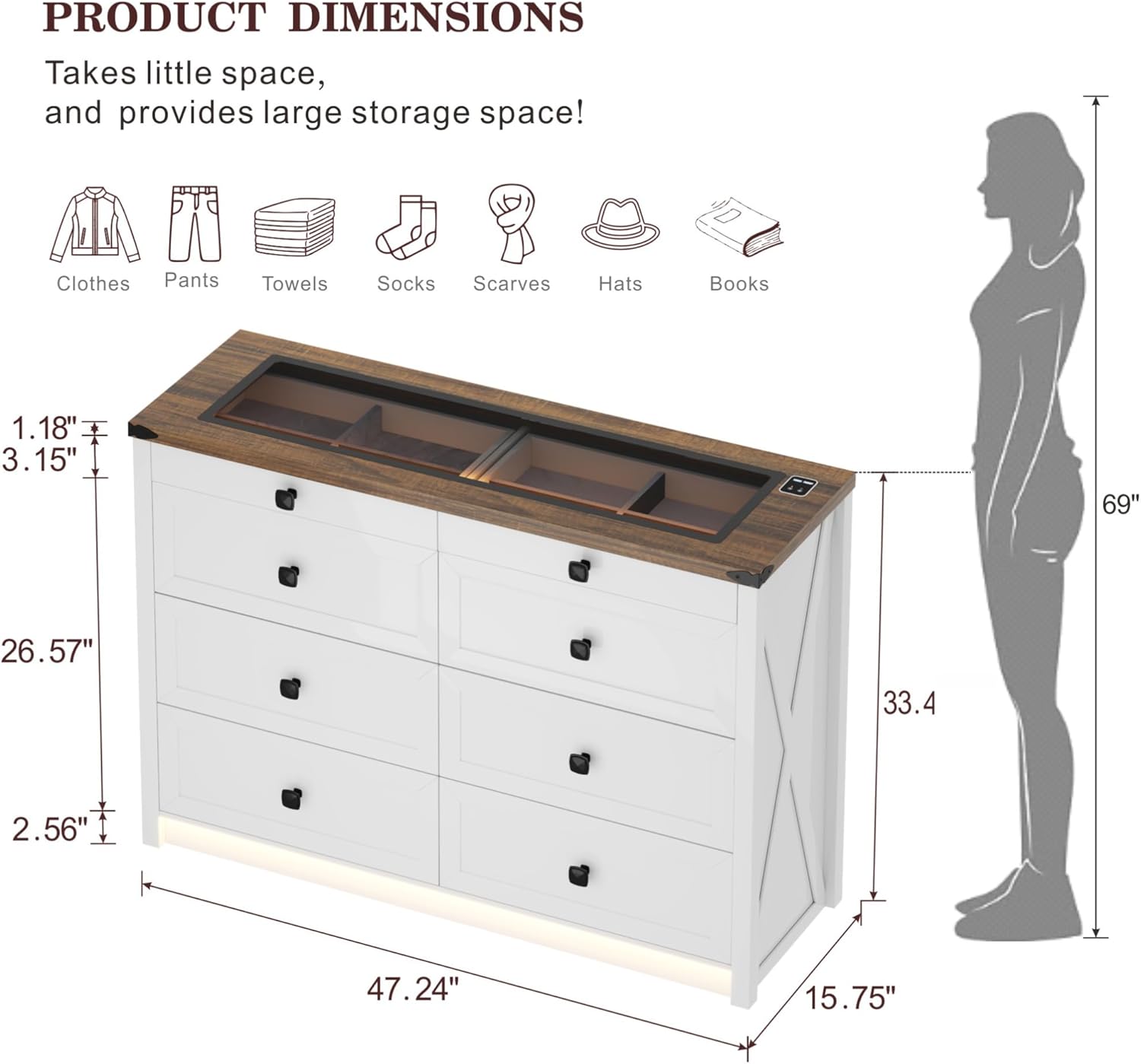
איור 7.1: מידות מפורטות של המוצר.
תרשים זה מספק סקירה מקיפהview of the dresser's dimensions, including overall height, width, depth, and specific measurements for drawer height and top surface thickness.

Figure 7.2: Storage capacity illustration.
An illustrative image demonstrating the ample storage capacity of each large drawer, capable of holding approximately 20-25 t-shirts or 15-20 pairs of jeans.
8. אחריות ותמיכה
For warranty information, technical support, or to order replacement parts, please contact FREDEES customer service directly. Refer to the product packaging or the original purchase documentation for contact details.
Please have your model number (BL-97022-25/29) and purchase date available when contacting support.
Ask a question about this manual
Ask about setup, troubleshooting, compatibility, parts, safety, or missing instructions. Manuals+ will review the question and use this page’s manual context to help answer it.