1. הקדמה
Welcome to the Aliencraft OUMUA Pro Advanced Bluetooth Speaker user manual. This guide provides detailed instructions for setting up, operating, and maintaining your new speaker. The OUMUA Pro features advanced Bluetooth 5.3 connectivity, powerful 20W RMS audio with extra bass, dynamic RGB lighting, and IPX7 water resistance, making it ideal for various environments. Enjoy immersive 360° sound and True Wireless Stereo (TWS) pairing for an enhanced audio experience.
2. תכולת החבילה
אנא סמן את התיבה עבור הפריטים הבאים:
- Aliencraft OUMUA Pro Bluetooth Speaker
- כבל טעינה USB-A ל-USB-C
- רצועת יד
- מדריך למשתמש (מסמך זה)
3. תכונות מוצר
3.1. Advanced Audio System
The OUMUA Pro is engineered with a full-range active woofer, ceramic tweeter, and a dual floating sub-woofer system, delivering 20 Watts RMS of powerful, clear audio with deep, solid bass.
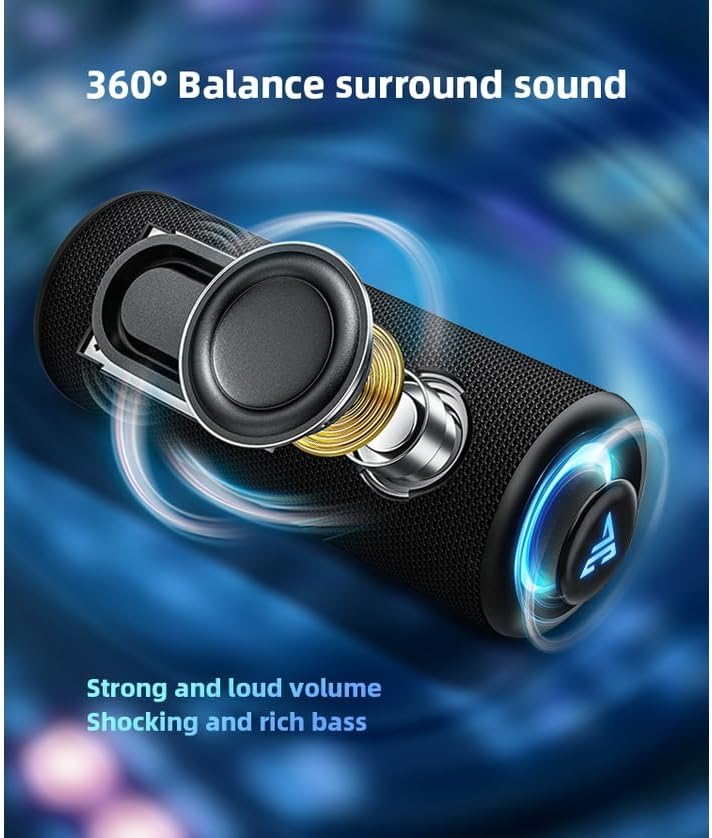
Image showing the internal components of the Aliencraft OUMUA Pro speaker, highlighting the woofer, tweeter, and sub-woofers for 360-degree balanced surround sound.
3.2. קישוריות בלוטות' 5.3
Equipped with a powerful Bluetooth 5.3 chip, the OUMUA Pro ensures low-latency, stable, and fast connections, maintaining clear sound within a 10-meter range. Ideal for gaming and seamless audio streaming.

Image illustrating the Bluetooth 5.3 chip, emphasizing stable and fast wireless connection capabilities.
3.3. תאורת RGB דינמית
The speaker features a twin RGB backlight system that illuminates and pulsates with the rhythm of your music, creating a futuristic and immersive atmosphere.
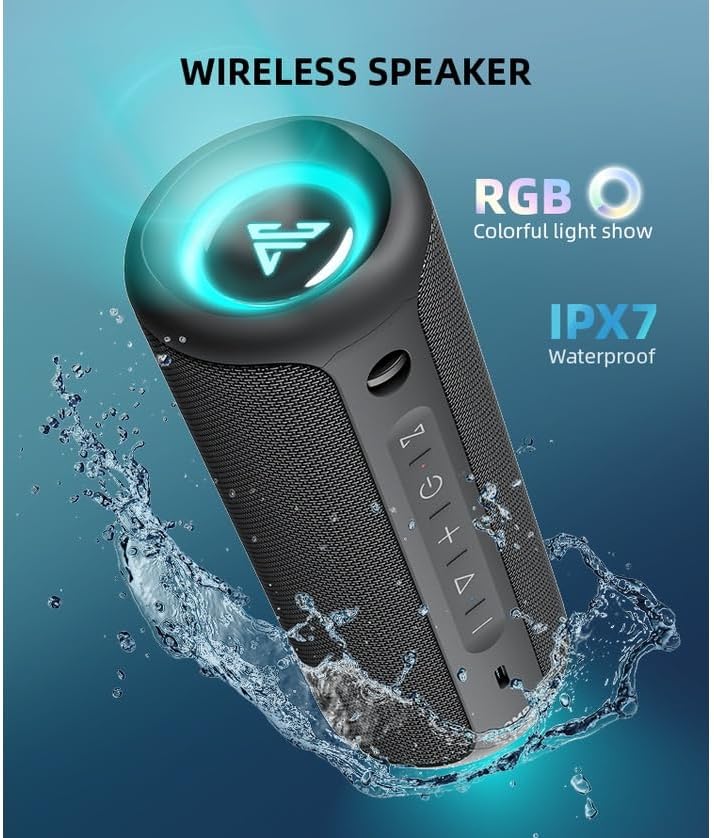
Image of the Aliencraft OUMUA Pro speaker with dynamic RGB lighting activated, showcasing its colorful light show and highlighting its IPX7 waterproof rating with water splashes.
3.4. עמידות למים בתקן IPX7
With IPX7 certification, the OUMUA Pro is completely water-resistant, making it suitable for use by the pool, at the beach, or in other outdoor environments. It is also resistant to impacts and falls.
3.5. Extended Battery Life & Portability
The large internal battery provides up to 10 hours of continuous playback at medium volume (without RGB light). Its compact size and included wrist strap make it highly portable.

Image depicting the Aliencraft OUMUA Pro speaker being carried by a person, illustrating its portability, 10-hour battery life, and fast charging capability.
3.6. פונקציית סטריאו אלחוטי אמיתי (TWS)
Connect two OUMUA Pro speakers to create a True Wireless Stereo (TWS) system, separating left and right audio channels for a powerful, wide-coverage surround sound effect.

Image showing two Aliencraft OUMUA Pro speakers wirelessly connected via TWS, demonstrating how they can create a stereo sound system.
4. התקנה
4.1. טעינת הרמקול
Before first use, fully charge the speaker. Connect the included USB-A to USB-C charging cable to the speaker's charging port and a 5V/1A power adapter (not included). A full charge takes approximately 3 hours.
4.2. הפעלה / כיבוי
Press and hold the Power button (refer to Controls section) for 2 seconds to turn the speaker on or off.
4.3. זיווג Bluetooth
- Ensure the speaker is powered on and in Bluetooth pairing mode (indicated by a flashing light).
- במכשיר שלך (סמארטפון, טאבלט, מחשב נייד), הפעל את Bluetooth וחפש מכשירים זמינים.
- Select 'Aliencraft OUMUA Pro' from the list. Once connected, the speaker will emit a confirmation sound, and the light indicator will become solid.
4.4. TWS Pairing (Optional)
- Ensure both OUMUA Pro speakers are powered on and not connected to any Bluetooth device.
- On one speaker, press and hold the TWS Connect button (refer to Controls section) for 2 seconds. It will enter TWS pairing mode.
- שני הרמקולים יתחברו אוטומטית זה לזה. לאחר החיבור, רמקול אחד יפעל כרמקול ראשי (ערוץ שמאלי) והשני כרמקול עבדי (ערוץ ימני).
- Now, connect your device to the master speaker via Bluetooth as described above.
5. הוראות הפעלה
5.1. בקרות עלview
The Aliencraft OUMUA Pro features intuitive controls located on the top panel. Refer to the diagram below for button functions.

Diagram illustrating the control panel of the Aliencraft OUMUA Pro speaker, with labels for each button and their corresponding functions (single press, double press, long press).
5.2. פונקציות כפתור
| כפתור/פעולה | פוּנקצִיָה |
|---|---|
| Power Button (Hold 2s) | הפעלה/כיבוי |
| Light Button (Press 1x) | Turn RGB light On/Off or Switch Modes |
| Play/Pause Button (Press 1x) | Play/Pause Track, Answer/End Call |
| Play/Pause Button (Press 2x) | המסלול הבא |
| Play/Pause Button (Hold 2s) | דחיית שיחה, הפעלת עוזר קולי |
| Volume Up Button (Press 1x) | הגברת עוצמת הקול |
| Volume Up Button (Hold 2s) | המסלול הבא |
| Volume Down Button (Press 1x) | הורדת עוצמת הקול |
| Volume Down Button (Hold 2s) | המסלול הקודם |
| TWS Button (Press 1x) | TWS Connect/Disconnect |
| TWS Button (Hold 2s) | נקה רשומת התאמה |
6. תחזוקה
6.1. ניקיון
נגב את הרמקול באמצעות רך, damp מטלית. אין להשתמש בחומרי ניקוי שוחקים או ממסים. יש לוודא שמכסה שקע הטעינה סגור היטב לפני ניקוי או חשיפה למים.
6.2. עמידות במים
The IPX7 rating means the speaker can be submerged in up to 1 meter of fresh water for 30 minutes. Do not expose to saltwater or chemicals. Always ensure the charging port cover is sealed when near water.
6.3. טיפול בסוללה
To prolong battery life, avoid fully discharging the speaker frequently. Store in a cool, dry place when not in use for extended periods. Recharge at least once every three months.
7. פתרון תקלות
- אין כוח: Ensure the speaker is charged. Connect to a power source and try turning it on again. If the issue persists, the battery may be fully depleted or faulty.
- אין צליל: Check the volume level on both the speaker and your connected device. Ensure the speaker is properly paired via Bluetooth. Try re-pairing the device.
- ניתוק Bluetooth/לא ניתן להתאים: Ensure the speaker is within the 10-meter range of your device. Clear the pairing record on the speaker (hold TWS button for 2 seconds) and on your device, then attempt to re-pair. Ensure no other devices are actively connected to the speaker.
- כשל צימוד TWS: Ensure both speakers are not connected to any other Bluetooth device before attempting TWS pairing. Place them close to each other. Clear TWS pairing records on both speakers and try again.
- נורות RGB לא עובדות: Press the Light button to cycle through modes or turn the lights on. Ensure the speaker has sufficient battery charge.
8. מפרטים
| תכונה | פְּרָט |
|---|---|
| שם הדגם | Omua Pro |
| סוג רמקול | מולטימדיה |
| תכונות מיוחדות | Bluetooth, Tweeters, RGB Lighting, IPX7 Waterproof |
| שימושים מומלצים | Smartphones, Tablets, Computers, Surround Sound Systems, Televisions, Video Game Consoles |
| מכשירים תואמים | סמארטפון, טאבלט, מחשב נייד |
| קוטר סאב וופר | 8 אינץ' |
| תצורת ערוץ הקול | 2.0 |
| צֶבַע | שָׁחוֹר |
| רכיבים כלולים | כבל טעינה USB-A ל-USB-C |
| מידות המוצר | 10D x 10W x 20H סנטימטרים |
| דירוג עמיד למים | IPX7 |
| סוג אחריות | מוּגבָּל |
| מספר פריטים | 1 |
| שיטת בקרה | Application (and Physical Buttons) |
| טכנולוגיה אלחוטית | בלוטות' 5.3 |
| גודל רמקול | 8 סנטימטרים |
| מקור כוח | סוֹלְלָה |
| יַצרָן | Aliencraft |
| עוצמת פלט מקסימלית של הרמקול | 20 וואט RMS |
| מצב פלט שמע | גברת בס |
| סוג הרכבה | Floor, Table Mount |
| חיי סוללה ממוצעים | 10 שעות |
| זמן טעינה | 3 שעות |
9. אחריות ותמיכה
The Aliencraft OUMUA Pro speaker comes with a limited warranty. Please refer to the warranty card included in your product packaging for specific terms and conditions. For technical support, product inquiries, or warranty claims, please contact Aliencraft customer service through their official webהאתר או פרטי הקשר שסופקו עם הרכישה.