
מָבוֹא
Thank you for choosing the VTech ES2051 Digital Cordless Phone. This manual provides comprehensive instructions for setting up, operating, and maintaining your new phone system. The ES2051 is designed for ease of use, featuring a digital answering machine, call blocking capabilities, volume amplification, and an antibacterial plastic construction for enhanced hygiene.
Please read this manual thoroughly before using your phone to ensure proper operation and to take full advantagהתכונות שלו.
מידע בטיחות
יש להקפיד תמיד על אמצעי זהירות בסיסיים בעת השימוש במוצר זה כדי להפחית את הסיכון לשריפה, התחשמלות ופציעות אדם.
- אל תשתמש במוצר זה ליד מים או כאשר אתה רטוב.
- Avoid using the phone during a thunderstorm. There may be a remote risk of electric shock from lightning.
- אל תשתמש במוצר זה כדי לדווח על דליפת גז בסביבת הדליפה.
- Use only the power adapter and batteries provided with this product.
- אין להשליך סוללות לאש. הן עלולות להתפוצץ. יש לבדוק את התקנות המקומיות לקבלת הוראות מיוחדות לסילוק.
- נתק את המוצר מהשקע בקיר לפני הניקוי. אין להשתמש בחומרי ניקוי נוזליים או אירוסולים. השתמש במודעהamp מטלית לניקוי.
תוכן החבילה
ודא שכל הפריטים נמצאים בחבילה שלך:
- Main Base Unit with Digital Answering Machine
- Cordless Handset(s) (typically two for this model)
- Handset Charger(s) (for additional handsets)
- מתאם/י חשמל
- כבל קו טלפון
- NiMH AAA Rechargeable Batteries (4 included)
- מדריך למשתמש (מסמך זה)
הגדרה
1. חיבור יחידת הבסיס
- חבר את הקצה הקטן של מתאם החשמל לשקע החשמל בגב יחידת הבסיס.
- Plug the large end of the power adapter into a wall outlet not controlled by a wall switch.
- חבר קצה אחד של כבל הטלפון לשקע הטלפון בגב יחידת הבסיס.
- חבר את הקצה השני של כבל הטלפון לשקע טלפון בקיר.
2. Installing and Charging Batteries
- פתח את מכסה תא הסוללות בגב השפופרת.
- Insert the supplied NiMH AAA batteries, observing the correct polarity (+ and -).
- סגור את מכסה תא הסוללות.
- Place the handset in the base unit or charger to charge. The handset will beep, indicating it is charging.
- יש לאפשר למכשיר להיטען לפחות 16 שעות לפני השימוש הראשון. לקבלת ביצועי סוללה אופטימליים, יש להשאיר את המכשיר במטען כאשר אינו בשימוש.

Image: The VTech ES2051 Digital Cordless Phone system, showing the main base with one handset and a charging cradle for the second handset, ready for setup.
הוראות הפעלה
ביצוע וקבלת שיחות
- להתקשר: לִלְחוֹץ TALK / FLASH or רַמקוֹל, לאחר מכן חייג את מספר הטלפון.
- כדי לענות לשיחה: לִלְחוֹץ TALK / FLASH or רַמקוֹל כשהטלפון מצלצל.
- כדי לסיים שיחה: לִלְחוֹץ כבוי/נקה או החזר את השפופרת לבסיס/מטען.
משיבון דיגיטלי
The integrated digital answering machine can record up to 30 minutes of messages. It automatically answers calls when you are unavailable.
- השמעת הודעות: לִלְחוֹץ הפעל/עצור על יחידת הבסיס.
- מחיקת הודעות: לִלְחוֹץ לִמְחוֹק במהלך השמעת הודעות.
- הקלטת הודעה: Follow the instructions in the full manual for custom outgoing message recording.

Image: A woman interacting with the VTech ES2051 phone, highlighting the digital message counter on the base unit, which indicates the number of new messages.
חוסם שיחות
The selective call blocking feature allows you to block up to 100 unwanted numbers, preventing them from ringing your phone.
- כדי לחסום מספר: During a call or from the Caller ID log, press the בלוק שיחה button (often represented by a specific icon) and follow the on-screen prompts to add the number to the blacklist.
- ניהול מספרים חסומים: Access the call block list through the handset menu to review or remove blocked numbers.

Image: A visual representation of the call blocker feature, showing a family in a kitchen setting with an icon indicating unwanted calls are being blocked.
כֶּרֶך Ampחיים יותר
הווליום amplification feature enhances incoming sounds and voices, improving clarity and volume in the handset earpiece. This is particularly useful for users with hearing impairments or those who prefer a louder audio experience.
- Activating/Adjusting: During a call, press the dedicated הגברת נפח button (often indicated by a speaker icon with a plus sign) or use the volume up/down keys to increase the earpiece volume.
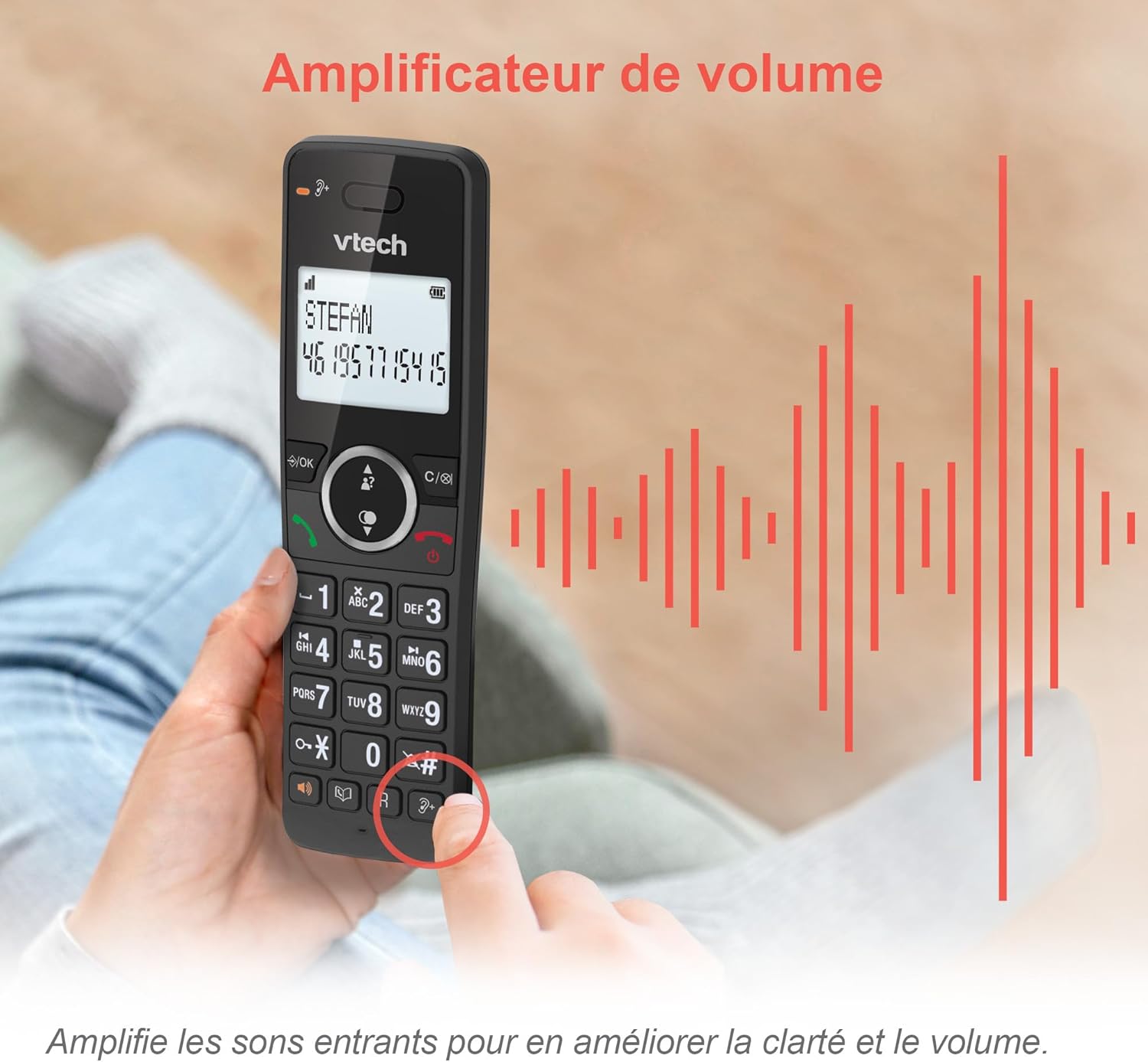
Image: A hand holding the VTech ES2051 handset, with graphic sound waves emanating from the earpiece, illustrating the volume amplification feature.
Conference Function
The conference function allows multiple users to participate in a single conversation. You can set up a three-way conference call with two internal callers (handsets) and one external caller.
- התחלת שיחת ועידה: Refer to the detailed instructions in the full manual for specific steps on how to add a third party to an ongoing call.

Image: Three people engaged in a conversation, visually representing the three-way conference call capability of the VTech ES2051 phone system.
פונקציית אינטרקום
The intercom feature allows you to communicate between handsets within your home without using the landline. This is useful for calling family members in different rooms.
- שימוש באינטרקום: הקש על אינטרקום button (if available) or access the intercom function through the handset menu, then select the desired handset to call.
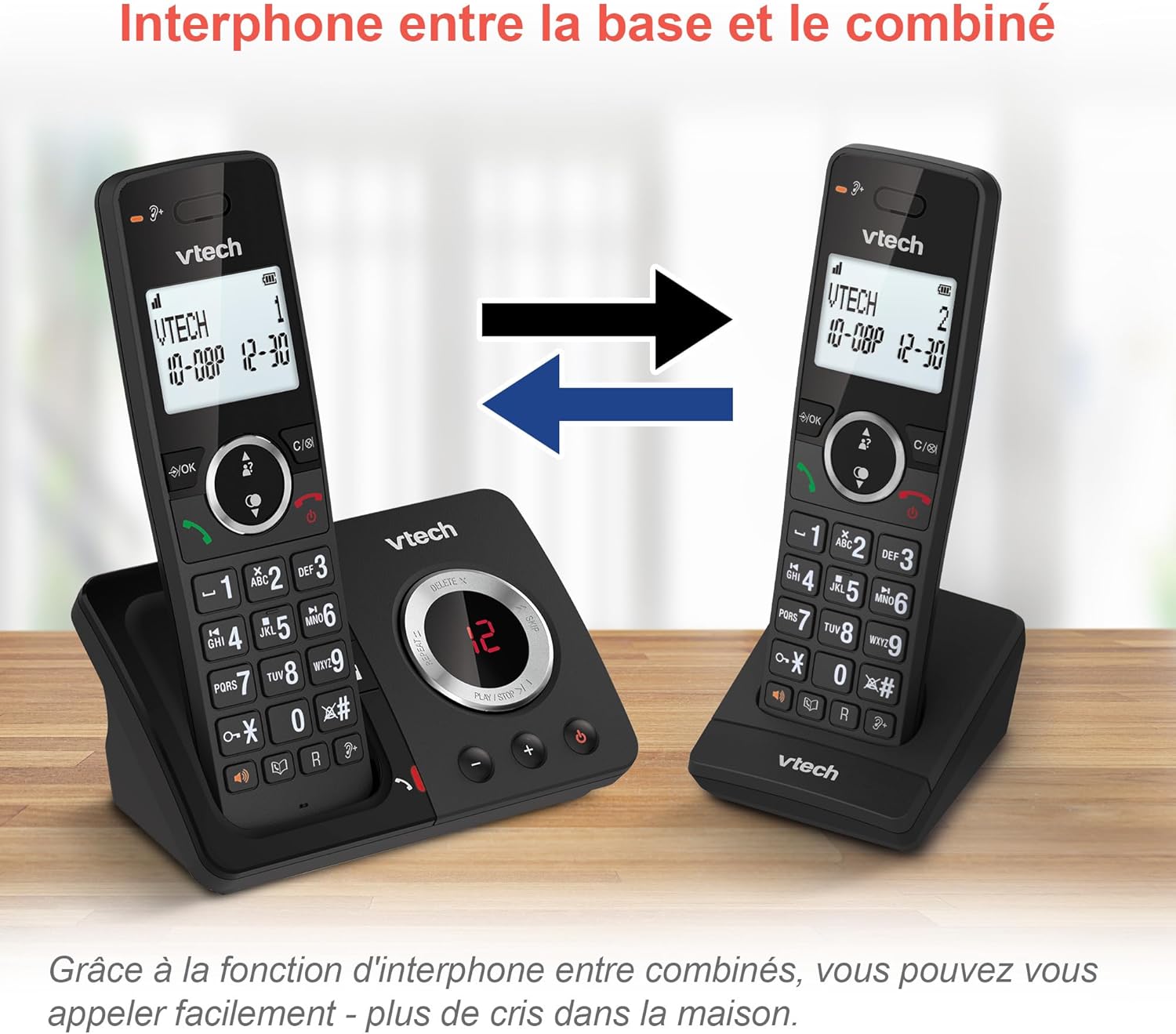
Image: A diagram showing two VTech ES2051 handsets with arrows indicating communication between them, illustrating the intercom feature.
Phonebook and Call Features
The phone includes a 100-name and number phonebook, 8 speed dial keys, and a backlit screen and keypad for easy visibility.
- אחסון אנשי קשר: Navigate to the phonebook menu to add, edit, or delete contacts.
- חיוג מהיר: Assign frequently called numbers to the 8 speed dial keys for quick access.
- יומן זיהוי מתקשר: Review the last 20 incoming calls with Caller ID information.
- חיוג חוזר: Access the list of the last 10 dialed numbers for quick redialing.

תמונה: קולאז' של תמונות המוצגותasing various VTech ES2051 phone features, including the 100-entry phonebook, call display, redial function, and an 18-hour talk time battery life indicator.
מצב לסביבה
The ECO mode automatically adjusts and minimizes the radio frequency power based on the distance between the handset and the base unit. This feature helps conserve energy and reduce power consumption.
תַחזוּקָה
ניקוי הטלפון
The VTech ES2051 is made with antibacterial plastic and features a seamless, easy-to-clean design. To clean your phone:
- Unplug the base unit from the wall outlet and telephone line.
- נגבו את משטחי הטלפון בעזרת מטלית רכהamp בַּד. אין להשתמש בחומרי ניקוי נוזליים או אירוסולים.
- Ensure the phone is completely dry before plugging it back in.
טיפול בסוללה
- Use only the supplied rechargeable NiMH AAA batteries.
- אין להשליך סוללות לאש.
- אם לא נעשה שימוש בטלפון למשך תקופה ממושכת, הוציאו את הסוללות כדי למנוע דליפה.
פתרון בעיות
If you experience any issues with your VTech ES2051 phone, try the following troubleshooting steps:
| בְּעָיָה | פִּתָרוֹן |
|---|---|
| אין צליל חיוג | Ensure the telephone line cord is securely plugged into both the base unit and the wall jack. Check if other phones on the same line are working. |
| לא ניתן לבצע או לקבל שיחות | Check the power connection to the base unit. Ensure the handset batteries are charged. If using a DSL service, you may need a DSL filter. |
| Handset displays "Out of Range" or "No Power at Base" | Move the handset closer to the base unit. Ensure the base unit's power adapter is securely plugged in. |
| משיבון לא מקליט הודעות | Check if the answering machine is turned ON. Ensure there is enough recording time available (max 30 minutes). |
| איכות שמע ירודה או סטטיות | קרב את השפופרת ליחידת הבסיס. הימנע מהצבת יחידת הבסיס בקרבת מכשירים אלקטרוניים אחרים (למשל, מיקרוגלים, נתבי Wi-Fi) שעלולים לגרום להפרעות. |
If the problem persists after trying these steps, please refer to the VTech support webאתר או צרו קשר עם שירות הלקוחות לקבלת סיוע נוסף.
מפרטים
| תכונה | פְּרָט |
|---|---|
| מותג | VTech |
| מספר דגם | ES2051 |
| צֶבַע | שָׁחוֹר |
| סוג טלפון | אלחוטי |
| סוג מערכת מענה | דִיגִיטָלי |
| זמן הקלטה של משיבון | עד 30 דקות |
| מכשירים תואמים | Landlines, Answering Machine |
| סוללות | 4 סוללות AAA - כלולות |
| הרכב סוללה | NiMH |
| מקור כוח | מופעל על סוללה |
| חוֹמֶר | Plastic (Antibacterial) |
| סוג חייגן | מקלדת פשוטה |
| מידות פריט (L x W x H) | 18.3 x 13.5 x 11 סנטימטרים |
| ארץ מוצא | סִין |
אחריות ותמיכה
מוצרי VTech מיוצרים בסטנדרטים גבוהים של איכות. למידע בנוגע לכיסוי האחריות, אנא עיינו בכרטיס האחריות המצורף למוצר שלכם או בקרו באתר הרשמי של VTech. webאתר עבור האזור שלך.
For technical support, frequently asked questions, or to download the full user manual, please visit the VTech support section online or contact their customer service helpline. Contact details can typically be found on the VTech webבאתר או על אריזת המוצר.