
1. הקדמה
Thank you for choosing the RIGOL DS1102Z-E Digital Oscilloscope. This manual provides essential information for the safe and efficient use of your device. Please read it thoroughly before operation and keep it for future reference.
The DS1102Z-E is a high-performance digital oscilloscope designed for various applications including research and development, education, maintenance, and industrial testing. It features a 100 MHz bandwidth, 1 GSa/s sample rate, and a 24 Mpts memory depth, enabling precise analysis of complex waveforms.
2. המוצר נגמרview
The RIGOL DS1102Z-E is a versatile measurement instrument integrating a frequency counter and supporting protocol decoding for RS232/UART, I2C, and SPI. It also includes FFT analysis and automatic measurement functions to enhance testing efficiency.
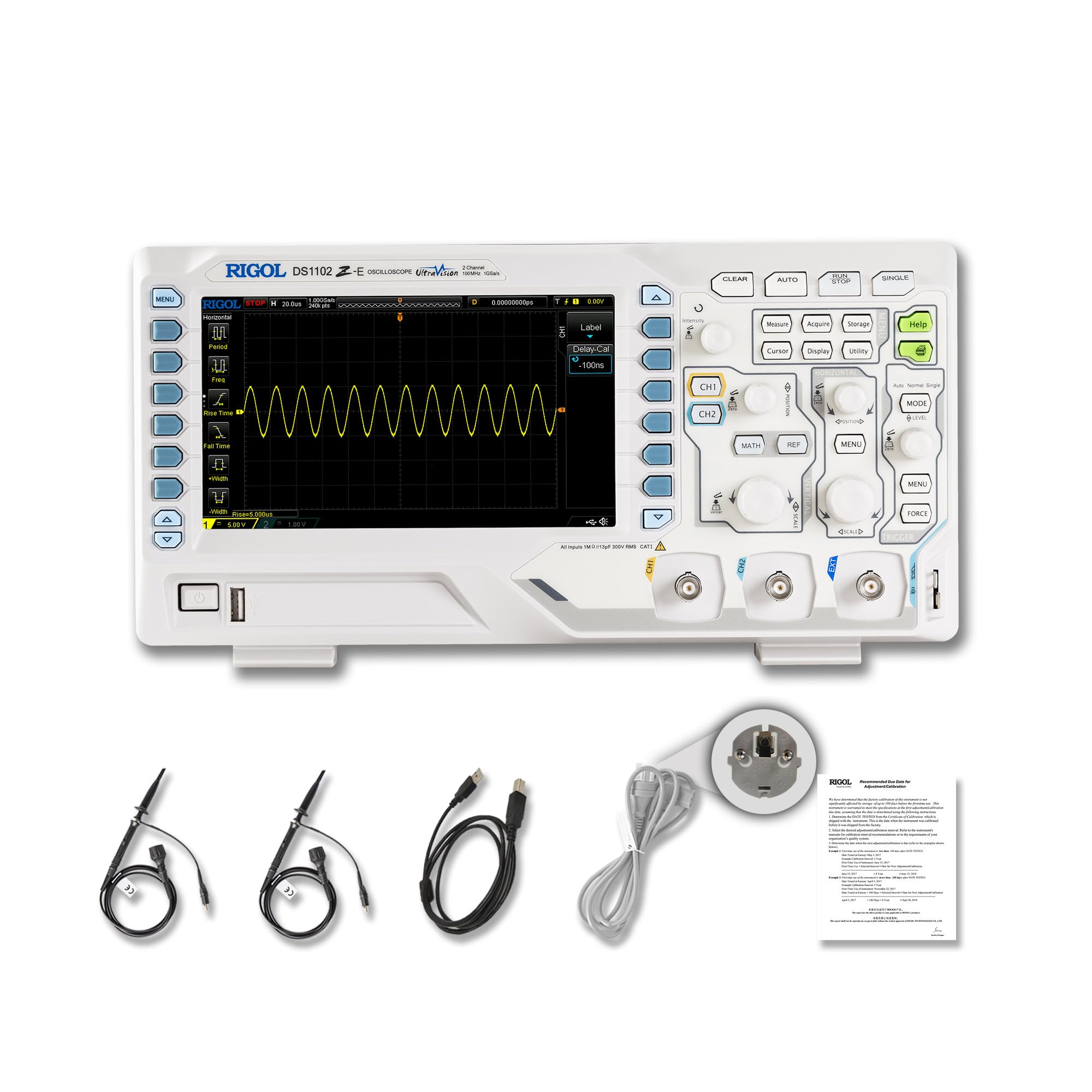
איור 2.1: חזית view of the RIGOL DS1102Z-E Digital Oscilloscope.
2.1 תכונות עיקריות
- 100 MHz Bandwidth, 1 GSa/s SampLe Rate: Captures signals with high precision.
- 24 Mpts Memory Depth: Allows for extended signal capture and detailed waveform analysis.
- Multi-function Measurement Device: Includes frequency counter, protocol decoding (RS232/UART, I2C, SPI), FFT analysis, and automatic measurement functions.
- Waveform Recording and Playback: Records signal variations and replays them for fault identification.
- תצוגה בחדות גבוהה: 7-inch TFT screen with 256-level grayscale, offering a phosphor-like display effect for clear waveform details.
- Remote Control & Secondary Development Support: Equipped with USB and LAN ports for PC remote control, compatible with SCPI commands, LabVIEW, Visual Basic, and Visual C++.
2.2 מה בקופסה

Figure 2.2: Contents included with the DS1102Z-E Oscilloscope.
- 1x Main Unit (DS1102Z-E Digital Oscilloscope)
- 2x Passive Probes (150MHz)
- 1x Power Cable (EU plug)
- 1x USB A-B Cable
- 1x תעודת אחריות
- 1x Calibration Certificate
- 1x Declaration of Conformity
3. התקנה
Follow these steps to set up your RIGOL DS1102Z-E oscilloscope:
- פריקת אריזה: Carefully remove all components from the packaging. Inspect the device for any signs of damage.
- חיבור חשמל: Connect the provided power cable to the oscilloscope's power input and then to a suitable AC power outlet.
- חיבור בדיקה: Connect the passive probes to the BNC input connectors (CH1, CH2) on the front panel. Ensure a secure connection.
- הַאֲרָקָה: Always ensure the oscilloscope is properly grounded through the power cable.
- USB/LAN Connection (Optional): If you plan to use remote control or secondary development, connect the USB cable to a PC or the LAN cable to your network.

איור 3.1: מעלview of the oscilloscope's physical dimensions and ports.
4. הוראות הפעלה
This section covers the basic operation of your oscilloscope.
4.1 הפעלה/כיבוי
- הפעלה: Press the power button located on the front panel. The device will perform a self-test and display the main interface.
- כיבוי: לחץ והחזק את לחצן ההפעלה עד שהמכשיר יכבה.
4.2 תצוגת צורת גל בסיסית
After powering on, connect a signal to one of the input channels (e.g., CH1). Adjust the vertical scale (Volts/Div) and horizontal scale (Time/Div) knobs to display the waveform clearly. Use the AUTO button for automatic setup of the waveform display.

איור 4.1: דוגמהample of a waveform displayed on the oscilloscope screen.
4.3 פונקציות מתקדמות
- פונקציות מדידה: הקש על לִמְדוֹד button to access automatic measurements like frequency, period, peak-to-peak voltagה וכו '.
- מערכת טריגר: Use the trigger controls to stabilize repetitive waveforms. Adjust the trigger level and mode (Edge, Pulse, Video, Slope, etc.) as needed.
- הקלטת צורת גל: The oscilloscope allows recording and replaying waveforms. Access this feature through the menu to capture transient events.
- Protocol Decoding: For serial bus analysis (RS232/UART, I2C, SPI), configure the decoding settings via the menu.
- ניתוח FFT: Perform Fast Fourier Transform (FFT) to analyze the frequency components of your signal.

Figure 4.2: Complex waveform analysis with measurement data.

Figure 4.3: Multiple waveforms displayed simultaneously for comparison.
5. תחזוקה
תחזוקה נאותה מבטיחה את אורך החיים והדיוק של האוסילוסקופ שלך.
- ניקוי: Use a soft, dry cloth to clean the exterior of the oscilloscope. For stubborn dirt, a slightly damp cloth with mild detergent can be used. Avoid abrasive cleaners or solvents.
- טיפול במסך: Clean the display screen with a soft, lint-free cloth. Do not use excessive force or harsh chemicals.
- אִחסוּן: When not in use, store the oscilloscope in a clean, dry environment, away from direct sunlight, extreme temperatures, and excessive dust.
- טיפול בבדיקה: Handle probes carefully. Avoid bending or stressing the probe tips. Store them properly to prevent damage.
- כִּיוּל: For optimal performance, periodic calibration by qualified personnel is recommended. Refer to the official RIGOL website for calibration services.
6. פתרון תקלות
סעיף זה מספק פתרונות לבעיות נפוצות שאתה עשוי להיתקל בהן.
| בְּעָיָה | סיבה אפשרית | פִּתָרוֹן |
|---|---|---|
| No power when turned on. | Power cable not connected, power outlet faulty, or power button issue. | Check power cable connection. Test the power outlet. Ensure the power button is fully pressed. |
| לא מוצגת צורת גל | No signal input, probe not connected correctly, vertical/horizontal scale incorrect, or trigger not set. | Verify signal source. Check probe connections. Adjust Volts/Div and Time/Div. Press AUTO or adjust trigger settings. |
| צורת הגל אינה יציבה. | Incorrect trigger settings. | Adjust trigger level, mode, and source to stabilize the waveform. |
| השלט רחוק לא עובד. | USB/LAN cable issue, incorrect network settings, or software driver not installed. | Check cable connections. Verify network configuration. Install necessary drivers and software (e.g., UltraScope). |
If the problem persists, please contact RIGOL technical support.
7. מפרטים
Detailed technical specifications for the RIGOL DS1102Z-E Digital Oscilloscope.

Figure 7.1: Visual representation of key technical specifications.
| תכונה | מִפרָט |
|---|---|
| מותג | ריגול |
| דֶגֶם | DS1102Z-E |
| רוחב פס | 100 מגה-הרץ |
| ערוצים | 2 Channels + EXT |
| Sample Rate | 1 GSa/s |
| עומק זיכרון | 24 Mpts |
| קצב לכידת צורת גל | 30,000 Wfms/s |
| רזולוציה אנכית | 8 סיביות |
| רגישות מינימלית | 1 mV/div |
| Minimum Time Base | 2 ns/div |
| תמיכה בפענוח | RS232/UART, I2C, SPI |
| ניתוח FFT | תֶקֶן |
| לְהַצִיג | 7-inch TFT (800x480) |
| קישוריות | USB Host, USB Device, LAN |
| מקור כוח | מתאם AC |
| צֶבַע | אפור לבן |
| משקל פריט | 2.9 קילוגרם |
| מידות (L x W x H) | 31.31 x 16.08 x 12.24 סנטימטרים |
| תואם תקנים | CE, RoHS |
| מספר חלק של היצרן | DS1102Z-E |
| ארץ מוצא | סִין |
8. אחריות ותמיכה
RIGOL is committed to providing high-quality products and excellent customer service.
- אַחֲרָיוּת: The RIGOL DS1102Z-E Digital Oscilloscope comes with a אחריות לשנה מתאריך הרכישה. אחריות זו מכסה פגמים בחומרים ובעבודה בשימוש רגיל.
- תמיכה טכנית: RIGOL offers תמיכה טכנית 24/7 to assist you with any questions or issues you may encounter. Please refer to the official RIGOL webאתר לקבלת פרטי קשר ומשאבי תמיכה.
- משאבים מקוונים: Visit the official RIGOL website for product documentation, software updates (e.g., UltraScope), and additional support materials.

Figure 8.1: RIGOL oscilloscopes support multiple languages for user convenience.