
1. הקדמה
Thank you for choosing the HETP Magnetic Portable Charger Power Bank. This compact and powerful device is designed to provide convenient and efficient charging for your compatible iPhone models and other USB-C devices. Featuring a strong magnetic attachment for wireless charging and a clear LCD display, it ensures you stay powered on the go. Please read this manual carefully to ensure proper use and maintenance of your power bank.

Figure 1.1: HETP Magnetic Portable Charger Power Bank
2. תכונות מוצר
- טעינה מגנטית: Specifically designed for iPhone 16/16 Plus/16 Pro/16 Pro Max/15/15 Plus/15 Pro/15 Pro Max/14/13/12 series and MagSafe compatible cases.
- קיבולת גבוהה: Built-in 10800mAh battery capacity, capable of fully charging an iPhone 15 Pro up to 1.9 times.
- Ultra-Strong Magnetic Attachment: Ensures secure and stable 7.5W magnetic wireless charging, preventing disconnection issues.
- 20W PD USB-C Output: Allows for fast wired charging of other devices simultaneously with magnetic charging.
- קומפקטי ונייד: Measures approximately 3.99 x 2.59 x 0.78 inches and weighs 0.39 lb, ideal for travel and daily use.
- תצוגת LCD: Provides a clear digital readout of the remaining battery percentage.
- מערכת בטיחות רב-הגנה: Incorporates over-voltage, over-charge, over-current, and short-circuit protection for safe charging.

Figure 2.1: Compatibility with iPhone 12-16 Series and MagSafe Cases

Figure 2.2: Charging Through Magnetic Cases
3. מה בקופסה
עם פתיחת החבילה, אנא ודא שכל הפריטים הבאים כלולים:
- 1 x HETP Magnetic Wireless Power Bank
- כבל טעינה 1 x USB-C
- מדריך למשתמש אחד (מסמך זה)
- 1 x Dust-proof Portable Storage Bag
4. התקנה
4.1 טעינה ראשונית של סוללת הכוח
- Connect the provided USB-C charging cable to the USB-C port on the power bank.
- Plug the other end of the USB-C cable into a compatible USB-C wall adapter (not included).
- The LCD display on the power bank will show the charging percentage. Charge the power bank until it reaches 100% for optimal performance.
4.2 Attaching to Your iPhone
Ensure your iPhone is a 12 series or newer, or is equipped with a MagSafe compatible case.
- Align the back of the power bank with the MagSafe area on your iPhone.
- The power bank will magnetically snap into place, and wireless charging will begin automatically.

Figure 4.1: Magnetic Attachment
5. הוראות הפעלה
5.1 Wireless Charging (MagSafe)
Once the power bank is magnetically attached to your compatible iPhone, wireless charging will commence. The LCD display will show the power bank's remaining charge, and your iPhone will indicate that it is charging.
טעינה חוטית 5.2 (USB-C)
כדי לטעון מכשירים באמצעות כבל:
- Connect one end of a USB-C cable to the power bank's USB-C port.
- Connect the other end to your device's charging port.
- The power bank will automatically detect the device and begin charging.
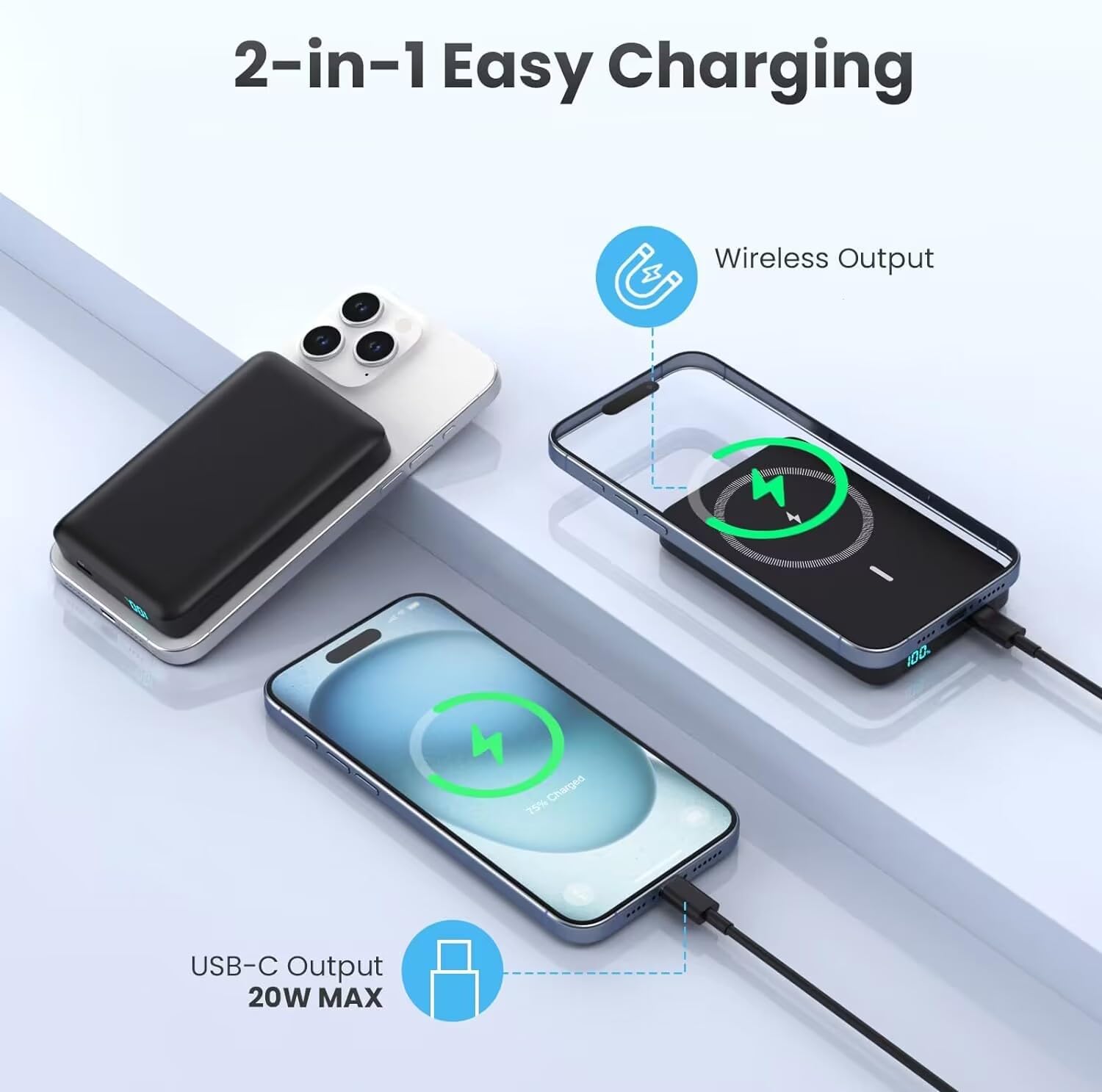
Figure 5.1: 2-in-1 Charging Capability
5.3 טעינת מעבר
The HETP power bank supports pass-through charging, allowing you to charge your phone wirelessly while simultaneously recharging the power bank itself via the USB-C input. This provides uninterrupted power for both devices.

איור 5.2: טעינת מעבר בפעולה
5.4 תצוגת LCD
The integrated LCD display shows the precise percentage of battery remaining in the power bank. This allows you to easily monitor its charge level and know when it needs to be recharged.
6. תחזוקה
- ניקוי: השתמשו במטלית רכה ויבשה כדי לנקות את פני השטח של סוללת הכוח. הימנעו משימוש בכימיקלים חזקים או בחומרים שוחקים.
- אִחסוּן: יש לאחסן את סוללת הסוללה במקום קריר ויבש, הרחק מאור שמש ישיר וטמפרטורות קיצוניות.
- טיפול בסוללה: To prolong battery life, avoid fully discharging the power bank frequently. Recharge it when the battery level is low. If storing for extended periods, charge it to about 50-70% every 3 months.
- הימנע מטיפות: While durable, dropping the power bank can damage internal components. Handle with care.

Figure 6.1: Internal Battery Design for Longevity
7. פתרון תקלות
| בְּעָיָה | סיבה אפשרית | פִּתָרוֹן |
|---|---|---|
| בנק הכוח לא נטען | בעיה בכבל או במתאם; סוללת גיבוי ריקה לחלוטין; יציאה פגומה. | Try a different USB-C cable and wall adapter. Ensure the power bank is not completely depleted before attempting to charge. |
| טעינה אלחוטית לא עובדת | Misalignment; non-MagSafe case; phone not compatible; foreign object. | Ensure proper alignment of the power bank with your iPhone's MagSafe area. Use a MagSafe compatible case or no case. Remove any foreign objects between the power bank and phone. Confirm your iPhone model is 12 series or newer. |
| Wired charging not working | Cable issue; device not compatible; power bank low on charge. | Try a different USB-C cable. Ensure your device is compatible with USB-C charging. Check the power bank's LCD display for sufficient charge. |
| סוללת גיבוי מתחממת במהלך השימוש | פעולה רגילה; עומס מוגזם; אוורור לקוי. | It is normal for the power bank to get slightly warm during charging or discharging. If it becomes excessively hot, disconnect it immediately and allow it to cool down. Ensure adequate ventilation and avoid covering the power bank during use. |
| LCD display not showing charge | סוללת גיבוי כבויה; סוללה חלשה. | Connect the power bank to a charger to activate the display. If the battery is completely drained, it may take a few minutes for the display to light up. |
8. מפרטים
- מספר דגם: HX100M7
- קיבולת סוללה: 10800 מיליamp שעות (mAh)
- סוג סוללה: ליתיום פולימר
- יציאת טעינה אלחוטית: 7.5W (Magnetic)
- Wired Charging Output: 20W PD (USB Type C)
- סוג מחבר: USB סוג C
- מידות המוצר: 4 x 1 x 0.5 אינץ' בערך
- משקל פריט: בערך 6.2 אונקיות
- יַצרָן: Dongguan Yuanhaoxun Technology Co., Ltd
- תאריך זמין ראשון: 26 בפברואר 2024
9. אחריות ותמיכה
Your HETP Magnetic Portable Charger Power Bank comes with a worry-free אחריות ל-24 חודשים מתאריך הרכישה. אחריות זו מכסה פגמי ייצור ומבטיחה ביצועים אמינים של המכשיר שלך.
For any technical assistance, product inquiries, or warranty claims, please contact our customer service team. We provide תמיכה טכנית לכל החיים and friendly customer services to ensure your satisfaction.
אנא עיינו בפרטי הקשר המופיעים על אריזת המוצר או ב-HETP הרשמי. webאתר לערוצי התמיכה העדכניים ביותר.