
1. הקדמה
This manual provides essential information for the setup, operation, and maintenance of the Stemedu Heltec ESP32 915MHz LoRa V3 Development Board. This board is a versatile IoT development platform integrating Wi-Fi, Bluetooth Low Energy (BLE), and LoRa communication capabilities, featuring an onboard 0.96-inch 128x64 OLED display. It is designed for various intelligent scene applications, including Meshtastic and Arduino projects.

Figure 1: Heltec ESP32 915MHz LoRa V3 Development Boards with included accessories.
2. תכולת החבילה
ודא שכל הפריטים המפורטים להלן נמצאים בחבילה שלך. אם חסרים או פגומים רכיבים כלשהם, אנא פנה לתמיכת הלקוחות.
- 2 x Heltec ESP32 LoRa V3 SX1262 0.96 inch OLED Display Development Boards
- 2 x 868MHz/915MHz GSM IPX IPEX 1.13 UF.L Antennas
- 2 x Terminal Connector Cables
- 4 x Pin Headers
3. המוצר נגמרview and Key Differences (V2 vs. V3)
The Heltec WiFi LoRa 32 V3 board is an evolution of the V2, incorporating several key upgrades for enhanced performance and usability.

Figure 2: Comparison of key specifications between WiFi LoRa 32 V2 and V3.
Key Differences:
- יחידת מיקרו-בקר (MCU): V3 utilizes the ESP32-S3FN8 dual-core processor, an upgrade from the V2's ESP32-D0WDQ6. This change affects GPIO pin definitions.
- LoRa Chip: V3 features the SX1262 LoRa chip, offering improved performance over the V2's SX1276/8.
- ממשק USB: V3 incorporates a modern USB Type-C interface, replacing the Micro USB found on V2.
- מתנד קריסטל: V3 uses a high-precision temperature-compensated crystal oscillator for better stability.
- Low Power Features: V3 offers significantly lower power consumption in deep sleep mode (less than 10uA) compared to V2 (approximately 800uA).
- RF Circuitry: V3 includes better impedance matching for its RF circuits.
איור 3: למעלה view comparison (V2 vs V3).

Figure 4: USB interface comparison (V2 vs V3).
4. Board Layout and Pinout
4.1. זיהוי רכיבים
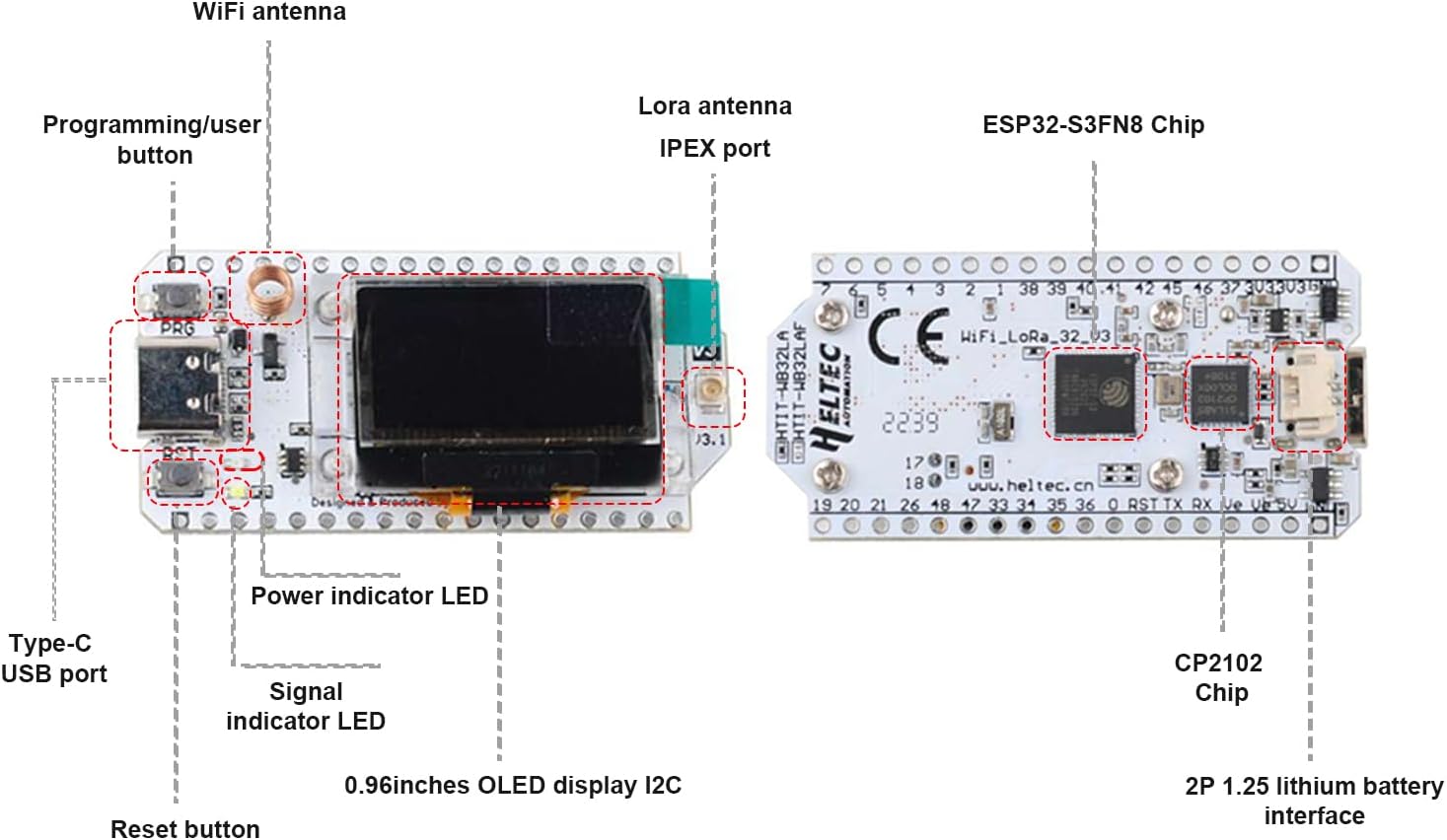
Familiarize yourself with the main components of the Heltec ESP32 LoRa V3 board as illustrated below.

Figure 5: Heltec ESP32 LoRa V3 Board Component Layout.
- אנטנת WiFi: For 2.4GHz Wi-Fi communication.
- Programming/User Button (PRG): Used for entering bootloader mode or as a general-purpose button.
- כפתור איפוס (RST): Resets the ESP32-S3 microcontroller.
- יציאת USB מסוג C: For power supply, data communication, and programming.
- נורית מחוון כוח: Illuminates when the board is powered.
- נורית חיווי אות: User-programmable LED.
- 0.96-inch OLED Display I2C: 128x64 pixel monochrome display.
- LoRa Antenna IPEX Port: Connects to the external LoRa antenna.
- ESP32-S3FN8 Chip: Dual-core microcontroller with Wi-Fi and BLE.
- CP2102 Chip: USB-to-UART bridge for serial communication.
- 2P 1.25 Lithium Battery Interface: For connecting a 3.7V LiPo battery (battery not included).
4.2. תרשים פינאוט
The pinout diagram details the functionality of each pin on the Heltec ESP32 LoRa V3 board. Refer to this diagram for proper connection and programming.

Figure 6: Heltec ESP32 LoRa V3 Pinout Diagram.
אַגָדָה: Physical Pin (Grey), GND (Black), Power (Red), GPIO (Pink), ADC/DAC (Green), Serial SPI I2C (Light Blue), Connected (Dark Blue), Other (White), Pull Up/Down (Yellow Arrows).
5. התקנה ושימוש ראשוני
5.1. חיבור אנטנה
Before powering on the board, ensure the 915MHz LoRa antenna is securely connected to the IPEX port. Operating the LoRa module without an antenna can cause damage.
- Carefully align the IPEX connector on the antenna cable with the IPEX port on the board.
- Gently press down until you feel a click, indicating a secure connection.
5.2. ספק כוח
The board can be powered via the USB Type-C port or a 3.7V lithium battery.
- USB Type-C: Connect a standard USB Type-C cable to the board and a power source (e.g., computer USB port, USB wall adapter). The Power Indicator LED will illuminate.
- סוללת ליתיום: Connect a 3.7V lithium battery to the 2P 1.25mm connector. The board includes a charging circuit for connected batteries when powered via USB.
5.3. הגדרת סביבת פיתוח
To program the Heltec ESP32 LoRa V3 board, you will typically use the Arduino IDE or PlatformIO.
- Install the Arduino IDE or PlatformIO.
- Add the ESP32 board support package for your chosen IDE. Specific instructions can be found on the official Heltec Automation website or Espressif documentation.
- Install necessary libraries for LoRa, OLED display, and other functionalities (e.g., Heltec ESP32 library).
- Connect the board to your computer via the USB Type-C cable.
- Select the correct board model and COM port in your IDE.
6. הוראות הפעלה
6.1. Basic LoRa Communication
The LoRa module allows for long-range, low-power wireless communication.
- משדר: Program one board to send data packets using the LoRa library. Ensure the correct frequency (915MHz for this model) and spreading factor are configured.
- קַבָּלָה: Program a second board to listen for incoming LoRa packets on the same frequency and with matching parameters.
- Exampעל: For Meshtastic applications, refer to the official Meshtastic documentation for firmware installation and configuration.
6.2. Wi-Fi and BLE Functionality
The ESP32-S3 microcontroller supports standard Wi-Fi (802.11 b/g/n) and Bluetooth Low Energy (BLE) protocols.
- Wi-Fi: Use standard ESP-IDF or Arduino Wi-Fi libraries to connect to access points, host soft APs, or establish peer-to-peer connections.
- BLE: Implement BLE client or server roles for short-range communication with other BLE-enabled devices.
6.3. שימוש בצג OLED
The onboard 0.96-inch OLED display can be used to show sensor data, status messages, or other information.
- Utilize an appropriate OLED library (e.g., U8g2, Adafruit SSD1306) to initialize and draw graphics/text on the display.
- The display communicates via I2C. Ensure correct I2C pins are configured in your code.
7. תחזוקה
To ensure the longevity and optimal performance of your Heltec ESP32 LoRa V3 board, follow these maintenance guidelines:
- אִחסוּן: Store the boards in an anti-static bag in a dry, cool environment when not in use.
- ניקוי: Use a soft, dry brush or compressed air to remove dust from the board. Avoid using liquids or harsh chemicals.
- טיפול: Always handle the board by its edges to avoid touching sensitive components or introducing static discharge.
- טיפול באנטנה: Ensure the LoRa antenna is not bent or damaged. Disconnect it carefully when transporting the board.
8. פתרון תקלות
סעיף זה עוסק בבעיות נפוצות שאתה עשוי להיתקל בהן.
- הלוח לא מזוהה על ידי המחשב:
- ודא שכבל ה-USB Type-C מחובר במלואו ופועל כראוי.
- Install the correct CP210x USB to UART Bridge drivers for your operating system.
- נסה יציאת USB או כבל אחר.
- Failed to upload code:
- ודא שהלוח ויציאת ה-COM הנכונים נבחרו ב-IDE שלך.
- Press and hold the "PRG" (Boot) button, then press and release the "RST" (Reset) button, then release "PRG" to enter bootloader mode before uploading.
- Check for correct ESP32 board support package installation.
- צג OLED לא עובד:
- Ensure the OLED library is correctly installed and initialized in your code.
- Verify that the I2C pins used in your code match the board's pinout.
- בדוק אם יש נזק פיזי לתצוגה.
- בעיות תקשורת של LoRa:
- Confirm the LoRa antenna is securely connected.
- Ensure both transmitting and receiving boards are configured with matching frequencies, spreading factors, and other LoRa parameters.
- Check the range and environmental factors (obstacles, interference).
9. מפרט טכני
Detailed technical specifications for the Heltec ESP32 915MHz LoRa V3 board.
| תכונה | מִפרָט |
|---|---|
| בקרים זעירים | ESP32-S3FN8 Dual-core Processor |
| לורה צ'יפ | SX1262 |
| תדר LoRa | 915MHz (863~928MHz supported) |
| Wi-Fi בתקן | 802.11 b/g/n, עד 150Mbps |
| בלוטות' | אנרגיה נמוכה ב- Bluetooth (BLE) |
| לְהַצִיג | 0.96-inch 128x64 OLED (I2C) |
| ממשק USB | USB Type-C |
| ספק כוח | USB Type-C (5V) or 3.7V Lithium Battery |
| מַעֲרֶכֶת הַפעָלָה | FreeRTOS (compatible with Arduino IDE, PlatformIO) |
| אַיִל | 512 KB SRAM |
| זיכרון פלאש | 8 מגה-בייט |
| משקל פריט | 1.12 אונקיות (כ-31.75 גרם) |
| מידות | עיין באיור 7 לקבלת מידות מפורטות. |

Figure 7: Heltec ESP32 LoRa V3 Board Dimensions.
10. אחריות ותמיכה
Stemedu products are designed for reliability and performance. For warranty information, technical support, or assistance with your Heltec ESP32 915MHz LoRa V3 board, please refer to the official Stemedu webאתר או צרו קשר ישירות עם שירות הלקוחות שלהם.
For additional resources, community forums, and example code, consider visiting the Heltec Automation official website or relevant online communities for ESP32 and LoRa development.