
1. הקדמה
Thank you for choosing the Muse MH08MB Portable Radio. This device is designed for versatility and durability, offering multiple power sources, audio playback options, and emergency features. Please read this manual carefully to ensure proper use and maintenance of your device.

איור 1: Muse MH08MB Portable Radio. This image displays the Muse MH08MB portable radio from a side angle, highlighting its integrated hand crank for dynamo charging, the solar panel on top, and the powerful LED flashlight on the front. A green lanyard is attached for portability.
2. מידע בטיחות
- אין לחשוף את המכשיר לטמפרטורות קיצוניות או לאור שמש ישיר למשך תקופות ממושכות.
- הימנע מלהפיל את המכשיר או לחשוף אותו למכות חזקות.
- Keep the device away from water and moisture, despite its splash-proof design, to prevent damage.
- אל תנסה לפרק או לתקן את המכשיר בעצמך. יש לפנות לכל מטפל מוסמך בתחום התחזוקה.
- Use only the specified charging methods (USB-C, solar, dynamo) to power the device.
3. תכולת החבילה
אנא ודאו שכל הפריטים נמצאים:
- Muse MH08MB Portable Radio
- כבל טעינה USB-C
- מתאם מתח
- מדריך למשתמש (מסמך זה)
4. המוצר נגמרview
Familiarize yourself with the various parts and controls of your Muse MH08MB radio.

איור 2: מֵעַלview of Muse MH08MB Features. A detailed infographic summarizing all major features of the Muse MH08MB portable radio. It includes a jumbo display, FM radio with 5 presets, hands-free function, IP64 dust and splash resistance, siren, clock, 6 hours playtime, multiple charging options (USB-C, hand crank, solar), stereo pairing, LED flashlight, and an AUX-in jack.
מרכיבי מפתח:
- תצוגה דיגיטלית: Shows frequency, time, and other indicators.
- לחצני שליטה: Power, Play/Pause, Skip, Preset selection (1-5).
- אנטנה טלסקופית: לשיפור קליטת הרדיו.
- פנס לד: מקור אור משולב.
- קראנק יד: For dynamo charging.
- פאנל סולארי: לטעינה סולארית.
- יציאת USB-C: For charging the device and external devices.
- שקע AUX-IN: לחיבור מקורות שמע חיצוניים.
- מִיקרוֹפוֹן: לשיחות דיבורית.
- סִירֶנָה: פונקציית התרעת חירום.

איור 3: רֹאשׁ View with Antenna and Controls. This view of the Muse MH08MB portable radio features its telescopic antenna fully extended for improved radio reception. The top panel shows various control buttons, and the digital display is active.
5. טעינת ההתקן
The Muse MH08MB offers multiple charging methods to ensure you always have power.
5.1. טעינת USB-C
- חבר את כבל ה-USB-C המצורף ליציאת ה-USB-C ברדיו.
- חבר את הקצה השני של הכבל למתאם החשמל וחבר אותו לשקע בקיר.
- מחוון הטעינה בתצוגה יציג את מצב הטעינה.
5.2. טעינה סולארית
Place the radio with the solar panel facing direct sunlight. The solar panel will convert sunlight into energy to charge the internal battery. This method is ideal for maintaining charge or slow charging in outdoor environments.
5.3. Dynamo (Hand Crank) Charging
Extend the hand crank located on the side of the radio. Rotate the crank clockwise or counter-clockwise at a steady pace. Continuous cranking will generate power to charge the internal battery, useful in emergency situations or when other power sources are unavailable.

איור 4: Charging Options and IP64 Design. This infographic illustrates the versatile charging options of the Muse MH08MB, including solar power and hand-crank dynamo. It also points out the USB-C port for charging other devices and emphasizes its IP64 dust and splash-proof design.
6. התקנה
6.1. הפעלה ראשונית
לחץ והחזק את כּוֹחַ button to turn on the device. The digital display will illuminate.
6.2. כוונון השעון
כשהמכשיר מופעל, לחץ על שָׁעוֹן button (if available, or refer to the general controls for time setting). Use the Tune/Skip buttons to adjust the hour and minute. Press the שָׁעוֹן לחצן שוב כדי לאשר.
7. הוראות הפעלה
7.1. הפעלה/כיבוי
לחץ והחזק את כּוֹחַ button for approximately 2 seconds to turn the radio on or off.
7.2. פעולת רדיו (AM/FM)
- הפעל את הרדיו.
- הרחב את האנטנה הטלסקופית לקבלת קליטת FM אופטימלית.
- הקש על מצב לחצן לבחירת רצועת FM או AM.
- השתמש ב- Tune/Skip כדי לכוון ידנית לתחנה או לחץ לחיצה ממושכת כדי לסרוק אוטומטית אחר התחנה הזמינה הבאה.
- To save a preset, tune to your desired station, then press and hold one of the הגדרה קבועה מראש (1-5) buttons until the display confirms it's saved. To recall a preset, simply press the corresponding מוגדר מראש לַחְצָן.
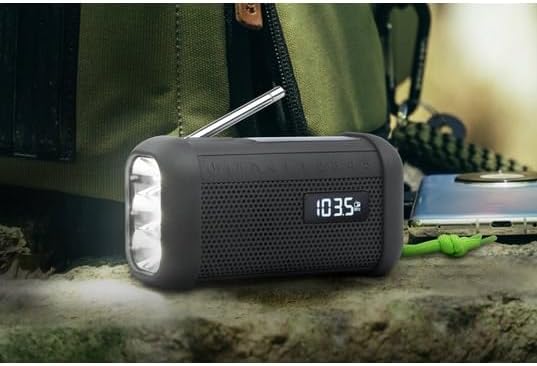
איור 5: Digital Display in Radio Mode. The Muse MH08MB portable radio is shown resting on a surface, with its digital display clearly indicating "103.5 MHz", signifying active FM radio tuning. The speaker grille and flashlight are also visible.
7.3. זיווג Bluetooth
- Turn on the radio and switch to Bluetooth mode using the מצב button. The display will show a Bluetooth indicator.
- במכשיר הנייד שלך, הפעל את Bluetooth וחפש מכשירים זמינים.
- Select "MH08MB" from the list of devices.
- Once paired, the radio will confirm the connection, and you can play audio from your device.
7.4. Hands-Free Microphone
When connected via Bluetooth to a smartphone, the integrated microphone allows for hands-free calling. When a call comes in, the radio will pause playback. Press the הפעל/השהה כפתור לענות או לסיים שיחה.
7.5. פנס לד
הקש על פָּנַס כִּיס button (or designated button) to turn the LED flashlight on or off. The flashlight features 3 ultra-bright LEDs.
7.6. Siren Function
במקרה חירום, לחצו והחזיקו את סִירֶנָה button to activate the emergency siren and flashing light. Press again to deactivate.
7.7. זיווג סטריאו (TWS)
If you have two Muse MH08MB units, you can pair them for True Wireless Stereo (TWS) sound. Turn on both units and ensure they are in Bluetooth mode. On one unit, press and hold the זוג סטריאו button (refer to controls for exact button). The units will connect, providing a wider stereo soundstage.
7.8. מצב AUX-IN
Connect an external audio device (e.g., MP3 player) to the AUX-IN jack using a 3.5mm audio cable. Switch the radio to AUX mode using the מצב button. Audio from the external device will play through the radio's speaker.
8. תחזוקה
- ניקוי: נגבו את המכשיר במטלית רכה ויבשה. אין להשתמש בחומרי ניקוי שוחקים או ממסים.
- אִחסוּן: Store the radio in a cool, dry place away from direct sunlight when not in use for extended periods.
- טיפול בסוללה: To prolong battery life, avoid fully discharging the battery frequently. Charge it regularly, especially if stored for a long time.
9. פתרון תקלות
| בְּעָיָה | סיבה אפשרית | פִּתָרוֹן |
|---|---|---|
| אין כוח | הסוללה מתרוקנת | Charge the device using USB-C, solar, or dynamo. |
| קליטת רדיו גרועה | Antenna not extended or weak signal | Extend the telescopic antenna fully. Try moving to a different location. |
| בלוטות' לא מתחבר | Radio not in pairing mode or device too far | Ensure radio is in Bluetooth mode. Move your device closer. Forget and re-pair on your mobile device. |
| אין קול | Volume too low or incorrect mode | Increase volume. Ensure the correct mode (Radio, Bluetooth, AUX) is selected. |
10. מפרטים
| תכונה | פְּרָט |
|---|---|
| מספר דגם | MH08MB |
| מותג | מוּזָה |
| צֶבַע | שָׁחוֹר |
| קישוריות | בלוטות' |
| להקות רדיו | AM/FM (5 digital presets) |
| מקורות כוח | USB-C, Solar, Dynamo (Hand Crank) |
| סוֹלְלָה | סוללת ליתיום-יון אחת (כלולה) |
| חיי סוללה | Up to 6 hours (depending on volume/content) |
| תכונות מיוחדות | Integrated Clock, Hands-free Microphone, LED Flashlight (3 ultra-bright LEDs), Siren, Stereo Pairing (TWS), NFC |
| עמידות במים | IP64 (עמיד בפני אבק והתזות) |
| מידות (L x W x H) | 15.8 x 6.4 x 8 ס"מ |
| רכיבים כלולים | Power adapter, USB-C Charging Cable, User manual |

איור 6: Product Dimensions. A technical diagram showing the dimensions of the Muse MH08MB portable radio: 158mm length, 80mm height, and 64mm width.
11. אחריות ותמיכה
Muse products are designed for reliability and performance. For warranty information and technical support, please refer to the warranty card included with your purchase or visit the official Muse webאתר. שמור את הוכחת הרכישה שלך עבור כל תביעת אחריות.
For further assistance, please contact Muse customer service.