
מָבוֹא
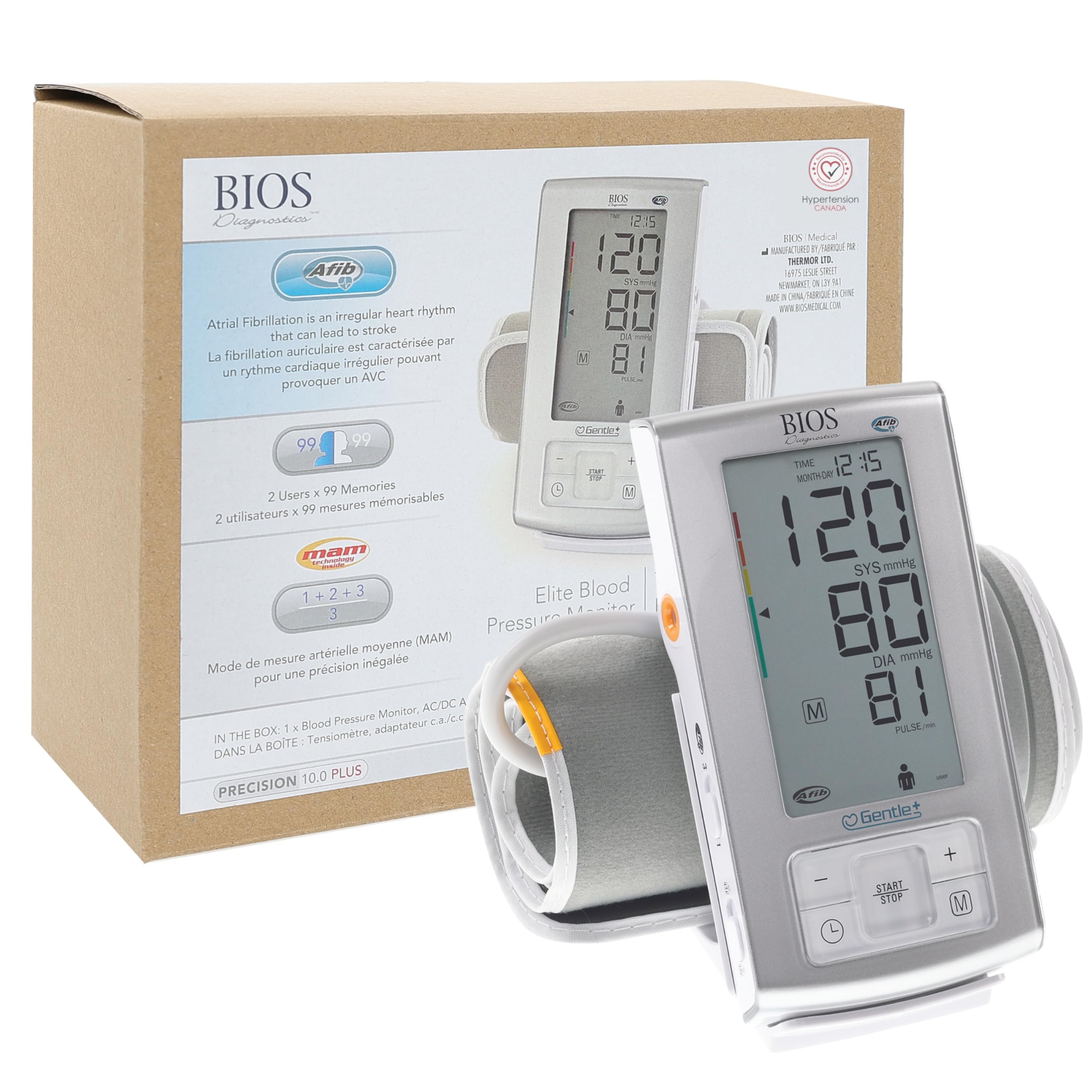
The BIOS Diagnostics Elite Blood Pressure Monitor is designed for accurate and reliable blood pressure measurement at home. This device incorporates advanced technology for precise readings and features Atrial Fibrillation (AFIB) screening, which is crucial for detecting irregular heart rhythms linked to stroke risk. It is recommended by Hypertension Canada and licensed by Health Canada, ensuring clinical accuracy with a BHS “AA” rating.
The BIOS Diagnostics Elite Blood Pressure Monitor is recommended by Hypertension Canada.
מה כלול
Your BIOS Diagnostics Elite Blood Pressure Monitor package includes the following items:
- יחידה לניטור לחץ דם
- Wide range rigid cuff (22 cm – 42 cm / 8.8 in. – 16.5 in.)
- תיק אחסון
- מתאם AC/DC
- סוללות (4x AAA)
- מדריך הוראות

All components included in the BIOS Diagnostics Elite Blood Pressure Monitor package.
המוצר נגמרview
Familiarize yourself with the components and display indicators of your blood pressure monitor for optimal use.

Detailed diagram of the monitor's display and buttons.
הגדרה
1. Install Batteries or Connect AC Adapter
- פתח את תא הסוללות בגב הצג.
- הכנס 4 סוללות AAA תוך הקפדה על קוטביות נכונה.
- Alternatively, connect the AC/DC adapter to the monitor and a power outlet.
2. Attach the Cuff
- Insert the air plug of the cuff firmly into the air jack on the side of the monitor.
מדידת לחץ הדם שלך
Follow these steps for accurate blood pressure readings:
- הֲכָנָה: Rest quietly for at least 5 minutes in a comfortable room. Avoid caffeine, alcohol, or exercise for 30 minutes prior to measurement. Ensure your bladder is empty.
- מיקום: Sit with your back supported by a chair and feet flat on the floor. Do not cross your legs.
- מיקום השרוול: Place the cuff on your non-dominant arm, directly on bare skin, approximately 2-3 cm (0.8-1.2 in) above your elbow. Ensure the cuff is snug but not too tight (you should be able to insert two fingers).
- Arm Position: Support your arm on a table or other hard surface, positioning the cuff level with your heart.
- מְדִידָה: Press the START/STOP button. Remain still and do not speak during the measurement.
- Review תוצאות: The monitor will display your systolic, diastolic, and pulse readings.

Correct posture and arm placement are essential for accurate blood pressure readings.
מצבי הפעלה ותכונות
- AFIB (Atrial Fibrillation) Screening: The monitor can detect signs of Atrial Fibrillation, an irregular heartbeat that can increase stroke risk. Consult your physician if AFIB is frequently detected.
- Patented Average Mode (MAM Technology): This feature automatically takes three consecutive measurements and displays the average, providing a more reliable reading.
- 2 Users x 99 Memories: The device supports two users, each with 99 memory slots to store readings with time and date, allowing for long-term tracking.
- תצוגה גדולה: The monitor features a large, easy-to-read digital display for clear visibility of results.

מֵעַלview of key features including AFIB detection and MAM technology.
Important Tips for Accurate Readings
- Measure your blood pressure at the same time each day, preferably in the morning before breakfast and medication, and in the evening.
- If taking multiple readings, wait at least 1 minute between each measurement.
- Blood pressure naturally fluctuates throughout the day and can be affected by stress, activity, and food intake.
- Avoid mental stress during measurement.
תחזוקה וטיפול
- נקו את הצג ואת השרוול בעזרת מטלית רכה ויבשה. אין להשתמש בחומרי ניקוי שוחקים או לטבול את המכשיר במים.
- Store the device in its storage bag in a cool, dry place away from direct sunlight.
- החלף סוללות כאשר מחוון סוללה חלשה מופיע על הצג.
פתרון בעיות
If you encounter issues with your monitor, refer to the full instruction manual for detailed troubleshooting steps. Common issues may include:
- הודעות שגיאה: Check cuff placement, arm movement, or speak during measurement.
- קריאות לא מדויקות: Ensure proper posture, cuff size, and relaxation before measurement.
- אין כוח: Check battery installation or AC adapter connection.
מפרטים
| מותג | אבחון BIOS |
| מספר דגם | A6PC |
| סוג תצוגה | Digital; Large Display |
| מקור כוח | Battery Powered & Corded Electric |
| גודל שרוול | 22 cm – 42 cm (8.8 in. – 16.5 in.) |
| זֵכֶר | 2 users x 99 memories |
| מידות המוצר | 15.6L x 6.1W x 3.5Th סנטימטר |
| משקל פריט | 0.26 קילוגרם |
אחריות ותמיכה
For warranty information or technical support, please refer to the contact details provided in your product packaging or visit the official BIOS Diagnostics website. Always consult a healthcare professional for interpretation of your blood pressure readings.