
1. הקדמה
Thank you for choosing the PNI Voyager S2600 WiFi 4K Ultra HD Car DVR Camera. This device is designed to record high-quality video footage of your journeys, providing security and evidence in case of incidents. It features 4K Ultra HD recording, Wi-Fi connectivity for smartphone control, parking monitoring, and a G-sensor for automatic incident detection.

Image 1.1: PNI Voyager S2600 Dash Cam installed in a vehicle, showcasing its key features: 4K Ultra HD recording, Wi-Fi connectivity, and Parking Monitoring.
2. מידע בטיחות
אנא קראו ופעל לפי הנחיות הבטיחות הללו כדי להבטיח פעולה תקינה ולמנוע נזק למכשיר או פציעה.
- אין לחשוף את המכשיר לטמפרטורות קיצוניות, לאור שמש ישיר למשך תקופות ממושכות או לחות גבוהה.
- ודא שהמכשיר מותקן בצורה מאובטחת ואינו חוסם את תנועת הנהג view או להפריע לשלטי הרכב.
- Use only the provided power cable and accessories. Using unauthorized accessories may damage the device and void the warranty.
- אל תנסה לפרק או לתקן את המכשיר בעצמך. פנה לאנשי שירות מורשים לקבלת סיוע.
- שמרו על ניקיון העדשה כדי להבטיח הקלטת וידאו ברורה.
- Always format the microSD card regularly to maintain optimal recording performance.
3. תכולת החבילה
ודא שכל הפריטים נמצאים בחבילה:
- PNI Voyager S2600 Car DVR Camera
- Power cord with cigarette lighter plug (12V/24V compatible)
- תושבת השמשה הקדמית
- מדריך למשתמש

Image 3.1: The PNI Voyager S2600 dash cam, its magnetic mount, and the power cable with a cigarette lighter adapter.
4. המוצר נגמרview
Familiarize yourself with the components of your PNI Voyager S2600 dash cam.
4.1. פריסת מכשיר
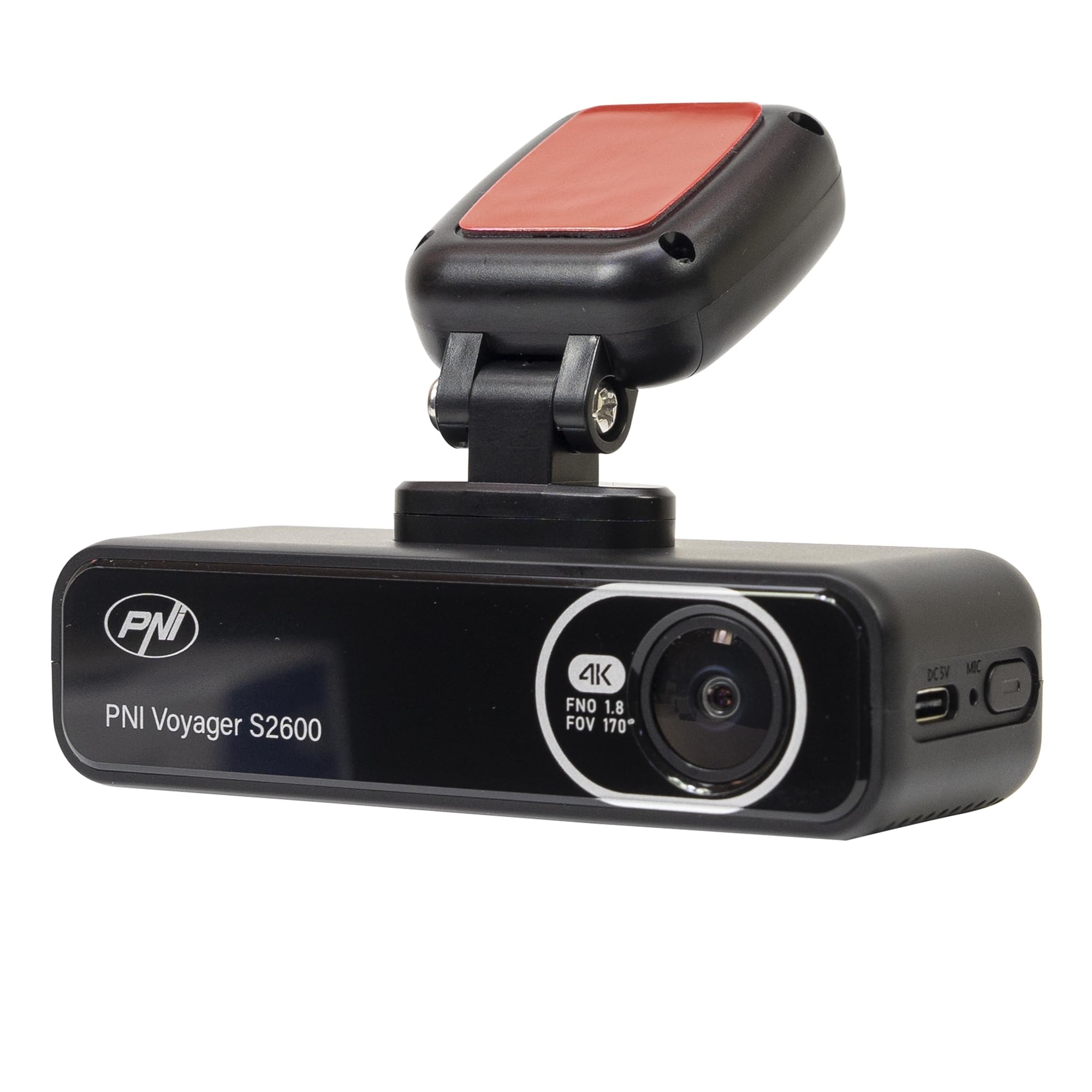
תמונה 4.1: חזית view of the PNI Voyager S2600, displaying the camera lens with 4K FNO 1.8 FOV 170° markings, the PNI brand logo, and the model name.

תמונה 4.2: מפורט view of the side of the dash cam, highlighting the USB-C power input (DC 5V) and the microphone opening.
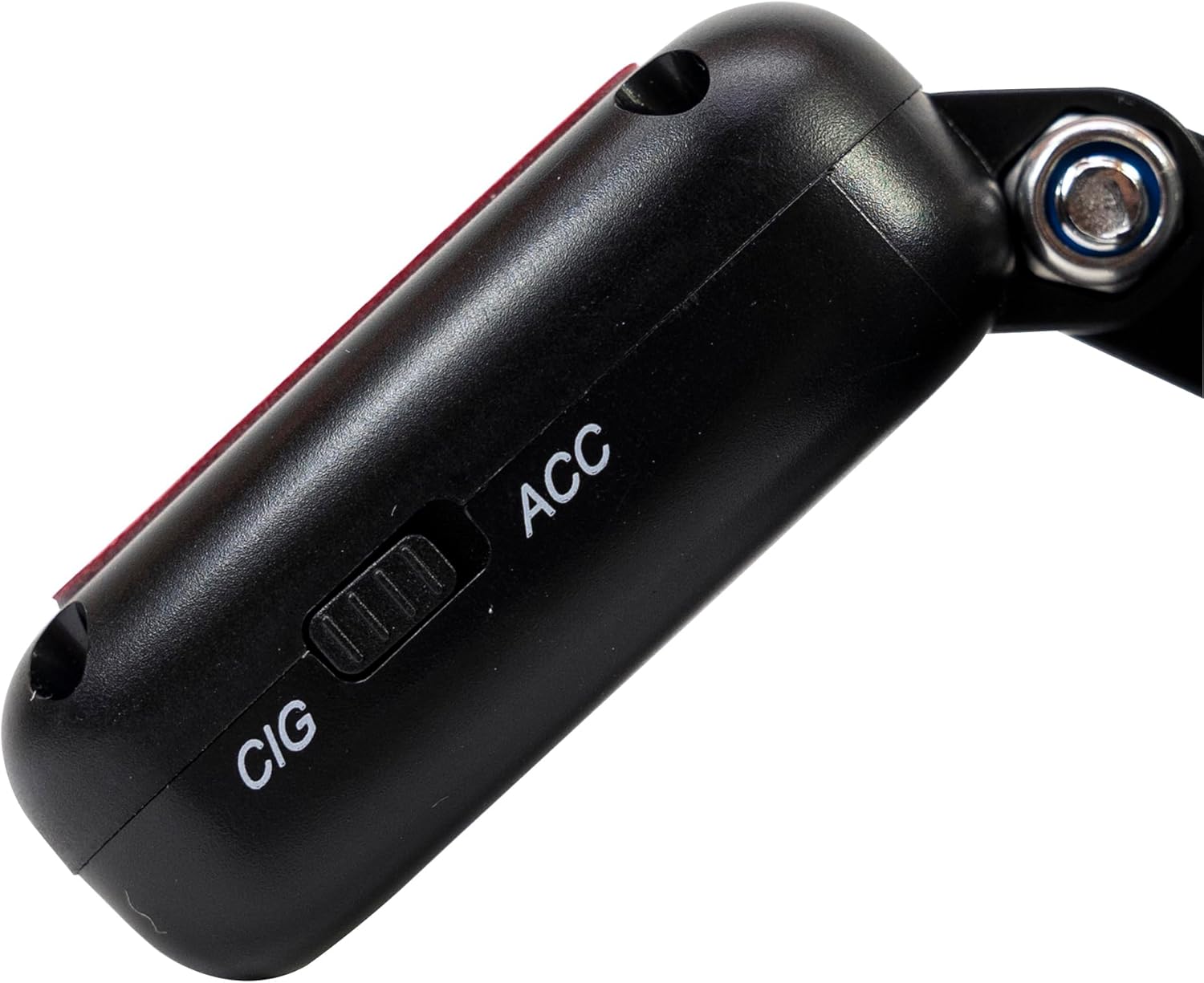
תמונה 4.3: צד view of the magnetic mount, featuring a switch to select between 'CIG' (cigarette lighter power) and 'ACC' (accessory power) modes.
4.2. תכונות עיקריות
- 4K Ultra HD Video Recording: Captures video at 3840x2160 resolution at 30FPS, or 2560x1440 at 30FPS, and 1920x1080 at 60FPS/30FPS.
- קישוריות Wi-Fi: Connects to your smartphone via the Viidure-Dashcam Viewer app for live view, הורדת וידאו והתאמת הגדרות.
- ניטור חניה: Activates the camera to record when vibration or movement is detected while the vehicle is parked.
- חיישן G: Automatically locks the current video file in case of a collision to prevent overwriting.
- עדשה זווית רחבה: 170 מעלות viewing angle to capture a broad perspective of the road.
- הקלטת לולאה: דורס את המזון הישן ביותרtagכאשר כרטיס הזיכרון מלא, מה שמבטיח הקלטה רציפה.
- GPS משולב: Records speed and coordinates, which can be displayed on recorded videos.
5. התקנה
5.1. הכנסת כרטיס MicroSD
- ודא שמצלמת הרכב כבויה.
- אתר את חריץ כרטיס ה-microSD במכשיר.
- Insert a high-speed (Class 10 or higher) microSD card (up to 512GB) into the slot until it clicks into place.
- To remove, gently push the card in until it clicks, then release. The card will eject.
חָשׁוּב: Format the microSD card within the app or on a computer before first use and periodically thereafter to ensure stable recording.
5.2. התקנה וחיבור חשמל
- נקו את האזור בשמשה הקדמית שבו אתם מתכוונים להרכיב את מצלמת הרכב. ודאו שהיא לא חוסמת את view.
- Attach the windshield mount to the dash cam. The mount is magnetic for easy attachment.
- Peel off the protective film from the adhesive pad on the mount and firmly press it onto the chosen spot on your windshield for at least 30 seconds.
- Connect the power cable to the USB-C port on the mount.
- Route the power cable neatly along the windshield and dashboard to the vehicle's cigarette lighter socket.
- Plug the cigarette lighter adapter into the vehicle's 12V/24V power outlet.
- Select the appropriate power mode on the mount's switch: 'CIG' for continuous power from the cigarette lighter, or 'ACC' for power only when the vehicle's ignition is on.

Image 5.1: The PNI Voyager S2600 dash cam detached from its magnetic mount, illustrating the contact points for secure attachment.
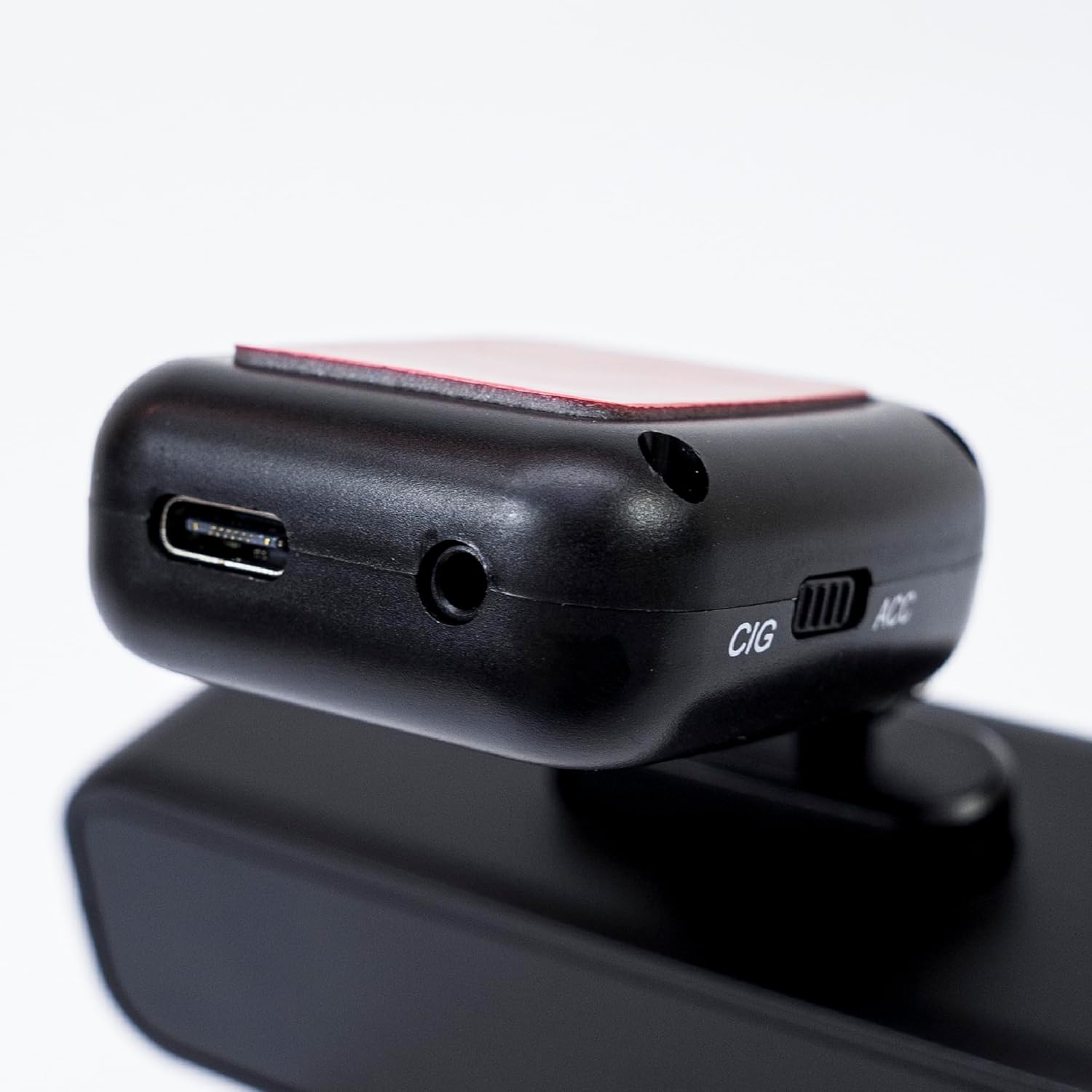
Image 5.2: The top of the dash cam mount, featuring the USB-C port for power input and the CIG/ACC switch for power mode selection.
5.3. התקנת אפליקציה וחיבור Wi-Fi
- הורד את ה Viidure-Dashcam Viewer האפליקציה מחנות האפליקציות (iOS) או מחנות גוגל פליי (אנדרואיד).
- הפעל את מצלמת הרכב.
- On your smartphone, go to Wi-Fi settings and connect to the dash cam's Wi-Fi network. The network name (SSID) and password can usually be found in the dash cam's settings (if it has a screen) or in the manual.
- Open the Viidure-Dashcam Viewer app. The app should automatically detect and connect to the dash cam.
- דרך האפליקציה, אתה יכול view פו חיtage, adjust settings, download recorded videos, and format the microSD card.

Image 5.3: A smartphone showing the Viidure-Dashcam Viewer application, demonstrating the wireless connection and control over the PNI Voyager S2600 dash cam.
6. הוראות הפעלה
6.1. הקלטה אוטומטית
Once powered on and with a valid microSD card inserted, the PNI Voyager S2600 will automatically begin loop recording. Video files are saved in segments (e.g., 1, 3, or 5 minutes) to the microSD card.
6.2. חיישן G (הקלטת חירום)
The built-in G-sensor detects sudden impacts or rapid acceleration/deceleration. When triggered, it automatically locks the current video segment, preventing it from being overwritten by loop recording. These emergency files are stored in a separate folder on the microSD card.
6.3. ניטור חניה
When the vehicle is parked and the dash cam is powered (either continuously via CIG mode or with a hardwire kit), the parking monitor function activates. If the G-sensor detects a collision or motion detection is enabled and detects movement, the dash cam will automatically power on and record a short video segment. This feature helps protect your vehicle when unattended.

Image 6.1: Visual representation of the Parking Monitor feature, showing the dash cam detecting an impact while the car is parked.
6.4. Wi-Fi and App Usage
The Viidure-Dashcam Viewer app allows you to:
- לִחיוֹת View: See what the camera is recording in real-time on your smartphone.
- הפעלת סרטון: Review recorded videos directly from the microSD card.
- Download Videos: Transfer important video files from the dash cam to your smartphone.
- התאמת הגדרות: Configure various dash cam settings, such as video resolution, G-sensor sensitivity, loop recording duration, and parking monitor options.
- פורמט כרטיס SD: Erase all data on the microSD card.
6.5. פונקציונליות GPS
The integrated GPS receiver records your vehicle's speed and location data. This information can be overlaid on the video footage during playback via the app or compatible desktop software, providing additional context for your recordings.
7. תחזוקה
7.1. ניקוי המכשיר
Use a soft, dry cloth to clean the dash cam body. For the lens, use a specialized lens cleaning cloth to avoid scratches. Do not use chemical cleaners or abrasive materials.
7.2. MicroSD Card Formatting
It is recommended to format the microSD card every 2-4 weeks to prevent data corruption and ensure optimal recording performance. This can be done through the Viidure-Dashcam Viewהאפליקציה.
7.3. עדכוני קושחה
Periodically check the PNI website or the Viidure-Dashcam Viewer app for available firmware updates. Firmware updates can improve performance, add new features, or fix bugs. Follow the instructions provided with the update carefully.
8. פתרון תקלות
If you encounter issues with your PNI Voyager S2600, refer to the following common problems and solutions:
| בְּעָיָה | סיבה אפשרית | פִּתָרוֹן |
|---|---|---|
| מצלמת הדאשבוקס לא נדלקת. | No power supply; faulty cable; incorrect power mode. | Check power cable connection; ensure cigarette lighter socket is active; verify CIG/ACC switch setting. |
| ההקלטה נעצרת או קופאת. | MicroSD card error; card full; low-speed card. | Format microSD card; replace with a high-speed (Class 10 U3) card; ensure sufficient storage. |
| חיבור ה-Wi-Fi לא יציב או נכשל. | Interference; incorrect password; app issue. | Ensure dash cam Wi-Fi is enabled; re-enter password; restart app and dash cam; try connecting in a different location. |
| איכות וידאו ירודה. | Dirty lens; incorrect resolution setting. | Clean the camera lens; check video resolution settings in the app. |
| צג חניה לא עובד. | Incorrect power mode; feature disabled. | Ensure dash cam is receiving continuous power (CIG mode or hardwire kit); enable parking monitor in app settings. |
If the problem persists, please contact PNI customer support.
9. מפרטים
Detailed technical specifications for the PNI Voyager S2600 Car DVR Camera:
| תכונה | תֵאוּר |
|---|---|
| מספר דגם | PNI-S2600 |
| רזולוציית וידאו | 4K (3840x2160@30FPS), 2K (2560x1440@30FPS), FHD (1920x1080@60FPS/30FPS) |
| חיישן תמונה | SONY335 (5MP, 2592x1944px) |
| Viewזווית | 170 מעלות |
| פורמט וידאו | MP4, H.264 |
| פורמט תמונה | JPEG |
| רזולוציית תמונות מקסימאלית | 8 מגה פיקסל (3264x2448) |
| אִחסוּן | MicroSD card slot, up to 512GB (Class 10 or higher recommended) |
| קישוריות | Wi-Fi, GPS (integrated) |
| תכונות מיוחדות | G-Sensor, Parking Monitoring, Motion Detection, Loop Recording |
| ספק כוח | 5V/2A (via 12V/24V car adapter) |
| סוֹלְלָה | Super capacitor 1.5 UF |
| טמפרטורת הפעלה | -26°C ~ +80°C |
| מידות (L x W x H) | 105 מ"מ x 35 מ"מ x 27 מ"מ |
| מִשׁקָל | 88 גרם |
| סוג USB | סוג ג' |
10. אחריות ותמיכה
10.1. מידע על אחריות
The PNI Voyager S2600 Car DVR Camera comes with a אחריות ל-24 חודשים from the date of purchase. This warranty covers manufacturing defects under normal use. It does not cover damage caused by misuse, accidents, unauthorized modifications, or improper installation. Please retain your proof of purchase for warranty claims.
10.2. תמיכת לקוחות
For technical assistance, troubleshooting, or warranty inquiries, please contact PNI customer support. You can find more information and support resources on the official PNI webאֲתַר:
יצרן: ONLINESHOP SRL
Address: Olteniei 26A, Piatra Neamt, Neamt, 610206, Romania