
מָבוֹא
תודה על הרכישהasing the Muse M-780 BTB Bluetooth Speaker. This portable speaker features 20W output, colored lights, IPX5 splash resistance, hands-free calling, and stereo pairing capabilities. It supports Bluetooth, Auxiliary input, and USB MP3 playback. Please read this manual carefully before use to ensure proper operation and to maximize your listening experience.
מידע בטיחות
- אין לחשוף את המכשיר לטמפרטורות קיצוניות, לאור שמש ישיר או לחות גבוהה.
- הימנע מהפלת הרמקול או הכפיפה למכות חזקות.
- The speaker is IPX5 splash-resistant. Do not immerse it in water or expose it to strong jets of water.
- אל תנסה לפרק או לשנות את הרמקול. פעולה זו תגרום לביטול האחריות.
- השתמשו רק בכבל הטעינה המצורף או שאושר.
- הרחק מהישג ידם של ילדים.
תוכן החבילה
אנא ודאו שכל הפריטים נמצאים:
- Muse M-780 BTB Bluetooth Speaker
- כבל טעינה USB-C
- כבל קלט עזר
- מדריך הוראות (מסמך זה)
המוצר נגמרview
הכירו את הבקרות והיציאות של הרמקול.
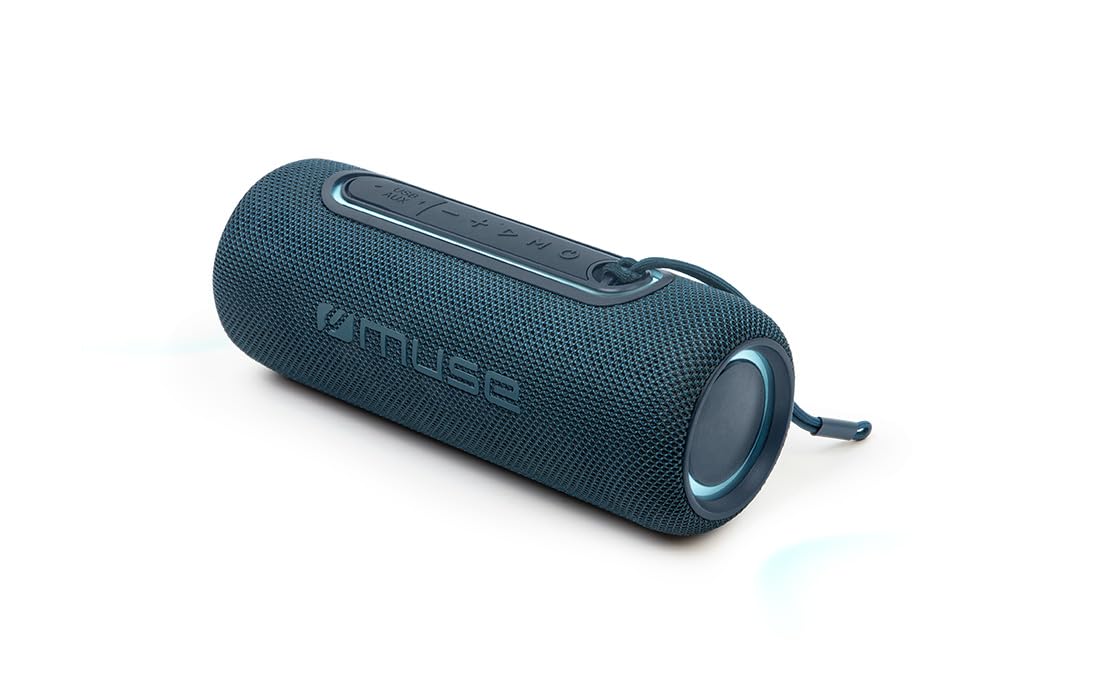
איור 1: חֲזִית view of the Muse M-780 BTB Bluetooth Speaker, showing the speaker grille and control buttons on top.
בקרות ומחוונים:
- לחצן הפעלה: לחץ והחזק להפעלה/כיבוי.
- לחצן הפעלה/השהה: לחץ כדי להשמיע או להשהות מוזיקה. מענה/ניתוק שיחות.
- הגברת עוצמת הקול (+): לחץ כדי להגביר את עוצמת הקול. לחץ לחיצה ממושכת כדי להופיע על הרצועה הבאה.
- להנמיך קול (-): לחץ כדי להנמיך את עוצמת הקול. לחץ לחיצה ממושכת כדי להופיע על הרצועה הקודמת.
- לחצן מצב (M): Press to switch between Bluetooth, Aux-in, and USB modes.
- לחצן מצב אור: Press to cycle through different colored light effects.
- Bluetooth Pairing LED Indicator: מציג את סטטוס חיבור ה-Bluetooth.
- מחוון LED טעינה: מציג את מצב טעינת הסוללה.
יציאות:
- יציאת טעינה USB-C: לטעינת הסוללה הפנימית.
- יציאת AUX-IN: לחיבור התקני שמע חיצוניים באמצעות כבל 3.5 מ"מ.
- יציאת USB: For MP3 playback from a USB flash drive.
הגדרה
1. טעינה ראשונית
Before first use, fully charge the speaker. Connect the supplied USB-C cable to the speaker's USB-C charging port and the other end to a USB power adapter (not included) or a computer's USB port. The Charging LED indicator will illuminate during charging and turn off when fully charged. A full charge provides up to 10 hours of music playback.
2. הפעלה / כיבוי
לחץ והחזק את כפתור הפעלה למשך כ-3 שניות כדי להפעיל או לכבות את הרמקול.
הוראות הפעלה
Bluetooth
- Turn on the speaker. It will automatically enter Bluetooth pairing mode, and the Bluetooth Pairing LED indicator will flash.
- Enable Bluetooth on your smartphone, tablet, or other Bluetooth-compatible device.
- חפש "M-780 BTB" in the list of available devices and select it to connect.
- Once successfully paired, the Bluetooth Pairing LED indicator will stop flashing and remain solid. You can now stream music wirelessly from your device within a range of up to 10 meters.
קלט עזר (AUX-IN)
- Connect one end of the supplied 3.5mm auxiliary cable to the AUX-IN port on the speaker.
- חבר את הקצה השני לשקע האוזניות או ליציאת השמע של התקן השמע החיצוני שלך.
- הקש על לחצן מצב (M) to switch to AUX-IN mode.
- שלוט בהשמעה ובעוצמת הקול מהמכשיר החיצוני שלך.
ניגון MP3 באמצעות USB
- הכנס כונן הבזק מסוג USB המכיל קובץ שמע MP3 fileליציאת ה-USB ברמקול.
- הקש על לחצן מצב (M) כדי לעבור למצב USB.
- הרמקול יתחיל לנגן באופן אוטומטי MP3 files מכונן ה-USB.
- Use the Play/Pause, Volume Up (+), and Volume Down (-) buttons to control playback.
שיחות ללא ידיים
כאשר מחובר באמצעות Bluetooth לטלפון החכם שלך:
- מענה/סיום שיחה: הקש על לחצן הפעלה/השהה פַּעַם.
- דחה שיחה: לחץ והחזק את לחצן הפעלה/השהה למשך 2 שניות.
Stereo Pairing (TWS - True Wireless Stereo)
You can pair two M-780 BTB speakers together for a true wireless stereo sound experience.
- Ensure both M-780 BTB speakers are turned on and not connected to any Bluetooth device.
- ברמקול אחד (זה יהיה הרמקול הראשי), לחצו והחזיקו את לחצן מצב (M) for 2-3 seconds until you hear a confirmation tone. The speakers will attempt to pair with each other.
- Once successfully paired, you will hear another confirmation tone. The Bluetooth LED on the primary speaker will flash, and the LED on the secondary speaker will be solid.
- כעת, חברו את מכשיר ה-Bluetooth שלכם לרמקול הראשי כפי שמתואר בסעיף "צימוד Bluetooth". שני הרמקולים ינגנו אודיו בסטריאו.
אורות צבעוניים
הקש על כפתור מצב אור to cycle through various colored light effects. Press again to change the effect or turn the lights off.
טעינת הרמקול
When the battery is low, the speaker may emit an audible alert. Connect the USB-C charging cable to the speaker and a power source. The Charging LED indicator will show the charging status. Disconnect the cable once fully charged to preserve battery life.
תַחזוּקָה
- ניקוי: השתמשו במטלית רכה ויבשה לניקוי משטח הרמקול. אין להשתמש בחומרי ניקוי שוחקים או ממסים.
- עמידות במים: The M-780 BTB has an IPX5 splash-resistant rating, meaning it can withstand splashes of water. Do not submerge the speaker in water or expose it to running water. Ensure the port cover is securely closed to maintain water resistance.
- אִחסוּן: אחסנו את הרמקול במקום קריר ויבש כאשר אינו בשימוש למשך תקופות ממושכות.
פתרון בעיות
| בְּעָיָה | סיבה אפשרית | פִּתָרוֹן |
|---|---|---|
| הרמקול לא נדלק. | הסוללה התרוקנה. | טען את הרמקול באמצעות כבל USB-C. |
| אין קול. | עוצמת הקול נמוכה מדי או מושתקת. מצב קלט שגוי. | Increase volume on both the speaker and the connected device. Press the Mode button to select the correct input (Bluetooth, AUX, USB). |
| לא ניתן לבצע צימוד דרך בלוטות'. | הרמקול אינו במצב צימוד. המכשיר רחוק מדי. הפרעה. | Ensure speaker is in pairing mode (flashing LED). Move device closer to speaker (within 10m). Turn off other Bluetooth devices. |
| צימוד סטריאו לא עובד. | Speakers not correctly paired. | Ensure both speakers are disconnected from other devices. Follow the stereo pairing instructions carefully. |
מפרטים
| שם הדגם: | M-780 BTB |
| מותג: | מוּזָה |
| כוח פלט: | 20 וואט |
| קישוריות: | בלוטות', USB, כניסת AUX |
| טווח Bluetooth: | עד 10 מטר (33 רגל) |
| עמידות במים: | IPX5 Splash-Resistant |
| זמן השמעה: | עד 10 שעות (בעוצמה בינונית) |
| יציאת טעינה: | USB-C |
| מידות (L x W x H): | 24.2 x 9.2 x 9.2 ס"מ (9.5 x 3.6 x 3.6 אינץ ') |
| מִשׁקָל: | 1 ק"ג (2.2 פאונד) |
| מכשירים תואמים: | טלפונים חכמים, טאבלטים, מחשבים ניידים |
| מאפיינים מיוחדים: | Colored Lights, Hands-Free Calling, Stereo Pairing (TWS) |
אחריות ותמיכה
This product is covered by a standard manufacturer's warranty. For detailed warranty terms and conditions, please refer to the warranty card included with your purchase or contact your retailer. For technical support or service inquiries, please contact Muse customer service through their official webאתר או פרטי הקשר שסופקו עם המוצר שלך.