
1. הקדמה
Thank you for choosing TTQ Open Ear Headphones, Model CT26. These true wireless sports earbuds are designed to provide a comfortable listening experience while allowing you to remain aware of your surroundings. Featuring Bluetooth 5.3 connectivity, IPX7 waterproofing, and crystal-clear call quality, they are ideal for various activities including running, cycling, workouts, and driving. This manual will guide you through the setup, operation, and maintenance of your new headphones.
2. תכולת החבילה
אנא ודא שכל הפריטים נמצאים בחבילה שלך:
- TTQ Open Ear Headphones (Left and Right Earbuds)
- נרתיק טעינה
- כבל טעינה USB-C
- מדריך למשתמש

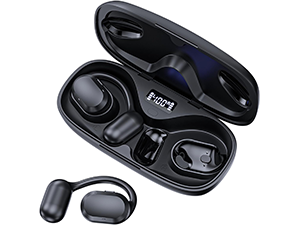
תְמוּנָה: The TTQ Open Ear Headphones, Model CT26, displayed within their open charging case. The case features an LED digital power display indicating the battery level of both the case and the individual earbuds.
3. המוצר נגמרview
The TTQ CT26 headphones feature an innovative open-ear design with flexible earhooks, ensuring comfort and stability during extended use. This design allows ambient sounds to be heard, enhancing safety in outdoor environments.

תְמוּנָה: A person wearing the TTQ Open Ear Earbuds, demonstrating how the open-ear design sits comfortably outside the ear canal, allowing for situational awareness.

תְמוּנָה: Two individuals cycling outdoors, both wearing TTQ Open Ear Headphones. This illustrates the product's suitability for sports and activities where awareness of surroundings is crucial for safety.
4. התקנה
4.1 טעינת האוזניות והמארז
Before first use, fully charge the headphones and the charging case. Connect the provided USB-C charging cable to the charging port on the case and a power source. The LED display on the charging case will show the battery percentage, and individual earbud charge indicators will light up during charging.
- A full charge provides up to 8 hours of music playtime or 9 hours of call time for the earbuds.
- מארז הטעינה מאריך את זמן הנגינה הכולל עד 36 שעות.

תְמוּנָה: The TTQ charging case with its lid open, showcasing the digital LED display that indicates the battery percentage of the case and the charging status of the earbuds. A USB-C charging port is visible at the front.
4.2 צימוד עם המכשיר שלך
- ודא שהאוזניות טעונות.
- Open the charging case. The earbuds will automatically enter pairing mode, indicated by a flashing light (if applicable, refer to product specific light indicators).
- במכשיר שלך (סמארטפון, טאבלט, מחשב), עבור אל הגדרות Bluetooth והפעל את Bluetooth.
- חפש available devices and select "CT26" from the list.
- לאחר החיבור, האוזניות יציינו את ההתאמה המוצלחת (למשל, הנחיה קולית או אור קבוע).
האוזניות יתחברו מחדש אוטומטית למכשיר האחרון שצומד לאחר הוצאתן מהמארז, אם Bluetooth מופעל במכשיר.

תְמוּנָה: A visual representation of Bluetooth 5.3 technology, showing a smartphone's Bluetooth settings screen with 'CT26' listed as a connected device, illustrating the stable and fast connection capability.
5. הוראות הפעלה
The TTQ CT26 headphones feature a physical button for easy control of various functions.
תְמוּנָה: A diagram illustrating the single button controls on the earbud, detailing actions for pause/play, answer/hang up, rejection, volume adjustment, switching songs, and activating Siri.
5.1 השמעת מוזיקה
- הפעל/השהה: Press the button once (x1).
- השיר הבא: Press the button twice (x2).
- השיר הקודם: Press the button three times (x3).
- עוצמת הקול מעלה/הנמכת: Press and hold the button for 2 seconds (Hold 2s).
5.2 ניהול שיחות
- מענה/סיום שיחה: Press the button once (x1).
- דחה שיחה: Press and hold the button for 2 seconds (Hold 2s).
The headphones feature dual-mic noise-cancelling technology for clearer calls by reducing environmental noise.

תְמוּנָה: A man wearing TTQ Open Ear Headphones while holding a smartphone, illustrating the intelligent noise cancellation feature that boosts human voice and reduces environmental noise for clearer calls.
5.3 עוזר קולי
- הפעלת העוזר הקולי (Siri, Google Assistant וכו'): Press the button three times (x3).
6. תחזוקה
To ensure the longevity and optimal performance of your TTQ Open Ear Headphones, follow these maintenance guidelines:
- ניקוי: נגבו באופן קבוע את האוזניות ואת נרתיק הטעינה בעזרת מטלית רכה, יבשה ונטולת סיבים. הימנעו משימוש בחומרים שוחקים או כימיקלים חזקים.
- עמידות במים: The headphones are IPX7 waterproof, meaning they can withstand submersion in up to 1 meter of water for 30 minutes. They are resistant to sweat and rain, making them suitable for workouts. However, they are not designed for swimming or prolonged submersion. Ensure the charging port is dry before charging.
- אִחסוּן: כאשר אינן בשימוש, יש לאחסן את האוזניות בנרתיק הטעינה שלהן כדי להגן עליהן מפני אבק ונזק. יש לאחסן במקום קריר ויבש הרחק מטמפרטורות קיצוניות.

תְמוּנָה: TTQ Open Ear Headphones and their charging case on a wet surface with water splashes, demonstrating their IPX7 waterproof rating, indicating resistance to rain and sweat.
7. פתרון תקלות
If you encounter issues with your TTQ Open Ear Headphones, please refer to the following common solutions:
- אין צליל/עוצמת קול נמוכה:
- ודא שהאוזניות מותאמות ומחוברות כראוי למכשיר שלך.
- בדוק את עוצמת הקול הן באוזניות והן במכשיר המחובר.
- ודא שהאוזניות טעונות.
- בעיות זיווג:
- ודא ש-Bluetooth מופעל במכשיר שלך.
- Ensure the headphones are in pairing mode (flashing indicator).
- כבה את ה-Bluetooth במכשירים אחרים בקרבת מקום שעשויים לנסות להתחבר.
- Forget/remove "CT26" from your device's Bluetooth list and try pairing again.
- Restart both your device and the headphones (by placing them back in the case and taking them out).
- בעיות טעינה:
- ודא שכבל הטעינה מחובר היטב הן למארז והן למקור החשמל.
- נסה כבל USB-C וספק כוח אחרים.
- ודאו שמגעי הטעינה באוזניות ובמארז נקיים וללא לכלוך.
- חיבור לסירוגין:
- Ensure your device is within the Bluetooth range (up to 10 meters/33 feet).
- Avoid physical obstructions between the headphones and your device.
- מזער הפרעות ממכשירים אלחוטיים אחרים.
אם הבעיה נמשכת לאחר ניסיון שלבים אלה, אנא צור קשר עם תמיכת הלקוחות.
8. מפרטים
| תכונה | מִפרָט |
|---|---|
| שם הדגם | CT26 |
| טכנולוגיית קישוריות | אלחוטי (Bluetooth) |
| טכנולוגיית תקשורת אלחוטית | בלוטות' 5.3 |
| טווח בלוטות' | 10 מטר (33 רגל) |
| רמת עמידות במים | IPX7 עמיד למים |
| מיקום אוזניים | אוזן פתוחה |
| גורם צורה | אלחוטי אמיתי |
| חיי סוללה (אוזניות) | 8 Hours (Music) / 9 Hours (Calls) |
| זמן משחק כולל עם מארז טעינה | עד 36 שעות |
| סוג מנהל התקן שמע | מנהל התקן דינמי |
| גודל מנהל התקן שמע | 16.2 מילימטרים |
| טווח תדרים | 20 הרץ - 20,000 הרץ |
| בקרת רעש | ביטול רעשים אקטיבי (לשיחות) |
| שיטת בקרה | כפתור פיזי |
| יציאת טעינה | USB-C |
| משקל פריט | 7.8 אונקיות (0.22 קילוגרם) |
| חוֹמֶר | פּלָסטִי |
| UPC | 717977781312 |
9. תמיכת לקוחות
For any questions, concerns, or if you receive a defective product, please do not hesitate to contact TTQ customer support. We are committed to providing solutions within 24 hours.
Please visit the official TTQ store on Amazon for more information and support resources: TTQ Store