
1. הקדמה
Thank you for choosing the WORKPRO 7.2V Cordless Rotary Tool. This manual provides essential information for the safe and effective operation, maintenance, and troubleshooting of your tool. Please read it thoroughly before use and retain it for future reference.
The WORKPRO 7.2V Cordless Rotary Tool is a versatile and compact device designed for various DIY and craft projects. Its lightweight design and variable speed settings make it suitable for tasks such as sanding, engraving, cutting, drilling, grinding, and polishing.

Figure 1: WORKPRO 7.2V Cordless Rotary Tool with included accessories and storage bag.
2. מידע בטיחות
יש להקפיד תמיד על אמצעי זהירות בסיסיים כדי להפחית את הסיכון לשריפה, התחשמלות ופגיעה גופנית בעת הפעלת כלי עבודה חשמליים.
- קרא את כל ההוראות: הכירו את הנחיות ההפעלה והבטיחות של הכלי.
- ללבוש הגנה לעיניים: הרכיבו תמיד משקפי בטיחות או משקפי בטיחות עם מגני צד.
- חומר עבודה מאובטח: תמיד clamp או לאבטח את חומר העבודה בדרך אחרת כדי למנוע תנועה במהלך הפעולה.
- לשמור על אזור עבודה נקי: אזורים עמוסים מזמנים תאונות.
- הימנע מסביבות מסוכנות: אין להשתמש בכלים חשמליים ב-damp או מקומות רטובים, או לחשוף אותם לגשם. שמור על אזור העבודה מואר היטב.
- הרחק ילדים: יש לשמור על כל המבקרים במרחק בטוח מאזור העבודה.
- להתלבש כמו שצריך: Do not wear loose clothing or jewelry. They can be caught in moving parts. Non-skid footwear is recommended. Wear protective hair covering to contain long hair.
- השתמש בכלי הנכון: אין להכריח את הכלי או הקובץ המצורף לבצע עבודה שהיא לא תוכננה לה.
- נתק חשמל: Disconnect the tool from its power source before making adjustments, changing accessories, or storing it.
- אל תגזים: שמור על דריסת רגל ושיווי משקל נאותים בכל עת.
- תחזוק כלים בזהירות: שמור על כלים חדים ונקיים לביצועים טובים ובטוחים יותר. עקוב אחר ההוראות לשימון והחלפת אביזרים.
- בדוק אם יש חלקים פגומים: לפני שימוש נוסף בכלי, יש לבדוק היטב מגן או חלק אחר שניזוק כדי לקבוע שהוא יפעל כראוי ויבצע את תפקידו המיועד.
- Do Not Operate While Charging: For safety reasons, do not use the tool while it is being charged.
3. המוצר נגמרview
The WORKPRO 7.2V Cordless Rotary Tool is designed for precision work. Understanding its components is key to effective operation.
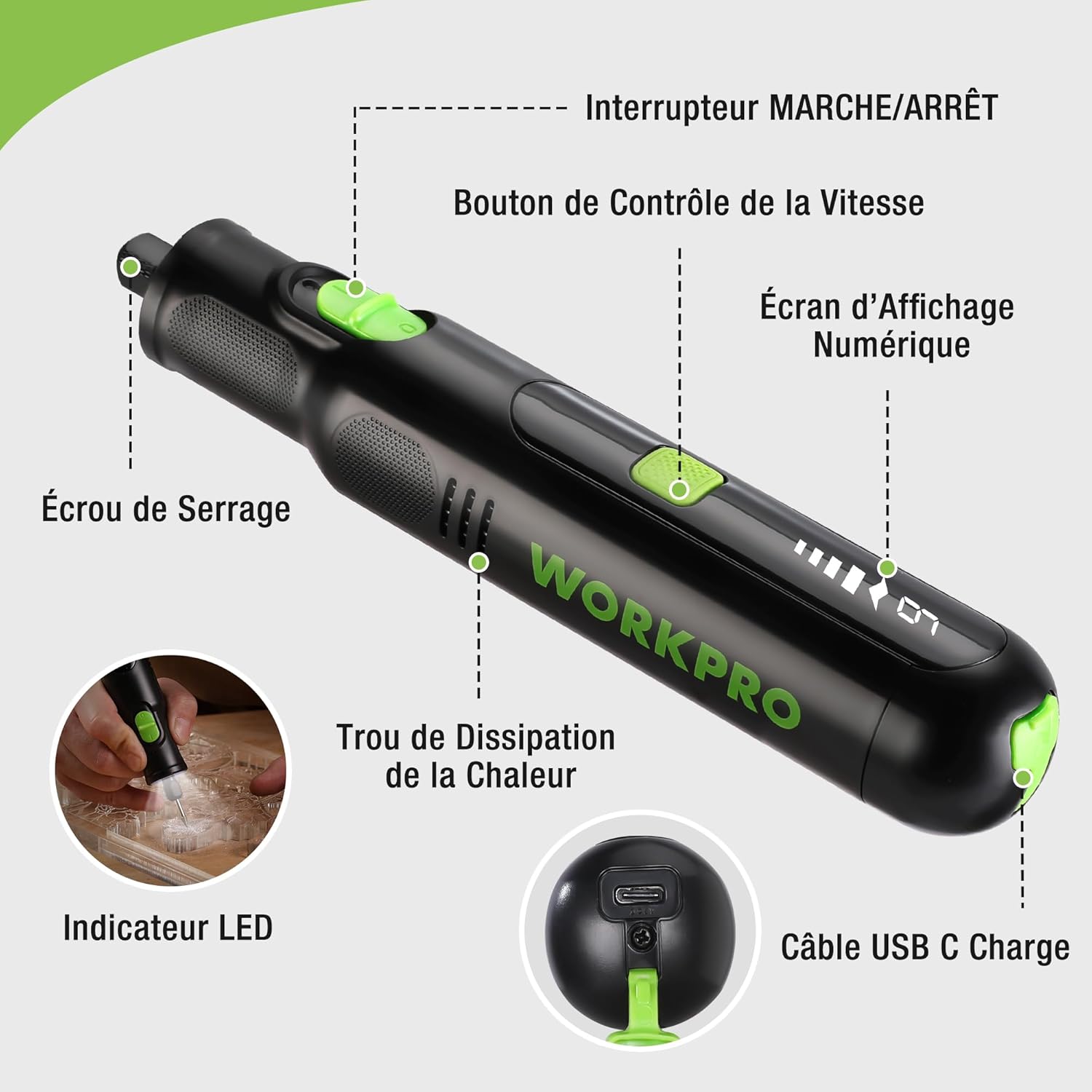
Figure 2: Key components of the rotary tool.
רכיבים:
- מתג הדלק / כבה: מפעיל ומכבה את הכלי.
- לחצן בקרת מהירות: Adjusts the rotational speed of the tool.
- מסך תצוגה דיגיטלי: Shows the current speed setting.
- אום קולט: Secures the accessory bits in place.
- חור פיזור חום: Ensures proper cooling of the motor during operation.
- מחוון LED: מספק תאורה לאזור העבודה.
- יציאת טעינה USB-C: לטעינת הסוללה הפנימית.
אביזרים כלולים:
Your WORKPRO rotary tool comes with 117 diverse accessories, enabling a wide range of applications. These include:

איור 3: מעלview of the 117 included accessories.
- השחזה/חידוד: Grinding stones and wheels for material shaping and sharpening.
- גִילוּף: Diamond bits for detailed carving and engraving.
- מֵרוּט: Wool felt wheels, felt wheels, screw mandrels, and metal brushes for achieving smooth, shiny finishes.
- כִּרסוּם: Milling bits for precise material removal.
- גְזִירָה: Cutting discs and saw blades for various cutting tasks, along with a cutting disc holder.
- מלטש: Sandpaper, rubber sanding drums, and sanding bands for surface preparation and finishing.
- קולטים: 2.35mm and 3.2mm collets to accommodate different shank sizes.
- הִתעַמְלוּת: 2.35mm and 3.2mm drill bits for small-scale drilling.
- מַפתֵחַ בְּרָגִים: For securing and loosening collet nuts.
4. התקנה
4.1 טעינת הכלי
The tool is equipped with a 7.2V 1100mAh Lithium-ion rechargeable battery. Before first use, fully charge the tool.
- Connect the provided USB-C charging cable to the tool's USB-C charging port.
- חבר את הקצה השני של כבל ה-USB למקור מתח USB תואם (למשל, מחשב, מתאם USB לקיר).
- The digital display will indicate charging status. A full charge typically takes approximately 2 hours.
- לאחר טעינה מלאה, נתק את כבל הטעינה.
Note: For optimal battery life, it is recommended to store the tool with the battery charged between 50% and 75%. Recharge the tool at least once every 3 to 6 months if not used regularly.

Figure 4: Charging the rotary tool via USB-C.
4.2 התקנת אביזרים
The WORKPRO rotary tool features an automatic spindle lock design for easy and secure accessory changes.
- ודא שהכלי כבוי.
- Unscrew the collet nut at the front of the tool.
- Select the appropriate collet size for your desired accessory (2.35mm or 3.2mm). Insert the collet into the tool if not already present.
- Insert the shank of the accessory bit into the center of the collet nut. Ensure the bit is fully seated.
- Hand-tighten the collet nut. For a secure fit, use the included wrench to tighten the collet nut firmly. Do not overtighten.

Figure 5: Two-step accessory replacement process.

Figure 6: Detailed installation steps for various accessories.
Note: The automatic spindle lock engages when the tool is off, allowing for accessory changes without needing to press a separate button. A slight clicking sound when the tool stops is normal due to this mechanism.
5. הוראות הפעלה
5.1 הפעלה/כיבוי
To turn the tool ON, slide the ON/OFF switch to the 'ON' position. To turn it OFF, slide the switch to the 'OFF' position.
5.2 כוונון מהירות
The tool features 6 variable speed settings, ranging from 5000 RPM to 30000 RPM. Press the Speed Control Button to cycle through the speeds. The current speed setting will be displayed on the digital screen.
- Speed I: 5000 RPM
- Speed II: 10000 RPM
- Speed III: 15000 RPM
- Speed IV: 20000 RPM
- Speed V: 25000 RPM
- Speed VI: 30000 RPM
Choose the appropriate speed for your task and material. Lower speeds are generally suitable for polishing, delicate work, and softer materials, while higher speeds are for cutting, grinding, and harder materials.

Figure 7: Variable speed settings and powerful motor.
5.3 תאורת LED משולבת
The tool includes an integrated LED light that illuminates the work area, improving visibility in dimly lit spaces and for detailed tasks.

Figure 8: Using the LED light for precision engraving.
5.4 יישומים
The WORKPRO rotary tool is highly versatile and can be used for:
- גְזִירָה: Use appropriate cutting discs for various materials.
- גילוף/חריטה: Utilize diamond bits for intricate designs on wood, plastic, or soft metals.
- מֵרוּט: Apply felt wheels and polishing compounds to restore shine to surfaces.
- מלטש: Use sanding bands and drums for smoothing rough edges or preparing surfaces.
- הִתעַמְלוּת: Employ small drill bits for precision holes.

איור 9: דוגמהamples of versatile applications.
6. תחזוקה
6.1 ניקוי
- תמיד נתקו את הכלי מכל מקור חשמל לפני ניקוי.
- השתמש רך, דamp מטלית לניגוב החלק החיצוני של הכלי. אין להשתמש בכימיקלים חזקים או בחומרי ניקוי שוחקים.
- Use a small brush or compressed air to clear dust and debris from the heat dissipation holes and around the collet area.
6.2 טיפול ואחסון סוללה
- To prolong battery life, avoid completely discharging the battery regularly.
- For long-term storage, ensure the battery is charged to approximately 50-75%. Recharge the tool every 3 to 6 months to prevent deep discharge and maintain battery health.
- יש לאחסן את הכלי במקום קריר ויבש, הרחק מאור שמש ישיר וטמפרטורות קיצוניות.
6.3 אחסון אביזרים
Keep all accessories organized in the provided storage bag or a suitable container to prevent loss and damage.
7. פתרון תקלות
סעיף זה מטפל בבעיות נפוצות שאתם עשויים להיתקל בהן עם כלי הסיבוב WORKPRO שלכם.
| בְּעָיָה | סיבה אפשרית | פִּתָרוֹן |
|---|---|---|
| הכלי לא נדלק. | הסוללה ריקה. | Charge the tool fully using the USB-C cable. |
| Tool stops unexpectedly during use. | הסוללה חלשה או שהכלי עמוס יתר על המידה. | Recharge the battery. Reduce pressure on the tool or use a lower speed setting for the task. |
| Clicking sound when turning off. | Normal operation of the automatic spindle lock. | This is a normal function and does not indicate a fault. |
| Accessory bit is loose or wobbles. | Collet nut not tightened sufficiently or incorrect collet size. | Ensure the correct collet size is used for the accessory. Tighten the collet nut firmly with the included wrench. |
| Reduced performance or short runtime. | Battery degradation or improper charging/storage. | Ensure proper charging and storage practices are followed (refer to Section 6.2). If the issue persists, the battery may need replacement. |
8. מפרטים
Below are the technical specifications for the WORKPRO 7.2V Cordless Rotary Tool (Model W123024A).
| תכונה | מִפרָט |
|---|---|
| מותג | WORKPRO |
| מספר דגם | W123024A |
| כרך ידtage | 7.2 וולט |
| סוג סוללה | ליתיום-יון (1 כלול) |
| קיבולת סוללה | 1100 מיליאמפר/שעה |
| מהירות סיבוב מקסימלית | 30000 סל"ד |
| מהירויות משתנות | 6 (5000-30000 סל"ד) |
| זמן טעינה | כ. 2 שעות |
| Runtime (Max Speed) | כ. 45 דקות |
| מִשׁקָל | 227 גרם |
| מידות (L x W x H) | 25.2 x 16.8 x 5.5 ס"מ |
| תכונה מיוחדת | Cordless, Integrated LED Light, Automatic Spindle Lock |
| רכיבים כלולים | 117 אביזרים נלווים |
| יַצרָן | האנג ג'ואו גרייט סטאר תעשייתי בע"מ |
9. אחריות ותמיכה
For warranty information, please refer to the documentation provided at the time of purchase or contact your retailer. WORKPRO is committed to providing quality products and customer satisfaction.
If you encounter any issues or have questions regarding your WORKPRO 7.2V Cordless Rotary Tool, please contact the seller or WORKPRO customer support through their official website or contact channels. Please have your model number (W123024A) and purchase details ready when seeking support.